dev-manager-desktop: the version scheme stops at 1.99, and two Linux builds disagree on the CPU name
Device/DevMode Manager for webOS TV
At a glance
- What is it?
- A desktop tool for managing webOS TVs that are already in developer mode or rooted, built as an Angular front end inside a Tauri shell and shipped as six kinds of installer. The readme is 147 words and six feature bullets, so most of what is knowable comes from the manifests: a Cargo patch pointing two crates at one person's fork, four toolchains in one tree, an embedded terminal, and an error reporting integration the readme never mentions.
- Who is it for?
- This fits someone who has already put a webOS TV into developer mode or rooted it and wants a graphical way to add that device and install apps, since the tool's value is removing the command line, not removing the prerequisite. It does not fit someone looking for instructions, because the readme documents no usage at all, only the download table and six features.
- Can I use it commercially?
- Yes. Apache-2.0 is a permissive licence: you can use, modify and sell software built on it, as long as you keep its copyright and licence notices.
- Is it still maintained?
- Yes. The repository last received commits 7 days ago.
- What is it written in?
- Mainly TypeScript, according to GitHub's language statistics.
Answers come from the project's GitHub data, last synced on November 21, 2026, and from our analysis. They are not legal advice.
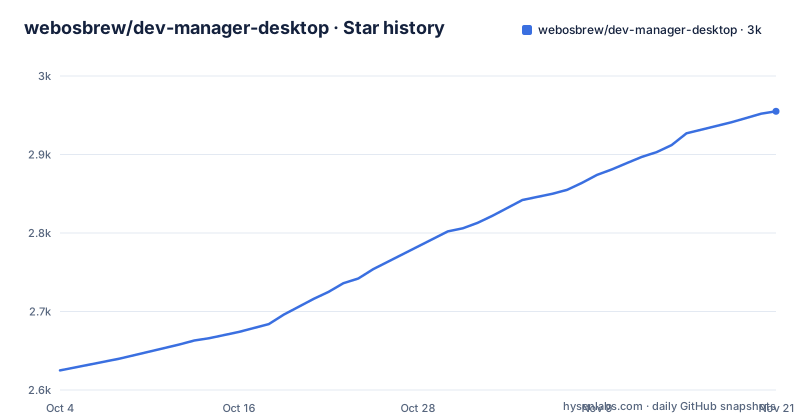
Star history
- webosbrew/dev-manager-desktop2,955 ★ · +330
| Repository | 2026-10-04 | 2026-11-21 |
|---|---|---|
| webosbrew/dev-manager-desktop | 2.6k | 3k |
330 Stars in the last 48 days, measured from the daily GitHub snapshot. Compare with other projects
Editorial analysis
Two Linux packages spell the same processor differently
The download section is the only substantial part of the readme, and it is a table of artifacts per operating system and architecture. Reading it closely, the two Linux rows disagree about what to call the same processor. The Debian and Ubuntu row names its packages with one convention, offering an amd64 build and an arm64 build. The row for other distributions offers an AppImage with the same amd64 spelling and an aarch64 name for the ARM build.
So on an ARM machine you are offered a file ending in `_arm64.deb` from one row and one ending in `_aarch64.AppImage` from the other. Both are the same 64-bit ARM target, named two ways in the same table, which is exactly the kind of detail that sends someone to the wrong file.
The architecture coverage is otherwise uneven in a way worth knowing. 32-bit x86 exists only on Windows. Windows on ARM is marked not available in both rows. macOS gets a single universal package that covers Intel and Apple Silicon together, so the claim that it works on Apple Silicon is delivered by one file rather than by a separate build, and the two columns for macOS point at the same artifact. Every filename also carries a version placeholder rather than a number, so the actual name only exists once a release is published.
Version numbers stop just short of two
The releases are numbered 1.99.20, 1.99.19 and 1.99.18, and the manifest carries the same number, 1.99.20. That is not a typo and not a leftover from a 2.0 that never shipped. A patch component in the nineties means a build is always numerically newer than any ordinary 1.x release a user might already have, so an update check comparing versions sees an upgrade every time, while the project never has to claim a 2.0 it has not earned.
The readme contains the clearest evidence of the scheme's purpose, in the row for Windows 7, 8 and 8.1. That row is labelled as dropped support and pins its filenames to a fixed version, 1.13.3, rather than using the placeholder. So the table records the last build that ever shipped for that platform, which is roughly eighty patch releases behind the current one, and the numbering scheme makes that gap visible in a way a semantic version would hide.
Release dates are irregular rather than periodic: the three newest tags span February, August and August 2026. The last commit to the branch is dated 23 September 2026, after the newest tag, so the packaged application and the current source are not the same build.
The precondition appears in the description and nowhere else
The project's one line description says it manages developer mode enabled or rooted webOS TVs. That sentence is the only place the prerequisite appears. The readme body does not say how to put a TV into developer mode, does not mention a developer mode password, does not describe what rooting changes about the workflow, and does not give a single step for adding a device even though adding devices is a headline feature.
Instead the feature list is framed entirely as subtraction. No need to install the LG SDK or IDE. No need to use the command line. Install apps on the TV with a few clicks. Configuration compatible with ares-cli. Works on Windows, Linux and macOS. Dark mode follows system preferences.
That framing is honest about what the tool replaces and silent about what it needs. Each subtraction implies an alternative that exists somewhere else, in the vendor toolchain or in a command line utility, and the readme names one of them by pointing at ares-cli for configuration compatibility. Compatibility there means the two share configuration, so a user who already has that tool configured does not start over. What is missing is the corresponding addition: what to do first, on a TV that has never been prepared.
A Cargo patch points two crates at one person's fork
The Rust side is a workspace with a single member, the Tauri application directory. Its manifest then overrides a crate registry dependency with a git checkout:
[patch.crates-io]
r2d2 = { git = "https://github.com/mariotaku/r2d2.git", rev = "aaa2a2b" }
#tauri = { git = "https://github.com/mariotaku/tauri.git", rev = "f501f7b" }
Two things are visible in four lines. The active patch replaces a connection pool crate with a fork maintained by one individual, pinned to a short commit hash rather than a tag, so the build follows that fork rather than the published crate. And a second patch for the Tauri core itself is present but commented out, pointing at a fork by the same author at another short hash.
That combination is worth pausing on for a desktop tool that reaches a device over a network. A patched Tauri means the application shell is not running the upstream release of its own framework, and a commented out line is the kind of change that gets re-enabled during a debugging session and forgotten. Nothing in the readme mentions either fork, and the repository records no homepage, so a reader has no way to learn from the documentation why the override exists.
Four toolchains share one repository
Count the package managers and you get four. There is an npm project with a manifest, a lock file, an npm configuration file and an nvm file. There is a Cargo workspace with its own lock file. There is a Ruby setup with a Gemfile, a lock file and a fastlane directory, which is the conventional way to automate macOS builds and notarisation. And there is a Nix flake with its own lock file, which pins a development environment declaratively.
That is a lot of environments to keep in step for one application, and each has its own notion of what is installed. The Node requirement is unusually specific, accepting three separate lines:
  "engines": {
    "node": "^22.22.3 || ^24.15.0 || >=26.0.0"
  },
Two caret ranges and one open ended range, with a patch level pinned in the first, and an nvm file alongside to select one. Getting this wrong produces an install failure rather than a warning.
The front end configuration is just as layered: an Angular workspace file, a Karma configuration, and four separate TypeScript configuration files splitting the application build, the spec build, and an integration build from the base. That last one is the interesting detail, since an integration test target with its own compiler settings is not a default Angular layout.
Two of the three build entry points bypass their own wrapper
The scripts section defines a wrapper for the Tauri command line and then does not use it for the two commands that matter most:
    "tauri": "node scripts/tauri-wrapper.js",
    "start": "tauri dev",
    "build": "tauri build",
    "ng": "node scripts/ng-wrapper.js",
    "icon": "node scripts/icon-generator.js",
    "test": "node scripts/ng-wrapper.js test --watch=false",
    "test:integration": "node scripts/ng-wrapper.js run ui:test-integration"
The Angular side is consistent: a script named for the tool calls a Node wrapper, and the test and integration test scripts route through that same wrapper rather than invoking the binary. The Tauri side is not. There is a wrapper and a script that uses it, but starting the development build and producing a release both call the tool directly, so whatever the wrapper does happens on one path and not the others.
The likely reason is to force a consistent Node version before invoking a binary that resolves its own, which would matter on the Windows path where the shell differs. That reasoning is not written down anywhere. The readme does not mention the wrappers, the icon generator, or the integration test target, and with no homepage recorded there is no other documentation entry point in the metadata to look for.
An embedded terminal and an error reporter the readme omits
The dependency list describes a considerably larger application than six feature bullets suggest. It embeds a terminal emulator with addons for fitting the viewport, searching within the buffer and turning output into links, so remote shell access to a device is built into the interface. It loads a hosted error reporting service on the Angular side. And it pulls in the desktop shell plugins for shell execution, filesystem access, HTTP requests, uploads, operating system information, logging and file dialogs.
Two of those deserve a decision from anyone deploying it. An error reporting integration means telemetry leaves the machine, and for a tool whose whole purpose is holding credentials and a network session with a television on a home network, that is a reasonable thing to be told about before installing rather than after. An embedded terminal plus the shell plugin means the application can run commands, which is what makes a device manager convenient and also what makes it worth understanding.
The remaining dependencies are conventional: Bootstrap with its icon set, a component library, a positioning library, and the localisation package that gives the interface its translations. None of this appears in the readme, which stops at dark mode following system preferences.
Editorial conclusion
This fits someone who has already put a webOS TV into developer mode or rooted it and wants a graphical way to add that device and install apps, since the tool's value is removing the command line, not removing the prerequisite. It does not fit someone looking for instructions, because the readme documents no usage at all, only the download table and six features. Before you rely on it, confirm your CPU architecture against the artifact names, because the Debian package and the AppImage spell the same 64-bit ARM target differently, and note that the tool reports errors to an external service and embeds a full terminal, neither of which the readme discloses.
Frequently asked questions
how to install dev manager desktop
From the latest release page, pick the installer for your system: an msi for Windows 10 or newer, a universal dmg for macOS, a deb for Debian or Ubuntu, or an AppImage for other Linux distributions. Windows 7, 8 and 8.1 support was dropped and the last build for those systems is version 1.13.3.
How do I start webOS Dev Manager on my LG TV?
It does not run on the television. This is a desktop application for Windows, Linux and macOS that connects to a TV you have already prepared, either with developer mode enabled or rooted, and the readme documents no way to run it on the device itself.
How do I log in to LG webOS Developer Mode?
Not covered here. The project describes managing a device that is already in developer mode or rooted and says nothing about the developer mode password or how to sign in to that mode. Its features are framed around avoiding the vendor SDK and the command line.
How can I use AdFree YouTube on LG webOS?
The repository does not cover that. It describes installing apps on a prepared TV from a desktop application, and contains no documentation about any particular app, channel or modification of the television's own software.
How do I install Homebrew on my LG Smart TV?
That is a different project from this one. This repository is the desktop manager, and its readme documents nothing about installing anything on the television itself, only how to obtain the desktop application for your operating system.
Official sources
Add this badge to your README
If you maintain this project, the badge below links readers to this analysis and shows its maintenance status from the daily GitHub snapshot. Paste the markdown into your README; add ?metric=license or ?metric=stars to the image URL for a different field.

[](https://hysenlabs.com/projects/webosbrew-dev-manager-desktop)Star history chart for your README
[](https://hysenlabs.com/projects/webosbrew-dev-manager-desktop)Was this useful?