WeightWatcher: reading a network's generalization story from its weights alone
The WeightWatcher tool for predicting the accuracy of Deep Neural Networks
At a glance
- What is it?
- WeightWatcher analyzes pretrained Conv2D and Dense layers by fitting a power law to the eigenvalue spectrum of each weight matrix, with no training or test data. Useful for ranking checkpoints and spotting over-trained layers, tied to a specific theory you have to accept or test yourself.
- Who is it for?
- Adopt WeightWatcher when you have many saved checkpoints and no evaluation set, because a power law exponent per layer is a cheap way to compare them, and when you already trust the alpha metric or are willing to calibrate it against measurements you have taken. Do not adopt it as a training loss or a substitute for a test set, and treat the PEFT and LORA path as research code until the base and fine-tuned layer names match exactly.
- Can I use it commercially?
- Yes. Apache-2.0 is a permissive licence: you can use, modify and sell software built on it, as long as you keep its copyright and licence notices.
- Is it still maintained?
- Yes. The repository last received commits 12 days ago.
- What is it written in?
- Mainly Python, according to GitHub's language statistics.
Answers come from the project's GitHub data, last synced on November 7, 2026, and from our analysis. They are not legal advice.
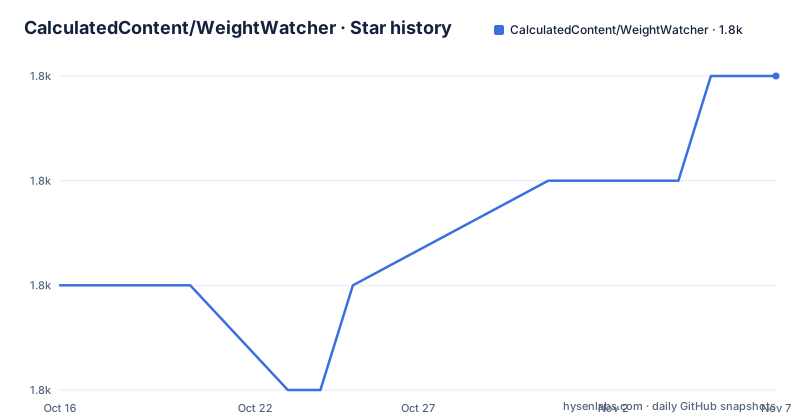
Star history
- CalculatedContent/WeightWatcher1,780 ★ · +2
| Repository | 2026-10-16 | 2026-11-07 |
|---|---|---|
| CalculatedContent/WeightWatcher | 1.8k | 1.8k |
2 Stars in the last 22 days, measured from the daily GitHub snapshot. Compare with other projects
Editorial analysis
The premise is that you do not need data to describe a model
WeightWatcher starts from an unusual constraint. Every other tool in the deep learning toolbox tells you about a network by running it: a validation set, a benchmark, a probe dataset. WeightWatcher's claim is that you can analyze a pretrained model with no access to training data and no test data at all, and still get a description of how it is likely to generalize.
The descriptive tag on the repository is precise: "The WeightWatcher tool for predicting the accuracy of Deep Neural Networks". The README lists what it is for: analyzing pretrained PyTorch, Keras and DNN models with Conv2D and Dense layers, monitoring models and their layers to see whether they are over-trained or over-parameterized, predicting test accuracies across different models with or without training data, and detecting problems when compressing or fine-tuning a pretrained model. It also attaches layer warning labels, over-trained or under-trained.
It is built on a stated theory, Heavy-Tailed Self-Regularization, drawing on Random Matrix Theory, statistical mechanics and strongly correlated systems, and the project ties that theory to published research. Understanding whether the numbers mean what the README claims means reading that research, not the code.
The licence is Apache-2.0, and the package builds with setuptools and setup.py, requiring Python 3.3 or newer.
Four lines of Python produce a dataframe and a summary dictionary
Installation from the stable index is a single command, and the README documents a TestPyPI fallback for the current 0.8.0 build:
pip install weightwatcherpython3 -m pip install --index-url https://test.pypi.org/simple/ --extra-index-url https://pypi.org/simple weightwatcherThe basic use loads the library, loads a torchvision model, constructs a watcher and asks it twice, once for per layer detail and once for a summary:
import weightwatcher as ww
import torchvision.models as models

model = models.vgg19_bn(pretrained=True)
watcher = ww.WeightWatcher(model=model)
details = watcher.analyze()
summary = watcher.get_summary(details)
details is a pandas dataframe with one row per layer plus plots, and summary is a dictionary of generalization metrics. The README shows the shape of that dictionary with values like log_norm, alpha, alpha_weighted, log_alpha_norm, log_spectral_norm, stable_rank and mp_softrank, each paired with a number such as 2.11 for log_norm and 3.06 for alpha on the example run.
The dependency list in setup.py explains why the install is heavier than a pure Python package would be: numpy, pandas, matplotlib, matplotlib-inline, powerlaw and scikit-learn are all required. This is a scientific stack, not a utility.
The mechanism is a power law fit to the correlation matrix spectrum
For each weight matrix W, WeightWatcher forms the correlation matrix X = W transpose times W and looks at its eigenvalues. That distribution is the empirical spectral density, or ESD. The library plots the ESD as a histogram, then fits its tail to a truncated power law, and plots the fit on several axes so you can see how well the assumption holds.
The summary metrics characterise the shape and scale of that distribution. The exponent alpha is the headline number. The README states that the ESDs in the best layers of the best networks can be fit to a power law with alpha closer to 2.0, and that on a log log plot the ESD looks like a straight line. stable_rank and mp_softrank come from a Marchenko Pastur fit, which is why there is a Marchenko_Pastur_Plots notebook in the examples directory.
The `min_evals` parameter is the constraint to internalise. The README says the power law fits need at least 50 eigenvalues to make sense, while describe and the other methods do not. That threshold is why analyze defaults to min_evals=50 and describe defaults to min_evals=0. With a thin layer spectrum you can set the threshold lower, and then you get a fitted exponent with no statistical meaning behind it.
The full call surface is documented as several methods on the watcher object: analyze, describe, get_details, get_summary, get_ESD and distances, which compares two models. analyze also accepts max_evals, plot, randomize, mp_fit, pool and savefig.
min_evals filters layers out, and that filter is the tool's main failure mode
The honest limitation is not a bug. It is that a correlation matrix with few eigenvalues produces a spectrum where a power law fit is arbitrary, and the tool responds by excluding that layer from the metrics rather than warning loudly.
The practical consequence is that a model's apparent health can be a function of how many layers happened to pass min_evals. A small model, or a model with narrow layers, may have many layers silently dropped. Because the threshold is a parameter, you can lower it, and if you do, you should treat alpha for those layers as noise.
There is a second limit worth stating. The predictions are generalization metrics derived from weight spectra, and the README frames the project goal as finding metrics that reflect observed test accuracies across many models and architectures. That is an empirical claim that has to be checked against your own models, and the project provides calibration notebooks such as WW-Calibrate_Alpha for that purpose. A metric you have not calibrated is a number, not a prediction.
Version 0.8.0 added trap level randomized diagnostics, analyse the shape of individual correlation matrix traps:
trap_df = watcher.analyze_traps(layers=[3, 5], plot=True, savefig="trap_images")The workflow is documented separately in docs_trap_features.md, which describes using analyze_traps together with remove_traps.
PEFT and LORA support is experimental and has hard preconditions
Analysing fine-tuned models is supported behind a peft option, and the README labels the whole section experimental. Two modes exist. With peft set to 'peft_only', the library forms the low rank BA product and analyses the delta layers, tagging them in the name with lora_BA:
details = watcher.analyze(peft='peft_only')With peft set to True, it analyses the base model, the delta and the combined weight matrices together:
details = watcher.analyze(peft=True)The preconditions are strict and worth reading twice. The base model and the fine-tuned model must have the same layer names, and layers whose names do not match are ignored. Biases are not considered at this point. Both models should be stored in the same format, the README naming safetensors as an example.
If you want to select layers by id, you must first run describe with peft set to False, and then select both the lora_A and lora_B layers. Missing the second half of the pair is the kind of mistake that produces a plausible but meaningless summary, and nothing in the output would tell you.
Repository signals suggest a project with a steady core and a slow release trail
The repository is not archived. The last push was on 2026-05-11, which is five months before 2026-10-17, so it is inside the six month window and the project is still receiving work.
The release history is where the picture gets uneven. The most recent tagged releases are 0.7.3.5, named PEFT Test Release, from 2024-01-10, 0.55 from 2021-10-17 and 0.4.8 from 2021-06-05. Meanwhile the installation section documents installing version 0.8.0, which suggests the PyPI version and the newest tag have moved apart. If you pin a version for reproducibility, check which artifact you actually get rather than assuming the newest tag is the newest code.
The repository layout is that of a research project with a long memory. There is a checks/ directory, a tests/ directory wired up through test_suite in setup.py, a notebooks/ folder with a BuildWeightWatcher notebook and a Colab variant, presentations/, and an examples/ directory the README itself warns is quite old. The examples span image models, BERT and GPT notebooks, a GloVe vectors notebook, an LSA notebook, MNIST experiments with AdamW and Muon, and a double descent notebook. That is a broad surface for a tool whose core is one fit.
There is also a commercial path. WeightWatcher-Pro is offered in beta and free for submitting models for analysis, which is worth understanding before you decide where your models and results live. Apache-2.0 covers the open source side; this is not legal advice, and the terms of any hosted service are separate from it.
What WeightWatcher is for, next to what it cannot tell you
The realistic use is comparative. You have several checkpoints saved from one training run, no held-out set, and you want to know which is not obviously over-trained. Per layer alphas, warning labels and a summary dictionary answer that faster than anything requiring a dataset.
It also fits the workflow of inspecting a model before compression or fine-tuning, which is the third bullet in the README's list of uses, and the PEFT path exists for exactly that.
What it does not do is run inference, evaluate accuracy, or tell you why a layer failed to generalise. It has no opinion about your data pipeline, your loss, or your training loop. And every sentence it produces is a statement about weight structure, which is evidence about a model rather than proof of its behaviour.
The honest summary is that WeightWatcher trades data for theory. Where you cannot measure, it infers from weights, and the inference chain runs through power law fits, Random Matrix Theory and a stated generalisation hypothesis. That chain is the project's contribution and also the thing a sceptical user has to evaluate on their own models, with a calibration notebook rather than with the README.
Editorial conclusion
Adopt WeightWatcher when you have many saved checkpoints and no evaluation set, because a power law exponent per layer is a cheap way to compare them, and when you already trust the alpha metric or are willing to calibrate it against measurements you have taken. Do not adopt it as a training loss or a substitute for a test set, and treat the PEFT and LORA path as research code until the base and fine-tuned layer names match exactly. Before relying on a number, set min_evals to 50 or higher and watch how many layers get excluded by that threshold, then check whether alpha tracks accuracy on a model where you know the answer.
Frequently asked questions
How do I install WeightWatcher?
Run pip install weightwatcher. The README also gives a TestPyPI command for the current 0.8.0 build: python3 -m pip install --index-url https://test.pypi.org/simple/ --extra-index-url https://pypi.org/simple weightwatcher.
Does WeightWatcher need training or test data?
No. It is described as a diagnostic tool for analyzing Deep Neural Networks without needing access to training or even test data, working from the weight matrices of Conv2D and Dense layers.
What does the alpha metric mean in WeightWatcher?
alpha is the exponent of the truncated power law fitted to the tail of the layer's empirical spectral density. The README says the ESDs in the best layers of the best networks fit a power law with alpha closer to 2.0.
Why does analyze skip some layers?
The power law fits need at least 50 eigenvalues to make sense, so analyze defaults to min_evals=50 and excludes layers below it, while describe defaults to min_evals=0. Lowering the threshold for analyze produces fits without statistical meaning.
Can WeightWatcher analyze a PEFT or LORA fine-tuned model?
Yes, experimentally. Pass peft='peft_only' to analyse the delta layers formed from the low rank BA product, or peft=True to analyse the base model, the delta and the combined matrices. Both models must share layer names and be stored in the same format, and biases are not considered.
Official sources
Add this badge to your README
If you maintain this project, the badge below links readers to this analysis and shows its maintenance status from the daily GitHub snapshot. Paste the markdown into your README; add ?metric=license or ?metric=stars to the image URL for a different field.

[](https://hysenlabs.com/projects/calculatedcontent-weightwatcher)Star history chart for your README
[](https://hysenlabs.com/projects/calculatedcontent-weightwatcher)Was this useful?