Cybersecurity-Projects: 70 Security Projects in a Tiered Learning Repo
Building 70 Projects ranging from beginner to advanced so anyone can — learn from, build upon, use as a reference, or even copy directly. Gamified Cybersecurity learning 👇
At a glance
- What is it?
- CarterPerez-dev/Cybersecurity-Projects is a tiered collection of hands-on security projects, from single-file Python teaching tools to advanced builds, with certification roadmaps and a resource index alongside. The repository is a curriculum, not a library, and its value depends on which tier you actually need.
- Who is it for?
- Adopt this repository if you are learning security by building and want finished reference implementations instead of course videos, or if you are assembling a portfolio and need projects with documented scope.
- Can I use it commercially?
- Yes, with strict conditions. AGPL-3.0 is a network copyleft licence: if people use a modified version over a network, for example as a hosted service, you must offer them its source code under the same licence.
- Is it still maintained?
- Yes. The repository last received commits 2 days ago.
- What is it written in?
- Mainly Go, according to GitHub's language statistics.
Answers come from the project's GitHub data, last synced on November 15, 2026, and from our analysis. They are not legal advice.
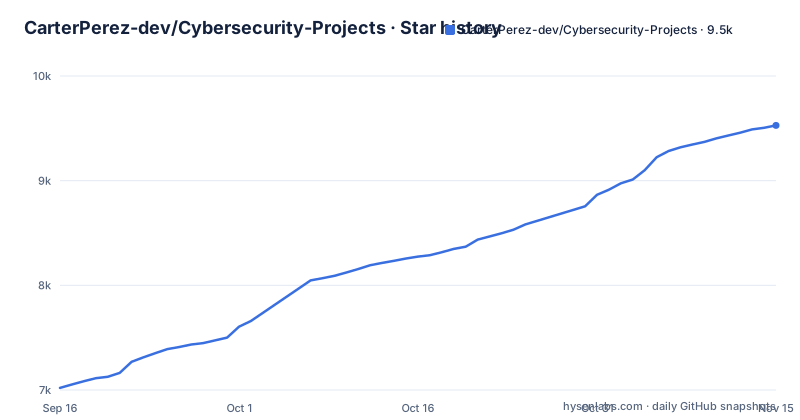
Star history
- CarterPerez-dev/Cybersecurity-Projects9,528 ★ · +2,508
| Repository | 2026-09-16 | 2026-11-15 |
|---|---|---|
| CarterPerez-dev/Cybersecurity-Projects | 7k | 9.5k |
2,508 Stars in the last 60 days, measured from the daily GitHub snapshot. Compare with other projects
Editorial analysis
What CarterPerez-dev/Cybersecurity-Projects actually is
This is a monorepo of learning material, not a tool you install once. The README organizes the work into four tiers: Foundations (described as pre-beginner, for first-time programmers), Beginner, Intermediate, and Advanced. Alongside the PROJECTS directory sit ROADMAPS, RESOURCES, SYNOPSES, and TEMPLATES folders, so the repository doubles as a career-path index and a project scaffold.
The intended audience is explicit. The README says the repository exists so anyone can "learn from, build upon, use as a reference, or even copy directly." That is a wide claim, and it matters for how you read the rest of the repository: the projects are designed to be read and modified, not consumed as versioned packages. The primary language listed for the repository is Go, though the project tables in the README show Python and C++ work as well, which tells you the language mix varies by folder rather than being uniform.
The tiering is the real organizing idea. Foundations projects are single-file Python programs with heavy inline comments and NumPy-style docstrings on every function. The README states the code in that tier is still production-quality while the explanations start from zero. That combination is unusual and is the strongest reason to look at this repository at all.
The tier system and what each level assumes
The four tiers assume different starting points, and the README is direct about the split. Foundations is for someone who has never written Python and has barely used a terminal. Beginner projects "assume you already know the language and move faster." That sentence is the most useful line in the README, because it tells you where the hand-holding stops.
The Foundations tier currently lists three projects in the README table: a Hash Identifier (identifying hash types by prefix, length, and charset), an HTTP Headers Scanner (auditing a URL's response headers for missing or weak controls such as CSP, HSTS, and X-Frame-Options), and a Password Manager (an encrypted local vault with a master password, using Argon2id key derivation and AES-GCM).
Beginner projects include a Simple Port Scanner in C++ (credited to a contributor, @deniskhud) covering TCP socket programming and async I/O, and a Keylogger that captures keyboard events with timestamps. The presence of a keylogger is worth pausing on: it is a standard teaching exercise, and the repository frames it as such, but anyone working through it should keep it confined to systems they own.
Each project links to a learn folder for documentation, and the README describes those folders as explaining concepts from zero in the Foundations tier. That structure is the mechanism by which the repository teaches: source file plus a parallel explanation directory.
Installing nothing: how to work with a curriculum repository
There is no package to install and no CLI to run. The README gives no install command for the repository as a whole because the repository is not a program. What you do instead is clone it and enter a specific project folder.
The first real step is getting the tree locally, including the PROJECTS directory where the source lives:
git clone https://github.com/CarterPerez-dev/Cybersecurity-Projects.git
cd Cybersecurity-Projects/PROJECTS
After that, pick a tier and a project. If you are starting from zero, the README points at the Foundations tier first, and the Hash Identifier is the first project listed there. From the PROJECTS directory you would move into that project's folder:
cd foundations/hash-identifier
ls
The README states that Foundations projects are single-file Python programs, so the listing should show one main Python file plus a learn folder. Read the file top to bottom; the README says every line that introduces a new concept is annotated inline. The learn folder is where the concept explanations live, and the README describes it as covering Python features and security concepts from zero.
Because the repository has no release artifacts, there is no version to pin and no upgrade path to follow. You get whatever is on the main branch at the moment you clone.
Where the repository is thin, and where it will fail you
The most concrete limitation is stated by the repository itself. The description talks about building 70 projects, and the README notes a project currently being built (a DDoS Mitigation Tool). If you arrived expecting all 70 to be finished, check that the specific project you want has source code before you plan around it.
Second, the repository is a collection of independent folders, not a maintained library. There is no changelog, no GitHub releases, and no dependency manifest for the whole tree. Nothing here is versioned in a way that lets you say "I use Cybersecurity-Projects 2.1." If a project breaks against a newer Python or C++ toolchain, the fix is yours to make.
Third, and this is the case where it is the wrong tool entirely: do not treat these projects as production security software. A teaching password manager and a teaching port scanner are written to be readable. The README itself frames the code as something to "build upon" or "copy directly," which is an invitation to adapt, not a claim of hardening. If you need a scanner or a vault for real use, take an audited tool and read this repository for the concepts instead.
Certification roadmaps and the CertGames connection
Two things sit beside the code. The first is a ROADMAPS directory, which the README describes as 10 structured career paths with certification guides covering roles such as SOC Analyst, Pentester, and Security Engineer. The second is a RESOURCES directory indexing tools, courses, certifications, communities, and frameworks.
The README also links to certgames.com, describing it as guided project courses that build the same security tools step by step, with the concepts explained as you go, offered free. The relationship is worth naming plainly: the repository is the finished source, and the linked site is the walkthrough. If you learn better by reading completed code and reverse-engineering it, the repository alone is enough. If you get stuck without narration, the README's own tip points you at the guided version.
A practical consequence: the roadmaps are text and links, not an assessment. Nothing verifies that you completed a path or checks your understanding. They function as a reading order, and you should treat them that way rather than as a certification in themselves.
How it compares with a course platform or a single-tool repository
The obvious alternative is a video course platform, where you follow along and the instructor explains each step. The difference in approach is that this repository hands you the finished artifact first and expects you to read it, with the learn folders supplying the explanation afterward. That suits people who prefer source over narration and who want something they can modify, but it is worse for anyone who needs the concept introduced before seeing the code.
The second alternative is a focused single-tool repository, such as a standalone port scanner or a standalone password manager. Those give you one maintained tool with issues, releases, and a narrower surface. This repository gives you breadth and a reading path across many small tools, at the cost of depth and maintenance per tool. Neither is strictly better. If your goal is to ship one utility, adopt the single-tool project. If your goal is to understand a range of security concepts by reading working code, the tiered collection is the more efficient path.
A third comparison is your own from-scratch project. Building a hash identifier yourself teaches more than reading one, but you lose the reference implementation to check against. The repository's stated purpose, letting you "use as a reference," is exactly the middle ground: build yours, then compare.
Licence and the cost of keeping up
The repository is licensed AGPL-3.0. That is a strong copyleft licence with a network clause: if you modify the code and let users interact with it over a network, the AGPL requires you to offer them the corresponding source. For a learner copying a hash identifier into a personal script, this is a non-issue. For a team wanting to fold one of these tools into an internal service, the obligation is real and worth reading in full before you copy anything. This is not legal advice; read the LICENSE file and, where it matters, ask someone qualified.
On maintenance cost: the last push to the repository was on 2026-11-02, so the tree is being touched. But "being touched" is not the same as "every project maintained." There are no releases, so there is no upgrade cadence to plan around. Your cost of keeping up is whatever it takes to re-clone and re-read the specific folder you care about, plus any fixes needed when your Python or C++ toolchain moves. If you forked a project and adapted it, you own that fork permanently, because there is no upstream version to merge from.
Editorial conclusion
Adopt this repository if you are learning security by building and want finished reference implementations instead of course videos, or if you are assembling a portfolio and need projects with documented scope. Do not adopt it as a dependency for production security tooling: the projects are teaching artifacts, the repository is a monorepo of independent folders rather than a maintained library, and the AGPL-3.0 licence imposes source-disclosure obligations on network use that many internal tools cannot accept. Before committing time, verify that the tier you intend to work in has source code present, and check the learn folder for the specific project you chose.
Frequently asked questions
How do I use GitHub for cybersecurity projects like this one?
Clone the repository and work inside a single project folder under PROJECTS, reading the main source file and the project's learn folder together. The README states that Foundations projects are single-file Python programs with inline comments, which makes them readable without jumping between files.
What are some examples of cyber security projects in this repository?
The README lists a Hash Identifier, an HTTP Headers Scanner, and a Password Manager in the Foundations tier, plus a Simple Port Scanner in C++ and a Keylogger in the Beginner tier. Each entry links to its source code and a learn folder.
What cybersecurity projects can I do as a beginner in this repository?
The README directs first-time programmers to the Foundations tier, which is described as pre-beginner and assumes no prior Python or terminal experience. The Foundations table lists the Hash Identifier first, followed by the HTTP Headers Scanner and the Password Manager.
How do I get cybersecurity projects from this repository?
Clone the repository from GitHub; the README gives no package install because the tree is a collection of project folders rather than an installable program. Source lives under PROJECTS, organized into Foundations, Beginner, Intermediate, and Advanced tiers.
Official sources
Add this badge to your README
If you maintain this project, the badge below links readers to this analysis and shows its maintenance status from the daily GitHub snapshot. Paste the markdown into your README; add ?metric=license or ?metric=stars to the image URL for a different field.

[](https://hysenlabs.com/projects/carterperez-dev-cybersecurity-projects)Star history chart for your README
[](https://hysenlabs.com/projects/carterperez-dev-cybersecurity-projects)Was this useful?