NOFX AI auto trading: Frontier's approved orders, Autopilot's unattended ones, and the Docker install behind both
Your AI trading terminal assistant for US stocks, commodities, forex, and crypto.
At a glance
- What is it?
- NOFX is a self-hosted Go and web trading system that uses LLMs to plan crypto trades in Frontier or run them continuously in Autopilot. The approval model in Frontier is careful. The default deployment and wallet handling need more attention than the one-line installer suggests.
- Who is it for?
- NOFX fits a trader who already holds accounts on Binance USDT perpetuals, Hyperliquid, OKX or Bitget, is comfortable running Docker, and wants LLM-generated entry plans that still need a click to execute. It does not fit anyone who wants to leave Autopilot running unsupervised on a server they have not locked down, or who cannot manage a funded private key for the Claw402 fee wallet.
- Can I use it commercially?
- Yes, with strict conditions. AGPL-3.0 is a network copyleft licence: if people use a modified version over a network, for example as a hosted service, you must offer them its source code under the same licence.
- Is it still maintained?
- Yes. The repository last received commits 10 days ago.
- What is it written in?
- Mainly Go, according to GitHub's language statistics.
Answers come from the project's GitHub data, last synced on November 13, 2026, and from our analysis. They are not legal advice.
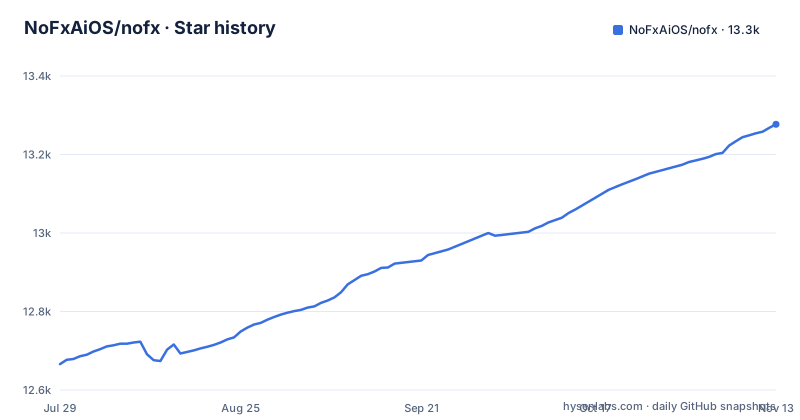
Star history
- NoFxAiOS/nofx13,277 ★ · +611
| Repository | 2026-07-29 | 2026-11-13 |
|---|---|---|
| NoFxAiOS/nofx | 12.7k | 13.3k |
611 Stars in the last 107 days, measured from the daily GitHub snapshot. Compare with other projects
Editorial analysis
Frontier generates entry plans that never submit on their own
Frontier is the cautious half of NOFX. You pick a market from top-volume instruments, a native exchange symbol or the Binance AI500 list, then ask the model for entry plans. Four plan shapes are available: a market entry, a limit entry at a chosen price, a weighted ladder that splits the position across price levels, and TWAP, which releases a finite sequence of orders over time within approved price limits. Each plan shows entry price, stop loss, targets, leverage, position value and estimated margin side by side on the chart.
Generating a plan does not submit an order. You select a plan, review the current account and order details, and explicitly approve execution. Positions and open exchange orders sit below the chart, with manual entry and close controls.
Frontier supports Binance USDT perpetuals, Hyperliquid, OKX and Bitget. Public markets can be browsed before connecting anything, but trading requires a matching account on that venue. One caveat applies to every plan type except market: limit orders and scheduled TWAP slices may remain unfilled, so an approved plan is not a guaranteed position. The README points to docs/features/trade-planning.md for execution and recovery details.
Autopilot keeps trading until you stop it, and stopping does not close positions
Autopilot is the opposite contract. You configure a trader from three parts (a model, an exchange account and a strategy) and the trader reads the market, makes decisions and routes orders through the NOFX exchange runtime without asking. The README states the difference plainly: Frontier requires approval for each trade, Autopilot can place trades while it is running, and starting or stopping it is a separate action.
The Strategy workspace holds market selection, indicators, sizing and trading instructions. The Dashboard shows positions, performance and decision history for running traders, and a Leaderboard compares published trader performance.
The sentence to remember sits in the update instructions: stopping a process does not close its positions. Halting Autopilot, restarting the containers or pulling a new image leaves open exposure on the exchange exactly as it was. After a restart the README tells you to check positions and orders at the exchange and reconcile any execution marked as needing attention before placing another trade. For an unattended strategy with leverage, that means a crash or a host reboot is a manual recovery job, not a pause button.
Claw402 bills model calls from a USDC wallet on Base
The first-session flow sets up AI and data access through Claw402. In the Config workspace you create or import an AI fee wallet, save its private key, and fund its address with USDC on Base. That balance pays for model requests and paid-data requests. Trading funds stay on the exchange, separate from this wallet.
Two consequences follow. First, running NOFX at all costs crypto on a specific chain, which is a hurdle for a stock or forex trader drawn in by the repository description. Second, the fee wallet's private key is now part of your deployment. The docker-compose.yml comments explain that .env is bind-mounted so the onboarding flow can write CLAW402_WALLET_* values back to the host file, and that without the mount the wallet is regenerated on every container restart. Lose the mount and you lose track of a funded address.
Settlement receipts can be checked independently. NOFX_X402_RECEIPT_RPC_URL in .env.example defaults to https://mainnet.base.org for read-only verification of Claw402 Permit2 receipts, with a note to prefer a dedicated Base mainnet RPC in production.
Installing NOFX with the one-line Docker script
On Linux or macOS, install and start Docker with Compose, then run the installer:
curl -fsSL https://raw.githubusercontent.com/NoFxAiOS/nofx/main/install.sh | bashThe script generates any missing environment keys and starts NOFX from published Docker images, so no Go or Node.js toolchain is needed. When it finishes, open http://127.0.0.1:3000 in a desktop browser, create your local account, set up Claw402 in Config, add a trading account, and open Frontier. Note that the script is fetched from the main branch, while the repository's default branch is dev.
On Windows, use Docker Desktop with a Bash environment such as WSL2 and run the same command. A Railway deploy button is also offered.
Updating an installer-based install happens in the installation directory, ~/nofx by default, after stopping active Autopilot traders and reviewing any running Frontier execution:
docker compose pull
docker compose up -d
Keep .env and the data/ directory across upgrades. They hold configuration, encryption material and saved application state.
Developers who want to run source changes clone with submodules and build locally. The charting code lives in the web/vendor/charting submodule, and TradingView chart assets are under their own license.
git clone --recurse-submodules https://github.com/NoFxAiOS/nofx.git
cd nofx
./start.sh start --build
The installer's Compose file listens on every host interface
This is the detail most likely to hurt someone who installs NOFX on a VPS. The README states that the installer uses the production Compose configuration, which publishes its ports on all host interfaces by default. The source Compose configuration, docker-compose.yml, binds the frontend and API to 127.0.0.1 through NOFX_BIND_ADDRESS, with the backend on 8080 and the frontend on 3000.
So the quick path and the developer path have different exposure. A one-line install on a cloud machine with no firewall puts a trading interface, connected to funded exchange accounts, on the public internet. The README's instruction is to configure host bindings and an authenticated HTTPS proxy before exposing a remote instance, and .env.example repeats it: bind locally by default and use an authenticated TLS reverse proxy for remote access.
On a laptop this matters less. On a server, check the bindings before you add an exchange key.
Encryption keys and the container RCE trade-off in .env
Secrets in NOFX sit in one file. .env.example lists three required values: JWT_SECRET for signing sessions, DATA_ENCRYPTION_KEY (an AES-256 key, Base64-encoded, 32 bytes) used to encrypt API keys and secrets stored in the database, and RSA_PRIVATE_KEY for end-to-end encryption of sensitive data sent from the browser. The installer and start.sh generate missing keys for you. To make one by hand, the file's own comment gives:
openssl rand -base64 32The weak point is the bind mount described earlier. Because .env is mounted into the backend container, the comments in docker-compose.yml acknowledge that the file is reachable via container RCE, and suggest deploying via environment variables only and removing the mount for threat models where that matters. Doing so brings back the wallet regeneration problem. You choose between a fee wallet that survives restarts and an encryption key that a compromised container cannot read.
In docker-compose.yml the backend container defaults TZ to Asia/Shanghai and sets AI_MAX_TOKENS=8000, and .env.example sets NOFX_TIMEZONE=Asia/Shanghai as well. Traders elsewhere should set the timezone before reading decision history.
AGPL-3.0, no tagged releases, and a Go 1.26.10 backend
NOFX is licensed AGPL-3.0. Running it privately for yourself is the simple case. If you modify it and offer it to other people over a network, the AGPL's network clause requires making the modified source available to them, which matters for anyone thinking of hosting it for clients.
The repository has no GitHub releases. Version history lives in CHANGELOG.md, the installer pulls published images, and the last push was on 2026-10-21. Without tags there is no named version to pin or roll back to. Your reference points are commits and CHANGELOG.md entries, which is thin for software that holds exchange credentials.
The backend is Go, pinned to go 1.26.10 in go.mod, using gin for the API, gorm with both PostgreSQL and SQLite drivers, and exchange clients for Binance and Hyperliquid among others. The tree also carries telegram/, mcp/ and telemetry/ directories, and go.mod pulls in a Telegram bot API client, so read docs/ for what each one sends before enabling it. Building without Docker requires the Go version in go.mod, Node.js 24 and TA-Lib, and `make test` runs both `go test -v ./...` and the frontend tests.
Editorial conclusion
NOFX fits a trader who already holds accounts on Binance USDT perpetuals, Hyperliquid, OKX or Bitget, is comfortable running Docker, and wants LLM-generated entry plans that still need a click to execute. It does not fit anyone who wants to leave Autopilot running unsupervised on a server they have not locked down, or who cannot manage a funded private key for the Claw402 fee wallet. Before trading, check which Compose file your install used and whether ports 3000 and 8080 are reachable from outside the host.
Frequently asked questions
Does NOFX place trades without approval?
Frontier does not: generating a plan never submits an order, and each trade needs explicit approval. Autopilot can place trades on its own while it is running.
Which exchanges does NOFX Frontier support?
Frontier supports Binance USDT perpetuals, Hyperliquid, OKX and Bitget. You can browse public markets without an account, but trading requires a matching exchange account.
How does NOFX pay for AI model requests?
Through Claw402, using an AI fee wallet you create or import in Config and fund with USDC on Base. That balance pays for model and paid-data requests and is kept separate from trading funds.
Official sources
Add this badge to your README
If you maintain this project, the badge below links readers to this analysis and shows its maintenance status from the daily GitHub snapshot. Paste the markdown into your README; add ?metric=license or ?metric=stars to the image URL for a different field.

[](https://hysenlabs.com/projects/nofxaios-nofx)Star history chart for your README
[](https://hysenlabs.com/projects/nofxaios-nofx)Was this useful?