CellProfiler: measuring cell phenotypes from thousands of images
An open-source application for biological image analysis
At a glance
- What is it?
- CellProfiler is a free open-source application that lets biologists without computer vision or programming training quantify phenotypes across thousands of images. It ships three release channels, a stable build for users, nightly builds for module maintainers and beta builds for testers, and its newest tagged release is 4.2.8 from 2024-09-27.
- Who is it for?
- CellProfiler fits a wet-lab or imaging group that needs repeatable quantification across large image sets and does not want to build a computer vision pipeline, and it does not fit a team that needs a library it can call from a script or a notebook, or one that has to run on a cluster it assembles itself.
- Can I use it commercially?
- Check first. The repository uses a licence we do not classify automatically, so read its LICENSE file before any commercial use.
- Is it still maintained?
- Yes. The repository last received commits 1 day ago.
- What is it written in?
- Mainly Python, according to GitHub's language statistics.
Answers come from the project's GitHub data, last synced on November 7, 2026, and from our analysis. They are not legal advice.
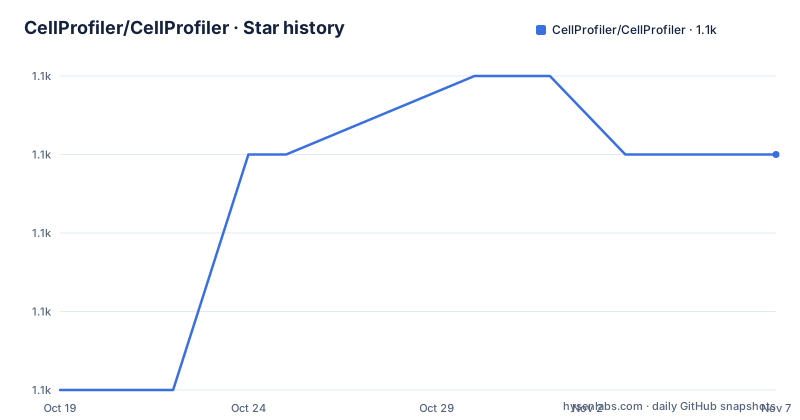
Star history
- CellProfiler/CellProfiler1,142 ★ · +3
| Repository | 2026-10-19 | 2026-11-07 |
|---|---|---|
| CellProfiler/CellProfiler | 1.1k | 1.1k |
3 Stars in the last 19 days, measured from the daily GitHub snapshot. Compare with other projects
Editorial analysis
The audience is biologists, not computer vision engineers
CellProfiler is described as free open-source software designed to enable biologists without training in computer vision or programming to quantitatively measure phenotypes from thousands of images automatically.
That sentence is the whole product definition, and it explains the shape of the project. The unit of work is a phenotype, a measurable property of a cell or an object in an image, and the volume is thousands of images, which is the regime where manual or semi-automated analysis stops being viable. The user is expected to arrive without the skills of a computer vision researcher, so the pipeline is assembled from named measurement steps rather than from code.
The alternative this positions against is writing an analysis script yourself, or running a general-purpose image processing library and building the pipeline in Python. Both are entirely reasonable approaches, and for a team that already has a working Python image analysis stack, they are often faster to reach for. What CellProfiler offers is the pipeline as a document, built from steps that each know how to identify or measure something, which is a different kind of artefact to review, share and rerun.
The wider context is the Image.sc forum, which carries a tagged CellProfiler topic, and the project wiki, which is where the documentation lives. The homepage is `cellprofiler.org`.
Three release channels, and the project tells you which one you want
The version guidance is unusually explicit, and it is the most practically useful part of the documentation for anyone deciding what to install.
For users, the stable release is the one to take, downloadable for macOS and Windows from the CellProfiler releases website. The project states that recommendation directly rather than leaving it to be inferred.
For contributors and people planning to contribute, the guidance is to compile from source, and the wiki has separate instructions for Linux, macOS and Windows. That is the practical meaning of the split: a contributor needs the source tree, not a binary.
For third-party module maintainers, the nightly release is the correct choice. The reasoning is sound and stated in the documentation: a module is maintained against the current development state, so a stable build is by definition behind the API the module is written for, and the project asks module maintainers to report if a nightly has broken their module. This is a distribution of software that treats third-party extensions as a first-class concern, which is rarer than it should be.
For everyone else, the beta release is offered to enthusiastic users who want to try something earlier, with the instruction to report bugs as GitHub issues. Nightly and beta are both available for macOS and Windows from the same releases page.
The tree carries two independent environment definitions
The top-level layout shows a Python project with more than one way to pin its environment. There is a `pixi.toml` with a `pixi.lock` alongside it, and separately a `flake.nix` with a `flake.lock`, plus a `nix/` directory. Two lock files for two environment systems means the same dependency set is described twice, for two different workflows, and one of them is aimed at reproducible builds while the other is the more conventional local development setup.
The rest of the tree is organised around a `src/` directory for the application, a `tests/` directory, `scripts/`, `docs/` and a `distribution/` directory that presumably covers packaging for the downloadable macOS and Windows builds. There is also a `pytest.ini` and a `mypy.ini`, so the test framework and the type checker are configured at the repository root rather than left to defaults.
Two files at the root are worth noting because they are unusual. `CITATION` exists, which is how a research tool asks to be cited, and `CONDUCT` alongside `CONTRIBUTING.md`. A `flake.lock` also implies the Nix build is pinned, so a given build of the application can be reproduced rather than resolved afresh.
The last push to the repository was on 2026-10-19 and the repository is not archived, so the source tree is being worked on even though the newest tagged release is older.
The newest release is 4.2.8, and the documentation is versioned with it
The release history shows v4.2.8 on 2024-09-27, v4.2.7 on 2024-07-29 and v4.2.6 on 2023-08-14. The version badges in the project documentation point at 4.2.8 for both the version and the documentation, with the manual hosted for that specific release.
That pairing is a deliberate detail and it has a practical consequence. The documentation you are reading is the documentation for the build you installed, which removes a whole class of confusion where a user follows a manual describing a feature that their binary does not have, or assumes a workflow that changed two releases ago.
The gap between the newest tag and the newest commit is the thing to weigh. The last push was on 2026-10-19, while v4.2.8 dates from 2024-09-27, so development has continued past the tag for roughly two years without a new tagged release on the default branch. For a nightly-channel project that is not necessarily alarming, since nightly builds are produced from the branch tip, and the project explicitly recommends nightly for module maintainers, which implies the branch is expected to be usable. But for someone who wants a fixed, dated artefact with matching documentation, the newest available pair is 4.2.8 and the manual for it.
The version numbering itself has been stable for a while, on the 4.2.x line across the three most recent tags, so nothing in the naming suggests a disruptive change is imminent.
A custom licence that GitHub cannot classify
The licence is the one item on this project that deserves a closer look before use, and it is unusual in a way that should not be glossed over.
The licence is recorded as a custom one that GitHub cannot classify, and the pointer is the `LICENSE` file at the root of the repository. When a hosting platform's automated classifier cannot map a licence to a recognised identifier, that is a signal to read the text rather than to assume the nearest familiar licence.
For a research application distributed free of charge, the terms will typically be about redistribution, attribution and modification rather than about warranty or patent grants, but that is a general expectation and not a reading of this particular file. If your institution requires a specific licence, or if you intend to distribute CellProfiler inside a commercial product or a bundled tool, the question to answer is what the LICENSE file actually grants, and that is a question for whoever reviews licensing where you work rather than something to infer from the badge.
The `CITATION` file in the repository root is a related, simpler matter. It specifies how the software should be referenced in a publication, which matters more than usual for a tool whose output ends up as numbers in a paper.
Where CellProfiler is the wrong choice
There are two clear cases.
The first is an automated pipeline. CellProfiler is an application with a graphical interface, and the documentation offers no command line entry point or scripting API. A lab that processes a fixed set of images once a week and wants the result unattended is pushed toward exporting images, running something else, and importing results back. If you need reproducibility as code, that is a different tool.
The second is a large-scale or cluster setting. The downloadable builds cover macOS and Windows, and the Linux route the project documents is a compile from source, which is a per-machine activity. A core facility running thousands of images across many nodes is expected to manage its own environment, and the pixi and Nix files in the tree show the ingredients for that, but the packaging is oriented towards a desktop application rather than a batch job on a cluster.
A third, quieter case: a team that already has a working Python image analysis pipeline. Adding a separate desktop application alongside a maintained library creates two places where the same measurement logic exists, and the two will drift.
The honest summary is that CellProfiler trades automation for accessibility. That trade is the right one for a biologist at a workstation with a folder of images and a question about a phenotype, and the wrong one for a pipeline that has to run unattended on a schedule.
Compared with a Python image analysis stack you build yourself
The real alternative is not another application, it is the general-purpose path: use Python with the scientific imaging libraries directly and write the measurement pipeline as a script or notebook.
The difference in approach is about where the knowledge lives. In a hand-built pipeline, each measurement is a piece of code your team writes, reviews and debugs, and every threshold or segmentation parameter is explicit and versioned with your own source. In CellProfiler, the measurement steps exist already, and what you build is a configuration that selects and orders them. That is faster to reach a first result from, and it puts the tuning decisions into a document a biologist can open.
The trade runs the other way on three axes. Reproducibility is easier in code, because a notebook and its environment are things a lab already knows how to version and re-run. Sharing is easier in code, because a colleague can read what the script does. And the ceiling is higher in code, because a library you write can be adapted to an unusual measurement that no built-in step covers, whereas you are limited to the steps the application provides and whatever third-party modules extend it with.
The choice therefore reduces to who owns the analysis. A group that wants a measurement it can select and tune will get further with CellProfiler. A group that needs a measurement nobody has built, on a schedule, on many machines, will get further with a script. The project supports the second group too, in the sense that its source and the module system are open, but the downloadable artefact is built for the first group.
Editorial conclusion
CellProfiler fits a wet-lab or imaging group that needs repeatable quantification across large image sets and does not want to build a computer vision pipeline, and it does not fit a team that needs a library it can call from a script or a notebook, or one that has to run on a cluster it assembles itself. Before adopting, read the LICENSE file at the root of the repository, because the licence is a custom one that GitHub cannot classify, and check the source installation instructions in the project wiki for your platform, since the downloadable builds cover macOS and Windows only and the Linux path is a compile from source.
Frequently asked questions
What is CellProfiler used for?
CellProfiler is a free open-source application for biological image analysis. It is designed to let biologists without training in computer vision or programming quantitatively measure phenotypes from thousands of images automatically.
Which CellProfiler release should I download?
The project recommends the stable release for users, with macOS and Windows builds on the releases page. Contributors should compile from source using the wiki instructions, third-party module maintainers should use the nightly release, and the beta release is offered to users who want to try earlier builds.
Is CellProfiler still being developed?
The repository is not archived and the last push was on 2026-10-19. The most recent tagged releases are v4.2.8 on 2024-09-27, v4.2.7 on 2024-07-29 and v4.2.6 on 2023-08-14.
What licence is CellProfiler released under?
It is a custom licence that GitHub cannot classify, and the full terms are in the LICENSE file at the root of the repository. Read that file for the actual grant rather than relying on the platform's licence label.
Official sources
Add this badge to your README
If you maintain this project, the badge below links readers to this analysis and shows its maintenance status from the daily GitHub snapshot. Paste the markdown into your README; add ?metric=license or ?metric=stars to the image URL for a different field.

[](https://hysenlabs.com/projects/cellprofiler-cellprofiler)Star history chart for your README
[](https://hysenlabs.com/projects/cellprofiler-cellprofiler)Was this useful?