MMCV in 2.x: the package renames that break old install lines, and what the ops cost to build
OpenMMLab Computer Vision Foundation
At a glance
- What is it?
- MMCV is the OpenMMLab computer vision foundation library, and its 2.x line swapped the meaning of its two package names while moving training out to a separate engine. Pick the right package name and the CUDA version together, because that choice decides whether your install is a wheel or a compile.
- Who is it for?
- Take MMCV when you need its ops and transforms for a model trained elsewhere, on a system where a prebuilt wheel matches your PyTorch and CUDA versions. Prefer mmcv-lite when you are on CPU or Apple silicon and the CUDA ops are dead weight.
- Can I use it commercially?
- Yes. Apache-2.0 is a permissive licence: you can use, modify and sell software built on it, as long as you keep its copyright and licence notices.
- Is it still maintained?
- Yes. The repository last received commits 48 days ago.
- What is it written in?
- Mainly Python, according to GitHub's language statistics.
Answers come from the project's GitHub data, last synced on November 15, 2026, and from our analysis. They are not legal advice.
Star history
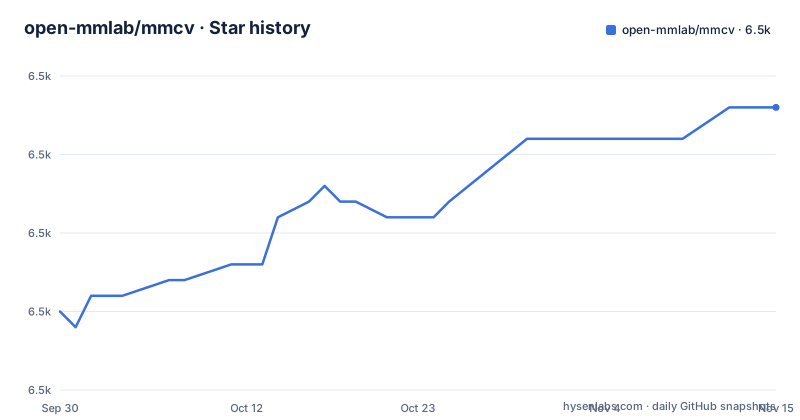
- open-mmlab/mmcv6,488 ★ · +13
| Repository | 2026-09-30 | 2026-11-15 |
|---|---|---|
| open-mmlab/mmcv | 6.5k | 6.5k |
13 Stars in the last 46 days, measured from the daily GitHub snapshot. Compare with other projects
Editorial analysis
The 2.x rename turned mmcv-full into mmcv and mmcv into mmcv-lite
Everything an older tutorial tells you to install changed meaning when the 2.x line arrived. In that line the package formerly called mmcv is now mmcv-lite, and the package formerly called mmcv-full is now plain mmcv. An install line copied from an older post therefore pulls the full build with CUDA ops where it used to pull the lite package. The 2.x release also cut training related components out of the library, which is why the front of the page now spends a paragraph on MMEngine, a separate training engine announced at the World Artificial Intelligence Conference on September 1, 2022, presented as the new home for that half of the work. What 2.x added on the other side is a data transformation module. So what you install is a library for image and video processing, annotation visualization, image transformation, CNN architectures and common CPU and CUDA ops, with no training loop inside it.
Pick one package: mmcv with CUDA ops, or mmcv-lite without them
Two packages ship from one project and they cannot share an environment. mmcv is the full build, with every feature and the CUDA ops ready out of the box, which is why it takes longer to build. mmcv-lite drops the CUDA ops and keeps the rest, described as similar to MMCV from before 1.0.0, for the case where you do not need those ops. The rule about mixing them is stated without hedging: do not install both versions in the same environment, because you will hit errors of the ModuleNotFound kind, and one has to be uninstalled before the other goes in. The page also recommends the full version whenever CUDA is available, which quietly puts anyone on CPU only inference, and macOS users without an NVIDIA card, on the lite path. Supported systems are Linux, Windows and macOS, and the stated floor is Python 3.7.
A .tar.gz instead of a .whl means no wheel exists for your torch and CUDA pair
The install log tells you more than it appears to. A successful prebuilt install prints an index for the exact combination you are on, a directory such as the cu102 and torch1.8.0 one under download.openmmlab.com, then downloads a wheel whose filename encodes the MMCV version, the Python tag and the platform, ending in manylinux1_x86_64.whl. When the same command instead fetches a source package ending in .tar.gz, the interpretation is narrow and worth stating plainly: there is no prebuilt package matching your PyTorch, CUDA or MMCV version. Nothing has gone wrong at that moment, but the install stops being an install and becomes a compile, with a C++ toolchain needed and the build time now yours. That is what the build from source page is for. Apple silicon falls into the same category from the other end, and the page asks those users to put PyTorch 1.13 or newer in place first.
Install and first use through openmim, with PyTorch already in place
PyTorch goes first. The page asks you to install it following the official PyTorch guide before MMCV touches anything, then reaches for openmim instead of pip for the library itself:
pip install -U openmim
mim install mmcv
Pin the version when a project needs a specific one, which is also how you stay on the 1.x or the 2.x line instead of tracking whatever is newest:
mim install mmcv==2.0.0The lite build is the same two steps with a different distribution name:
pip install -U openmim
mim install mmcv-lite
The line to watch in the output is the one starting with Looking in links, since it names the wheel index for your torch and CUDA combination. If it resolves to a .tar.gz instead, read the previous section rather than waiting out a compile you did not ask for. Everything after installation lives in the documentation rather than on this page: tutorials and usage notes sit on the readthedocs site, and installation, CUDA and RuntimeError problems have their own question page.
setup.py probes MLU, MUSA and SUPA before it compiles a single op
Compiling is where the packaging gets specific, and setup.py is where you can read it. The script imports torch, then walks a chain of accelerator backends: torch_mlu with a FORCE_MLU environment override, torch_musa with FORCE_MUSA, torch_supa with FORCE_SUPA, and a parrots branch. Whichever one matches decides which BuildExtension compiles the operator sources. The fallback matters more than the list. When torch is absent, the import raises, the extension command is left empty, and the build prints one line and carries on:
Skip building ext ops due to the absence of torch.That is an install which succeeds and hands you a library with no compiled ops in it, easy to mistake later for a broken CUDA setup. Dependencies are not one file either: requirements.txt pulls in requirements/build.txt, optional.txt, runtime.txt and test.txt, so the test tooling is declared next to the runtime ones. The version string has a single home as well, mmcv/version.py, which setup.py reads and executes instead of hardcoding a number.
Four branch names, two of them aliases, and releases that do not sort by series
Branch names here need a decoder. Four exist: main, 1.x, master and 2.x. Two are aliases, since 2.x points at main and master points at 1.x, and main is the default branch. Both lines are maintained at once, the 1.x content on master and the 2.x content on main, and the stated plan is to delete the 2.x and master alias branches later. The releases show what running two lines costs. v2.1.0 was published on 2023-10-17, v1.7.2 on 2023-12-29 and v2.2.0 on 2024-04-24, so the older series kept taking patch releases after 2.x had moved on, and sorting tags by date does not put them in series order. The branch schedule is laid out as a phase table in the README. The last push to main landed on 2026-09-28.
What MMCV will not do: train your model, or cover your CUDA combination
Three boundaries decide whether this is the dependency you want. It does not train your model. That half was removed in 2.x and moved to MMEngine, so any evaluation script expecting a trainer, a runner or a config driven loop inside MMCV has to change its imports. It does not cover every hardware combination with a binary. Prebuilt wheels are indexed by PyTorch and CUDA version, and a mismatch turns an install into a compile, which costs something different on a build machine than on a laptop. And the Apache 2.0 licence is not the whole picture, because the project states it is released under Apache 2.0 while some individual operations carry other licences, naming LICENSES.md as the place to check when the code is used commercially. Each of those can be settled with the documentation open in minutes, and none of them is visible from the package name alone.
Editorial conclusion
Take MMCV when you need its ops and transforms for a model trained elsewhere, on a system where a prebuilt wheel matches your PyTorch and CUDA versions. Prefer mmcv-lite when you are on CPU or Apple silicon and the CUDA ops are dead weight. Before pinning a version, settle two things: read LICENSES.md, because individual operations are not all Apache 2.0, and check the compatibility notes for the 2.x renames, since an old install line for mmcv will otherwise hand you the full build where it used to install the lite package.
Frequently asked questions
What is the difference between mmcv and mmcv-lite in MMCV?
mmcv is the full build with the CUDA ops included, and it takes longer to build. mmcv-lite has no CUDA ops but keeps all other features, and is described as similar to MMCV from before 1.0.0. Installing both in one environment causes errors of the ModuleNotFound kind, so one has to be removed first.
Why does installing MMCV download a .tar.gz instead of a wheel?
It means no prebuilt package corresponds to your PyTorch, CUDA or MMCV version, so pip falls back to the source distribution. Prebuilt wheels are indexed by the torch and CUDA combination, and the page links a build from source guide for that case.
Does MMCV run on macOS and Apple silicon?
Linux, Windows and macOS are listed as supported systems, and Python 3.7 or newer is required. For Apple silicon the page asks you to use PyTorch 1.13 or newer first, and the lite package is the one built without CUDA ops.
Official sources
Add this badge to your README
If you maintain this project, the badge below links readers to this analysis and shows its maintenance status from the daily GitHub snapshot. Paste the markdown into your README; add ?metric=license or ?metric=stars to the image URL for a different field.

[](https://hysenlabs.com/projects/open-mmlab-mmcv)Star history chart for your README
[](https://hysenlabs.com/projects/open-mmlab-mmcv)Was this useful?