ChatbotX: a self-hosted, omnichannel chat marketing platform
Open-source ManyChat alternative, built for AI. Omnichannel marketing across WhatsApp, TikTok, Facebook, Instagram, Telegram, Zalo, Email, API, and Webchat 🤖
At a glance
- What is it?
- ChatbotX is an open source platform for marketing over chat, positioned as an alternative to ManyChat and similar hosted tools, with a visual flow builder, AI agents you bring your own keys for, a live inbox with human takeover, and channels spanning WhatsApp, Messenger, Instagram, Threads, TikTok, Telegram, Zalo, email, API and webchat. It is a pnpm and Turborepo monorepo with a Docker Compose stack behind it.
- Who is it for?
- ChatbotX is a good fit for a team that has outgrown a hosted chat marketing tool and wants its own data, its own hosting and its own flows, especially if the flows need to reach a comment on Instagram and a message on WhatsApp through the same builder. It is the wrong choice if you need a product with a support contract, if you cannot run PostgreSQL, Redis and object storage, or if you want the AI included rather than billed to your own account.
- Can I use it commercially?
- Check first. The repository uses a licence we do not classify automatically, so read its LICENSE file before any commercial use.
- Is it still maintained?
- Yes. The repository last received commits 1 day ago.
- What is it written in?
- Mainly TypeScript, according to GitHub's language statistics.
Answers come from the project's GitHub data, last synced on November 7, 2026, and from our analysis. They are not legal advice.
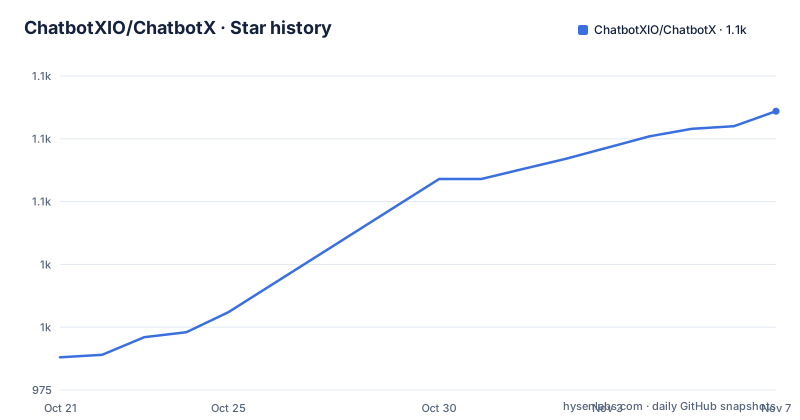
Star history
- ChatbotXIO/ChatbotX1,086 ★ · +98
| Repository | 2026-10-21 | 2026-11-07 |
|---|---|---|
| ChatbotXIO/ChatbotX | 988 | 1.1k |
98 Stars in the last 17 days, measured from the daily GitHub snapshot. Compare with other projects
Editorial analysis
The pitch is a comparison table
ChatbotX describes itself as an agentic chat marketing platform built for OpenClaw, Hermes and Claude, and an alternative to ManyChat, Chatfuel, Wati and similar products. The argument is made in a feature table that is unusual in an open source readme. On self-hosting, white labelling, the command line interface and MCP, the table marks ChatbotX as the one that has them and the incumbent as the one that does not; public API, omnichannel support and AI agents it marks as limited for the incumbent. It also turns two rows the other way, and those are the honest part: the alternative is marked as having cost growth, and AI credits are an add-on for the competitor against bring your own key for ChatbotX. The last row is the one that matters most in practice, because a hosted chat tool prices by contact volume, and a platform you run yourself prices by what your infrastructure costs. Everything else in the readme, from the visual flow builder to the live chat inbox, is an implementation of that proposition rather than a separate argument.
The flow builder and the comment to DM loop
The visual flow builder is a drag and drop editor with more than 15 node types, and the feature list shows what a node can be. A flow can trigger actions on events within the bot, call external APIs directly through webhooks and HTTP nodes, and run A/B tests to compare different message paths. The most interesting flow is the comment loop. Comment to DM automatically messages users who comment with specific keywords, which turns a social post into a conversation entry point. Comment automation goes further and auto replies, likes and hides comments on Messenger, Instagram, Threads and TikTok posts. The platform differences are spelled out, which saves you a debugging session later: on Threads, where there is no DM or like API, the same feature offers a public reply and hide only. The growth tools close the loop on the other side, generating conversation starter links for each platform so a post, a bio or a QR code can open the right flow.
AI agents on your own keys
The AI agents feature lists OpenAI, Claude, Gemini, DeepSeek, OpenRouter, NVIDIA NIM and local LLMs, which is a broad provider list for a single product. The credits model is the part that changes the economics: the comparison table marks AI credits as an add-on for the hosted alternative and bring your own key for ChatbotX, and the environment file shows the shape of that, since the app configuration carries an edition setting and a key material for developer apps. For a team already paying a model provider, that removes the second per-contact charge that makes hosted chat marketing expensive at scale. The readme also points at a separate repository for the agent tooling, 500 or more MCP and CLI tools for AI agents, and the documentation covers a CLI, an MCP server and a public API, so the platform is meant to be driven by agents rather than only by a person clicking in the builder.
Ten channels, and the contacts behind them
The channel list is WhatsApp, Facebook, Instagram, Threads, TikTok, Telegram, Zalo, Email, an API and webchat, and the point of the list is that one contact record spans them. The contact CRM is where that shows: contacts carry tags, custom fields and segmentation, and broadcasting sends targeted messages to a segment, so you can address a cohort across whichever channels it uses rather than building a separate campaign per app. Sequences automate drip campaigns with scheduled messages and automatic enrollment, which is the part that turns a chatbot into a marketing channel. Rich messaging covers the payload types each platform can carry, media, files, buttons, quick replies, catalogs, locations and carousel cards. The live chat inbox is the other half, a real-time inbox with human takeover and conversation assignment, so an agent that does not know the answer can be handed to a person. Team management sits alongside it, with invites, roles and permissions, since the same inbox has to be usable by several people.
The stack, and what Docker Compose starts for you
The technical stack is Node.js 24 with TypeScript 5, pnpm 10 workspaces and Turborepo, with Next.js 16 and React 19 in the builder application. Realtime messaging runs on PartyKit and PartySocket, the database layer is Drizzle ORM over PostgreSQL with pgvector, queues and worker coordination use Redis and BullMQ, and uploaded assets go to RustFS, which is S3 compatible. Docker Compose is the local infrastructure story, and the compose file shows what that means in practice. The database is not plain PostgreSQL but the TimescaleDB image, timescale/timescaledb-ha on PostgreSQL 18, published on 5432 with a named volume for the data directory and a health check that runs pg_isready. Next to it sits Adminer for inspecting the database, MailHog for catching outgoing mail on 1025 and 8025, and a RustFS filesystem service on 9000 with its console on 9001, plus a separate init service. The presence of a mail catcher and a database browser in the default compose file tells you the project expects you to run it and look inside it.
Configuration, secrets and the three editions
The environment file is where the operational requirements are written down, and four entries matter before the first run. BETTER_AUTH_SECRET signs sessions and tokens and must be a 32 byte base64 string, generated with openssl rand -base64 32. ENCRYPTION_KEY is the active 32 byte key in hex, 64 characters, used to encrypt developer app secrets at rest, and it is marked as something that must be overridden in production, which is a good warning to take literally since the example value is committed to the repository. DATABASE_URL points at the local PostgreSQL, and PLATFORM_ADMIN_EMAIL decides who can reach the management interface. The two generation commands are the only shell work needed:
openssl rand -base64 32
openssl rand -hex 32
The edition is set with NEXT_PUBLIC_EDITION, and the allowed values are community, enterprise and cloud. The enterprise and cloud editions require a LICENSE_KEY, which the environment file describes as a signed token issued by the vendor and verified fully offline against a public key baked into the app, with no other licence variable needed, and the documentation points at docs/licensing.md. That design, an offline check with no callback to the vendor, is the sort of detail that decides whether a licence check can work inside a private network.
The repository is a set of conventions as much as code
The tree shows a monorepo with strong internal discipline. Turbo runs the build, the dev server and the tests across the workspaces, Biome and Ultracite handle formatting and linting, Knip checks for unused code, and a circular dependency check runs madge over the source of every app and package. Lefthook handles git hooks, and Vitest is the test runner with a workspace level config. There is also a pair of scripts that keep the agent instructions in the repository in sync with each other, one that writes and one that only checks, so a mismatch fails the lint step rather than surprising an assistant later. The presence of .mcp.json, an opencode configuration, an AGENTS.md and a CLAUDE.md, and directories for .claude, .codex, .cursor, .devin and .agents, says the project is being developed with coding assistants and is trying to keep their instructions consistent. On the outside, releases are frequent, v1.11.0, v1.12.0 and v1.13.0 between late September and 2026-10-17, with the last push on 2026-10-20, so the tree is moving quickly. The licence is the one loose end: the readme badge says MIT while GitHub classifies the licence file as something it cannot categorise, so read the file before you rely on it.
Editorial conclusion
ChatbotX is a good fit for a team that has outgrown a hosted chat marketing tool and wants its own data, its own hosting and its own flows, especially if the flows need to reach a comment on Instagram and a message on WhatsApp through the same builder. It is the wrong choice if you need a product with a support contract, if you cannot run PostgreSQL, Redis and object storage, or if you want the AI included rather than billed to your own account. Before you deploy, set BETTER_AUTH_SECRET and ENCRYPTION_KEY to fresh values, choose the edition that matches how you intend to use it, and read the LICENSE file, since the readme badge and the way GitHub classifies the licence do not match.
Frequently asked questions
What is ChatbotX?
ChatbotX is an open source chat marketing platform positioned as an alternative to ManyChat and similar hosted tools. It offers a visual flow builder with more than 15 node types, AI agents, a live chat inbox with human takeover, a contact CRM, broadcasts, sequences and comment-to-DM automation.
Which channels does ChatbotX support?
WhatsApp, Facebook, Instagram, Threads, TikTok, Telegram, Zalo, Email, an API and webchat. Comment automation differs by platform, and on Threads it offers a public reply and hide only, because Threads has no DM or like API.
What do I need to run ChatbotX locally?
Node.js 24 or newer with pnpm, plus the Docker Compose stack: a TimescaleDB image on PostgreSQL 18, Adminer, MailHog for outgoing mail and a RustFS filesystem service. The environment file also needs BETTER_AUTH_SECRET, a 32 byte base64 value, and ENCRYPTION_KEY, a 32 byte hex value that must be overridden in production.
Which AI providers can ChatbotX agents use?
OpenAI, Claude, Gemini, DeepSeek, OpenRouter, NVIDIA NIM and local LLMs. The AI credit model is bring your own key rather than an add-on purchased from the platform, according to the comparison table in the readme.
What are the ChatbotX editions and how is the licence checked?
NEXT_PUBLIC_EDITION can be community, enterprise or cloud, and the enterprise and cloud editions require a LICENSE_KEY. The token is issued by the vendor and verified fully offline against a public key baked into the app, so no other licence environment variable is needed.
Official sources
Add this badge to your README
If you maintain this project, the badge below links readers to this analysis and shows its maintenance status from the daily GitHub snapshot. Paste the markdown into your README; add ?metric=license or ?metric=stars to the image URL for a different field.

[](https://hysenlabs.com/projects/chatbotxio-chatbotx)Star history chart for your README
[](https://hysenlabs.com/projects/chatbotxio-chatbotx)Was this useful?