Chatbox Community Edition: A Desktop Client That Puts Your LLM Keys in One Place
Powerful AI Client
At a glance
- What is it?
- Chatbox is a GPL-3.0 TypeScript desktop app for Windows, macOS, and Linux that connects to OpenAI, Claude, Gemini, Ollama, and more. It stores data locally and syncs code with a commercial Pro edition, which shapes both its features and its limits.
- Who is it for?
- Adopt Chatbox Community Edition if you want a single desktop interface for multiple LLM providers, especially if you use Ollama for local models and value local data storage. Do not adopt it if you need a fully independent open source project, since the Pro edition sync means the community repo may lag or carry features shaped by a commercial roadmap.
- Can I use it commercially?
- Yes, with conditions. GPL-3.0 is a copyleft licence: if you distribute software that includes it, you must release that software's source code under the same licence. Running it internally without distributing it does not trigger that obligation.
- Is it still maintained?
- Yes. The repository last received commits 3 days ago.
- What is it written in?
- Mainly TypeScript, according to GitHub's language statistics.
Answers come from the project's GitHub data, last synced on November 15, 2026, and from our analysis. They are not legal advice.
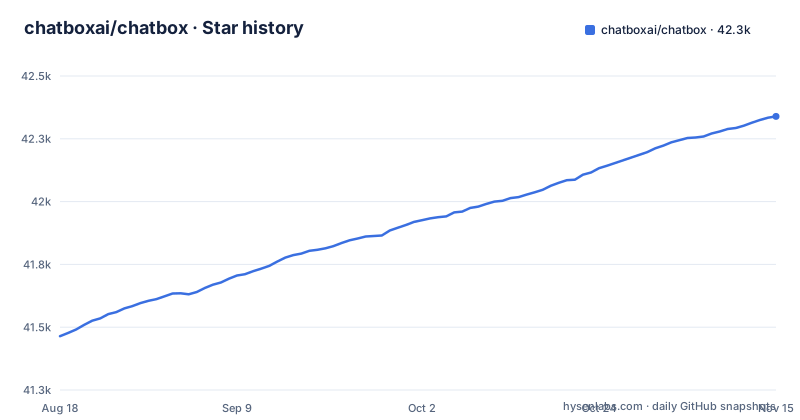
Star history
- chatboxai/chatbox42,339 ★ · +875
| Repository | 2026-08-18 | 2026-11-15 |
|---|---|---|
| chatboxai/chatbox | 41.5k | 42.3k |
875 Stars in the last 89 days, measured from the daily GitHub snapshot. Compare with other projects
Editorial analysis
What Chatbox Actually Solves
Chatbox solves the problem of juggling multiple AI chat interfaces. Instead of keeping one browser tab for ChatGPT, another for Claude, and a third for a local Ollama model, you run one desktop app and switch providers in settings. The README lists OpenAI, Azure OpenAI, Claude, Google Gemini Pro, Ollama, and ChatGLM-6B as supported. It also adds image generation with Dall-E-3. The target user is someone who works across several LLM providers daily and wants a unified chat history that stays on their own machine. The local data storage claim is explicit: your data remains on your device. This is not a server or a library; it is an end-user application with installers for Windows, macOS, and Linux.
How the Application Is Built and How It Works
The primary language is TypeScript, and the repository is a desktop client. The README does not describe the internal architecture in detail, but package.json uses electron-vite and electron-builder, so it is an Electron app. The data flow is straightforward: you configure API keys in settings, the app sends requests to the selected provider, and responses stream back in real time. Streaming reply is listed as a feature, meaning you see tokens as they arrive rather than waiting for a full response. The app supports Markdown, LaTeX, and code highlighting for rendering those streamed responses. Local storage means chat history, prompts, and settings are written to your device, not to a cloud account. The team collaboration feature, described as sharing OpenAI API resources among your team, suggests some kind of shared configuration or proxy mechanism, but the README points to a separate document for details. The exact mechanism for team sharing is not specified in the README.
Getting It Running: Installers and Configuration
End users do not build from source. The README directs you to the releases page to download a Setup.exe for Windows, an Intel or Apple Silicon build for macOS, and an AppImage for Linux. There are also iOS and Android apps via the App Store, Google Play, and a direct APK. System requirements are modest: Windows 10 x64, macOS 11 Big Sur or later, and Ubuntu 20.04 or another AppImage-compatible distro. After installation, you configure your AI provider in settings. The quick start says to configure your AI provider in settings. For Ollama, the README says it enables access to local models like llama2 and Mistral. The quick start is genuinely quick for a desktop app: download, install, configure, chat.
The GPL-3.0 License and the Pro Edition Sync
Chatbox is open sourced under GPL-3.0, and the README calls this the Community Edition. The key caveat is that the project is not a pure open source effort. The README states: 'We regularly sync code from the pro repo to this repo, and vice versa.' That means the community repo is not the only upstream, and the sync can go both ways. For an engineer evaluating adoption, this has real implications. GPL-3.0 requires that any derivative work you distribute also be GPL-3.0, which is fine for personal use or internal tools but restrictive if you plan to embed Chatbox in a proprietary product. More importantly, the sync with a pro repo means the community edition's feature set is whatever the maintainers decide to publish. You cannot assume the community repo is the complete upstream. The license is clear, but the governance is opaque. If you need a project where the open source repository is the definitive source of truth, this is a yellow flag.
A Genuine Limitation: Feature Lag and the Web Version
The README lists a web version. If the web version is hosted by the vendor, then your data may not stay local when you use it, which contradicts the local storage selling point. Another limitation is the lack of a command-line interface or headless mode. This is a GUI application, so it is the wrong tool for scripting, automation, or server-side use. If you need to integrate LLM calls into a CI pipeline or a backend service, you should use the provider's API directly.
The Real Alternative: Using Provider APIs Directly
The obvious alternative is to skip the client and call each provider's API directly. For OpenAI, you use the openai Python or Node SDK. For Claude, you use the Anthropic SDK. For Ollama, you use its REST API. The difference in approach is fundamental. A direct API integration gives you full control over requests, responses, error handling, and cost tracking. You can build a custom tool that fits your workflow exactly. Chatbox gives you a polished UI and local storage, but it also imposes its own data model, settings panel, and update cycle. If you only use one provider, a direct API client is simpler and avoids the GPL-3.0 constraint. If you use multiple providers, Chatbox saves you from writing a multi-provider abstraction layer yourself. The trade-off is between convenience and control.
Maintenance and Upgrade Cost
The repository shows recent releases on a regular cadence: v1.23.5 on 2026-09-24, v1.23.3 on 2026-09-16, and v1.23.2 on 2026-09-10, with the last push on 2026-10-29. That is three releases in about two weeks, which indicates active maintenance. The cost of keeping up is that you will see frequent updates, and each one may change behavior or settings. The sync with the pro repo means the community edition's release notes might not fully document what changed, since some changes originate from the commercial side. For an end user, the upgrade cost is low: you download a new installer and replace the old app. For a developer who wants to fork or contribute, the cost is higher. You need to track two repos, understand which changes are in the community branch, and manage the GPL-3.0 obligations. The README invites contributions and lists steps for reporting issues and submitting pull requests. The maintenance burden is manageable for a user, but it is not zero for a developer.
Editorial conclusion
Adopt Chatbox Community Edition if you want a single desktop interface for multiple LLM providers, especially if you use Ollama for local models and value local data storage. Do not adopt it if you need a fully independent open source project, since the Pro edition sync means the community repo may lag or carry features shaped by a commercial roadmap. Before committing, verify the current release notes for the sync cadence, check that your provider's API keys are supported, and confirm the GPL-3.0 license fits your distribution plans. The project's real value is its breadth of provider support and local-first design, not a promise of open source independence.
Frequently asked questions
What is the difference between ChatGPT and ChatBox ai?
Chatbox is a client, not a model. This repository holds the Community Edition, a GPL-3.0 desktop application for Windows, macOS, and Linux that you point at a provider such as OpenAI, Azure OpenAI, Claude, Google Gemini Pro, Ollama, or ChatGLM-6B, with your chat data kept on your own device.
how to use chatbox ai
The quick start is four steps: download the installer for your platform from the releases page, install and launch Chatbox, configure your AI provider such as OpenAI or Claude in settings, and start chatting. Streaming replies and markdown rendering are available once a provider is set.
how to install chatbox
Desktop builds are a Setup.exe for Windows, separate Intel and Apple Silicon builds for macOS, and an AppImage for supported Linux distributions. System requirements are Windows 10, macOS 11 (Big Sur), and Ubuntu 20.04 or later. iOS and Android versions are distributed through the App Store, Google Play, and a direct .APK link.
Is ChatBox free?
The Community Edition in this repository is open-sourced under the GPLv3 license and downloaded from the releases page. The project also maintains a Pro edition, and the README states that code is regularly synced between the two in both directions.
Official sources
Add this badge to your README
If you maintain this project, the badge below links readers to this analysis and shows its maintenance status from the daily GitHub snapshot. Paste the markdown into your README; add ?metric=license or ?metric=stars to the image URL for a different field.

[](https://hysenlabs.com/projects/chatboxai-chatbox)Star history chart for your README
[](https://hysenlabs.com/projects/chatboxai-chatbox)Was this useful?