OCRFlux: a 3B VLM that turns PDFs into Markdown and stitches tables across pages
OCRFlux is a lightweight yet powerful multimodal toolkit that significantly advances PDF-to-Markdown conversion, excelling in complex layout handling, complicated table parsing and cross-page content merging.
At a glance
- What is it?
- OCRFlux is an Apache-2.0 Python toolkit from chatdoc-com that runs a 3B vision language model over PDFs and images to produce Markdown, with cross-page table and paragraph merging as its distinguishing feature. The README claims benchmark leadership on its own datasets; the repository's last push was on 2026-04-14.
- Who is it for?
- Adopt OCRFlux if your pipeline has to turn multi-page documents with tables into Markdown and you can supply a CUDA GPU with enough memory for a 3B model. Do not adopt it if you need a supported, versioned release: pyproject.toml still reads version 0.1.0 and the only news entry is the June 17, 2025 launch.
- Can I use it commercially?
- Yes. Apache-2.0 is a permissive licence: you can use, modify and sell software built on it, as long as you keep its copyright and licence notices.
- Is it still maintained?
- Activity is slowing. The repository last received commits 7 months ago.
- What is it written in?
- Mainly Python, according to GitHub's language statistics.
Answers come from the project's GitHub data, last synced on November 23, 2026, and from our analysis. They are not legal advice.
Star history
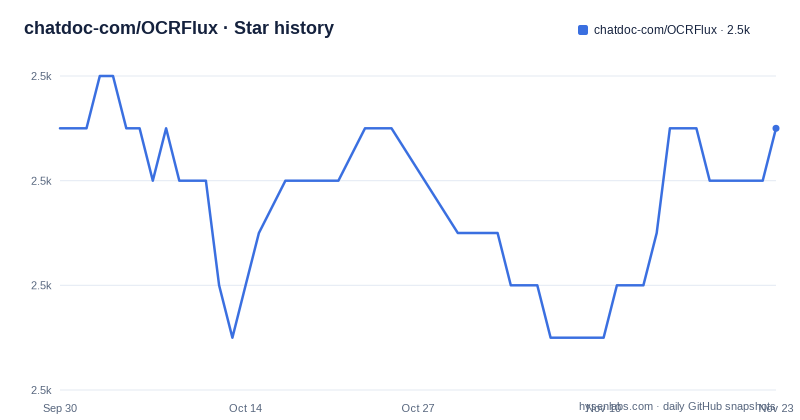
- chatdoc-com/OCRFlux2,533 ★ · +0
| Repository | 2026-09-30 | 2026-11-23 |
|---|---|---|
| chatdoc-com/OCRFlux | 2.5k | 2.5k |
0 Stars in the last 54 days, measured from the daily GitHub snapshot. Compare with other projects
Editorial analysis
The problem OCRFlux targets: page-by-page OCR that breaks at page boundaries
Most PDF-to-text tools treat each page as an independent unit. That works until a table spans a page break, at which point the header row is on page 4 and the last data row is on page 5, and you get two half tables in the output. The README lists cross-page table merging and cross-page paragraph merging as functions of the toolkit, and states that "to our best this is the first to support this feature in all the open sourced project." Whether or not that claim holds, it is the design goal that separates OCRFlux from a plain OCR pass.
The intended audience is engineers building document ingestion pipelines: RAG systems that need clean Markdown rather than raw text, or data teams extracting tables from reports. The output format is plain Markdown, and the README says headers and footers are removed automatically. That is a preprocessing decision, not a neutral one. A pipeline that needs the running header text for provenance will lose it.
How the pipeline works: a 3B VLM, PDF rendering, and a merge stage
The repository layout puts the code under ocrflux/, with eval/ alongside it and a Dockerfile at the root. The package metadata lists vllm==0.7.3 and transformers==4.50.0 as dependencies, which tells you the model is served through vLLM rather than a hosted API. The README points to OCRFlux-3B on Hugging Face as the released model, and notes it is based on a 3B parameter VLM that "can run even on GTX 3090 GPU."
On each page the model is asked to produce Markdown in natural reading order, including multi-column layouts, figures, insets, complicated tables and equations. After per-page conversion, a separate stage merges tables and paragraphs that continue across pages. The Dockerfile ends with ENTRYPOINT ["python3.12", "-m", "ocrflux.pipeline"], so the container's default action is to run the whole pipeline module rather than a single-page converter. The merge logic is therefore part of the default execution path, not an optional post-processing step you call yourself.
One consequence of using vLLM is that the model weights have to be reachable at runtime. The README links the weights on Hugging Face but does not document an offline or air-gapped weight path, so a deployment behind a firewall needs that resolved before the first run.
Installing OCRFlux and converting a first PDF
The package requires Python 3.11 or newer, per requires-python in pyproject.toml. The repository ships a Dockerfile based on ubuntu:24.04 that installs python3.12, poppler-utils, poppler-data and the Microsoft and Crosextra font packages, then installs the project itself with an extra find-links index for flashinfer wheels. Building it is the shortest path to a working environment, because the font and poppler packages are exactly the ones a bare pip install will not give you.
docker build -t ocrflux .The image sets PYTHONPATH=/OCRFlux and its entrypoint is the pipeline module, so running the container with no arguments starts the pipeline. The README does not document the command-line arguments the pipeline accepts, so check the module before wiring it into a job.
If you prefer a local install, the project is a normal setuptools package:
python3.12 -m pip install .Expect the install to pull torch, vllm and transformers at the pinned versions above; this is a GPU-oriented dependency set, not a lightweight one. The README also links a hosted demo at ocrflux.pdfparser.io, which is the fastest way to see the output format before installing anything.
Where the benchmark numbers come from, and why that matters
The README reports Edit Distance Similarity on OCRFlux-bench-single: 0.971 for English, 0.962 for Chinese, 0.967 overall, against 0.872 overall for olmOCR-7B-0225-preview, 0.858 for Nanonets-OCR-s and 0.780 for MonkeyOCR. On OCRFlux-pubtabnet-single, the total TEDS is 0.861 for OCRFlux-3B against 0.853 for MonkeyOCR and 0.828 for Nanonets-OCR-s.
The README states that the released benchmarks are not included in training or evaluation data. It also states that OCRFlux-bench-single contains 2000 pages, 1000 English and 1000 Chinese, with ground-truth Markdown "manually labeled with multi-round check." Both the model and the benchmark come from the same project, so the comparison is self-reported on self-released data. That is not a reason to dismiss it, but it is a reason to run your own documents through the pipeline before you trust a ranking.
The table results are also not uniform. On complex tables in OCRFlux-pubtabnet-single, MonkeyOCR scores 0.826 and OCRFlux-3B scores 0.807. OCRFlux wins the total because it is stronger on simple tables, 0.912 against 0.880. If your corpus is dominated by tables with rowspan and colspan cells, the README's own numbers put a different model ahead.
Limitations: GPU memory, alpha status, and thin operational documentation
The README's claim that the model runs on a GTX 3090 sets a floor, not a target. A 3B model plus vLLM's KV cache and the PDF rendering path means a consumer card with less memory than a 3090 is not covered by anything in the repository. There is no CPU-only path documented.
The package metadata classifies the project as "Development Status :: 3 - Alpha" and the version is 0.1.0. The only news entry in the README is the June 17, 2025 initial public launch and demo. The last push to the default branch was on 2026-04-14. The repository has no published GitHub releases, so there is no changelog to read and no upgrade path to plan against.
Operationally, the README is a capability document, not a manual. It does not document the pipeline's command-line interface, the environment variables it reads, how to point it at a local model directory, or how to disable the cross-page merge when you want strictly per-page output. The Dockerfile shows the entrypoint but not the arguments. Anyone deploying this will be reading ocrflux/ source to answer those questions.
OCRFlux compared with olmOCR
olmOCR-7B-0225-preview is the baseline OCRFlux measures itself against, and the difference in approach is visible in the numbers. olmOCR is a 7B model; OCRFlux-3B is roughly half the parameter count and the README positions that as a hardware advantage. On OCRFlux-bench-single the reported gap is 0.967 against 0.872 overall, and on OCRFlux-pubtabnet-single OCRFlux leads 0.861 to 0.744 on total TEDS.
The architectural difference that matters for pipelines is cross-page handling. olmOCR's published results in this README are single-page numbers. OCRFlux ships a separate cross-page benchmark family, OCRFlux-bench-cross and OCRFlux-pubtabnet-cross, and builds the merge into its default pipeline entrypoint. If your documents are single-page scans, that extra stage buys you nothing and you are paying for it in pipeline complexity. If your documents are long reports with tables that run over page breaks, it is the reason to pick this project over a per-page converter.
Licence and the cost of keeping it running
OCRFlux is licensed under Apache-2.0, per the LICENSE file and the classifier in pyproject.toml. That permits commercial use and modification, with the usual notice and attribution requirements. The model weights are distributed separately on Hugging Face under OCRFlux-3B; the repository does not state the licence of the weights in the documentation available here, so check that page before shipping.
The upgrade cost is the pinned dependency set. pyproject.toml pins transformers==4.50.0 and vllm==0.7.3 exactly, not with a range. vLLM moves quickly and its releases are tied to specific CUDA and PyTorch combinations, so bumping either pin is a coordinated change, not a routine one. The Dockerfile installs flashinfer from a CUDA 12.4 wheel index, which fixes another part of that matrix. Budget for this as a pinned stack you rebuild deliberately rather than a library you update casually.
Editorial conclusion
Adopt OCRFlux if your pipeline has to turn multi-page documents with tables into Markdown and you can supply a CUDA GPU with enough memory for a 3B model. Do not adopt it if you need a supported, versioned release: pyproject.toml still reads version 0.1.0 and the only news entry is the June 17, 2025 launch. Before committing, run the Docker image on one of your own PDFs and compare the output against the ground-truth Markdown in OCRFlux-bench-single, because the published EDS and TEDS numbers come from datasets the project itself released.
Frequently asked questions
What is the difference between an OCR PDF and a regular PDF?
OCRFlux does not produce an OCR'd PDF; it converts PDFs and images into plain Markdown text. The README describes the output as clean, readable Markdown, with headers and footers removed and cross-page tables merged.
What happens when you OCR a PDF with OCRFlux?
Each page is converted into Markdown in natural reading order, including multi-column layouts, figures, insets, complicated tables and equations, and then tables and paragraphs that continue across pages are merged. The Dockerfile's entrypoint is the ocrflux.pipeline module, so that whole sequence runs by default.
What hardware does OCRFlux-3B need?
The README states the toolkit is based on a 3B parameter VLM and can run even on a GTX 3090 GPU. No CPU-only path is documented, and the dependencies include torch, transformers and vllm.
How do I install OCRFlux?
The repository provides a Dockerfile based on ubuntu:24.04 that installs Python 3.12 and the project, and pyproject.toml requires Python 3.11 or newer for a local install. The README does not document a published package on PyPI.
Does OCRFlux merge tables that span multiple pages?
Yes. Cross-page table merging and cross-page paragraph merging are listed as functions of the toolkit, and the README states it is the first open sourced project to support this to the authors' knowledge. Separate cross-page benchmarks are published on Hugging Face.
Official sources
Add this badge to your README
If you maintain this project, the badge below links readers to this analysis and shows its maintenance status from the daily GitHub snapshot. Paste the markdown into your README; add ?metric=license or ?metric=stars to the image URL for a different field.

[](https://hysenlabs.com/projects/chatdoc-com-ocrflux)Star history chart for your README
[](https://hysenlabs.com/projects/chatdoc-com-ocrflux)Was this useful?