enable-chromium-hevc-hardware-decoding for Chrome and Electron
A guide that teach you enable hardware HEVC decoding & encoding for Chrome / Edge, or build a custom version of Chromium / Electron that supports hardware & software HEVC decoding and hardware HEVC encoding.
At a glance
- What is it?
- This repository provides a guide and patch set for adding HEVC decoding and encoding capabilities to Chrome, Edge, Chromium, and Electron builds. Its results depend on the operating system, GPU, Chromium version, and selected build path.
- Who is it for?
- Adopt this repository when you need HEVC support in a custom Chromium or Electron build and can validate the exact GPU profile, API path, and Chromium version. Do not treat it as a universal browser flag or as a guarantee of hardware encoding.
- Can I use it commercially?
- Yes. MIT is a permissive licence: you can use, modify and sell software built on it, as long as you keep its copyright and licence notices.
- Is it still maintained?
- Yes. The repository last received commits 67 days ago.
- What is it written in?
- Mainly JavaScript, according to GitHub's language statistics.
Answers come from the project's GitHub data, last synced on October 23, 2026, and from our analysis. They are not legal advice.
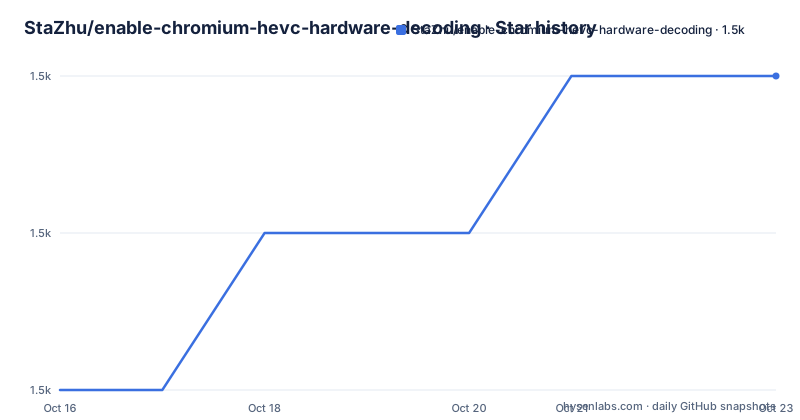
Star history
- StaZhu/enable-chromium-hevc-hardware-decoding1,453 ★ · +2
| Repository | 2026-10-16 | 2026-10-23 |
|---|---|---|
| StaZhu/enable-chromium-hevc-hardware-decoding | 1.5k | 1.5k |
2 Stars in the last 7 days, measured from the daily GitHub snapshot. Compare with other projects
Editorial analysis
What the Chromium HEVC patch set changes
StaZhu/enable-chromium-hevc-hardware-decoding is intended for users who need HEVC in Chrome, Edge, Chromium, or Electron and cannot rely on the capabilities already available in their browser build. The README describes three broad outcomes: enabling hardware HEVC decoding and encoding in supported browsers, building a custom version of Chromium or Electron with hardware and software HEVC decoding, and adding hardware HEVC encoding. The repository is therefore partly a configuration guide and partly a set of source changes.
The repository layout makes that distinction visible. Its root contains `enable-hevc-ffmpeg-decoding.patch`, `add-hevc-ffmpeg-decoder-parser.cjs`, `add-hevc-ffmpeg-decoder-parser.patch`, and a `widevine/` directory. The patch and parser files indicate that some results depend on modifying Chromium's media and FFmpeg integration rather than only changing a browser setting. The README does not provide a complete clone, checkout, patch, and rebuild sequence, so a reproducible build tutorial cannot be derived from it.
The project is most relevant to developers, desktop application teams, and Chromium packagers who control the browser source or Electron version. It is not aimed at users who only want to change a policy in an installed browser. The operating systems listed are macOS Big Sur 11.0 and above, Windows 8 and above, Android 5.0 and above, Chrome OS with a VAAPI-capable GPU, and Linux with Chrome 108.0.5354.0 or newer and a VAAPI-capable GPU.
HEVC decode profiles and GPU boundaries
The README presents HEVC support as a matrix of codec profiles, bit depths, chroma formats, GPU families, and Chromium version requirements. For decoding, it lists HEVC Main, Main 10, Main Still Picture, and partial Rext support. The documented resolution ceiling is up to 8192x8192 pixels, but that does not mean every hardware configuration supports every profile. A check mark in the table means GPU and software support, while a cross means the GPU does not support that combination.
The platform differences are substantial. Apple Silicon supports hardware HEVC Rext decoding for 8 to 10 bit 4:2:0, 4:2:2, and 4:4:4 content, with software decoding for 12-bit variants. Intel Gen10 hardware decoding covers the 8-bit and 10-bit formats listed in the table, while Gen11 and later add 12-bit support. Starting with Chrome 137, the README says NVIDIA GPUs support HEVC Rext hardware decoding for 8 to 12 bit content, but it also requires NVIDIA Driver 572.16 or newer.
There are additional browser version gates. HEVC 8b 444 and 12b 422 or 12b 444 require Chrome 117.0.5866.0 or newer, and HEVC 8b 422 requires Chrome 118.0.5956.0 or newer. Retaining original 4:2:2 or 4:4:4 chroma sampling requires Chrome 125.0.6408.0 or newer. These are concrete reasons to check the target build before applying patches. The README also lists minimum GPUs, including Intel DG1 and later discrete GPUs, NVIDIA GT635 or GTX645 and later, AMD RX460 and later, Apple M1 family chips, and Qualcomm Adreno 618 and later for integrated devices. The stated GPU requirement does not replace checking the exact profile matrix.
Windows, macOS, and Android encoding limits
Encoding support is narrower than decoding support in the documentation. The README lists hardware HEVC encoding through WebCodecs on Windows, macOS, and Android with Chrome 130.0.6703.0 or newer. WebRTC encoding is listed for the same three operating systems with Chrome 136.0.7077.0 or newer. MediaRecorder support is listed from Chrome 136.0.7064.0 or newer, with a feature switch required for Chrome 133 through 135.
For older Chrome releases, the README identifies a specific switch for HEVC encoding. It states that Chrome versions earlier than 130.0.6703.0 need `--enable-features=PlatformHEVCEncoderSupport`. The flag itself does not create hardware support. The operating system, GPU, MediaFoundation or platform encoder, and Chrome version still determine whether an encoding operation is available and what limits apply.
Windows limits changed across Chrome releases. The README says Chrome 131.0.6759.0 and newer no longer use the previous hardcoded resolution and frame-rate limit. Instead, it calculates a hardware-dependent combination through MediaFoundation, with up to 7680x4320 and 300fps. Earlier Windows versions are described as limited to 1920x1088 and 30fps. On Apple Silicon Macs with Chrome 131.0.6771.0 or newer, the documented maximum is 8192x4352 at 120fps. Other Macs are listed up to 4096x2304 at 120fps. Those figures describe stated platform conditions, not guaranteed output for every application.
Decode APIs, WebRTC, and Widevine paths
The documented API surface covers more than ordinary local file playback. For decoding, the README lists files, Media Source Extensions, WebCodecs, ClearKey and Widevine L1 hardware-only encrypted media, Encrypted Media Extensions, and WebRTC. WebCodecs has separate version requirements: 8-bit support requires Chrome 107.0.5272.0 or newer, while 10-bit HEVC and HEVC with alpha require Chrome 108.0.5343.0 or newer. WebRTC decoding is listed for Chrome 136.0.7077.0 or newer.
This matters because a codec library change does not necessarily affect every media path in the same way. A file player, a Media Source Extensions pipeline, a WebCodecs worker, a WebRTC session, and Widevine playback can have separate browser requirements and implementation paths. The README specifically marks Widevine L1 as hardware-only for encrypted media. It does not document DRM licensing procedures, key delivery behavior, or whether every Widevine application will accept the resulting build.
The repository name and topics emphasize hardware decoding, but the README also describes software HEVC decoding for some Apple Silicon Rext cases. That distinction matters for deployment planning. A system may have no hardware decoder for a specific profile and still support software decoding, with different resource demands. The README provides no benchmark data, so it cannot establish which path performs better on a particular machine.
Checking patches before the first Chromium build
The README explains compatibility requirements and the old Chrome encoding switch, but it does not show a complete installation or custom build tutorial. The repository does contain patch and parser files, so a source-build workflow is part of the project, but the exact commands are not documented in the README. The first concrete action is to inspect the repository files and identify which patch corresponds to the Chromium or Electron version being used.
For a browser version that falls in the range requiring the encoding feature switch, the documented switch is:
--enable-features=PlatformHEVCEncoderSupportThis is the switch identified by the README, not a complete browser launch command. The README also states that Chrome 130.0.6703.0 and newer does not need this switch for HEVC encoding. If applying a source patch, preserve the repository's file names and patch targets exactly. The README does not state a patch application command, build toolchain, output directory, or packaging command, so those steps cannot be reproduced from the published instructions.
A first validation should use a known HEVC file or stream and confirm the API path being exercised: file playback, WebCodecs, WebRTC, or MediaRecorder. For encrypted content, validation must separately account for Widevine L1 and the application's content protection requirements. The README links to WebCodecs encode and decode examples, WebRTC Media Capabilities and codec-change examples, and a MediaRecorder demo. It does not define an application-level test matrix or pass criteria.
The FFmpeg patch route and software fallback
The file `enable-hevc-ffmpeg-decoding.patch` indicates a direct route through Chromium's FFmpeg decoding integration. Separate files named `add-hevc-ffmpeg-decoder-parser.cjs` and `add-hevc-ffmpeg-decoder-parser.patch` point to a parser-related build change. That distinction matters because one patch and the parser change may serve different stages or configurations. The README excerpt does not explain their invocation order, supported upstream revisions, or conditions under which both are required.
A Chromium developer should not apply files by guesswork. Patch applicability depends on the source tree and its revision. A patch that applies to one Chromium release may conflict with another because surrounding source code can change. The repository's releases include custom versions such as 141.0.7358.0 paired with Chromium 142.0.7427.0, 137.0.7110.0 paired with Chromium 137.0.7110.0, and 133.0.6853.0 paired with Chromium 133.0.6853.0. The latest listed release was published on 2025-09-23, while the repository's last push was on 2026-08-17.
For users who cannot maintain a custom source build, these files offer no direct operating-system installation benefit. Their practical value lies in integrating HEVC handling into a Chromium-based product and then validating the resulting binary on the intended hardware. The README does not document rollback or compatibility testing instructions for failed patches.
Where this repository falls short
The main limitation is the gap between a detailed compatibility matrix and a complete published build procedure. The README names supported profiles and browser versions, but it does not explain how to apply `enable-hevc-ffmpeg-decoding.patch`, when to use `add-hevc-ffmpeg-decoder-parser.cjs`, or how the `widevine/` directory fits into a complete Chromium build. It also does not document build failures, a general driver setup procedure, rollback, or a supported upgrade process.
This repository is the wrong tool for someone who needs a managed browser package, an enterprise policy update, or a guaranteed HEVC feature in an existing Chrome installation. The README describes a guide and custom build material, not a signed Chrome or Edge distribution. It is also unsuitable as a promise of universal HEVC support because hardware support depends on GPU model, operating system, codec profile, bit depth, chroma sampling, browser version, and driver version.
A real alternative is to retain a stock browser and use the HEVC paths it already exposes. That avoids source maintenance, but it inherits the browser version, operating-system, GPU, and codec-profile boundaries described in this project. A custom Chromium build offers more control over integration and older targets, but the distributor assumes responsibility for matching patches, packaging, testing, and later upgrades.
The repository uses the MIT license. That identifier permits reuse and modification under the license's terms, but this article does not interpret those terms or assess codec patent, operating-system, Electron, or DRM obligations. Those separate concerns remain relevant when distributing a modified browser.
Editorial conclusion
Adopt this repository when you need HEVC support in a custom Chromium or Electron build and can validate the exact GPU profile, API path, and Chromium version. Do not treat it as a universal browser flag or as a guarantee of hardware encoding. First verify the operating system, GPU model, Chrome version, and whether the needed patch applies to the build you intend to distribute.
Frequently asked questions
Does enable-chromium-hevc-hardware-decoding add HEVC support to every Chrome installation?
No. The README describes a guide and custom Chromium or Electron build process, with support depending on operating system, GPU, HEVC profile, Chrome version, and, for some NVIDIA configurations, driver version.
Which Chrome versions support HEVC encoding through WebCodecs?
The README lists WebCodecs HEVC encoding on Windows, macOS, and Android for Chrome 130.0.6703.0 and newer. Earlier Chrome versions need the documented `PlatformHEVCEncoderSupport` switch.
What should I check before applying the Chromium HEVC patches?
Check the target Chromium or Electron version, operating system, GPU model, driver version, required HEVC profile, and API path. The README gives separate version requirements for WebCodecs, WebRTC, MediaRecorder, HDR formats, and several chroma or bit-depth combinations.
Official sources
Add this badge to your README
If you maintain this project, the badge below links readers to this analysis and shows its maintenance status from the daily GitHub snapshot. Paste the markdown into your README; add ?metric=license or ?metric=stars to the image URL for a different field.

[](https://hysenlabs.com/projects/stazhu-enable-chromium-hevc-hardware-decoding)Star history chart for your README
[](https://hysenlabs.com/projects/stazhu-enable-chromium-hevc-hardware-decoding)Was this useful?