Robot_Admin: a Vue 3 admin template that ships four architectures on four branches
Robot Admin,从容开工,随业务成长。以 Vue 3、TypeScript 和 Naive UI 打磨界面,搭配 Bun + Vite 带来流畅的开发体验。55 个业务组件、8 个专属生态包,让常用功能拿来就用,复杂需求也有清晰的起点。从单体到 Monorepo、MicroApp 与模块联邦,为不同规模的项目准备合适的架构方案。MIT 开源,持续打磨——让好想法更快成为好作品。
At a glance
- What is it?
- Robot_Admin is a Vue 3, TypeScript and Naive UI admin template with a company scoped identity model, 55 business components and 56 demo pages, and it keeps SPA, Monorepo, Module Federation and MicroApp variants in separate branches. The breadth is real, but choosing a branch means choosing a different codebase rather than a different flag.
- Who is it for?
- Robot_Admin fits a team starting an enterprise admin console that needs company scoped identity, dynamic route and button permissions, a wide component set and a Mock mode for demos, and it fits teams that want to compare four deployment topologies before committing.
- Can I use it commercially?
- Yes. MIT is a permissive licence: you can use, modify and sell software built on it, as long as you keep its copyright and licence notices.
- Is it still maintained?
- Yes. The repository last received commits 1 day ago.
- What is it written in?
- Mainly TypeScript, according to GitHub's language statistics.
Answers come from the project's GitHub data, last synced on November 7, 2026, and from our analysis. They are not legal advice.
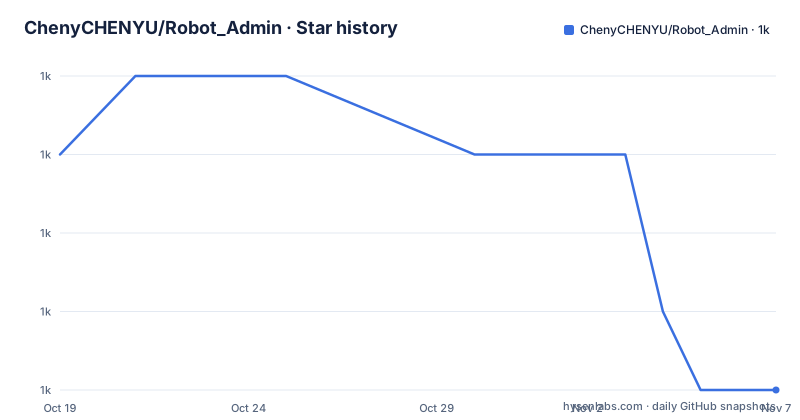
Star history
- ChenyCHENYU/Robot_Admin1,021 ★ · -3
| Repository | 2026-10-19 | 2026-11-07 |
|---|---|---|
| ChenyCHENYU/Robot_Admin | 1k | 1k |
-3 Stars in the last 19 days, measured from the daily GitHub snapshot. Compare with other projects
Editorial analysis
A company context that sits underneath the permission system
Robot_Admin is a Vue 3 admin template for Chinese enterprise back office systems, and the part that distinguishes it from a generic CRUD starter is the company model. The identity layer runs from the login screen through to the workspace: you pick an authorised company before you enter, the main and concurrent company roles are modelled, and you can switch context after logging in. The stated aim is that the login entry point and the working space share one company context rather than each inventing their own.
Permissions are layered on that base. The governance area covers users, roles, menus and dictionaries, together with dynamic routes, button level permissions, temporary role grants and a governance summary. The framing is that the backend decides which operations are open, and the front end handles concurrent modification conflicts when two administrators touch the same resource.
The mechanism that makes this safe is described as identity generation protection on route registration and on requests and responses. The stated purpose is to stop a late arriving result from an old session overwriting newer state after a company switch. That is a specific, unglamorous failure mode, and the fact that it is called out in the documentation suggests the author hit it rather than invented it.
Switching company also clears the old permissions, dynamic routes and open tabs. That is a deliberate reset rather than a partial update, and it is the right call for multi tenant consoles where a stale route set is a data leak.
Fifty five components, and how the heavy ones are kept off the first paint
The component surface is the reason most teams would look here. Fifty five business components and eleven directives, plus seven runtime @robot-admin/* packages and one Git hosted engineering package, cover forms, tables, editors, workflow and media.
The form layer is configuration driven, with dynamic rules, cross field validation, asynchronous submission, step and grid layouts. The table layer splits into two: C_Table as the unified loader, centring and pagination component, and MachTable which adds virtualisation, inline editing, selection, column state and responsive column widths. The editing and process group includes Cron expression parsing with an execution time preview, a formula keypad with a trial calculation, code, Markdown and rich text editors, and workflow and diagram editing.
The performance approach is the interesting bit. The component library provides independent subpath and style entry points, and the heavy editors, charts, process and media capabilities are loaded by route. That means a console with one chart on one page does not ship the chart library to every route. The table, editor and process layers are the ones most likely to bulk up a bundle, and routing them lazily is the standard way to keep the first load small.
There is a stated constraint on the demo pages: 56 demo pages plus 8 form layouts, 64 index.vue files in total, and the Cron preview does not create background tasks while the formula trial calculation does not modify business data. Demo data, front end data scope configuration and button controls need real interfaces and server side authorisation before any of it is usable in production. The template gives you the screens, not the backend.
The engineering analysis pages read your own build, not a fixture
One area of the template is unusual and worth looking at closely. The engineering analysis pages cover source and dependency distribution, build artefacts, browser load timelines and real repository counts, and the stated purpose is to display chart capability and project state using the current project data. The usage statistics area tracks successful navigation page views, logins and company switches, feature operations and page duration percentiles.
The usage statistics default to observing the current browser, and switch to site wide aggregation only when a real interface is connected. That default is a good one, because it means the analytics shown to a developer are their own behaviour, which is a debugging tool rather than a surveillance product. The metrics definitions are documented separately in the observability document, and the enterprise authentication contract has its own document as well.
The consequence for a reader is that this template carries its own introspection. A team adopting it can see how the console itself performs, which load timing and build budget checks the project cares about, without adding a second toolchain for that.
The project also lists dual lint, type checks, logic and component tests, build budgets, browser rendering regression and a build identity card under verification and traceability. The repository layout backs that up: eslint.config.ts, a prettier config, husky, commitlint.config.cjs, a cspell dictionary, vitest.config.ts, three Playwright configurations for e2e, local components and rendering, an mcp directory, and patches. The build identity card in particular is an unusual artefact, a per build record of what was built, which matters when a console is deployed across many environments.
Four architectures, four branches, four sets of manifests
The template offers four topologies, and the choice is explicitly framed as depending on how your team collaborates and where your deployment boundary sits.
SPA is the current main line, a single application with dynamic permission routes and independent npm ecosystem packages, aimed at a single back office, a team template, or a starting point for delivery. The Monorepo branch uses Bun Workspaces, with admin-internal and admin-saas applications sharing configuration packages, for teams maintaining several products in one repository and deploying them separately. The Module Federation branch produces an independent remoteEntry.js artefact with a Vue bridge and a consuming logistics side, for consuming remote modules at runtime and splitting release boundaries. The MicroApp branch is a portal with independent sub applications, an iframe sandbox and theme and context messaging, for teams bringing an existing system into a portal where each team maintains its own app.
The mechanism to understand is that these are branches, not a configuration switch. Each has its own configuration, entry point and verification commands, and the documentation states that the dependencies and feature versions of a branch follow that branch's own manifest, and that switching architecture requires following the corresponding integration and acceptance guide. Upgrading guides exist for the Monorepo and MicroApp branches.
That is a real trade-off, and a reviewer should name it. You get four maintained starting points instead of one generic template, but you also get four codebases that drift, and picking one later means a migration rather than a configuration change.
The install path is Bun, and the dev server listens on port 1988
Robot_Admin needs Node.js 22.18.0 or newer and Bun 1.4.2 or newer, with the package manager field pinned to [email protected] and the installed versions fixed by bun.lock. The quick start is four commands.
git clone https://github.com/ChenyCHENYU/Robot_Admin.git
cd Robot_Admin
bun install --frozen-lockfile
bun run dev
The dev server then answers on http://localhost:1988/, and a mirror of the repository is offered on Gitee for users in China. The dev script itself sets VITE_CONSOLE_BANNER and NODE_NO_WARNINGS and runs Vite with the native config loader in development mode.
There is a separate script for exposing the machine on the network.
bun run dev:ipThat one passes the host flag through to the dev server so both the local and the LAN address are shown, which is what you want when a phone or a second machine has to reach the running console. Other dev variants exist for working against locally linked packages, for a local component set, for a local MachTable, and for enabling the dev tools, each gated by an environment variable such as USE_LOCAL_PACKAGES or VITE_DEVTOOLS.
For a team that does not want Bun in its toolchain, that is the point at which the template stops being a drop in. The build, preview and type check scripts are all Bun or Vite invocations, and the lockfile is Bun's.
Mock by default, and the demo account set that lets you try the permission paths
The development environment enables Mock by default, and the public demo site runs in an explicit demo deployment mode. A real business integration goes through what the documentation calls application plus remote, with steps in the business integration section of the project documentation.
The demo account set is worth knowing before you click anything, because it exists to make the permission branches reachable rather than to be a convenience.
The administrator account is CHENY with the password 123456, and it expects a human verification step on the page. After the credentials check you select an authorised company, which activates a ticket, and a single company account goes straight in with switching available afterwards. The STAFF account demonstrates the single company case and NOACCESS demonstrates having no authorised company. The Mock layer accepts any non empty password, which is the right behaviour for a demo and also means the login screen proves nothing about your own authentication.
The two states, STAFF and NOACCESS, are the useful part. A template that only demonstrates the happy path hides the code path where a user has no company at all, and that path is where a real multi tenant console usually breaks. Having it as a named demo account means you can see how the app handles it before your own users do.
Ten runtime packages and an ecosystem that is still moving
The component library lives in a separate repository, naive-ui-components, and the template refers to it for the component documentation, with the online demo at robotadmin.cn as the other way to browse by scenario. The package layer is described as a plugin ecosystem where the application handles business configuration and the independent packages hold the reusable implementations, and the seven runtime @robot-admin/* packages follow that split, alongside one package hosted as a Git engineering package rather than published to a registry.
One inconsistency in the published numbers is worth flagging. The project description at the top of the repository advertises 55 business components and 8 dedicated ecosystem packages, while the project positioning table inside the document says 55 business components and 11 directives, with 7 runtime @robot-admin/* packages plus one Git hosted engineering package. The badge in the header says 56 demo pages, and the body text also says 56 demo pages plus 8 form layouts. The numbers are close but not identical between the summary and the detail, so treat the component count as a moving target rather than a contract.
On maintenance, the repository is not archived and the last push was on 2026-10-19, with the main branch package version at 2.7.0. The tagged releases listed are older, with v2.4.0 from 2026-04-20 the most recent of them, which tells you the release tags are not being cut on every version bump. The MIT license applies to the template, with no copyleft obligation on your own application code.
Editorial conclusion
Robot_Admin fits a team starting an enterprise admin console that needs company scoped identity, dynamic route and button permissions, a wide component set and a Mock mode for demos, and it fits teams that want to compare four deployment topologies before committing. It does not fit a team that expects one repository to hold all four architectures with a runtime switch, because the topologies live on separate branches with their own manifests, entry points and verification commands. It also does not fit a stack that is not Vue 3 with Vite, since the whole toolchain assumes Bun and Node 22.18.0 or newer. Check three things first. Check which branch you want, because switching architecture means following the branch specific integration guide and accepting that version numbers differ per branch. Check the Mock and demo boundaries, since the development environment enables Mock by default and the public demo runs in an explicit demo deployment mode, while real data needs the application plus remote integration with server side authorisation. And check the account model, since the demo uses CHENY with password 123456, a STAFF account for the single company case and a NOACCESS account for the unauthorised case, and Mock accepts any non empty password. The last push was on 2026-10-19, the main branch package version is 2.7.0, and the license is MIT.
Frequently asked questions
How do I install and run Robot_Admin locally?
Clone the repository, then run bun install --frozen-lockfile followed by bun run dev, and open http://localhost:1988/. Node.js 22.18.0 or newer and Bun 1.4.2 or newer are required, with the installed versions fixed by bun.lock.
What demo accounts are available in Robot_Admin?
The administrator account is CHENY with the password 123456 and requires the human verification step on the page. STAFF demonstrates the single company case, NOACCESS demonstrates having no authorised company, and the Mock layer accepts any non empty password.
What is the difference between the four architecture options in Robot_Admin?
SPA is a single application on the main branch, Monorepo uses Bun Workspaces with shared configuration packages, Module Federation ships an independent remoteEntry.js artefact for runtime module consumption, and MicroApp uses a portal with iframe sandboxed sub applications. Each lives on its own branch with its own configuration, entry point and verification commands.
Does Robot_Admin include a backend?
No. The development environment enables Mock by default, and the Cron preview and formula trial calculation explicitly do not create background tasks or modify business data. Real use needs the application plus remote integration with server side authorisation, and the demo data, data scope configuration and button controls need real interfaces behind them.
What license is Robot_Admin released under?
MIT, declared in package.json with a LICENSE file at the repository root. The main branch package version is 2.7.0 and the last push was on 2026-10-19.
Official sources
Add this badge to your README
If you maintain this project, the badge below links readers to this analysis and shows its maintenance status from the daily GitHub snapshot. Paste the markdown into your README; add ?metric=license or ?metric=stars to the image URL for a different field.

[](https://hysenlabs.com/projects/chenychenyu-robot-admin)Star history chart for your README
[](https://hysenlabs.com/projects/chenychenyu-robot-admin)Was this useful?