XCA: GUI-based X.509 certificate and key management with SQL storage
X Certificate and Key management
At a glance
- What is it?
- XCA is a C++ GUI application that manages X.509 certificates, private keys, CSRs, CRLs and PKCS objects in a local or remote SQL database. It targets system administrators running internal CAs and developers who need certificate management without writing OpenSSL command sequences.
- Who is it for?
- XCA suits system administrators and developers who manage an internal certificate authority through a GUI and want all issued certificates, keys and CRLs stored in one queryable database. Skip it when the requirement is automated or scriptable certificate issuance, since no CLI mode is documented and the application is designed for human operation.
- Can I use it commercially?
- Check first. The repository uses a licence we do not classify automatically, so read its LICENSE file before any commercial use.
- Is it still maintained?
- Yes. The repository last received commits 87 days ago.
- What is it written in?
- Mainly C++, according to GitHub's language statistics.
Answers come from the project's GitHub data, last synced on October 23, 2026, and from our analysis. They are not legal advice.
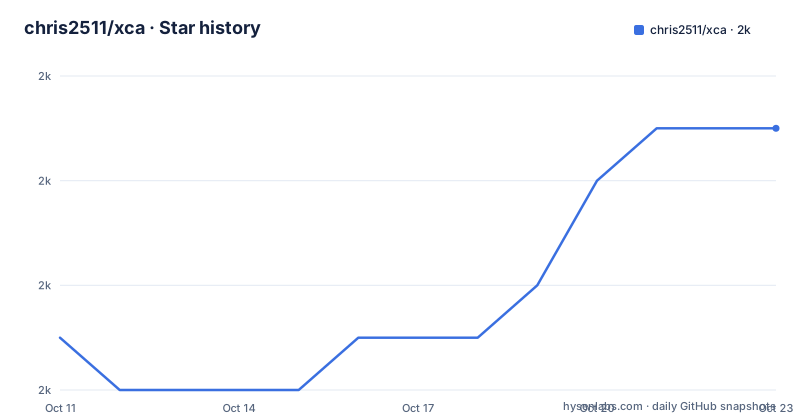
Star history
- chris2511/xca2,025 ★ · +4
| Repository | 2026-10-11 | 2026-10-23 |
|---|---|---|
| chris2511/xca | 2k | 2k |
4 Stars in the last 12 days, measured from the daily GitHub snapshot. Compare with other projects
Editorial analysis
XCA puts certificate authority management into a GUI, away from stateless OpenSSL command sessions
XCA is a C++ GUI application for managing X.509 certificates, private keys, certificate signing requests and certificate revocation lists, with support for RSA, DSA, EC, PKCS#7, PKCS#8, PKCS#11 and PKCS#12. All state lives in a database, which means querying which certificates were issued to a particular domain, or which expired last month, does not require parsing file names or running openssl x509 commands against a directory. Managing an internal CA with the openssl CLI requires running several commands in the correct order and tracking intermediate files manually, with no built-in audit record of what was issued when. XCA replaces those steps with a persistent SQL database that the GUI populates.
Its repository topics include certificate-authority, certificates, crl, dsa, ec, pkcs11, pkcs12, pkcs7, pkcs8, rsa-cryptography and x509, covering the full range of PKI material the application handles. System administrators running internal CAs and developers generating test certificates are its natural users. No scripting interface or CLI mode is documented in the project. Documentation lives in the application's Help menu and at https://www.hohnstaedt.de/xca/index.php/documentation/manual, and issues are reported on GitHub. Precompiled releases for all three platforms are available from the releases page, so the source build is optional for users who only need to run the application.
Linux build requires cmake, Qt 5.10.1 or later, OpenSSL 1.1.1 or later, and Sphinx
Building on Linux requires a toolchain, cmake, Qt at version 5.10.1 or higher, OpenSSL at version 1.1.1 or higher (or libressl-3.6.x), and Sphinx-Build for generating the embedded documentation.
On Debian Bookworm, the core packages are:
sudo apt install build-essential libssl-dev pkg-config cmake qttools5-dev python3-sphinxcontrib.qthelpBullseye replaces python3-sphinxcontrib.qthelp with python3-sphinx. Both Qt5 and Qt6 are supported, each with its own set of packages. Qt5 uses qtbase5-dev qttools5-dev-tools libqt5sql5 libqt5help5 qttools5-dev; Qt6 uses qt6-base-dev qt6-tools-dev. After the dependencies are in place, three cmake commands build and install the application:
cmake -B build xca
cmake --build build -j5
sudo cmake --install build
The -j5 flag runs five jobs in parallel, which the README uses for all three platforms. An install without root access uses DESTDIR=DEST cmake --install build --prefix /usr in place of the sudo variant, copying the resulting tree as root afterward. No package manager distribution for any Linux distro is documented, so building from source is the primary install path.
macOS uses Homebrew and cpack; Windows requires Python 3.11, aqtinstall and an OpenSSL MSI
On macOS, Homebrew handles the dependency install:
xcode-select --install
brew install openssl@3 qt6 python3 cmake
pip3 install sphinx
Configure and build with cmake -B build xca and cmake --build build -j5, matching the Linux pattern. cd build && cpack produces a DMG for distribution; cd build && cpack -G productbuild produces a PKG installer. For Xcode-based development, cmake -G Xcode -B . initializes the directory, and the project then opens normally in the IDE.
Windows has a longer setup. It requires Python 3.11 from python.org or the Windows Store, a specific OpenSSL MSI from slproweb.com (Win64OpenSSL-3_1_5.msi, with the SHA256 hash available in the slproweb hashes repository), and Qt 6.6.3 plus MinGW installed through aqtinstall:
aqt install-qt windows desktop 6.6.3 win64_mingw
aqt install-tool windows desktop tools_mingw90 qt.tools.win64_mingw900
aqt install-tool windows desktop tools_vcredist qt.tools.vcredist_64
After configuring the required PATH entries and the CMAKE_PREFIX_PATH variable pointing at the Qt lib/cmake directory, configure with cmake -B build -G "MinGW Makefiles" xca and build with cmake --build build -j5. Producing the MSI installer requires WiX Toolset from wixtoolset.org as an additional dependency.
Remote SQL drivers differ by platform, and MySQL plugins are no longer shipped with Qt
XCA can use a remote SQL database instead of a local file, and driver availability depends on both the platform and the database engine. Verifying which drivers are available for your target before building or installing is worth doing early, since this part of the setup is the most platform-specific.
On Linux with Qt6, SQL plugins are separate packages. Debian-based systems use libqt6sql6-psql for PostgreSQL, libqt6sql6-mysql for MySQL/MariaDB, and libqt6sql6-odbc for ODBC; RPM-based distributions use libqt6-database-plugin-pgsql, libqt6-database-plugin-mysql and libqt6-database-plugin-odbc. Those packages should pull in all necessary dependencies.
On macOS, PostgreSQL support is bundled in the precompiled releases since XCA 2.9.0 and MariaDB since XCA 2.8.0. ODBC on macOS requires /usr/local/opt/libiodbc/lib/libiodbc.2.dylib; when unixodbc is installed via brew, that library must be symlinked from /opt/homebrew/Cellar/libiodbc/3.52.16/lib/libiodbc.2.dylib. On Windows, PostgreSQL requires the command-line tools from enterprisedb.com and the Postgres bin directory added to PATH, while MariaDB uses a plugin from github.com/thecodemonkey86/qt_mysql_driver, selecting the MinGW variant.
MySQL plugins are no longer shipped with Qt due to licence issues. Any configuration relying on MySQL must source the driver separately, regardless of platform.
2.9.0 fixes a serial-collision revocation bug and ships the PostgreSQL driver on macOS
Version 2.9.0 was released on 2025-03-28 with four documented changes. It improves remote database support on macOS, adds the PostgreSQL driver to macOS precompiled releases, fixes a bug that incorrectly revoked a renewed certificate when the renewal shared a serial number with a revoked certificate, fixes default template lookup on Linux, and updates precompiled releases to use the latest OpenSSL and Qt.
Version 2.8.0 followed on 2024-10-13 and 2.7.0 on 2024-08-27, while a push to the main branch was recorded on 2026-07-28. A detailed changelog at https://hohnstaedt.de/xca/index.php/software/changelog covers the full version history.
The serial-collision revocation fix in 2.9.0 is the change most worth reviewing before upgrading. Any organization that renewed certificates with XCA before 2.9.0 and also maintains CRLs should re-examine the revocation state of those certificates in 2.9.0, since the pre-fix version could have marked a valid renewed certificate as revoked. Only a client that validates the CRL against the affected certificate would expose this problem, so deployments that do not actively check CRL status may not have noticed it.
XCA has no CLI mode: automated certificate issuance requires OpenSSL or a dedicated CA service
XCA is designed for human operation and no command-line or scripting interface is documented in the project materials. CI pipelines, automated certificate issuance, and any workflow that generates certificates without user interaction need a different tool.
OpenSSL's command-line interface (openssl req, openssl x509, openssl ca, openssl crl) is the direct alternative for that use case. Its trade-off against XCA is straightforward: openssl does not maintain a persistent database, requires managing state in files, and provides no audit trail beyond what you construct yourself. That makes it better suited for automation but harder to use for browsing or auditing a large set of issued certificates over time.
For organizations that need a full automated CA with a REST API, tools that run as services and sign certificate requests programmatically take a different architectural approach that XCA is not designed to cover. Precompiled releases are available for each platform, which means users who need only to run the GUI can skip the entire source build process.
Licence is a custom text in COPYRIGHT, and the Dockerfile builds on Ubuntu Noble with Ninja
GitHub classifies the licence as Other. COPYRIGHT at the repository root holds the full text, and the project documentation does not summarize the licence terms elsewhere. Reading that file directly is the required step before redistribution.
A Dockerfile at the repository root builds XCA on ubuntu:noble using Qt6, Ninja and cmake. Inside, the build sequence is: cmake -B BUILD -G Ninja, then cmake --build BUILD, then cmake --install BUILD. That sequence mirrors the Linux instructions but uses Ninja instead of the default build system. INSTALL.docker at the repository root documents how to use the container, providing a reproducible build environment without requiring the host system to match the dependency list manually.
Precompiled releases are built against the latest OpenSSL and Qt releases at the time of each tag, as noted in the 2.9.0 changelog. Anyone building from source against an older version of either library should consult the changelog for compatibility notes before deploying.
Editorial conclusion
XCA suits system administrators and developers who manage an internal certificate authority through a GUI and want all issued certificates, keys and CRLs stored in one queryable database. Skip it when the requirement is automated or scriptable certificate issuance, since no CLI mode is documented and the application is designed for human operation. Before adopting, verify that your platform has a compatible Qt version (5.10.1 or higher) and OpenSSL (1.1.1 or higher), and if you plan to use remote SQL storage, confirm which driver is available for your database and platform combination before building.
Frequently asked questions
What does XCA do?
XCA is a GUI application for managing X.509 certificates, private keys, CSRs and CRLs, with support for RSA, DSA, EC, PKCS#7, PKCS#8, PKCS#11 and PKCS#12. It stores everything in a local or remote SQL database and runs on Linux, macOS and Windows.
What are the build requirements for XCA?
Building requires cmake, a C++ toolchain, Qt at version 5.10.1 or higher (Qt5 or Qt6), OpenSSL at version 1.1.1 or higher (or libressl-3.6.x), and Sphinx-Build for documentation. Platform-specific steps differ for Linux, macOS and Windows.
Does XCA support remote databases?
Yes. XCA supports PostgreSQL, MySQL/MariaDB and ODBC remote databases. Driver availability differs by platform: Linux requires separate Qt SQL plugin packages, while macOS bundles PostgreSQL since 2.9.0 and MariaDB since 2.8.0. MySQL plugins are no longer shipped with Qt due to licence issues.
What was fixed in XCA 2.9.0?
XCA 2.9.0 fixed a bug where renewing a certificate with the same serial number as a revoked one would incorrectly revoke the renewed certificate. It also improved remote database support on macOS, fixed default template lookup on Linux, and updated precompiled releases to use the latest OpenSSL and Qt.
Can XCA be used from the command line?
No CLI or scripting mode is documented in the project. XCA is a GUI application, and certificate operations require the running application. Automated certificate issuance needs a different tool such as OpenSSL's command-line utilities.
Official sources
Add this badge to your README
If you maintain this project, the badge below links readers to this analysis and shows its maintenance status from the daily GitHub snapshot. Paste the markdown into your README; add ?metric=license or ?metric=stars to the image URL for a different field.

[](https://hysenlabs.com/projects/chris2511-xca)Star history chart for your README
[](https://hysenlabs.com/projects/chris2511-xca)Was this useful?