ClassroomIO's local setup fails on one shared secret and one package manager
The Open Source Education Platform for Companies. A Simple and Beautiful Alternative to Moodle LMS, EdX, Thinkific and Teachable
At a glance
- What is it?
- ClassroomIO is an AGPL-3.0 learning management system for companies, built as a pnpm and Turborepo monorepo on SvelteKit, Hono and PostgreSQL. Getting it running locally takes four apps, three .env files and one secret value that has to be identical in two of them.
- Who is it for?
- ClassroomIO is worth evaluating for internal compliance and partner certification training, where certificate IDs, renewal intervals and self hosting matter more than lesson authoring. It is not a Moodle replacement for a school, and the AGPL-3.0 licence means a modified version you host must offer its corresponding source to network users, which you should consider before forking it.
- Can I use it commercially?
- Yes, with strict conditions. AGPL-3.0 is a network copyleft licence: if people use a modified version over a network, for example as a hosted service, you must offer them its source code under the same licence.
- Is it still maintained?
- Yes. The repository last received commits 1 day ago.
- What is it written in?
- Mainly TypeScript, according to GitHub's language statistics.
Answers come from the project's GitHub data, last synced on October 24, 2026, and from our analysis. They are not legal advice.
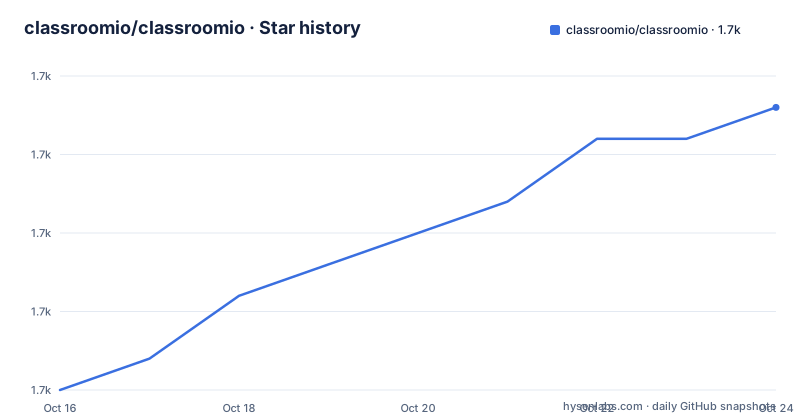
Star history
- classroomio/classroomio1,729 ★ · +9
| Repository | 2026-10-16 | 2026-10-24 |
|---|---|---|
| classroomio/classroomio | 1.7k | 1.7k |
9 Stars in the last 8 days, measured from the daily GitHub snapshot. Compare with other projects
Editorial analysis
Four apps, one monorepo, and a script that orchestrates them
The repository is a pnpm workspace driven by Turborepo, and the top-level package.json makes the entry points explicit. Development starts with a prepare step and then fans out:
pnpm devwhich runs `turbo prepare --concurrency 13 && turbo run dev`. Build and start are the same shape (`turbo run build`, `turbo run start`), and lint and format go through the same task graph, so a change to a shared package triggers rebuilds in every app that depends on it.
The apps are split by responsibility. The website is the landing page, the dashboard is the LMS itself hosted at app.classroomio.com, the api service handles PDF and video processing along with email and notifications, and docs holds the official documentation. Shared code lives under packages/, with packages/db, packages/utils and packages/ui named as examples. Jobs live in their own app, which handles background tasks such as emails, media processing and analytics rollups.
There is also a classroomio.sh script at the repository root, referenced by the environment example as the thing that auto-generates a blank PRIVATE_SERVER_KEY.
npm will not work, and the README says so plainly
The prerequisites list is short and the pnpm line is not a suggestion. Node.js at version 20.19.3 or newer is required, pnpm v10 is required because the package scripts call pnpm directly, and Docker is required to run Postgres and Redis without installing them locally. The README states that npm and yarn are not substitutes.
That is worth pausing on, because most JavaScript monorepos are pnpm-tolerant. Here the scripts use pnpm filters directly, for example the database tasks are `pnpm --filter @cio/db db:reset` and `pnpm --filter @cio/db db:studio`, so a wrong package manager breaks the workflow rather than merely changing it.
The Node version is managed with nvm, and the repository ships an .nvmrc. The setup sequence is clone, cd, nvm use, pnpm i, and then environment files. For anyone hitting friction, the README points at DEV_SETUP_NOTES.md as a full step-by-step walkthrough with a troubleshooting reference.
One secret must be identical in two files
Each app reads its own .env, and the API, jobs and dashboard each get one. The API file is the reference:
DATABASE_URL="postgresql://postgres:postgres@localhost:5432/classroomio"
REDIS_URL="redis://localhost:6379"
PUBLIC_SERVER_URL="http://localhost:3002"
TRUSTED_ORIGINS="http://localhost:5173"
BETTER_AUTH_SECRET="<generate-with-openssl-rand-hex-32>"
PRIVATE_SERVER_KEY="<generate-with-openssl-rand-hex-32>"
Generate secrets with `openssl rand -hex 32` rather than copying the example text. The critical instruction is on PRIVATE_SERVER_KEY: the two values must match, because they authenticate the dashboard's server-to-server calls to the API. Generate it once and paste the same value into both files.
The dashboard side names the failure mode if you get it wrong. PRIVATE_SERVER_URL is required, and without it login returns the error "API upstream not configured". The jobs app can reuse the API environment by symlink:
cd apps/jobs
ln -s ../../apps/api/.env .env
which works because the jobs service only additionally needs REDIS_URL.
Docker Compose ships Postgres, Redis and an S3 store with no auth
The compose file is more careful than a typical development stack. Postgres runs as postgres:16-alpine named cio-postgres, and the port mapping binds to loopback only, `127.0.0.1:5432:5432`, with a comment explaining that host tools such as pnpm api:dev and db:setup need to reach it without exposing the database to the LAN.
The healthcheck is more thoughtful still. It runs pg_isready and then an actual query, because pg_isready can pass while the database is still in recovery, which produces a 57P03 on sign-in. That is the kind of comment that tells you this stack has been debugged in production conditions.
Redis runs as redis:7-alpine with appendonly enabled and a redis-cli ping healthcheck. Storage is SeaweedFS at 4.48 as an S3-compatible store, and the comment explains that only port 9000 is published because the other SeaweedFS ports have no authentication. That is a real constraint: anyone self-hosting on a shared network must not assume the bundle ports are safe to expose.
CIO_VERSION is the difference between a stable deployment and a moving one
The environment example documents the image version choice in more detail than most projects document anything, and it is the single most useful piece of advice for anyone running this in production.
CIO_VERSION defaults to 1, and the comment spells out what latest does: it is the freshest main build, it moves on every merge to main, and it can include unreleased code, so a later pull can shift you to a newer build unannounced. Exact tags like 1.4.2 or 1.4 or 1 are immutable and published on a v* git tag. The recommended production setting is to pin an exact release so a merge to main never breaks you, and rollback is a matter of setting the previous version and pulling again.
Two other values have similar bite. BETTER_AUTH_SECRET is required for session signing, and the stack refuses to start if it is empty. PUBLIC_IS_SELFHOSTED is a build-time value baked into the dashboard client bundle through a Docker build argument, so changing it at runtime has no effect on an already-built image; the published dashboard image is built with it set to true.
The repository ships both docker-compose.yaml and docker-compose.images.yaml, the latter being the pull-based stack that consumes CIO_VERSION.
What the product covers and what it does not
The feature list is oriented at corporate training rather than schools. Compliance training gets deadline tracking, renewals and retake intervals, grace periods, waivers and certificates with custom IDs. Customer education gets a branded academy portal, cohorts with goals, an AI lesson tutor and multilingual content. Partner training adds partner workspaces, custom domains and embeddable widgets. Courses themselves are unlimited, with lessons, exercises, grading and certificates.
The AI features name their providers: the AI course builder generates outlines, lesson content and assignments using Gemini, GPT-4o and Claude. The integration surface is a REST API with webhooks for events such as certificate.issued and enrollment.completed, plus an MCP server published as @classroomio/mcp on npm, and a widget for embedding the catalogue on another site.
Two constraints deserve attention. The licence is AGPL-3.0, which for a network service means source obligations attach to modifications you deploy, so a fork that diverges from upstream is a decision with legal cost. And the repository has no GitHub releases at all; the package version in package.json reads 0.1.13 while the image tags follow their own v* scheme, so version tracking has to be done through the image tag you pin.
Editorial conclusion
ClassroomIO is worth evaluating for internal compliance and partner certification training, where certificate IDs, renewal intervals and self hosting matter more than lesson authoring. It is not a Moodle replacement for a school, and the AGPL-3.0 licence means a modified version you host must offer its corresponding source to network users, which you should consider before forking it. Before deploying, pin CIO_VERSION to an exact release rather than latest, because the environment file states that latest moves on every merge to main and can shift your running stack without announcement.
Frequently asked questions
What do I need installed to run ClassroomIO locally?
Node.js 20.19.3 or newer, pnpm v10 because the package scripts call pnpm directly and npm or yarn are not substitutes, and Docker, which runs Postgres and Redis so neither needs a local install.
Why does login fail with "API upstream not configured"?
The dashboard needs PRIVATE_SERVER_URL pointing at the API, which the README marks as required by the SSR auth proxy. Login returns that error when it is missing.
Why does the dashboard need the same PRIVATE_SERVER_KEY as the API?
Those two values must match because they authenticate the dashboard's server-to-server calls to the API. The README says to generate the key once with `openssl rand -hex 32` and paste the same value into both files.
Which version should a production self-hosting deployment pin?
The environment example recommends pinning an exact release such as 1.4.2, published on a v* git tag, rather than using latest, because latest moves on every merge to main and a later pull can shift the running stack without announcement.
Official sources
Add this badge to your README
If you maintain this project, the badge below links readers to this analysis and shows its maintenance status from the daily GitHub snapshot. Paste the markdown into your README; add ?metric=license or ?metric=stars to the image URL for a different field.

[](https://hysenlabs.com/projects/classroomio-classroomio)Star history chart for your README
[](https://hysenlabs.com/projects/classroomio-classroomio)Was this useful?