Freebuff: A Free Terminal AI Agent with a Built-in Model Catalog
Generate code from the terminal. **Loaded**, Built-in web research, browser use, and more.
At a glance
- What is it?
- Freebuff is a TypeScript monorepo that brings AI coding agents to the terminal, desktop, web, and GitHub. It is free, ad-supported, and built on the Codebuff framework, but its session limits and data-use policies deserve scrutiny.
- Who is it for?
- Adopt Freebuff if you are an individual developer or small team wanting a no-cost AI coding assistant with a choice of models and no API key setup. Avoid it if you handle sensitive code, because the privacy policy permits analysis of prompts and messages for ad personalization, and data may be used for training when a model or feature says so.
- Can I use it commercially?
- Yes. Apache-2.0 is a permissive licence: you can use, modify and sell software built on it, as long as you keep its copyright and licence notices.
- Is it still maintained?
- Yes. The repository received new commits within the last day.
- What is it written in?
- Mainly TypeScript, according to GitHub's language statistics.
Answers come from the project's GitHub data, last synced on November 13, 2026, and from our analysis. They are not legal advice.
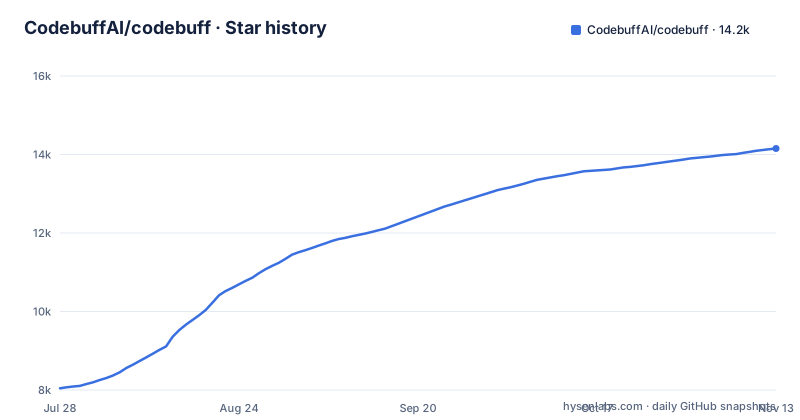
Star history
- CodebuffAI/codebuff14,154 ★ · +6,110
| Repository | 2026-07-28 | 2026-11-13 |
|---|---|---|
| CodebuffAI/codebuff | 8k | 14.2k |
6,110 Stars in the last 108 days, measured from the daily GitHub snapshot. Compare with other projects
Editorial analysis
What Freebuff Solves and Who It Is For
Freebuff targets developers who want AI assistance for coding, building, and research without paying a subscription or managing API keys. The README positions it as five free products: a desktop app for parallel local agents, a CLI for terminal-based code generation, a web app for full-stack builds, a cloud service that runs agents on any GitHub repository, and a chat interface for research. The core problem it addresses is the friction of setting up and paying for multiple AI tools. It is for individual developers, hobbyists, and teams that prioritize cost savings and are comfortable with session limits. The project is built on Codebuff, an open multi-agent framework, so it also serves developers who want to create custom agents or embed AI into their own applications via the @codebuff/sdk.
The Multi-Agent Architecture Behind the Terminal
Freebuff does not send every task through a single model and prompt. The README describes a system of specialized agents that divide work. File-finding agents map relevant parts of a project before editing. Implementation and review agents make changes, run commands, and inspect results. Research agents investigate documentation and use a real browser to test applications. This division of labor is visible in the product structure: the desktop app isolates concurrent agents in separate workspaces, while the web and cloud products provide sandboxes, previews, and deployment workflows. The architecture is a deliberate departure from a monolithic prompt approach, and it explains why Freebuff can claim to handle tasks like web research and browser use. The framework underneath, Codebuff, is open source and provides the orchestration, tools, and SDK, which means the agent behavior is not a black box.
Getting Started: Install, Run, and Configure
The quick start is straightforward. Install the CLI globally with npm: npm install -g freebuff. Then navigate to any project directory and run the command freebuff. You describe what you want, and Freebuff finds relevant files, makes changes, and runs the checks that matter for your project. The README does not list configuration keys beyond the environment setup for contributors. For local development, you need Docker and a .env.local file, then you run bun install and bun up. The CLI is started separately with bun start-cli. The model picker is a key configuration point. You choose from a curated catalog that includes MiMo v2.6 Flash Fast, GLM 5.3 Flash, DeepSeek V4.1 Flash 10/17, GPT-6 Luna, and Solar Pro 4. Each model has different access levels, and the picker shows what each model costs as a multiplier.
The Model Catalog and Its Session Economics
The model selection is a central feature, and it carries real constraints. Every model is paid for in hours at the multiplier shown in the picker: an hour on a 1x model uses one hour of your balance, an hour on a 3x model uses three, and models in the picker's Unlimited section use none. Solar Pro 4 is Upstage's larger model with 524K context, text only. DeepSeek V4 Pro was retired and replaced by GLM 5.3 Flash as the deep-reasoning pick. Models may serve from a quantized Q8_0 build, which means output quality can vary from the full-precision version. The README also mentions Gemini 3.1 Flash Lite powers specialist tasks like file finding and research, so it is not in the main picker. This catalog is not static; the release notes show a rapid beta cycle with multiple staging releases per day, so model availability and limits can change without warning. The hour-based economy is a trade-off: you get free access, but you must plan around a daily allowance.
Free Access, Text Ads, and Regional Limits
Freebuff is available in every country, but access is tiered. Supported regions receive full access. Other regions and VPN users receive limited access to GLM 5.3 Flash, DeepSeek V4.1 Flash 10/17, MiMo v2.6 Flash Fast, Solar Mini 4, and Solar Pro 4, with a free allowance of 5 hours a day, or 4 on a VPN or proxy. The free model is supported by text ads. The README states that Freebuff shows applicable session limits and any model-specific data-use notice before you start. This is a significant caveat for users who rely on VPNs for privacy or who live in unsupported regions. The regional difference means the tool is not uniformly free in practice. The ad-supported model also affects the user experience: you are the product in the sense that prompts and messages, including pasted content, may be analyzed to personalize ads. Separate uploads and connected repositories are not provided to advertising providers, according to the README, but that distinction is easy to miss when you paste code into a chat.
Data Use, Privacy, and the Fine Print
The privacy section is the most important part of the README for engineers evaluating this tool. It states that your messages, agent traces, and files are used to run the service. It also says Freebuff or the provider may keep submissions to develop, train, test, evaluate, and improve AI models, but only when a model or feature says data may be used for AI training. The ad personalization clause is broader: Freebuff may analyze this data, and how you use the app, to personalize ads and train ad models, and may share or sell training submissions to third parties. This is a clear warning for anyone working on proprietary code. The README does not specify retention periods; it points to the Privacy Policy for details. For a tool that runs in your terminal and has access to your project files, this is a material risk. The data-use notice is generated, which suggests it is updated automatically, but the core trade-off is explicit: free access in exchange for ad analysis of your prompts.
Maintenance, Licensing, and the Codebuff Dependency
The repository is a TypeScript monorepo built with Bun. The license is Apache-2.0, which is permissive for both commercial and personal use. The project is not archived, and the last push was November 2, 2026, while the most recent beta releases date from October 21, 2025. The release naming, v1.0.420-beta.185, indicates an active but unstable development cycle. The README says Freebuff is built on Codebuff, the open multi-agent framework, and points to the @codebuff/sdk on npm for custom agents. This means adopting Freebuff also ties you to Codebuff's evolution. For maintenance, the contributing guide requires Docker and a .env.local, but there is no mention of a migration path or upgrade notes for users. The rapid release cadence suggests you should expect frequent updates, and the staging label on releases implies some versions are not production-ready. If you need a stable tool for a critical workflow, this beta pace is a limitation.
Editorial conclusion
Adopt Freebuff if you are an individual developer or small team wanting a no-cost AI coding assistant with a choice of models and no API key setup. Avoid it if you handle sensitive code, because the privacy policy permits analysis of prompts and messages for ad personalization, and data may be used for training when a model or feature says so. Before using it, verify your region's access tier, check the hour multiplier for your chosen model, and review the full Privacy Policy at freebuff.com/privacy-policy to confirm whether your repository data is treated as separate from ad targeting. The project's rapid beta release cadence and staging releases mean you should expect frequent changes and occasional breakage.
Frequently asked questions
Is Codebuff free to use?
The README says no subscription, credits or API key are required, and the included models are paid for in hours from a free limited-access allowance of 5 hours a day, or 4 on a VPN or proxy. Gemini 3.8 Flash and Muse Spark 1.3 are listed as paid plans, and GPT-6.1 Sol is US only or paid plans elsewhere.
What is codebuff?
It is an Apache-2.0 TypeScript monorepo hosted at CodebuffAI/codebuff whose README presents five products branded Freebuff, from a terminal CLI to desktop, web, cloud and chat. The npm install is npm install -g freebuff, and the project homepage is codebuff.com.
How do I install codebuff?
The quick start installs the CLI globally with npm install -g freebuff, then runs freebuff inside a project directory. Building from source clones the repository, runs bun install and bun up, and needs Docker plus a configured .env.local, although the clone URL in the README points at CodebuffAI/freebuff.git rather than this repository.
What are the differences between Codebuff and Freebuff?
In this repository the README, the npm package name and the clone URL use Freebuff, while the repository name, the root package name and the .codebuffignore file use codebuff. The package.json exposes a dev:freebuff script that sets FREEBUFF_MODE=true, so both names are served from one codebase.
Is codebuff better than Claude Code?
They are not exclusive. Freebuff Desktop can run locally installed Claude Code and Codex agents using your existing provider account, and the README says those connected models are separate from the catalog Freebuff includes.
Official sources
Add this badge to your README
If you maintain this project, the badge below links readers to this analysis and shows its maintenance status from the daily GitHub snapshot. Paste the markdown into your README; add ?metric=license or ?metric=stars to the image URL for a different field.

[](https://hysenlabs.com/projects/codebuffai-codebuff)Star history chart for your README
[](https://hysenlabs.com/projects/codebuffai-codebuff)Was this useful?