Qinglong: the alpine/debian image split, the npm runtime gap and two commands called ql
支持 Python3、JavaScript、Shell、Typescript 的定时任务管理平台(Timed task management platform supporting Python3, JavaScript, Shell, Typescript).
At a glance
- What is it?
- Qinglong is a scheduler panel for Python3, JavaScript, Shell and TypeScript jobs. This piece covers what each install route leaves for you to supply, how the remote CLI authenticates, and which settings in .env.example matter before exposing the panel.
- Who is it for?
- Qinglong suits people who want one web panel for cron-style Python, JavaScript, Shell and TypeScript jobs and are fine choosing between a Docker image and a self-supplied npm runtime. Before deploying, decide on the alpine or debian tag, set JWT_SECRET and the trusted proxy, and keep the npm CLI out of any directory that holds the panel's own ql.
- Can I use it commercially?
- Yes. Apache-2.0 is a permissive licence: you can use, modify and sell software built on it, as long as you keep its copyright and licence notices.
- Is it still maintained?
- Yes. The repository last received commits 5 days ago.
- What is it written in?
- Mainly TypeScript, according to GitHub's language statistics.
Answers come from the project's GitHub data, last synced on November 13, 2026, and from our analysis. They are not legal advice.
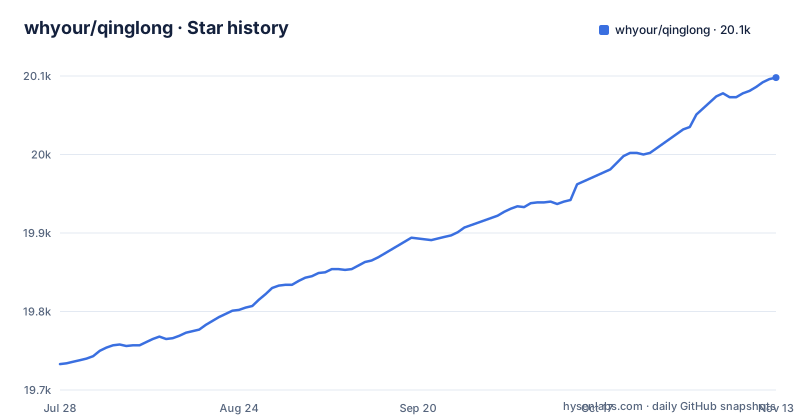
Star history
- whyour/qinglong20,098 ★ · +365
| Repository | 2026-07-28 | 2026-11-13 |
|---|---|---|
| whyour/qinglong | 19.7k | 20.1k |
365 Stars in the last 108 days, measured from the daily GitHub snapshot. Compare with other projects
Editorial analysis
Alpine's crond needs root, so a non-root container has to use the debian tag
Qinglong publishes two Docker tags. The latest tag is built on alpine and the debian tag is built on debian-slim. If your scripts need a dependency that alpine does not support, the project recommends the debian image.
The second reason to pick debian is user permissions. Alpine's crond needs root, so a container that must run as a non-root user has to use the debian tag. Pull either one:
docker pull whyour/qinglong:latest
docker pull whyour/qinglong:debian
Running the debian image as a non-root user means passing --user qinglong, mounting the data directory at /ql/data, and publishing port 5700:
docker run -d \
  -v /path/to/ql/data:/ql/data \
  -p 5700:5700 \
  --user qinglong \
  --name qinglong \
  whyour/qinglong:debian
The consequence is a real constraint: if your host policy forbids root containers, the default latest tag is not an option for you. Choose the tag on purpose before the first start, because the two images sit on different base systems and your scripts' native dependencies will be built against whichever you pick.
The npm package ships the panel but none of the runtimes it schedules
The npm route is a single command:
npm i @whyour/qinglongThe npm build supports debian, ubuntu and alpine systems, and you must install node, npm, python3, pip3 and pnpm yourself. The Docker images arrive with their interpreters; the npm package does not. Every interpreter version your jobs depend on is therefore your decision and your upkeep.
Only those three distributions are named, so a Windows or macOS host is outside what the project says it supports for this route. If you want the panel on a machine that is neither debian-family nor alpine, the Docker image is the documented way in, with the alpine and debian tag choice described above.
The latest release is v2.24.0, published on 2026-10-29, and the repository's last push was on 2026-10-30. The release list also carries upgrade-v2.24.0 and upgrade-master entries, which are upgrade channel releases rather than separate products.
What the npm tarball contains: shell wrappers, preload hooks and notify samples
The files list in package.json shows what actually lands on disk when you install from npm. Alongside .env.example, ecosystem.config.js, version.yaml, static/ and back/protos/api.proto, it includes a set of shell scripts: start.sh, start-simplify.sh, task.sh, task-timeout.sh, otask.sh, rmlog.sh, update.sh, check.sh, env.sh, share.sh, api.sh and bot.sh, plus shell/lang/*.sh and an upgrade-lock.yaml.
There is also a shell/preload directory with client.js, client.py, esm-loader.mjs, notificationAudit.js, sitecustomize.js and sitecustomize.py. JavaScript and Python each have a preload file, which tells you both languages are first-class paths in the package.
The sample directory contributes notify.js, notify.py, ql_sample.js and ql_sample.py, along with several .sample.* configuration templates. In the repository itself sample/ also holds auth.sample.json, config.sample.sh, extra.sample.sh, task.sample.sh and tool.ts.
A limit worth knowing: the file names tell you the layout, not the behaviour. Read task.sh and the preload files before relying on them for anything security sensitive.
Two programs named ql: the panel's built-in command and the npm CLI
The remote management CLI is a separate npm package, @whyour/qinglong-cli, installed globally and invoked as ql. The panel also ships a built-in command with the same name. On a machine that already hosts a panel, installing the npm CLI into the default location can overwrite the built-in command, so the project says to use a separate install directory there.
The CLI covers creating, editing, running and reading logs for tasks and subscriptions, plus OpenAPI resources: apps, environment variables, scripts, configuration and dependencies. Output can be JSON, which is aimed at scripts and AI agents. The package bundles a remote-management Skill file covering authentication, command choice and checking results, and the repository also contains a separate internal Skill for local execution and operations.
What it does not do is run scripts on your own machine. It is for managing a remote panel. Local script execution and operations are covered by a different document, cli/LOCAL.md, so do not expect the npm CLI to replace the panel's internal tools.
The remote CLI authenticates through an app you create inside the panel
The CLI needs Node.js 22.12 or newer, and Node.js 24 is the recommended version. Install it and point it at a panel:
npm install -g @whyour/qinglong-cli
ql login --url https://ql.example.com
ql auth status --json
ql task list --json
ql subscription list --json
ql --help
Before logging in, open System Settings and then App Settings in the panel (系统设置 → 应用设置), create an application and grant it the permissions you need. When ql login prompts, enter that application's Client ID and Secret. An alternative is to skip the prompt and supply an existing token through the QL_URL and QL_ACCESS_TOKEN environment variables.
Every command accepts --help, and setting QL_LANG=en switches the help text to English. The practical consequence of the permission model is that a leaked Client Secret is only as dangerous as the permissions you granted the app, so grant the minimum the automation needs rather than everything.
Port 5700, port 5500 and a wildcard bind address are set in .env.example
The example environment file sets BACK_PORT=5700 and GRPC_PORT=5500. The bind address defaults to ::, the IPv6 wildcard, which serves IPv4 and IPv6 on dual-stack systems. On an IPv4-only environment it falls back to 0.0.0.0 automatically, and BIND_HOST and BIND_HOST_GRPC can be uncommented to set an address by hand.
Because the default is a wildcard, the panel listens on every interface unless you narrow it. If the host is directly reachable, set BIND_HOST yourself or put a firewall in front.
Behind a reverse proxy, QL_TRUST_PROXY decides which proxies are trusted. It accepts a fixed number of hops, an IP, a CIDR range or a comma-separated list, for example loopback,172.18.0.0/16,10.20.0.8/32. The environment variable takes priority over the value configured under System Settings, Client IP. The file warns that the plain true setting is only for cases where the panel port can never be reached except through the proxy.
JWT_SECRET and JWT_EXPIRES_IN are blank in the example, so fill them in deliberately. LOG_LEVEL is 'info', PYTHON_VENV_DIR=./.venv points Python at a virtual environment (empty means system Python), and the QINIU_AK, QINIU_SK and QINIU_SCOPE entries are present but empty.
Running from source pins pnpm 8.3.1 and starts two processes at once
A source checkout needs the example environment copied into place and a specific pnpm version:
git clone https://github.com/whyour/qinglong.git
cd qinglong
cp .env.example .env
# 推荐使用 pnpm https://pnpm.io/zh/installation
npm install -g [email protected]
pnpm install
pnpm start
The package.json declares [email protected] as its packageManager, which matches the version installed above. pnpm start runs concurrently over the start:* scripts: start:back runs nodemon ./back/app.ts and start:front runs max dev. You get a backend and a frontend dev server together, so a failure in one process shows up in the same terminal as the other.
Open http://127.0.0.1:5700 in a browser once it is up. Other build entry points exist in package.json, including build:front with max build and build:back with tsc -p back/tsconfig.json, but a production deployment is pointed to the external installation guide at qinglong.online rather than described here. Since the Docker deployment steps live on that site, check it for compose files or reverse proxy examples.
The name is the Azure Dragon of the east, tied to wood and spring
Qinglong, also called Canglong, is one of the Four Symbols and one of the Four Spirits of Heaven in Chinese tradition. In the five phases system it is the spirit beast of the east, a blue-green dragon belonging to wood and to spring, and in the eight trigrams it is associated with zhen. Like the Responding Dragon, it has wings.
In the Twenty-Eight Mansions, Qinglong is the collective name for the seven eastern mansions. In early star worship it was the most honoured celestial deity. After Taoism absorbed it into its pantheon its standing dropped; Taoism calls it Mengzhang, and various scriptures give it titles such as emperor, holy general, divine general and ghost-catching general. Together with the White Tiger, Jianbing, it is one of Taoism's guardian deities.
The project's own text also quotes the Book of the Later Han, which says that when the sun has circled the heavens, with one cold and one hot season, the four seasons are complete, and the blue dragon has moved on a stellar position, that is called a year. None of this describes the software, but it explains why the product is named for an eastern guardian.
Editorial conclusion
Qinglong suits people who want one web panel for cron-style Python, JavaScript, Shell and TypeScript jobs and are fine choosing between a Docker image and a self-supplied npm runtime. Before deploying, decide on the alpine or debian tag, set JWT_SECRET and the trusted proxy, and keep the npm CLI out of any directory that holds the panel's own ql.
Frequently asked questions
What does Qinglong mean in Chinese?
Qinglong is the Azure Dragon, also called Canglong. It is one of the Four Symbols and one of the Four Spirits of Heaven in Chinese tradition.
What does Qinglong represent?
In the five phases system Qinglong is the spirit beast of the east. It belongs to wood and the season of spring, and the eight trigrams link it with zhen.
Who is the Qinglong god in Taoism?
Taoism calls Qinglong Mengzhang and gives it titles such as emperor, holy general, divine general and ghost-catching general. With the White Tiger, Jianbing, it is a guardian deity.
Official sources
Add this badge to your README
If you maintain this project, the badge below links readers to this analysis and shows its maintenance status from the daily GitHub snapshot. Paste the markdown into your README; add ?metric=license or ?metric=stars to the image URL for a different field.

[](https://hysenlabs.com/projects/whyour-qinglong)Star history chart for your README
[](https://hysenlabs.com/projects/whyour-qinglong)Was this useful?