MIO-KITCHEN-SOURCE: A Python-Based Android ROM Workbench with a Long Tail of Format Support
An Android Rom Tool in python
At a glance
- What is it?
- MIO-KITCHEN-SOURCE is an open-source Android ROM tool written in Python that unpacks and repacks a wide range of image formats. It is aimed at developers and modders who need a single cross-platform utility, but its AGPL license and LoongArch64 gaps demand attention.
- Who is it for?
- Adopt MIO-KITCHEN-SOURCE if you are an Android ROM developer or modder who needs a free, open-source tool that handles a broad set of image formats (boot, dtbo, ext4, erofs, payload, logo, and more) from a single Python codebase. Do not adopt it if you require official commercial support, if you are on LoongArch64 and depend on MagiskBoot or delta_generator, or if your project cannot comply with AGPL-3.0 obligations.
- Can I use it commercially?
- Yes, with strict conditions. AGPL-3.0 is a network copyleft licence: if people use a modified version over a network, for example as a hosted service, you must offer them its source code under the same licence.
- Is it still maintained?
- Yes. The repository last received commits 2 days ago.
- What is it written in?
- Mainly Python, according to GitHub's language statistics.
Answers come from the project's GitHub data, last synced on October 22, 2026, and from our analysis. They are not legal advice.
Star history
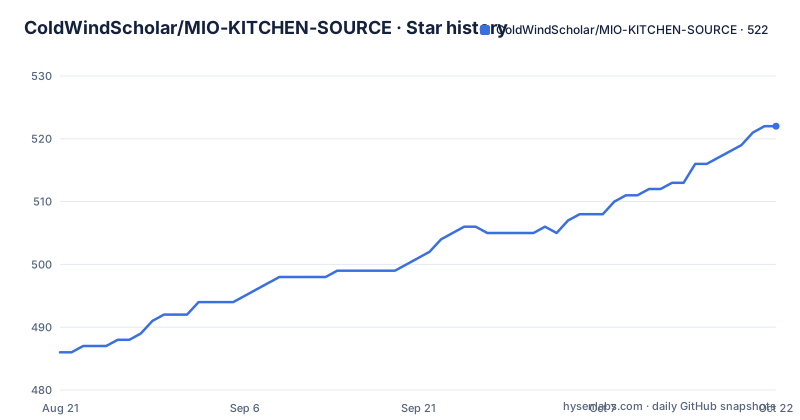
- ColdWindScholar/MIO-KITCHEN-SOURCE522 ★ · +36
| Repository | 2026-08-21 | 2026-10-22 |
|---|---|---|
| ColdWindScholar/MIO-KITCHEN-SOURCE | 486 | 522 |
36 Stars in the last 62 days, measured from the daily GitHub snapshot. Compare with other projects
Editorial analysis
What It Solves and Who It Is For
Who is it for? Specifically, ROM porters who need to repack boot images with Magisk, system maintainers who must convert sparse data images, and forensic analysts who need to parse proprietary formats like Oppo's ozip or Huawei's UPDATE.APP. If you only occasionally flash a stock ROM, this is overkill. But if you regularly dissect vendor images, the format coverage is the draw.
How the Tool Works: A Python Front End Over a Binary Zoo
The architecture is visible from the repository layout and the README's table. The Python code in src/core orchestrates a collection of external tools. For instance, the file src/core/aml_image.py is listed as the implementation for unpacking Amlogic V2 images, meaning some formats are handled by native Python code, while others delegate to compiled binaries. The README notes that most binaries are ported to LoongArch64 except MagiskBoot and delta_generator, which implies the tool dynamically selects the correct binary for the host architecture. The flow for a typical operation likely goes: the user selects an image file, the Python script identifies the format (by magic bytes or extension), then invokes the appropriate unpacker, and finally reassembles the payload with a repacker. The inclusion of tools like context_patch and fspatch suggests that the tool does not just extract files; it also patches file_contexts and file_config before repacking, which is essential for preserving SELinux labels and filesystem permissions. This is a sophisticated step that many simple extractors omit. The reliance on busybox for plugin support indicates that some features are shell-based, adding another layer of abstraction. The result is a hybrid: some paths are pure Python, others are subprocess calls to C or Rust binaries. This design keeps the core logic portable, but it also means the tool is only as good as its bundled binaries.
Getting It Running: Installation and First Steps
The README does not provide explicit installation commands in the truncated portion, but it does give a clear hint: the project is distributed as source, and the primary language is Python. The repository includes a main branch with a src/ directory, and recent releases are tagged as CI_BUILD_524 (version 4.2.1). A typical workflow would be to clone the repository, install Python dependencies (likely listed in a requirements.txt or setup.py, though not shown here), and then run the main entry point. The README's mention of 'Linux-LoongArch64 Supported!' suggests that prebuilt binaries are included for multiple architectures, so installation may involve downloading the appropriate binary set. The release tags (CI_BUILD_*) indicate that builds are produced by a CI pipeline, which means users can fetch a tagged release rather than building from source. For a concrete start, you would look for a file like main.py or a CLI entry point in the repository root. Since the README is truncated, I cannot confirm the exact command, so you should inspect the repository's top-level files after cloning. The tool likely runs as a command-line interface, given the nature of the project, though a graphical front end is possible but not indicated in the material.
Limitations and Failure Modes
The most obvious limitation is the incomplete LoongArch64 support. The README explicitly states that MagiskBoot and delta_generator are not ported, so features depending on them will not work on that architecture. This is a hard constraint for any user on LoongArch64 hardware, which is not mainstream but is used in some Chinese desktop and server environments. Another limitation is the reliance on third-party binaries. If a bundled binary is outdated or broken for a specific image variant, the Python code cannot compensate. For example, oppo_decrypt may fail with newer Oppo firmware if the encryption changes. The README also warns 'Unauthorized commercial use prohibited', which is a licensing constraint (more on that later). A failure mode that is easy to imagine: the tool may produce a repacked image that is not bootable if the patching steps (context_patch, fspatch) are not applied correctly or if the underlying filesystem tools have bugs. The project's rapid release cycle (three releases in one month) suggests that bugs are being fixed quickly, but it also means that a given version may have regressions. Finally, the tool is not a one-click solution for novices; it expects the user to understand what they are doing, as the caution banner implies.
Comparison with an Alternative: Payload Dumper Go and Friends
A common alternative for unpacking Android ROMs is a collection of single-purpose tools, such as Payload Dumper Go for extracting payload.bin files, or simg2img for sparse images. The key difference is that these tools are narrowly focused and often written in Go or C, providing a single function. MIO-KITCHEN-SOURCE aggregates many such tools under one Python interface, which reduces the need to switch between utilities. However, the trade-off is that you must trust the project's integration and keep the whole bundle updated. If you only need to unpack a payload.bin, a dedicated tool like payload-dumper-go is simpler and has fewer dependencies. But if you need to repack an ext4 image with proper SELinux contexts, you would need to combine several tools manually, which is where MIO-KITCHEN's patching steps add value. The alternative approach is to use a script that chains these tools yourself, which gives you control but increases maintenance. The README's list of used projects shows that MIO-KITCHEN is essentially a curated collection, so the alternative is to assemble the same collection manually.
Licensing and Maintenance Cost
The project is licensed under AGPL-3.0, which has significant implications. AGPL requires that if you modify the source and provide it over a network, you must release the modified source. For a local tool, this is less restrictive, but it still means any derivative work must be open-sourced under the same license. The README's note 'Unauthorized commercial use prohibited' is interesting because AGPL-3.0 does allow commercial use, but the project adds a restriction that may not be enforceable depending on jurisdiction. This creates a licensing gray area: the AGPL grants rights, but the project's own statement might deter some commercial users. You should consult a lawyer if you plan to use it in a commercial product. Maintenance cost is a real concern. The tool depends on over twenty external projects, each with its own release cycle. The maintainers must update the bundled binaries to fix security issues or support new formats. The recent activity (last push August 2026, with releases every few days) shows active maintenance, but that also means users must keep up with frequent updates to get fixes. The CI_BUILD naming suggests automated builds, which helps but does not eliminate the need for manual testing on real devices.
Conclusion: Who Should Adopt It and What to Verify First
Adopt MIO-KITCHEN-SOURCE if you are a ROM developer or power user who needs a single, free, open-source tool to handle a wide range of Android image formats, and you are comfortable with the AGPL license and the risk of using a tool that is in rapid development. Do not adopt it if you need official support, if you are on LoongArch64 and depend on MagiskBoot, or if your project cannot comply with AGPL. Before adopting, verify that the specific formats you work with are covered by the latest release (CI_BUILD_524, version 4.2.1) and that the bundled binaries are compatible with your host OS (the README mentions Linux-LoongArch64, but other platforms are not specified). Check the repository's issue tracker for known problems with your device or image type, and test on a non-critical device first. The project's active development is a double-edged sword: you get fixes, but you also get churn. If you value stability over features, you might wait for a mature release. The concrete next step is to clone the repository, inspect the top-level files for a requirements.txt or setup.py, and run the tool on a test image to see if it meets your needs.
Editorial conclusion
Adopt MIO-KITCHEN-SOURCE if you are an Android ROM developer or modder who needs a free, open-source tool that handles a broad set of image formats (boot, dtbo, ext4, erofs, payload, logo, and more) from a single Python codebase. Do not adopt it if you require official commercial support, if you are on LoongArch64 and depend on MagiskBoot or delta_generator, or if your project cannot comply with AGPL-3.0 obligations. Before committing, verify that the specific formats and vendor variants you work with (e.g., Sprd PAC, Oppo ozip, Amlogic V2) are covered by the bundled binaries and that the CI build (CI_BUILD_524, version 4.2.1) matches your target platform. Also check the repository's issue tracker for known bugs in the latest release, since the project's rapid release cycle (three releases in a month) suggests active but potentially unstable development.
Frequently asked questions
What does MIO-KITCHEN-SOURCE do?
It is an Android ROM tool written in Python. It unpacks and repacks the image formats a phone ships as, including boot and device-tree images, ext4, Erofs, sparse dat, Brotli and zstd payloads, and it patches the configuration files inside those images before repacking. It wraps roughly two dozen third-party projects to do it and presents them through one tool.
What licence does MIO-KITCHEN use and can I use it commercially?
The repository licence metadata reads AGPL-3.0, which normally permits commercial use, but the README adds a caution block stating that unauthorized commercial use is prohibited. The restriction does not say who authorizes or what authorization means, so the two statements have to be reconciled before any commercial deployment, especially given that the tool bundles around two dozen third-party projects whose own terms are not listed.
Does MIO-KITCHEN work on LoongArch64?
Mostly. The README states that most bundled binaries have been ported to LoongArch64, with two exceptions: a boot-patching component and a delta generator, and it says related features will not work. It does not say which features those two gate, and both are load-bearing for the tool's core use case.
How do I install MIO-KITCHEN?
The repository has no packaging manifest and no installable project entry point, so it is not distributed as a library. It consists of Python scripts run directly with dependencies from the requirements file, and a self-packaging tool is declared among those dependencies. The repository also contains a Nix shell definition, which would give a pinned environment, though the requirements file itself leaves most entries unpinned.
Which third-party projects does MIO-KITCHEN bundle?
The credits table names 27 of them, covering unpackers and repackers for Sprd pac, ext4, Erofs, Brotli, zstd, cpio, Romfs, sparse dat, kdz, RK resource and RKFW images, Amlogic images and Android super and update packages, plus device-tree tooling, a vendor-format decryptor and busybox builds. Four of the 27 are the author's own, and the table notes there are others beyond those listed.
Official sources
Add this badge to your README
If you maintain this project, the badge below links readers to this analysis and shows its maintenance status from the daily GitHub snapshot. Paste the markdown into your README; add ?metric=license or ?metric=stars to the image URL for a different field.

[](https://hysenlabs.com/projects/coldwindscholar-mio-kitchen-source)Star history chart for your README
[](https://hysenlabs.com/projects/coldwindscholar-mio-kitchen-source)