cool-admin-midway: a TypeScript admin framework where six CRUD endpoints come from one decorator
cool-admin (Midway edition): a cool backend permissions management framework with AI coding, workflow orchestration, modular and plugin-based architecture, and rapid CRUD development; permanently free and open source, built on Node.js, TypeScript, TypeORM, MySQL, JWT, Vue3, Vite and Element UI.
At a glance
- What is it?
- cool-admin-midway is a Node.js and TypeScript backend permission framework built on Midway, TypeORM and MySQL. Its selling point is code generation at the controller and entity level, and the README is honest that this convenience depends on running schema synchronisation.
- Who is it for?
- Adopt cool-admin-midway if your team already writes TypeScript and you want a permission model, multi-tenancy hooks and six CRUD endpoints per table without writing them by hand. Skip it if you need a stable released version, since package.json is still at 8.0.0 and the repository has no published GitHub releases, or if you cannot run MySQL 5.7 or newer and Node 18 or newer.
- Can I use it commercially?
- Check first. The repository uses a licence we do not classify automatically, so read its LICENSE file before any commercial use.
- Is it still maintained?
- Yes. The repository last received commits 132 days ago.
- What is it written in?
- Mainly TypeScript, according to GitHub's language statistics.
Answers come from the project's GitHub data, last synced on November 25, 2026, and from our analysis. They are not legal advice.
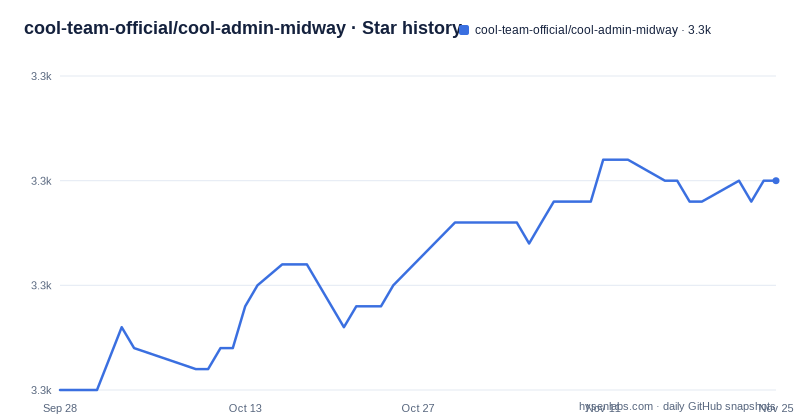
Star history
- cool-team-official/cool-admin-midway3,285 ★ · +10
| Repository | 2026-09-28 | 2026-11-25 |
|---|---|---|
| cool-team-official/cool-admin-midway | 3.3k | 3.3k |
10 Stars in the last 58 days, measured from the daily GitHub snapshot. Compare with other projects
Editorial analysis
The problem cool-admin-midway targets: repetitive admin backends in TypeScript
Most admin backends are the same program written many times. You need login, roles, permissions, a menu tree, file upload, pagination, and then a CRUD screen for every table in the schema. The framework part is boring and the CRUD part is endless. cool-admin-midway takes the position that both should be generated rather than typed out, and it is aimed at developers who are already comfortable in TypeScript and are willing to accept a framework's conventions in exchange for that generation. The README frames the audience explicitly: if you come from the frontend, the Vue 3 and Element Plus stack on the companion repository will feel familiar; if you come from the backend, the TypeScript syntax resembles Java or PHP. The project describes itself as a backend permission management framework with AI coding, flow orchestration, modularity, plugin support and fast CRUD development. It is not a general web framework. It is an opinionated starting point for internal tools and management consoles.
How the CRUD generation actually works: entity plus decorator, not scaffolding
The mechanism is not a code generator that writes files you then edit. It is runtime composition. You declare a TypeORM entity that extends BaseEntity, and then a controller class decorated with @CoolController, passing an api array and the entity. The framework reads that configuration and mounts the routes. The README's example declares api: ['add', 'delete', 'update', 'info', 'list', 'page'] on a DemoAppGoodsEntity and states that this produces six endpoints: POST /app/demo/goods/add, POST /app/demo/goods/delete, POST /app/demo/goods/update, GET /app/demo/goods/info, POST /app/demo/goods/list and POST /app/demo/goods/page. The page endpoint is documented as including fuzzy search and full field matching. Anything outside that set goes in the same class as a normal route, which is what the @Get('/other') method in the example does. The route prefix is derived from the module directory and the entity name, so the file layout is part of the API contract. That is the trade-off: you get six endpoints for roughly fifteen lines, and you give up control over naming and over what each endpoint does internally.
Installing cool-admin-midway and getting the first endpoint running
The prerequisites are stated in the README: MySQL 5.7 or newer (8.0 recommended) and Node 18.x or newer. The first step is the database connection, which lives in src/config/config.local.ts. The README gives this block for MySQL, and notes that the driver is already bundled so there is nothing extra to install. Note the comment on synchronize: the README warns in the config itself that it should not be used in production because it can cause data loss.
typeorm: {
    dataSource: {
      default: {
        type: 'mysql',
        host: '127.0.0.1',
        port: 3306,
        username: 'root',
        password: '123456',
        database: 'cool',
        synchronize: true,
        logging: false,
        charset: 'utf8mb4',
        cache: true,
        entities: ['**/modules/*/entity'],
      },
    },
  },
Then install and start. The README states that the first start initialises and imports the data automatically, so you should not need to run a migration by hand.
npm i
npm run dev
When it comes up, the README says the service is reachable at http://localhost:8001/. If npm i fails, the README suggests switching your registry mirror and recommends pnpm. If you would rather not install MySQL locally, the repository ships a docker-compose.yml with a coolDB MySQL service on port 3306 and a coolRedis service on port 6379; the compose file notes that data is stored under ./data and that you can adjust the host-side port if there is a conflict. The Dockerfile builds on node:lts-alpine, exposes 8001 and runs npm run start. The README also points to a demo instance at show.cool-admin.com with the account admin and password 123456, but that is a shared demonstration, not a deployment pattern.
Where cool-admin-midway gets in the way
The synchronize: true default is the sharpest edge. It is on in the example config, and the comment next to it says plainly that using it in production risks data loss. Because the framework's promise is that a new entity file becomes a table automatically, the path of least resistance is to leave it on, and that is exactly the path the config warns against. Anyone adopting this should plan to turn it off and manage schema changes separately, which means giving up part of the convenience the framework advertises.
The second constraint is the version situation. package.json declares version 8.0.0 and depends on @cool-midway/core ^8.0.7, and the repository has no published GitHub releases. The README's licence badge says MIT, while the repository metadata reports the licence as NOASSERTION, so the licence text in the LICENSE file is what you should read rather than the badge. Finally, the framework is convention-heavy by design: the route prefix comes from your directory structure, the entity path glob is baked into the config as '**/modules/*/entity', and the generation only covers the six operations listed. Teams that want explicit, hand-written routing and a migration tool of their own choosing will spend more time fighting the conventions than using them.
cool-admin-midway against the Java edition and against plain Midway
The README names its own alternative: cool-admin-java, for teams that want the same style of admin backend on the JVM. The difference is not feature parity but operational fit. Choosing the Java edition means your deployment target is a JVM, your team's existing Java tooling applies, and you are not asking frontend developers to work in Node. Choosing the Midway edition means one language across the API and the Vue 3 frontend, and the README argues this is friendly to frontend developers. The second comparison is plain Midway with TypeORM, which is what cool-admin-midway is built on. Plain Midway gives you the dependency injection container, the Koa-based HTTP layer and the TypeORM integration without the @CoolController abstraction, so you write each route yourself and choose your own permission model. If you need four endpoints, the abstraction costs more than it saves. If you need forty tables exposed with the same permission rules, the arithmetic flips.
Maintenance, versions and what upgrading costs you
The default branch is 8.x and the last push to the repository was on 2026-07-17. The project is not archived. The repository has no published GitHub releases, so there is no changelog to read before you upgrade and no tagged version to pin against; the practical unit of upgrade is the git branch plus the @cool-midway/* packages, which package.json pins with caret ranges such as ^8.0.7 for the core and ^8.0.2 for rpc and task. Caret ranges mean a fresh install can pull a newer minor or patch than the one the project was last tested against, so lockfile discipline matters more here than in a project with published releases. The Dockerfile builds from source with npm install, npm run build, then removes node_modules and package-lock.json and reinstalls for production, which means the image you build is not reproducible from the lockfile. On licensing, the README badge states MIT and the repository metadata reports NOASSERTION; read LICENSE before you rely on either, and treat that as a question for your own legal review rather than something this article can settle.
Editorial conclusion
Adopt cool-admin-midway if your team already writes TypeScript and you want a permission model, multi-tenancy hooks and six CRUD endpoints per table without writing them by hand. Skip it if you need a stable released version, since package.json is still at 8.0.0 and the repository has no published GitHub releases, or if you cannot run MySQL 5.7 or newer and Node 18 or newer. Before committing, verify three things: that synchronize: true is turned off in your production config, that the @cool-midway/* packages your code depends on are published at the versions package.json pins, and that the licence badge in the README matches the LICENSE file, because GitHub reports the licence as NOASSERTION while the badge claims MIT.
Frequently asked questions
What database and Node version does cool-admin-midway require?
The README specifies MySQL 5.7 or newer, with 8.0 recommended, and Node 18.x or newer, which package.json also records in its engines field. The README's technology list also mentions PostgreSQL and SQLite, with database configuration documented on the project site.
How do I install and start cool-admin-midway locally?
Configure the TypeORM connection in src/config/config.local.ts, then run npm i followed by npm run dev. The README states the first start initialises and imports the data automatically, and that the service is reachable at http://localhost:8001/.
How do I create a new CRUD API in cool-admin-midway?
Add an entity file under a module's entity directory that extends BaseEntity, then write a controller with the @CoolController decorator listing the api operations and the entity class. The README's example uses api: ['add', 'delete', 'update', 'info', 'list', 'page'] and states this produces six endpoints.
Is cool-admin-midway free and what licence does it use?
The README describes the project as permanently open source and free, and its licence badge says MIT. The repository metadata reports the licence as NOASSERTION, so check the LICENSE file in the repository rather than relying on the badge alone.
Official sources
Add this badge to your README
If you maintain this project, the badge below links readers to this analysis and shows its maintenance status from the daily GitHub snapshot. Paste the markdown into your README; add ?metric=license or ?metric=stars to the image URL for a different field.

[](https://hysenlabs.com/projects/cool-team-official-cool-admin-midway)Star history chart for your README
[](https://hysenlabs.com/projects/cool-team-official-cool-admin-midway)Was this useful?