Coqui TTS: A Broad Toolkit for Text-to-Speech, but Check Its Maintenance Status
GitHub describes it as 🐸💬 - a deep learning toolkit for Text-to-Speech, battle-tested in research and production. The repository metadata lists Python as its primary language. The metadata lists the MPL-2.0 license. This article stays within the project description and details documented in the GitHub repository README.
At a glance
- What is it?
- Coqui TTS offers a wide range of models and training tools for text-to-speech, but its last release was in December 2023 and the project may be in maintenance limbo. This review covers what it does, how to use it, and where it falls short.
- Who is it for?
- Adopt Coqui TTS if you need a flexible, research-oriented TTS library with many model options and training capabilities, and you are comfortable with a project that has not seen a release since December 2023. Do not adopt it if you require active maintenance, frequent updates, or production support, as the repository shows signs of stalled development.
- Can I use it commercially?
- Yes, with conditions. MPL-2.0 is a weak copyleft licence: you can use it inside commercial and closed-source software, but if you distribute changes to its own files, you must publish those changes under the same licence.
- Is it still maintained?
- Probably not. The repository last received commits 27 months ago, on August 16, 2024.
- What is it written in?
- Mainly Python, according to GitHub's language statistics.
Answers come from the project's GitHub data, last synced on November 15, 2026, and from our analysis. They are not legal advice.
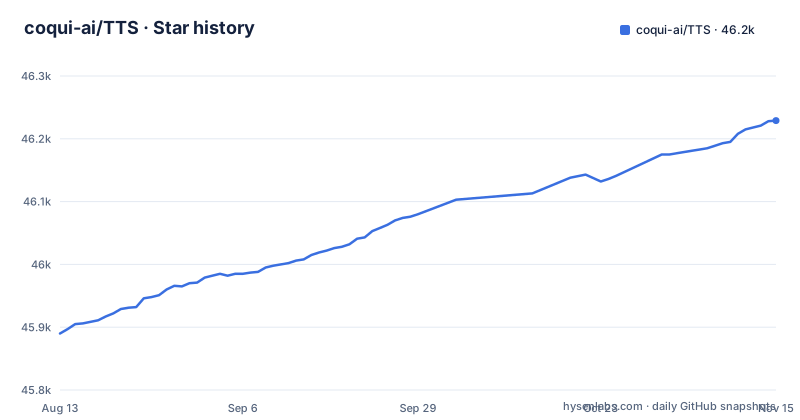
Star history
- coqui-ai/TTS46,229 ★ · +339
| Repository | 2026-08-13 | 2026-11-15 |
|---|---|---|
| coqui-ai/TTS | 45.9k | 46.2k |
339 Stars in the last 94 days, measured from the daily GitHub snapshot. Compare with other projects
Editorial analysis
What Coqui TTS Solves and Who It's For
Coqui TTS addresses a broad problem: giving developers and researchers a single Python library to build, train, and deploy text-to-speech systems. Instead of juggling separate codebases for each model architecture, you get a unified toolkit with spectrogram models, end-to-end models, vocoders, and speaker encoders. The README claims pretrained models in over 1100 languages, which is a huge draw for multilingual projects. This is for two audiences: researchers who want to experiment with different TTS architectures and compare them, and engineers who need to synthesize speech from text using pretrained models or fine-tune existing ones. If you need a specific model like XTTS for voice cloning or VITS for end-to-end synthesis, Coqui TTS packages them under one API, saving integration time.
How It Works: Architecture and Models
The toolkit is modular by design. It separates the TTS pipeline into distinct stages: spectrogram models that convert text to intermediate spectrograms, vocoders that turn spectrograms into waveforms, and end-to-end models that go directly from text to audio. For example, Tacotron2 is a spectrogram model, while VITS and YourTTS are end-to-end. This modularity means you can mix and match, like pairing a Tacotron2 spectrogram model with a HiFiGAN vocoder. The library also includes a speaker encoder (GE2E, Angular Loss) to compute speaker embeddings for multi-speaker synthesis and voice cloning. The Trainer API is described as "efficient, flexible, lightweight but feature complete," suggesting it handles training loops, logging, and checkpointing. Data curation tools under dataset_analysis help you prepare datasets. This architecture is a strength: you can switch components without rewriting your entire pipeline.
Getting Started: Installation and Basic Usage
The README states that Coqui TTS is tested on Ubuntu 18.04 with Python >= 3.9 and < 3.12. The easiest path is to install from PyPI: pip install TTS. This is for inference only, using released models. For training or fine-tuning, you likely need to clone the repository and install dependencies manually, though the README is truncated before giving exact training commands. The documentation on ReadTheDocs covers inference and training. A typical inference script would import TTS and load a model, but the README does not provide a full code example in the visible portion. You should check the official docs for the exact API. The installation constraint on Python version is a real limitation: if you are on Python 3.12 or newer, you will need to downgrade or use a virtual environment.
Where It Falls Short: Maintenance and Python Constraints
The most glaring limitation is the project's maintenance status. The last release, v0.22.0, was on December 12, 2023, and the default branch is dev. The repository is not archived, but a long gap with no releases suggests the maintainers may have moved on. This matters because TTS is a complex library with many dependencies, and without updates it can break with newer versions of PyTorch or other packages. The Python version restriction (>=3.9, <3.12) is another constraint. If your environment uses Python 3.12, you cannot install it without modifications. Also, the repository description says "battle-tested in research and production," but there is no evidence of production support or SLAs. For a production system, you would be relying on a community that may not be active.
Alternatives: What Else to Consider
The README itself does not compare Coqui TTS with other toolkits. It does point to the upstream projects behind some of the models it wraps, Tortoise and Bark, and to the Fairseq collection of roughly 1100 models.
Licensing and Upgrade Considerations
Coqui TTS is licensed under MPL-2.0, which is a weak copyleft license. This means you can use it in proprietary software as long as you comply with the license terms, such as making source code for modifications available. It is not a permissive license like Apache 2.0, so legal review is advised if you plan to modify the library itself. For upgrades, the last release is v0.22.0, and the README links a Road Map (main development plans) issue. The development branch is dev, which suggests ongoing work, but without releases, upgrading may require pulling from the dev branch, which can be unstable. You should pin your dependency to a specific version and test thoroughly before upgrading, but with no new releases, you are stuck with the current version or the dev branch. This is a significant consideration for long-term projects.
Who Should Use It and Who Should Avoid It
Use Coqui TTS if you are a researcher who wants to experiment with multiple TTS architectures without learning a new API for each, or if you need a specific model like XTTS for multilingual voice cloning and you can handle the maintenance risk. Avoid it if you are building a production system that requires long-term support, frequent updates, or compatibility with the latest Python versions. Also avoid it if you need a simple, lightweight TTS solution; Coqui TTS is a heavyweight library with many dependencies. If you are new to TTS and just want to synthesize speech quickly, the README suggests installing from PyPI and using the released models. Before adopting, verify that the models you need work with your hardware and that you can get support from the community, as the official maintainers may not be responsive.
Editorial conclusion
Adopt Coqui TTS if you need a flexible, research-oriented TTS library with many model options and training capabilities, and you are comfortable with a project that has not seen a release since December 2023. Do not adopt it if you require active maintenance, frequent updates, or production support, as the repository shows signs of stalled development. Before adopting, verify that the models you need (like XTTS or VITS) work with your Python version (>=3.9, <3.12) and that the community or your team can address issues, since the official maintainers may not respond promptly. Check the GitHub issues and discussions for recent activity to gauge the current state of support.
Frequently asked questions
What is Coqui TTS used for?
It is a library for advanced text-to-speech generation, with pretrained models in more than 1100 languages, tools for training new models and fine-tuning existing models in any language, and utilities for dataset analysis and curation. The released flagship is XTTS, described as a production model that can speak 13 languages, with XTTSv2 announced separately at 16 languages, and Bark is available for inference with unconstrained voice cloning.
What is the quality of Coqui TTS?
The project answers this on a TTS Performance page whose own note says the underlined TTS* and Judy* entries are internal models that are not released open-source and are shown to indicate potential, while models prefixed with a dot, such as .Jofish, .Abe and .Janice, are real human voices.
Is Coqui TTS open-source?
The repository is under the MPL-2.0 with LICENSE.txt in the tree, and the code plus most models are published, although the performance page explicitly marks some models as unreleased. The more consequential detail is the timeline: the newest release is v0.22.0 from 2023-12-12 and the last push to the repository was on 2024-08-16, so an open licence sits on code that has not been touched in over two years.
how to use coqui ai tts
Install from PyPI if you only want to synthesize speech with the released models, and check your interpreter first, because setup.py raises a RuntimeError unless you are on Python 3.9 up to but not including 3.12. The toolkit is tested on Ubuntu 18.04, and the system level dependencies it expects are espeak-ng and libsndfile1, both of which the Dockerfile installs alongside gcc, g++ and make before running make install.
Is voice AI TTS free?
The library carries the MPL-2.0 licence and installs from PyPI with no paid tier, so the cost is compute rather than licence. The dependency list requires torch>=2.1 and torchaudio, the default container base is nvidia/cuda:11.8.0-base-ubuntu22.04, and the training story is built around detailed logs on the terminal and Tensorboard plus a Trainer API, which means hardware is where the bill lands.
coqui ai tts alternative
The repository does not point at a replacement. What it does point at is the upstream projects behind two of the models it wraps, tortoise-tts and the Bark repository from suno-ai, plus the Fairseq collection of roughly 1100 models, so those are the places to look if you want one model rather than a research framework spanning dozens of architectures.
Official sources
Where this project is recommended
Add this badge to your README
If you maintain this project, the badge below links readers to this analysis and shows its maintenance status from the daily GitHub snapshot. Paste the markdown into your README; add ?metric=license or ?metric=stars to the image URL for a different field.

[](https://hysenlabs.com/projects/coqui-ai-tts)Star history chart for your README
[](https://hysenlabs.com/projects/coqui-ai-tts)Was this useful?