RokTracker: A Tesseract and ADB based stats scanner for Rise of Kingdoms
Open Source Rise of Kingdoms Stats Management Tool. Track TOP X Players of kingdom / alliance / honor leaderboard.
At a glance
- What is it?
- RokTracker is an open source Windows tool that turns Rise of Kingdoms leaderboards into spreadsheets, using OCR and Android Debug Bridge. It is practical for top X tracking, but its setup and game-specific constraints make it a niche tool for dedicated players.
- Who is it for?
- Adopt RokTracker if you are a Rise of Kingdoms player who runs Bluestacks 5 on Windows, needs periodic top X snapshots of kingdom, alliance, or honor rankings, and can tolerate a fiddly OCR setup. Do not adopt it if you expect a turnkey tool, need cross-platform support, or want reliable governor ID tracking for alliance and honor scans, as those are explicitly approximate.
- Can I use it commercially?
- Yes. MIT is a permissive licence: you can use, modify and sell software built on it, as long as you keep its copyright and licence notices.
- Is it still maintained?
- Yes. The repository last received commits 128 days ago.
- What is it written in?
- Mainly Python, according to GitHub's language statistics.
Answers come from the project's GitHub data, last synced on October 22, 2026, and from our analysis. They are not legal advice.
Star history
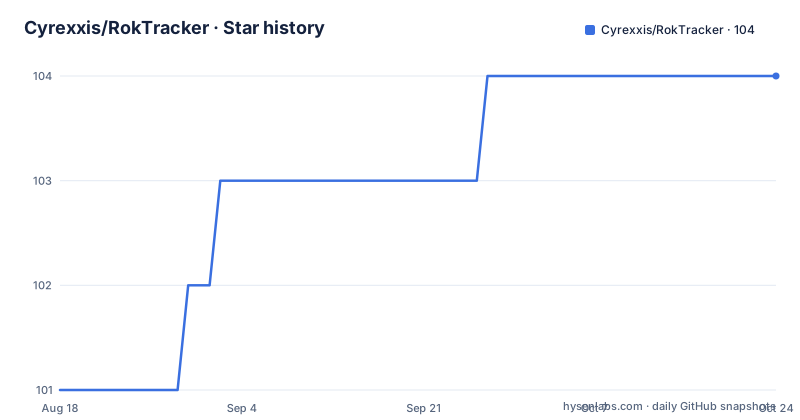
- Cyrexxis/RokTracker104 ★ · +3
| Repository | 2026-08-18 | 2026-10-22 |
|---|---|---|
| Cyrexxis/RokTracker | 101 | 104 |
3 Stars in the last 65 days, measured from the daily GitHub snapshot. Compare with other projects
Editorial analysis
What RokTracker actually does
RokTracker solves a narrow problem: it reads the on-screen leaderboards of Rise of Kingdoms and turns them into spreadsheet rows. The README describes it as a stats management tool for tracking TOP X players in kingdom, alliance, and honor rankings. The output differs by scan type. A kingdom scan produces a rich row: Governor ID, Governor Name, Power, Kill Points, Ranged Points, T1-T5 Kills, Total Kills, T4+T5 Kills, Dead Troops, RSS Gathered, RSS Assistance, Helps, and Alliance name. Honor, alliance, and seed scans produce only a name and a score, because the game does not guarantee name accuracy. The tool saves a screenshot of the name as a fallback. That distinction matters: if you need governor IDs for alliance or honor data, this tool will not give them to you. It is a scanner, not a full analytics platform. It is for players who want a periodic snapshot of who is on top, not for deep historical analysis.
How the scanning mechanism works
The tool does not read game data directly. It drives an Android emulator through ADB and reads the screen with Tesseract OCR. The README lists ADB Platform Tools and tessdata as required dependencies, and the Bluestacks settings require ADB to be enabled. The scanner takes screenshots of the leaderboard, runs OCR to extract names and numbers, and writes the results to an xlsx file. For kingdom scans, it also validates kill values: it checks that kills match kill points, and suspicious entries are saved to a manual_review folder with an F prefix. There is an optional kill reconstruction feature that tries to recover wrong kill values, saving those with an R prefix. Inactive accounts that cannot be clicked are skipped automatically, and screenshots can be saved to an inactives folder. The scanner uses the clipboard to read names, which is why the README warns against copying text during a scan. This OCR and clipboard approach is fragile by nature, but it is the only way to get data from a game that offers no public API.
Installation: two paths, both with manual steps
There are two installation routes. The simple one downloads a released .exe and requires no Python. The advanced one clones the source and runs with Python 3.14+ or uv. Both require two external downloads: tessdata trained data and ADB Platform Tools, which must be placed into deps/tessdata and deps/platform-tools. The README gives concrete commands for the advanced route: uv sync to install dependencies, then uv run scanner_console.py for the CLI or uv run scanner_ui.py for the GUI. The CLI presents an interactive menu to choose the scan type. The GUI has tabs for Kingdom and Rankings. Before running, you must configure Bluestacks 5 with resolution 1600x900, DPI 450, and ADB enabled. The config folder contains config.json for global settings, plus per-scan-type default files: kingdom_defaults.json, seed_defaults.json, alliance_defaults.json, honor_defaults.json, and gui_config.json. In v6, the config was restructured from a single file to this folder, and v5 configs are not compatible. That is a real migration cost if you are upgrading.
The Bluestacks and ADB dependency chain
The tool is tightly coupled to Bluestacks 5. The README specifies exact display settings: resolution 1600x900 and DPI 450, with ADB enabled. The scanner assumes ADB port 5555 by default, but it can auto-detect the port if you set bluestacks_config in config/config.json to the location of bluestacks.conf, typically C:\ProgramData\Bluestacks_nxt\bluestacks.conf. The instance name must match, and the scanner asks for it interactively. Not every Bluestacks variant has a config file, which the README acknowledges is not a scanner limitation but a property of the installed Android or Bluestacks version. In those cases, port 5555 is likely. This dependency chain means the tool will not work with other emulators, and it will break if Bluestacks changes its ADB behavior. If you already run Bluestacks for playing, this is convenient. If you do not, you are installing an emulator purely to feed this scanner.
Scan preparation constraints you cannot skip
The README lists several hard requirements for a successful scan. Your active character must be in Home Kingdom, otherwise KvK players from other kingdoms get included. You must start the scanner from the top of the ranking page and not scroll during the scan. For kingdom scans, your rank must be lower than the number of players you want to scan; the example says you cannot scan top 100 if you are ranked 85, so an alt account may be needed. The resume scan feature starts from the governor currently visible on screen, specifically the fourth one down. The game language must be English, or inactive governor detection breaks. Chinese characters may not render in CMD but will appear in the export file. And you must avoid copying text during the scan because the scanner uses the clipboard to read names. These are not minor tweaks; they are operational rules that affect data quality. A user who forgets to switch to Home Kingdom will get a polluted dataset.
What v6 changed and what it means for you
Version 6.0.0, released on 2026-06-15, introduced breaking changes. The single config.json was replaced with a config folder containing multiple files, and the four separate scanner entry points were merged into scanner_console.py and scanner_ui.py. The CLI now presents an interactive menu to select the scan type. The release notes also mention more config options, UI positions no longer hard coded and moved to config/internal/*.json, support for Acclaim, and a new GUI with theme support. For an existing user of v5, this means a configuration migration is required; v5 configs are not compatible. The good news is that the unified scanner reduces duplication. The bad news is that the config split adds more files to manage, and the internal UI positions file suggests that even UI layout is now part of the config surface. This is a tool that expects its users to read documentation and edit JSON files.
Maintenance, license, and upgrade considerations
The project is under the MIT license, which is permissive and allows commercial use and modification, but the README does not describe any contribution or maintenance process. The repository shows recent activity with v6.0.0 pushed on 2026-06-15 and several patch releases before it, so the project appears actively maintained, but there is no changelog beyond the breaking changes summary. The README notes that this is a heavily modified version of a tool by nikolakis1919, so the maintenance burden depends on the original upstream as well. Upgrade cost is real: v6 requires a config migration, and the README warns that v5 configs are not compatible. You also need to keep tessdata and platform-tools up to date, and the tool depends on Bluestacks and Tesseract versions. If those dependencies change, the scanner may break. There is no mention of automated tests or CI, so regressions are possible. For a tool that produces data you might use for decisions, that is a risk to accept consciously.
Alternatives: manual screenshots versus other scrapers
The obvious alternative is doing nothing: take screenshots of the leaderboard manually and type the numbers into a spreadsheet. That is slow and error-prone, but it has zero setup and no dependency on Bluestacks or OCR. Another alternative is a different OCR-based scraper, but the README does not name any, and the general approach of screen scraping via ADB is common for mobile games. A more robust alternative would be a tool that uses the game's memory or network traffic, but those are typically against terms of service and are not open source. The key difference with RokTracker is that it is open source and MIT licensed, so you can inspect and modify the OCR logic. Manual screenshots give you full control but no automation. A closed scraper might be more accurate but gives you no visibility into how it works. RokTracker sits in the middle: automated but fragile, transparent but requiring manual configuration.
Editorial conclusion
Adopt RokTracker if you are a Rise of Kingdoms player who runs Bluestacks 5 on Windows, needs periodic top X snapshots of kingdom, alliance, or honor rankings, and can tolerate a fiddly OCR setup. Do not adopt it if you expect a turnkey tool, need cross-platform support, or want reliable governor ID tracking for alliance and honor scans, as those are explicitly approximate. Before committing, verify that your Bluestacks instance uses ADB port 5555 or that you can point config.json at bluestacks.conf, that your game language is set to English, and that your active character is in Home Kingdom before each scan. Also confirm Python 3.14 or uv is available if you choose the advanced installation. The v6 config restructure means v5 configs will not carry over, so plan a fresh configuration.
Frequently asked questions
How do I install RokTracker without Python?
Download the latest RoK Tracker.zip release, extract it, and place tessdata into deps/tessdata/ and ADB Platform Tools into deps/platform-tools/. Then configure Bluestacks 5 at resolution 1600x900 with DPI 450 and ADB enabled, adjust the config files, and run the .exe.
What does RokTracker do with kill counts that do not add up?
A kingdom scan validates kills against kill points. Items that fail are saved to manual_review/ with an F prefix and a warning is logged, and the optional kill reconstruction writes recovered values to the same folder with an R prefix.
Can RokTracker run with Python instead of the exe?
Yes, on Python 3.14 or newer, or with uv. Install dependencies with uv sync, then run uv run scanner_console.py for the interactive CLI or uv run scanner_ui.py for the GUI. On Windows the Build Tools for C++ may also be required.
Why does my RokTracker scan come back with wrong or missing names?
Governor names are approximate because the game does not guarantee name accuracy, and a screenshot of each name is saved for that reason. Governor ID is not tracked on honor, alliance and seed rankings, which return only name and score.
What is in the RokTracker config folder after the version 6 upgrade?
Six files: config.json for global settings, four per-scan default files for kingdom, seed, alliance and honor scans, and gui_config.json for the default theme. Version 5 configuration is not compatible with version 6.
Official sources
Add this badge to your README
If you maintain this project, the badge below links readers to this analysis and shows its maintenance status from the daily GitHub snapshot. Paste the markdown into your README; add ?metric=license or ?metric=stars to the image URL for a different field.

[](https://hysenlabs.com/projects/cyrexxis-roktracker)Star history chart for your README
[](https://hysenlabs.com/projects/cyrexxis-roktracker)