MessagePipe: .NET and Unity pub/sub messaging with DI-first design
High performance in-memory/distributed messaging pipeline for .NET and Unity.
At a glance
- What is it?
- MessagePipe is a .NET and Unity messaging library covering Pub/Sub, CQRS mediator, and IPC-RPC through a dependency-injection-first API with zero-allocation publish operations. Its distributed mode requires Redis or NATS set up separately, and a bundled Roslyn analyzer catches subscription leaks at compile time.
- Who is it for?
- MessagePipe suits .NET and Unity teams already using Microsoft.Extensions.DependencyInjection or VContainer who want Pub/Sub, CQRS mediator, or IPC-RPC without pulling in Reactive Extensions. Skip it if your team is already on Rx.NET and the Subject pattern is sufficient.
- Can I use it commercially?
- Yes. MIT is a permissive licence: you can use, modify and sell software built on it, as long as you keep its copyright and licence notices.
- Is it still maintained?
- Yes. The repository last received commits 9 days ago.
- What is it written in?
- Mainly C#, according to GitHub's language statistics.
Answers come from the project's GitHub data, last synced on October 23, 2026, and from our analysis. They are not legal advice.
Star history
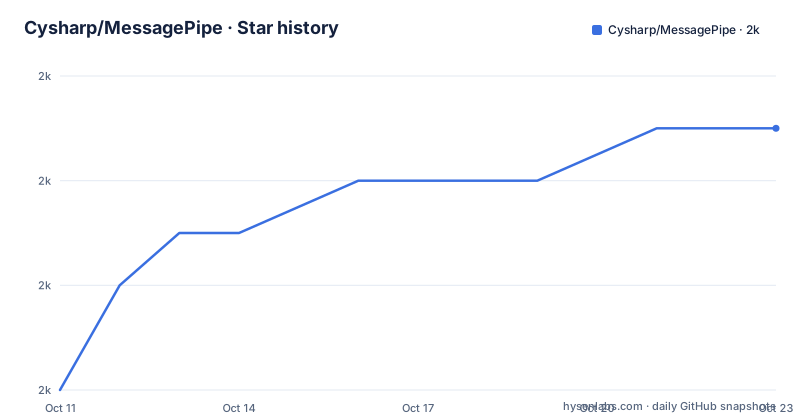
- Cysharp/MessagePipe2,005 ★ · +5
| Repository | 2026-10-11 | 2026-10-23 |
|---|---|---|
| Cysharp/MessagePipe | 2k | 2k |
5 Stars in the last 12 days, measured from the daily GitHub snapshot. Compare with other projects
Editorial analysis
Pub/Sub, CQRS mediator, and IPC-RPC from a single .NET and Unity library
MessagePipe covers in one library what .NET projects typically spread across multiple packages. Pub/Sub is the foundation. The same API also handles the mediator layer used in CQRS architectures, EventAggregator-style decoupling for view and view-model communication, and RPC over interprocess channels. That scope means fewer decisions about which messaging library to reach for in a given context.
The library works on .NET and Unity. For .NET it integrates with Microsoft.Extensions.DependencyInjection, the DI container used in ASP.NET Core, MAUI, WPF, and the .NET Generic Host. For Unity, it supports VContainer, Zenject, or the project's own Builtin Tiny DI. That alignment with existing host infrastructure means teams using ASP.NET Core or ConsoleAppFramework can add MessagePipe without introducing a separate DI container.
The feature matrix covers most messaging topology variations: sync and async, keyed and keyless, buffered and bufferless, singleton and scoped lifetimes, broadcast and request/response. That breadth is useful when a project needs several different messaging patterns in different parts of the codebase without switching between libraries. The Unity and .NET codepaths share the same interface contracts, which matters for projects that share logic across both targets.
IPublisher<T> and ISubscriber<T> resolve through the DI container like any other service
Requesting IPublisher<T> or ISubscriber<T> from the DI container follows the same injection pattern as any other typed service in a .NET host. The broker wiring is invisible to the consuming class.
The type parameter T is the message type and acts as the channel identifier. Publishers and subscribers for the same T connect through the DI container automatically. Any C# type parameter works as the message type, from an int to a domain event class. This model avoids the string-keyed event bus pattern where event names are stringly typed and typos are silent failures.
For cases where the same message type needs routing to different recipients, the keyed interface IPublisher<TKey, TMessage> and ISubscriber<TKey, TMessage> adds a second type parameter as a topic discriminator. The real-world example in the README involves a Blazor frontend and a Unity backend communicating through MagicOnion, where each browser connection has a Guid ID and events need routing per connection. A publisher injected with IPublisher<Guid, UnitEventData> sends to only the subscriber holding the matching Guid, not to all active connections. That pattern avoids a shared broadcast channel when tenants or sessions need isolation.
Install from NuGet and register with AddMessagePipe() in ConfigureServices
For .NET, the package is MessagePipe on NuGet. For Unity, see the Unity section of the README for the separate setup steps specific to Unity DI containers.
The AddMessagePipe extension method runs inside the standard host builder setup. One call registers all required services:
using MessagePipe;
using Microsoft.Extensions.DependencyInjection;

Host.CreateDefaultBuilder()
    .ConfigureServices((ctx, services) =>
    {
        services.AddMessagePipe(); // AddMessagePipe(options => { }) for configure options
    })
After registration, IPublisher<T> and ISubscriber<T> are available for injection anywhere in the application. Sending a message calls publisher.Publish(new MyEvent()); receiving attaches a handler via subscriber.Subscribe(). Unsubscribing does not require a matching unsubscribe call: Dispose on the returned IDisposable handles it. The README notes that every subscription must be disposed when completed, and that keeping them alive after use is the most common leak pattern in subscriber code.
DisposableBag manages composite subscription cleanup; the Roslyn analyzer catches leaks at build time
Managing many subscriptions with individual IDisposable references becomes error-prone in components with multiple event sources. DisposableBag solves this by collecting multiple disposables and releasing them all together. The README shows creating a bag, adding subscriptions with AddTo(), and building a single IDisposable from it:
var bag = DisposableBag.CreateBuilder();
subscriber.Subscribe(x => Console.WriteLine("here")).AddTo(bag);
disposable = bag.Build();
DisposableBag.Create(d1, d2) is also available for combining existing IDisposable instances directly without a builder. In the Blazor example in the README, the page's Dispose() method calls subscription?.Dispose() to release both event subscriptions when the browser closes the page.
A compile-time Roslyn analyzer ships alongside the package. It flags Subscribe calls where the IDisposable return value is discarded without being assigned to a variable or added to a DisposableBag. The README includes a screenshot of the analyzer diagnostic in action.
Default lifetime for the publisher/subscriber (called MessageBroker internally) is singleton. Scoped lifetime in MessagePipeOptions causes the DI container to handle disposal on scope exit, which makes subscription tracking in short-lived components unnecessary.
The filter pipeline intercepts Publish and Subscribe calls for cross-cutting concerns
MessagePipe's filter pipeline lets code run before and after each Publish or Subscribe call, similar to middleware in ASP.NET Core. Filters are classes that implement a specific interface and are registered in MessagePipeOptions. The README feature list names filter pipeline as a first-class feature alongside DI-first and sync/async support.
This pattern covers cross-cutting concerns like logging, authentication checks, message validation, or timing instrumentation. A filter can modify the message before it reaches subscribers, short-circuit delivery, or record timing data. Because filters are DI-managed services, they have access to the same dependencies as any other registered service, including database contexts or configuration objects.
The filter architecture is why MessagePipe describes itself as a pipeline rather than a bus or broker. The message travels through a configurable chain from publisher to subscriber, and each link in that chain has access to the full message context. That design makes the library worth considering for cases where transparent delivery from publisher to subscriber is not enough.
Redis on port 6379 and NATS on port 4222 back the distributed mode
MessagePipe's feature list includes in-memory, interprocess and distributed transport. The docker-compose.yml in the repository configures two external services for the distributed case: Redis at image version 6.2.1 on port 6379, and NATS (no version pinned) on port 4222. Those are the backends the project uses for integration testing.
Distributed messaging requires those external services to be running and accessible. The in-memory path has no external dependency, but moving to interprocess or distributed transport requires configuring the transport, which means setting up Redis or NATS separately from the library itself. The README does not enumerate the specific NuGet packages for each distributed transport, but the docker-compose.yml shows what the project's own tests rely on.
For Unity, the interprocess communication path enables RPC-style calls between a Unity application and a .NET backend, which is one of the use cases the README describes. The distributed mode is relevant when those two processes run on different hosts or when the application spans multiple server instances.
78x faster than Prism EventAggregator per README; no OnCompleted unlike Rx Subject
Two comparisons in the README place MessagePipe against common alternatives. The first is performance: two benchmark screenshots in the README show throughput against standard C# events and Prism's EventAggregator. The README gives a figure of 78 times faster than Prism's EventAggregator, with zero bytes allocated per publish. These figures come from the screenshots in the README, not an external benchmark suite.
The second comparison is with Reactive Extensions' Subject. OnCompleted is absent from MessagePipe's subscribe API, which is an intentional design decision. The absence is intentional. OnCompleted may or may not be used in practice, which makes it difficult to determine intent for the subscriber. With multiple publishers of different event types, handling duplicate OnCompleted signals is complex. Removing it simplifies the contract at the cost of incompatibility with the IObservable/IObserver protocol.
For teams already using Rx.NET, this incompatibility matters concretely. MessagePipe's subscribe callbacks are plain delegates rather than IObserver<T>, so Rx operators such as Select, Where and Throttle do not apply directly. The last push to the repository was on 2026-10-06. Version 1.8.2 was released on 2026-06-08. Prior to that, 1.8.1 was released on 2024-04-08 and 1.8.0 on 2024-03-29. The licence is MIT.
Editorial conclusion
MessagePipe suits .NET and Unity teams already using Microsoft.Extensions.DependencyInjection or VContainer who want Pub/Sub, CQRS mediator, or IPC-RPC without pulling in Reactive Extensions. Skip it if your team is already on Rx.NET and the Subject pattern is sufficient. The absence of OnCompleted is a deliberate design decision that changes how observable sequences terminate, so check whether that fits your existing event contracts before switching. Read CHANGELOG before upgrading to 1.8.2 from 1.8.1, since the gap between those two releases spans over two years and 1.8.2 was released on 2026-06-08.
Frequently asked questions
What is MessagePipe?
MessagePipe is a .NET and Unity messaging library with a DI-first API. It covers Pub/Sub, CQRS mediator, EventAggregator, and IPC-RPC from one package, with zero memory allocation per publish operation and a Roslyn analyzer for catching subscription leaks.
How do I install MessagePipe in a .NET project?
Add the MessagePipe package from NuGet to your project, then call services.AddMessagePipe() in ConfigureServices to register all required services. The README has separate instructions for Unity under the Unity section.
Does MessagePipe work with Unity?
Yes. For Unity, MessagePipe supports VContainer, Zenject, or the project's own Builtin Tiny DI instead of Microsoft.Extensions.DependencyInjection. The README has a dedicated Unity section for setup details.
How is MessagePipe different from Reactive Extensions (Rx.NET)?
MessagePipe has no OnCompleted, which is a deliberate design decision explained in the README. Subscribe returns IDisposable rather than requiring IObserver<T>, so Rx operators do not apply directly. The README benchmarks claim 78x better performance than Prism's EventAggregator.
What does MessagePipe use for distributed messaging?
The repository's docker-compose.yml shows Redis at version 6.2.1 on port 6379 and NATS on port 4222 as the backends used for distributed mode integration testing.
Official sources
Add this badge to your README
If you maintain this project, the badge below links readers to this analysis and shows its maintenance status from the daily GitHub snapshot. Paste the markdown into your README; add ?metric=license or ?metric=stars to the image URL for a different field.

[](https://hysenlabs.com/projects/cysharp-messagepipe)Star history chart for your README
[](https://hysenlabs.com/projects/cysharp-messagepipe)Was this useful?