daily.dev keeps its web app and browser extension in one monorepo
daily.dev application suite
At a glance
- What is it?
- The daily.dev application suite is a pnpm monorepo holding a Next.js web app, a browser extension, and a shared package that both consume, so a feature can ship in both places without a port. The repository also documents an unusual supply chain policy that delays new dependency releases by seven days.
- Who is it for?
- daily.dev's app suite suits a team that ships the same product as a website and a browser extension and wants one codebase to keep them in step, and it suits developers who want to read a well documented pnpm and Next.js monorepo. It is the wrong choice if you want to lift a reusable component out of it, because the shared package is written for these two applications rather than published as a library, and a poor match if you cannot accept AGPL-3.0 for the codebase.
- Can I use it commercially?
- Yes, with strict conditions. AGPL-3.0 is a network copyleft licence: if people use a modified version over a network, for example as a hosted service, you must offer them its source code under the same licence.
- Is it still maintained?
- Yes. The repository last received commits 1 day ago.
- What is it written in?
- Mainly TypeScript, according to GitHub's language statistics.
Answers come from the project's GitHub data, last synced on November 7, 2026, and from our analysis. They are not legal advice.
Star history
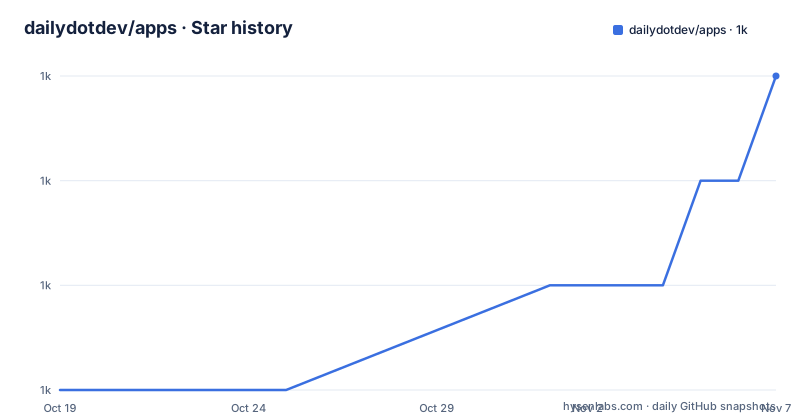
- dailydotdev/apps1,005 ★ · +3
| Repository | 2026-10-19 | 2026-11-07 |
|---|---|---|
| dailydotdev/apps | 1k | 1k |
3 Stars in the last 19 days, measured from the daily GitHub snapshot. Compare with other projects
Editorial analysis
Two front ends, one shared component library
The repository contains the daily.dev application suite, and the scope is stated plainly: the web app and the extension, along with shared components for the two. The web app is a Next.js project with more pages than the extension, including a registration page, a post page and a profile page. The extension is a browser extension project with its own webpack configuration for browser extensions and its own dedicated components.
The reason for putting both in one repository is spelled out too. By using a monorepo approach, the team can easily share code and maintain consistency across the different parts of the application suite, and the decision was made to allow faster iterations and to keep features parity in both platforms.
That parity goal is the interesting constraint. A browser extension and a website have different surfaces, different permissions and different lifecycles, and the usual outcome is that the two drift apart, with a fix landing in one and not the other. Putting the shared parts in one package and building both from it does not remove the drift, but it moves the duplicated work into a place where a single change updates both.
The toolchain follows from the setup. Node v24.18 is required, with a .nvmrc provided for nvm users, and pnpm 10.33.4 with workspaces manages the monorepo and its dependencies. The root package is private and named daily-apps, and the package manager is pinned to a specific pnpm version with a hash, so every contributor and every CI run uses the same tool.
The packages directory tells you where a change belongs
The package list is short and each entry answers the question of where a piece of work goes.
The shared package is the main one, and the rule for it is stated as a policy: every component that needs to be used on both platforms should be placed in this project. It includes the design system components, custom hooks, and more. So the design system, which is where a colour or spacing change would land, is shared code by default rather than something each app maintains.
The eslint-config package holds shared ESLint settings for consistent code quality, and eslint-rules is a custom ESLint plugin defining project specific rules, including a rule to enforce consistent colour usage. That last one is a small design decision with a large effect in a codebase with two themes and a design system: enforcing token use in lint rather than in review is what keeps a palette from drifting apart between the extension and the site.
The prettier-config package holds shared Prettier settings for all projects in the repository, and the storybook package is the Storybook configuration used to develop and showcase UI components in isolation. Storybook is doing real work here: a component that has to serve both a web app and an extension needs to be viewable on its own, and a screenshot or visual regression check of a shared component is only possible if the component can be rendered outside both applications.
That leaves the two application packages, extension and webapp, as the only places where platform specific code belongs.
Bootstrapping with nvm, corepack and a pinned pnpm
The repository documents a bootstrap sequence to run after cloning, and the order matters because each step depends on the previous one:
nvm use
corepack enable
corepack prepare [email protected] --activate
pnpm install
nvm use reads the .nvmrc and switches to the Node version the project expects, corepack enable turns on the package manager shim, corepack prepare pins the exact pnpm version the project uses, and pnpm install then resolves the workspace.
That pinning is not incidental. The root manifest records the package manager as [email protected] with a hash, and the supply chain section of the project documentation warns that older pnpm versions do not enforce the release cooldown setting the repository relies on. If you install a different pnpm, you silently lose one of the project's safety properties, which is the reason the sequence is written out rather than left to a package manager default.
Two details make the install work in unusual environments. The manifest's prepare script runs corepack enable and then copies worktree files if the helper script is present, and the project documentation explains the worktree setup in detail. New git worktrees receive the gitignored local files listed in .worktreeinclude, which are the webapp's local environment file and the development certificates, copied from the main checkout. Claude Code does this natively when it creates a worktree, and for a plain git worktree add the pnpm install step performs the copy, or you can run pnpm worktree:setup in a worktree that already has node_modules. The instruction to add new local only files to .worktreeinclude as plain paths, and never commit them, is the rule that keeps development secrets out of history.
For local infrastructure there is a docker-compose.yml with Postgres, Redis and the API service, and a Tiltfile and wait-for.sh at the root, so the same definition can be driven by Tilt for a repeatable development stack.
Loading the extension unpacked, and the conflict to avoid
Running the extension locally is a short procedure, and the project gives the Chrome case as the example. The dev server is started from the root directory with a filtered command:
pnpm --filter extension devThen in Chrome you open chrome://extensions/, enable Developer mode in the top right corner, click Load unpacked and select the packages/extension/dist/chrome folder. The extension should appear in the list, and you enable it from there.
Two cautions in that list are practical rather than ceremonial. You are told to disable the extension when you are done, and to disable the production extension if you have it installed, since it might cause conflicts. Both are about the same fact: the local build and the published extension are the same extension, and having both active means the same feature appears twice, or that one silently wins.
The build output path is the other detail worth noting, because packages/extension/dist/chrome is the artefact the browser loads, and the fact that the build is webpack based for browser extensions is what produces that layout. The extension package therefore has its own webpack configuration, separate from the Next.js build of the web app, even though the two share a component library.
For end to end coverage the root manifest exposes Playwright scripts, test:e2e, test:e2e:headed and test:e2e:ui, and the repository carries a CircleCI configuration alongside a GitHub workflow for end to end tests, so the browser extension is tested in a browser rather than only in unit tests.
Type checking comes in three strictness levels
The scripts in the root manifest are unusually explicit about type checking, and they describe a gradual tightening of the codebase rather than a single check.
The base level runs the typecheck script for the shared package, the web app and the extension in sequence. The strict level does the same with the typecheck:strict variant of each. A report variant runs the strict checks but always exits successfully, with each command guarded so a failure does not stop the others, which makes it usable as an informational report rather than a gate. And a fourth script, typecheck:strict:changed, runs a helper that only checks what changed, by invoking node ./scripts/typecheck-strict-changed.js.
That last one is the interesting piece. A strict check across a large codebase produces a backlog you cannot clear in one pull request, so the practical pattern is to require the strict check on changed files and report on the rest. It is a well known way to make a type system meaningful in an existing codebase, and having it as a script rather than a convention makes it enforceable in continuous integration.
The rest of the manifest shows the same attention to supply chain detail. There is a patched dependency for graphql-request at version 3.7.0 with the patch file kept in a patches/ directory, so a fork of a dependency is reviewed in the repository rather than applied in a build script. There is a package extension that widens the peer dependency of @next/bundle-analyzer to any next version. The development dependencies include eslint-plugin-unused-imports pinned to an exact version, 3.2.0, and the manifest is written so that unused imports are a lint failure rather than a matter of taste.
A seven day cooldown on new dependency versions
The most distinctive policy in this repository is a supply chain one, and it is documented at length.
The repository delays newly published package versions for seven days through minimumReleaseAge: 10080 in pnpm-workspace.yaml, where the value is in minutes. The rules that follow from it are explicit. Keep using the pinned pnpm version from package.json, because older pnpm versions do not enforce the setting. Keep pnpm-lock.yaml committed, and use frozen-lockfile installs in CI. And avoid adding git or tarball dependencies unless they are reviewed explicitly.
The escape hatch is spelled out as well. If an urgent dependency update must bypass the cooldown, you add a temporary minimumReleaseAgeExclude entry in pnpm-workspace.yaml, review the package contents and provenance first, and remove the exception after the release ages out. That last clause is the part that makes the policy credible: the exception is temporary by design and leaves a trace in a committed file.
The reasoning is not stated as a narrative, but the shape of it is clear. A compromise of a newly published package version is most likely in the window right after publication, and a seven day delay means you are unlikely to be the first adopter of a bad release. The cost is real and worth naming: a critical security fix is also delayed by seven days, which is why the project provides the reviewed exception path rather than leaving teams to disable the setting wholesale.
The container build follows the same discipline. The Dockerfile starts from node:24.18-alpine, installs the build toolchain with apk add g++ make python3, enables corepack and prepares the same pinned pnpm before running pnpm install, so the image cannot drift from the developer's toolchain.
AGPL-3.0, an active main branch and a fast extension release train
The licence is AGPL-3.0, and for an application suite rather than a published library the practical effect is on anyone who wants to reuse the code. AGPL-3.0 is a strong copyleft licence with a network clause, so a modified version of this suite offered to users over a network has to be published under the same terms. For a company that wants to fork daily.dev's interface and keep the changes private, that is a serious constraint, and it is the first thing to check before planning any reuse.
The maintenance picture is healthy. The repository is not archived, and the last push was on 2026-10-19. The recent release tags are extension releases, v3.47.5 on 2026-09-25, v3.47.7 on 2026-10-12 and v3.47.8 on 2026-10-13, so the extension has its own version stream and ships several times a month, while the web app deploys continuously through the Vercel configuration at the repository root.
The repository contents also show how the team works. There are AGENTS.md and CLAUDE.md files at the root, alongside a.claude/ and a.cursor/ directory, which means the project has been set up deliberately for AI assisted development rather than merely tolerating it. A plans/ directory and a docs/ directory sit next to them, and a.cert directory holds development certificates, which is what the worktree file copying described earlier is about.
The local stack is defined in the compose file, with a Redis service on redis:6 configured for append only persistence, a Postgres service on postgres:15.4-alpine started with wal_level=logical, and an API service that waits for both to report healthy before it starts. The logical replication setting in the Postgres command is a detail that tells you the development environment mirrors the replication behaviour of the production database rather than running a stripped down version of it.
Editorial conclusion
daily.dev's app suite suits a team that ships the same product as a website and a browser extension and wants one codebase to keep them in step, and it suits developers who want to read a well documented pnpm and Next.js monorepo. It is the wrong choice if you want to lift a reusable component out of it, because the shared package is written for these two applications rather than published as a library, and a poor match if you cannot accept AGPL-3.0 for the codebase. Before adopting, read the packages directory to see where a change belongs, run the bootstrap commands with the pinned pnpm version, and check the extension path in the Chrome instructions so you do not load a stale production build alongside your local one.
Frequently asked questions
How do I set up the daily.dev apps monorepo locally?
After cloning, run nvm use to pick up the Node version from .nvmrc, then corepack enable, corepack prepare [email protected] --activate and pnpm install. The pinned pnpm version matters, because older versions do not enforce the repository's dependency release cooldown.
How do I run the daily.dev browser extension locally?
Start the dev server with pnpm --filter extension dev, open chrome://extensions/ in Chrome, enable Developer mode, then use Load unpacked and select the packages/extension/dist/chrome folder. The documentation advises disabling the production extension at the same time to avoid conflicts.
What is the minimumReleaseAge setting in the daily.dev apps repository?
It delays newly published package versions by seven days, configured as minimumReleaseAge: 10080 in pnpm-workspace.yaml. An urgent update can bypass it with a temporary minimumReleaseAgeExclude entry after reviewing the package contents and provenance, and the exception is removed once the release ages out.
Which package should shared components go in?
The shared package, which holds the design system components, custom hooks and other code used by both platforms. The project states that every component needed on both platforms should be placed there, with the webapp and extension packages reserved for platform specific code.
Official sources
Add this badge to your README
If you maintain this project, the badge below links readers to this analysis and shows its maintenance status from the daily GitHub snapshot. Paste the markdown into your README; add ?metric=license or ?metric=stars to the image URL for a different field.

[](https://hysenlabs.com/projects/dailydotdev-apps)Star history chart for your README
[](https://hysenlabs.com/projects/dailydotdev-apps)Was this useful?