SQLBot: A Docker-Packaged Text-to-SQL Server with RAG and Workspace Isolation
An LLM- and RAG-based intelligent data Q&A system for conversational data analysis. Text-to-SQL generation via LLMs using RAG.
At a glance
- What is it?
- SQLBot is an open-source, Docker-deployable system that turns natural-language questions into SQL and charts, using LLMs and RAG. It targets teams that want a self-hosted ChatBI layer without building prompt pipelines from scratch.
- Who is it for?
- Adopt SQLBot if you need a self-hosted, Docker-run ChatBI layer that offers workspace-level data isolation, and if you can accept the FIT2CLOUD license restrictions on logo and copyright. Avoid it if you require a pure open-source license like Apache 2.0, or if your data sources are not among the supported connectors.
- Can I use it commercially?
- Check first. The repository uses a licence we do not classify automatically, so read its LICENSE file before any commercial use.
- Is it still maintained?
- Yes. The repository last received commits 1 day ago.
- What is it written in?
- Mainly JavaScript, according to GitHub's language statistics.
Answers come from the project's GitHub data, last synced on November 13, 2026, and from our analysis. They are not legal advice.
Star history
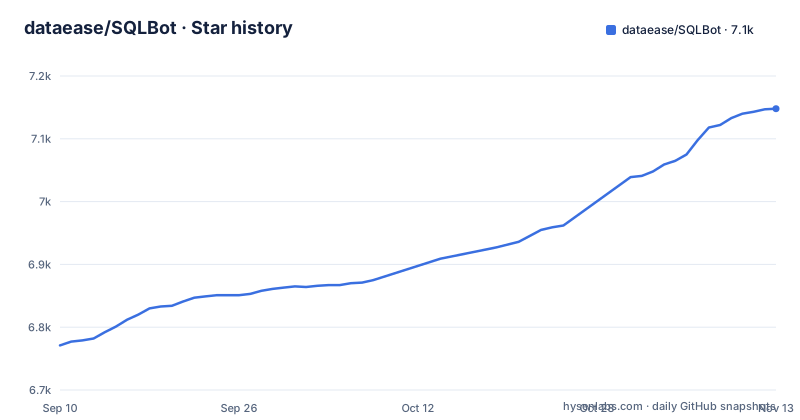
- dataease/SQLBot7,148 ★ · +377
| Repository | 2026-09-10 | 2026-11-13 |
|---|---|---|
| dataease/SQLBot | 6.8k | 7.1k |
377 Stars in the last 64 days, measured from the daily GitHub snapshot. Compare with other projects
Editorial analysis
What SQLBot Actually Does
SQLBot is a conversational data analysis system, often called ChatBI. It takes a natural-language question, converts it to SQL via a large language model, executes that SQL against your data source, and returns both the result and a visualization. The project comes from the DataEase open-source group, and the README lists other FIT2CLOUD projects including a BI tool, a Linux panel, and an agent platform. SQLBot is not a library or a framework. It is a ready-to-run server that you deploy with Docker. The intended user is a team that wants to give non-technical colleagues a chat interface to their database, without building the prompt engineering, RAG retrieval, and SQL execution plumbing themselves. The README stresses that configuration is simple: point it at an LLM provider and a data source, and you get question-and-answer over data. That positioning distinguishes it from Text-to-SQL libraries that only generate SQL strings and leave execution and visualization to you.
How the RAG and LLM Pipeline Is Supposed to Work
The README includes a diagram titled '工作原理' (working principle), but the actual image is not described in text. What we can infer from the listed features is that SQLBot relies on RAG to improve Text-to-SQL quality. The 'core advantages' section mentions custom prompts, a terminology library, and the ability to maintain SQL examples to calibrate logic. That suggests a retrieval step where relevant schema metadata, business terms, and example queries are fetched and injected into the LLM prompt before SQL generation. The phrase '越问越准' (gets more accurate the more you ask) implies that user interaction data can be fed back into the system for iterative improvement. However, the README does not specify how that feedback loop is implemented, what embedding model is used, or how the retrieval index is updated. If you are evaluating SQLBot for accuracy, you should look for a separate architecture document or inspect the source code, because the README gives only a high-level promise.
Deployment: One Docker Command, But With Privileged Mode
The quick start is a single docker run command. It maps ports 8000 and 8001, mounts volumes for Excel files, uploaded files, images, logs, and PostgreSQL data, and runs with --privileged=true. The image is dataease/sqlbot from Docker Hub. After starting, you open http://<server-ip>:8000 and log in with admin / SQLBot@123456. That default credential is a security risk if the server is exposed to the internet, and the README does not mention forcing a password change. The command also mounts ./data/postgresql to /var/lib/postgresql/data, which implies that SQLBot bundles its own PostgreSQL instance for internal metadata storage. The use of --privileged=true is worth questioning. Privileged mode gives the container broad access to the host kernel, which is a common but heavy-handed way to handle certain filesystem or network operations. For a production deployment, you may want to investigate why it is required and whether it can be dropped or replaced with specific capabilities. The README also mentions a 1Panel app store installation and an offline installer for intranet environments, which is useful if your network cannot reach Docker Hub.
LLM Provider Compatibility: OpenAI-Compatible Is the Rule
The README does not list supported model providers; it says only that you configure a large model and a data source to get started. Still, the README does not show the actual configuration form or environment variables, so you will need to consult the installation documentation or the UI to see how to set the endpoint.
Security and Multi-Tenancy: Workspace Isolation and Fine-Grained Permissions
One of the strongest selling points in the README is '安全可控' (safe and controllable). It claims workspace-level resource isolation, which creates clear data boundaries, and supports fine-grained data permission configuration. That is a meaningful feature for enterprises where different departments should not see each other's data. The README does not explain how these permissions are defined: whether they are row-level, column-level, or table-level. It also does not mention whether the permissions are enforced in the generated SQL or at the application layer. Given that SQLBot executes SQL on your data source, the enforcement point matters. If the LLM generates a query that bypasses a permission filter, the isolation could be broken. You should verify this in the source code or by testing with a restricted user. The 'workspace' concept suggests that each workspace has its own data source connections and perhaps its own terminology library. That would allow different teams to have different business glossaries, which is a sensible design for a multi-tenant ChatBI tool.
Integration and Embedding: Web, Popup, and MCP
SQLBot is not just a standalone web app. The README lists integration options: web embedding, popup embedding, and MCP (Model Context Protocol) calls. It claims you can embed SQLBot into n8n, Dify, MaxKB, and DataEase. MCP is a protocol that lets LLM agents call external tools, so SQLBot can act as a data-query tool for an agent. That is a forward-looking integration path. The README does not give code examples or iframe snippets, so you will need to read the full documentation on the homepage or in the docs folder. For an engineering team, the MCP option is likely the most interesting because it means you can let an agent ask SQLBot to fetch data, rather than forcing users to open a separate chat UI. However, the README does not specify whether MCP requires a separate server or is part of the main container. The port 8001 might be for that purpose, but that is speculation. Check the docs before assuming.
Licensing: GPLv3 Plus Extra Restrictions
The repository license is marked as NOASSERTION on GitHub, but the README states that the project follows the FIT2CLOUD Open Source License, which it describes as 'essentially GPLv3, but with some additional restrictions'. Those restrictions are: you cannot replace or modify SQLBot's logo and copyright information, and any derivative works must comply with GPLv3 obligations. That means if you modify SQLBot and distribute it, you must release your changes under GPLv3 and keep the original branding. For internal use, this is not a problem. For a company that wants to offer a modified SQLBot as a SaaS product, the GPLv3 obligations could be a serious constraint. The 'NOASSERTION' tag on GitHub is a red flag: it means the repository has not declared a standard SPDX license identifier. You should review the full LICENSE file before committing to a derivative work. The additional logo restriction goes beyond standard GPLv3, which typically does not restrict trademark or branding. This is not legal advice, but it is a clear sign that the license is not vanilla open source.
Maintenance and Upgrade Considerations
The project is actively maintained, with releases v1.10.1, v1.10.2, and v1.10.3 between August and October 2026, and a last push in November 2026. The release cadence of roughly one release per month suggests ongoing feature work and bug fixes. The README does not mention an upgrade path, such as database migrations or breaking changes between versions. When you upgrade a Docker container, you will need to handle the mounted volumes, especially the PostgreSQL data directory. If the schema changes, the container may need to run migrations on startup, but that is not documented in the README. The fact that the image bundles PostgreSQL means you have one more stateful component to back up. The volume mounts for excel, file, and images suggest that users can upload files as data sources, and those files need persistent storage. The README does not specify how many concurrent users or queries the system can handle, so you should load-test it with your own data and query patterns before rolling it out widely.
Editorial conclusion
Adopt SQLBot if you need a self-hosted, Docker-run ChatBI layer that offers workspace-level data isolation, and if you can accept the FIT2CLOUD license restrictions on logo and copyright. Avoid it if you require a pure open-source license like Apache 2.0, or if your data sources are not among the supported connectors. Before production use, verify the actual list of supported database types (the README does not enumerate them), test SQL generation accuracy against your schema, and confirm that the default admin credentials are changed immediately after the first login.
Frequently asked questions
How do I install SQLBot on a machine I control?
The quick start is a single detached Docker run on a Linux host, mapping ports 8000 and 8001 and mounting five host directories including the Postgres data path. You then open http://<your server IP>:8000/ and sign in as admin with the password SQLBot@123456.
What is the SQLBot default admin password and can I change it?
The quick start logs you in as admin with the password SQLBot@123456, and the same value appears in docker-compose.yaml as DEFAULT_PWD.
Which databases can SQLBot connect to?
The quick start asks you to configure a data source without naming the supported engines, and the compose file shows only the bundled PostgreSQL instance. The repository does not enumerate the tested engines, so check the data source settings in a running instance before pointing it at a warehouse.
Can I call SQLBot from another application?
Yes. Web embed, popup embed and MCP are the three documented integration surfaces, with n8n, Dify, MaxKB and DataEase named as hosts. The MCP path also needs SERVER_IMAGE_HOST filled in, since the compose file ships it as a placeholder URL.
What license is SQLBot released under?
The README calls it the FIT2CLOUD Open Source License, which is described as essentially GPLv3 with extra restrictions. You may not replace or modify the SQLBot logo or the copyright information, and derivative works must keep the GPLv3 obligations.
Official sources
Add this badge to your README
If you maintain this project, the badge below links readers to this analysis and shows its maintenance status from the daily GitHub snapshot. Paste the markdown into your README; add ?metric=license or ?metric=stars to the image URL for a different field.

[](https://hysenlabs.com/projects/dataease-sqlbot)Star history chart for your README
[](https://hysenlabs.com/projects/dataease-sqlbot)Was this useful?