Mysti: A VS Code Extension That Runs Two Coding Agents Against the Same Problem
AI coding dream team of agents for VS Code. Claude Code + openai Codex collaborate in brainstorm mode, debate solutions, and synthesize the best approach for your code.
At a glance
- What is it?
- Mysti is an Apache-2.0 TypeScript VS Code extension that wraps 12 AI coding providers and adds a brainstorm mode where two of them debate a task before a synthesis step. The interesting part is the orchestration layer, not any single model.
- Who is it for?
- Adopt Mysti if you already pay for two or more coding agents and want them arguing about the same file in one editor panel, and if you are willing to read the settings keys rather than trust defaults. Skip it if you run one provider, or if you need a reproducible audit trail: brainstorm output is a synthesized answer, and the README does not describe how to reconstruct which agent contributed which claim.
- Can I use it commercially?
- Yes. Apache-2.0 is a permissive licence: you can use, modify and sell software built on it, as long as you keep its copyright and licence notices.
- Is it still maintained?
- Yes. The repository last received commits 13 days ago.
- What is it written in?
- Mainly TypeScript, according to GitHub's language statistics.
Answers come from the project's GitHub data, last synced on November 22, 2026, and from our analysis. They are not legal advice.
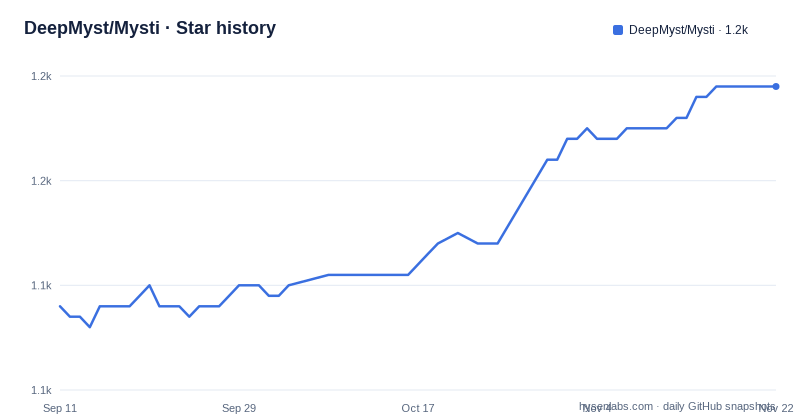
Star history
- DeepMyst/Mysti1,159 ★ · +21
| Repository | 2026-09-11 | 2026-11-22 |
|---|---|---|
| DeepMyst/Mysti | 1.1k | 1.2k |
21 Stars in the last 72 days, measured from the daily GitHub snapshot. Compare with other projects
Editorial analysis
The problem Mysti is aimed at: one model, one opinion
A single coding agent gives you one answer with one set of blind spots. If Claude Code misreads your build setup, nothing in the tool tells you that. The usual workaround is manual: paste the same prompt into a second tool, read both answers, and reconcile them yourself. Mysti packages that workaround into a VS Code extension. The README frames the pitch as "wisdom of the crowd where the collective intelligence of several agents outperforms a single one," which is a claim about the product's design intent, not a measured result. The audience is developers who already have CLI coding agents installed and authenticated, and who want a second opinion without leaving the editor. It is not aimed at people who have never configured a provider.
What actually happens in brainstorm mode
Brainstorm mode takes two agents selected from the settings panel and puts them on the same task. The README lists 5 collaboration strategies, and the roles differ by strategy. The Quick strategy is described as direct synthesis, suited to simple tasks. The Debate strategy assigns a critic role, so one agent produces a proposal and the other attacks it. A synthesis step then produces the final answer. That structure is the real product: the value is in the turn-taking and the merge, not in either model. If your decision depends on how the synthesis prompt is worded, read the source before adopting.
Provider plumbing and the 12-agent roster
Mysti does not host models. It shells out to provider CLIs you have already installed. The README names Claude Code, Codex, Gemini, GitHub Copilot, Cline, Cursor, OpenClaw, Manus, OpenCode, Qwen Code, Ollama and LocalAI. Two of these matter for a different reason than the rest: Ollama and LocalAI run inference locally, so a brainstorm pair can be assembled without sending code to a cloud endpoint. Qwen Code is described as using the same streaming protocol as Claude Code, which is why it slots into the same integration path. OpenCode is described as a multi-backend agent covering Anthropic, OpenAI, Google and Groq through one CLI. The practical consequence is that the extension's behaviour is coupled to each provider's CLI version. A breaking change in a provider CLI is a Mysti bug report.
Installing and pointing Mysti at your CLIs
Installation is a single command from the VS Code quick open prompt: ext install DeepMyst.mysti. The extension is also listed on the VS Code Marketplace under the publisher DeepMyst. Configuration is where the real work sits. The release notes for v0.4.0 mention two concrete settings: mysti.codexPath, which Brainstorm now respects after issue #26, and an auto shell mode that fixed a spawn EINVAL error on Windows in issue #14. The existence of a dedicated codexPath key implies the extension does not always find provider binaries on its own, so budget time for path configuration per provider. Providers that require authentication are subject to auth pre-checks, one of the 18 stability fixes listed for v0.4.0. If a provider is not logged in, expect the failure to surface in the brainstorm flow rather than at extension startup.
Where the design gets thin
Two agents debating costs roughly two agents' worth of tokens and wall-clock time for one answer. The README presents the Quick strategy as the escape hatch for simple tasks, which is an admission that the default multi-agent path is not free. The stability notes are more revealing than the feature list: silence-based timeouts, convergence guards, mention limits and retry cleanup all point at failure modes where a debate does not terminate cleanly. Convergence guards exist because two models can keep disagreeing. Mention limits exist because @-mention routing between agents can fan out. None of this is disqualifying, but it tells you the orchestration layer is doing hard work, and that a stalled brainstorm is a realistic outcome rather than a theoretical one.
Mysti against the single-agent editor assistants
The comparison the README draws is against Copilot and Cursor. The difference is architectural rather than cosmetic. Copilot and Cursor route your request to a model they choose, under a subscription you pay them. Mysti routes your request to a CLI you installed and authenticated yourself, and lets you pick two of them to work the same problem. That means Mysti inherits your existing provider billing instead of adding a new line item, and it inherits your provider's data handling rather than inserting a new intermediary. The cost is operational: you maintain the CLIs, the paths and the credentials. A team that wants one supported assistant with one vendor relationship is better served by the thing Mysti is comparing itself to.
Maintenance, licensing and what to verify
Mysti is Apache-2.0, which permits commercial use and modification and requires that you preserve the licence and notice files; the usual patent grant applies. Nothing in the repository description suggests a dual licence or a hosted service component, but the homepage at deepmyst.com is a separate surface and its terms are not covered by the repository licence. The release cadence visible here is v0.4.0 in March 2026 and v0.3.1 in February 2026, roughly monthly, with the last push to main in July 2026. The v0.4.0 notes mention 360 automated tests via vitest, a specific, checkable number. Before adopting, verify three things yourself: that each provider CLI you intend to pair is authenticated inside VS Code's environment and not just your shell, that mysti.codexPath resolves on your platform, and whether the brainstorm strategies available in your installed version match the five listed in the README.
Editorial conclusion
Adopt Mysti if you already pay for two or more coding agents and want them arguing about the same file in one editor panel, and if you are willing to read the settings keys rather than trust defaults. Skip it if you run one provider, or if you need a reproducible audit trail: brainstorm output is a synthesized answer, and the README does not describe how to reconstruct which agent contributed which claim. Before installing, check the mysti.codexPath setting and your provider CLI paths, and confirm that the 5 brainstorm strategies in the settings panel match what you actually want two models doing to your codebase.
Frequently asked questions
How many AI providers does Mysti support?
The page says twelve in the header, the release notes and the comparison table, while the provider selection table has eleven rows, and the agent that is missing from that table is also absent from the paragraph listing the assistants.
What are the five brainstorm collaboration strategies in Mysti?
A direct synthesis for simple tasks, a critic against a defender for architecture decisions, a proposer against a challenger for security reviews, a risk analyst against an innovator for greenfield design, and a facilitator against a refiner for reaching consensus.
What does auto-convergence do in Mysti brainstorm mode?
It ends the discussion early once the agents agree and their positions stop moving. It is opt-in, and the release notes list convergence guards among the stability fixes for the brainstorm mode.
When does the Mysti extension activate in VS Code?
On editor startup with no condition, and also when the workspace contains one of a list of config filenames belonging to other coding tools or to Mysti itself, in both lowercase and uppercase variants for two of them.
How do I install the Mysti VS Code extension?
Open the command palette with Ctrl+P, or Cmd+P on a Mac, and run the extension install command for the publisher and extension name, or install it from the marketplace listing.
Official sources
Add this badge to your README
If you maintain this project, the badge below links readers to this analysis and shows its maintenance status from the daily GitHub snapshot. Paste the markdown into your README; add ?metric=license or ?metric=stars to the image URL for a different field.

[](https://hysenlabs.com/projects/deepmyst-mysti)Star history chart for your README
[](https://hysenlabs.com/projects/deepmyst-mysti)Was this useful?