zed-windows-builds: the community builds that outlived their own reason to exist
Unofficial nightly builds of the Zed editor for Windows
At a glance
- What is it?
- This repository publishes unofficial Windows builds of the Zed editor, but its scope has narrowed since Zed shipped official Windows binaries. What remains is the OpenGL stable build, which upstream does not produce, and nightly builds in both Vulkan and OpenGL, all distributed through Scoop buckets and built every night at UTC+0000.
- Who is it for?
- Adopt this repository if you specifically need a Windows Zed build that upstream does not provide, which in practice means the OpenGL variant, or if you want to track bleeding-edge commits a day or two ahead of a release. Do not adopt it as a general source of Zed on Windows, because official binaries now exist and the Scoop `extras/zed` manifest points at them, and do not expect this project to fix a Zed bug.
- Can I use it commercially?
- Not without permission. GitHub finds no licence file in the repository, and without a licence all rights are reserved by default: you may read the code but not reuse it. Check the README, or ask the authors, before using it.
- Is it still maintained?
- Yes. The repository last received commits 1 day ago.
- What is it written in?
- Mainly Shell, according to GitHub's language statistics.
Answers come from the project's GitHub data, last synced on November 7, 2026, and from our analysis. They are not legal advice.
Star history
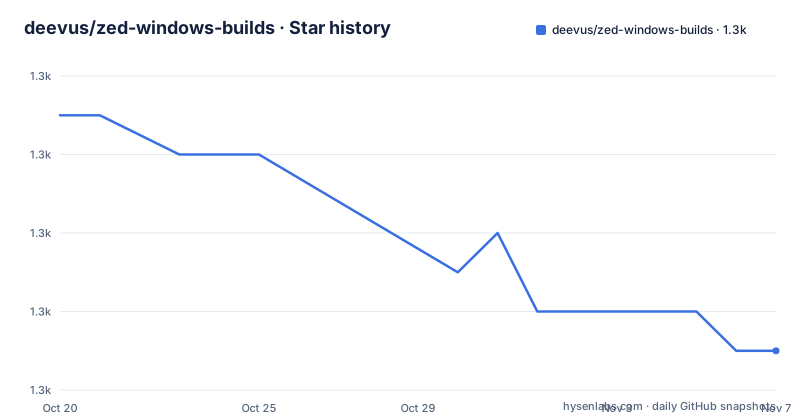
- deevus/zed-windows-builds1,321 ★ · -6
| Repository | 2026-10-20 | 2026-11-07 |
|---|---|---|
| deevus/zed-windows-builds | 1.3k | 1.3k |
-6 Stars in the last 18 days, measured from the daily GitHub snapshot. Compare with other projects
Editorial analysis
The scope narrowed to OpenGL and nightlies
This repository is a set of unofficial Windows builds of the Zed editor, and the first thing its README says is that official Windows builds are now available from the Zed website.
That changes what the project is for. The README states that it continues to provide community builds for two things: OpenGL stable builds, for systems where Vulkan or DX11 is not available, with the note that Zed upstream does not ship an OpenGL variant, and nightly builds in both Vulkan and OpenGL, for users who want bleeding-edge commits.
There is a third consequence, and it is the one that changes your install command. The Scoop `extras/zed` manifest now pulls stable Vulkan and DX11 builds directly from the `zed-industries/zed` upstream repository, and this repository no longer produces stable Vulkan or DX11 builds at all. The `extras` bucket is still the right place to go for the stable channel, but the binaries behind it are upstream's now.
That leaves a project with a narrow, specific purpose. The OpenGL stable build fills a gap that upstream has chosen not to fill, which is the kind of gap a community build is genuinely good for. The nightly channel is a convenience: you get the tip of `main` rather than the last tagged release.
The README is also direct about scope in a way that is worth reading before you file anything. It says plainly that this is not a support channel for Zed on Windows, that any issue with the Windows build should go through official channels, and that the repository does not concern itself with the source code of Zed or issues found in it. Suggestions about the build process are welcome as a discussion or a pull request.
The intended user is therefore narrow: a Windows developer who needs the OpenGL variant, or who wants to live on the bleeding edge and accepts that they are running unreleased code.
Installing through Scoop, and which bucket to use
All the installation instructions require Scoop to be installed on the system. There are four channels, and picking the right one matters now that the stable channel comes from upstream.
For the stable channel, which is upstream's official binary rather than this repository's:
scoop bucket add extras
scoop install extras/zed
For nightly builds, in the `versions` bucket:
scoop bucket add versions
scoop install versions/zed-nightly
The OpenGL stable build is the case this repository still owns:
scoop bucket add extras
scoop install extras/zed-opengl
And the nightly OpenGL build:
scoop bucket add versions
scoop install versions/zed-opengl-nightly
Updates follow the same four names, one `scoop update` per installed channel:
# Stable version
scoop update zed
# Stable OpenGL version
scoop update zed-opengl
# Nightly version
scoop update zed-nightly
# Nightly OpenGL version
scoop update zed-opengl-nightly
The `extras` and `versions` buckets are standard Scoop buckets, and the manifest names are the whole of the interface. There is no installer script of your own to write and no archive to unpack by hand.
One Windows 10 caveat is documented, and it is the kind of thing that costs an afternoon if you hit it cold. Zed may not start on Windows 10 unless the Microsoft Visual C++ Redistributable 2022 package is installed, and the README gives the Scoop route for it:
scoop bucket add extras
scoop install vcredist2022
The reasoning is the same on Windows 11 and on any other platform where the runtime is missing, so installing it proactively is the safer habit.
A nightly workflow that builds main at UTC+0000
The README describes the build setup in one sentence, and the sentence is the whole security and maintenance story: this repository is just a simple GitHub workflow that builds Zed from `main` and publishes a release every night at UTC+0000, and additionally on push for testing.
That description is a little misleading in the best way, because the workflows directory contains four separate pipelines and each has a status badge in the README: the test scripts workflow, the test integration workflow, the scheduled nightly build workflow, and the scheduled stable build workflow. The scheduled stable workflow is the one that produces the OpenGL stable build, since stable Vulkan and DX11 are upstream's job now.
The publishing cadence is therefore both scheduled and reactive. A nightly run at UTC+0000 gives you a fresh build every morning whether anyone touched the code or not, and the additional on-push run gives you a build whenever the build scripts themselves change, which is when you most want to know whether your edit broke the pipeline.
The recent tags are consistent with that cadence. v1.24.2 was published on 2026-10-15, v1.23.3 on 2026-10-13 and v1.23.2 on 2026-10-08, and the last push to the repository was on 2026-10-15.
What a nightly build means in practice is worth spelling out. The build is made from a moving branch, so the artefact you installed yesterday is not the artefact you get today even if nothing about the build changed, and a nightly can break in ways a tagged release would not. That is the trade you accept for having the newest commit, and the reason the OpenGL stable channel exists at all is that some people would rather have a fixed build of the variant upstream does not publish.
Resilient builds, checksums and failure scenarios
The build process section is short, and the three bullets in it are specific enough to be testable.
Resilient builds means the pipeline is built to survive a partial failure. If one build variant, DX11 or OpenGL, fails, the other still completes and creates a release. That is a deliberate design decision with a clear justification: a failure in one renderer should not cost you the other one, particularly for a scheduled job that runs unattended.
Quality assurance here means each release includes SHA256 checksums for integrity verification. That is the concrete answer to the question in the README's own heading, Is it safe. The published checksum lets you confirm the artefact you downloaded is the one that was built, which is the only verification the repository can offer for binaries it compiles itself.
The third bullet says the build scripts are thoroughly tested with automated test suites, and the Testing section expands on what that means in practice. There are script tests, which are unit tests for the release preparation logic, and integration tests, which exercise the build and release workflows end to end. Then there are failure scenarios, which the README describes as testing of partial build failures to ensure robust handling.
That last category is the one that most distinguishes this project from a hobby script. Testing the failure path means the resilient behaviour is verified rather than hoped for, so when the DX11 build does break on some night's commit, you have a reason to believe the OpenGL artefact was still produced and still carries a checksum.
The repository layout supports this structure. Alongside the workflows are a `scripts/` directory that the README points to for details of the testing infrastructure, a `docs/` directory, a `.cargo/` directory, a `.mise.toml` for tool version management, and an `.actrc` file for running the GitHub Actions workflows locally.
Where to take a problem, and what the OpenGL build is really for
Two practical questions come up immediately with a project like this, and the README answers both.
The first is where to report a bug. The answer is that this is not a support channel for Zed on Windows, and issues with the Windows build belong in official channels, because this repository does not deal with the source code of Zed or with defects in it. If the crash is in the editor rather than in the packaging, upstream is where it goes. If the build script produced a broken artefact or the Scoop manifest is wrong, that is a discussion or a pull request here.
The second is when the OpenGL build is the right answer. The README's condition is precise: OpenGL stable builds are for systems where Vulkan or DX11 is not available. The DX11 section is phrased as a troubleshooting entry, DX11 doesn't work for you, followed by Install the OpenGL version.
That is a real population of machines. Older hardware, some virtualised environments, certain remote desktop and GPU passthrough setups, and some corporate configurations do not expose a usable Vulkan or D3D11 path, and an editor that refuses to start on that hardware is a non-starter. Since upstream does not ship an OpenGL variant, the community build is the only route that keeps those users on Zed rather than pushing them to another editor.
The trade-offs follow from that position. An OpenGL renderer is generally the older path in the ecosystem, and any performance difference versus the Vulkan path is something you would have to measure on your own hardware, since the repository publishes no benchmarks. And the OpenGL stable build here is still built by a community pipeline, so the SHA256 checksum remains your verification tool.
Licence, provenance and the case for using upstream
Two housekeeping facts are worth stating before anyone builds on this repository.
The first is provenance. This is not the Zed project. The README points to the Zed homepage and the official repository for details, and the repository's own scope statement is that it concerns itself with the build, not with the editor. Any question about behaviour, features or editor bugs belongs upstream.
The second is licensing. The project metadata for this repository lists the licence as unknown, and there is no licence file among the top-level entries, which are limited to `.actrc`, `.cargo/`, `.github/`, `.gitignore`, `.mise.toml`, `README.md`, `docs/` and `scripts/`. That is worth knowing if you intended to fork the build pipeline itself rather than install a binary. Installing a compiled artefact is a different act from redistributing the scripts that produced it, and the terms for the former are clearer than for the latter.
It is also worth being honest about the direction of travel. This repository existed because Windows support was missing and someone filled the gap. Official Windows builds now exist, the stable Scoop manifest has been repointed at upstream binaries, and the remaining scope is the OpenGL variant plus nightlies. That is a healthy outcome rather than a decline, since a community project that hands its main job back to the upstream project and keeps the useful remainder is doing exactly what it should.
The practical recommendation follows from that. If your machine has working Vulkan or DX11 and you are not chasing the newest commit, install `extras/zed` and stop reading this repository. If your machine has neither, the OpenGL build here is the reason this project still exists, and it is worth using with the SHA256 checksum in hand. If you want the newest commit, the nightly channels give you that, and you should accept that you are running code that upstream has not tagged.
Editorial conclusion
Adopt this repository if you specifically need a Windows Zed build that upstream does not provide, which in practice means the OpenGL variant, or if you want to track bleeding-edge commits a day or two ahead of a release. Do not adopt it as a general source of Zed on Windows, because official binaries now exist and the Scoop `extras/zed` manifest points at them, and do not expect this project to fix a Zed bug. Verify three things first: that your machine genuinely lacks Vulkan or DX11 support before reaching for the OpenGL build, that the SHA256 checksum published with the release matches the file you downloaded, and that the nightly channel's instability is acceptable to you, since by construction it is built from the `main` branch and can break at any commit.
Frequently asked questions
What does the zed-windows-builds repository still provide now that Zed ships official Windows builds?
It provides OpenGL stable builds for systems where Vulkan or DX11 is unavailable, which upstream does not ship, and nightly builds in both Vulkan and OpenGL for users who want bleeding-edge commits. It no longer produces stable Vulkan or DX11 builds, and the Scoop extras/zed manifest now points at upstream binaries.
How do I install the OpenGL build of Zed on Windows?
With Scoop installed, run `scoop bucket add extras` followed by `scoop install extras/zed-opengl` for the stable variant, or use the versions bucket with `scoop install versions/zed-opengl-nightly` for the nightly one.
Zed does not start on my Windows 10 machine, what should I do?
The README says Zed may not start on Windows 10 without the Microsoft Visual C++ Redistributable 2022 package. With Scoop you can install it using `scoop bucket add extras` and `scoop install vcredist2022`.
How are the nightly builds produced and published?
A GitHub workflow builds Zed from the main branch and publishes a release every night at UTC+0000, and additionally on push for testing. The repository has separate workflows for the nightly build, the scheduled stable build, script tests and integration tests, and each release includes SHA256 checksums.
Where should I report a problem with these Zed Windows builds?
The README states that this is not a support channel for Zed on Windows and that issues with the Windows build should go through official channels, since the repository does not concern itself with the source code of Zed. Suggestions about the build process can be raised as a discussion or a pull request.
Official sources
Add this badge to your README
If you maintain this project, the badge below links readers to this analysis and shows its maintenance status from the daily GitHub snapshot. Paste the markdown into your README; add ?metric=license or ?metric=stars to the image URL for a different field.

[](https://hysenlabs.com/projects/deevus-zed-windows-builds)Star history chart for your README
[](https://hysenlabs.com/projects/deevus-zed-windows-builds)Was this useful?