RVM: interpreter switching and the gap between stable and master
Ruby enVironment Manager (RVM)
At a glance
- What is it?
- A shell tool that installs Ruby interpreters and switches between them, where the command grammar is forgiving, the interpreter list runs to ten names, and the newest release tag sits years behind the branch tip.
- Who is it for?
- RVM fits a machine that has to hold several Ruby versions side by side and switch them often, and the `--default` flag plus a `.ruby-version` file cover the boring parts of that job. It does not fit a container image or a single-version project, where the extra Ruby installs are dead weight on disk.
- Can I use it commercially?
- Check first. The repository uses a licence we do not classify automatically, so read its LICENSE file before any commercial use.
- Is it still maintained?
- Yes. The repository last received commits 16 days ago.
- What is it written in?
- Mainly Shell, according to GitHub's language statistics.
Answers come from the project's GitHub data, last synced on November 14, 2026, and from our analysis. They are not legal advice.
Star history
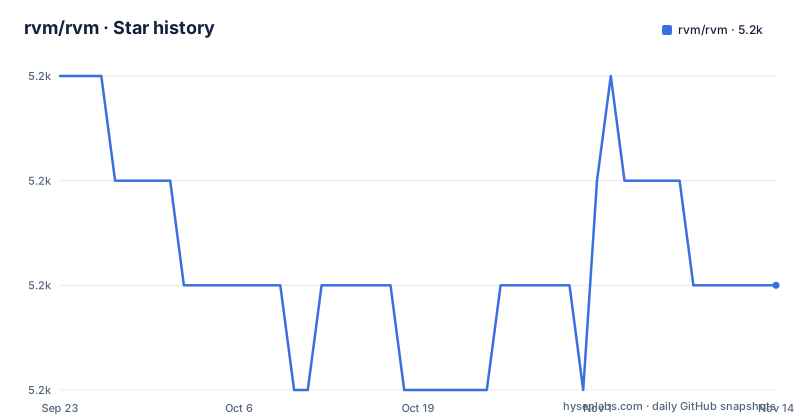
- rvm/rvm5,187 ★ · -2
| Repository | 2026-09-23 | 2026-11-14 |
|---|---|---|
| rvm/rvm | 5.2k | 5.2k |
-2 Stars in the last 52 days, measured from the daily GitHub snapshot. Compare with other projects
Editorial analysis
curl | bash -s stable, and the two packages it assumes
On anything that is not Ubuntu, the install has prerequisites spelled out before it has a command. Two packages must already be there:
* `curl` * `gpg2`
Then the whole installer is one line:
curl -sSL https://get.rvm.io | bash -s stableThe trailing word matters more than it looks. It selects the `stable` channel, which is the same word `rvm get` uses later, so the channel you install from and the channel you upgrade into can be the same decision or a different one.
Ubuntu is deliberately handled somewhere else, with a dedicated package whose instructions live at github.com/rvm/ubuntu_rvm. The README also tells you what to do when that package is not the version you wanted: install the base version from it, then use the upgrade step to move to a newer one. Anything beyond these two routes, including the details of the installation process itself, is on the page at rvm.io/rvm/install.
rvm get takes stable, master, or a branch path
Upgrading is one command with three documented shapes for its argument:
`rvm get VERSION`
* `stable` is the latest stable RVM, described as good for servers * `master` is the latest RVM, which the docs warn might not be stable * `branch /path/branch` pulls a branched version, for testing new features or bug fixes
So upgrading is not one thing but three, and the difference is who absorbs the risk. `stable` is the choice for a machine other people depend on. `master` is what you take when you are chasing a fix, and it is also the first thing the project asks a bug reporter to try. The branch form exists for work in progress, where you point at a specific line of development rather than at a channel.
More upgrading options are kept on rvm.io/rvm/upgrading, and the same split shows up in the command help: for anything beyond install and use, `rvm help COMMAND` is the documented way to get the details of a single command.
The newest tag is from 2021 and master keeps moving
The release list is where the picture gets uneven. The newest tags are 1.29.12 published 2021-01-15, 1.29.11 on 2020-12-29, and 1.29.10 on 2020-03-25. The default branch is master, and the last push to it is dated 2026-10-29.
Put those two facts side by side and the consequence is concrete: what `stable` gives you and what `master` gives you are not the same code, and the gap between them is measured in years rather than weeks. Nobody has to be at fault for that. The project explains that releases come out once a level of stability is reached and that this might take a while, which is exactly the pattern that produces a branch that is busy and a tag line that is quiet.
It also explains the advice bug reporters get. If an issue may already be fixed, it will be fixed on the development branch rather than in a release, so the first move on an RVM bug is to fetch master and try again. Plan on that when you decide what to track.
Four spellings of one install, and what --default changes
The install grammar is written as `rvm install INTERPRETER[-VERSION] OPTIONS`, and two omissions are filled in for you. Leave the version out and RVM takes the latest stable version of the chosen interpreter. Leave the interpreter out as well and it assumes you wanted MRI ruby. That forgiving grammar means these four commands are documented as having exactly the same effect:
rvm install ruby-2.3.1
rvm install ruby-2.3
rvm install 2.3.1
rvm install 2.3
One option changes state beyond the current shell. Passing `--default` makes the selected ruby your default ruby rather than something you have to switch to on purpose. That is the difference between a ruby you get in new shells and directories and one you only get after `rvm use`, and it is easy to add the flag early and then forget why a shell somewhere on the machine behaves differently from another.
The version numbers in that example are from the documentation rather than from a recommendation. What RVM installs as latest stable is whatever upstream ships, so pin a version when reproducibility matters to you and let it float when you want the newest thing.
Ten interpreter names, and not all of them run Ruby
The interpreter list is the widest part of the project and the easiest to misread. `ruby` is MRI, `jruby` is the Java implementation, `mruby` is the lightweight one, `truffleruby` is described as a high performance ruby using GraalVM, and `rbx` is Rubinius. Then there are names that do something other than run MRI: `opal` is a ruby to JavaScript compiler, `ironruby` is a .NET ruby, `macruby` targets ruby 1.9 directly on top of macOS core technologies, `maglev` is a 64-bit implementation on top of VMware's GemStone, and `topaz` is written in RPython.
So the choice of name decides what you get, and picking one is not an interchangeable selection. Ask for `opal` and you asked for a compiler, not an interpreter.
One name is explicitly historic. `ree`, Ruby Enterprise Edition, is listed separately as a historical interpreter you can still install with RVM, while being no longer developed or supported by its authors. Installable is not the same as maintained, and RVM makes that distinction for you here rather than letting you infer it from the install succeeding.
rvm use, two special interpreters, and the file that follows you
Switching is `rvm use INTERPRETER[-VERSION]`, and the docs are explicit that the same rules and options apply as for `install`, with two extra interpreters bolted on. `default` means the default ruby, or the system ruby if no default has been set. `system` means the system ruby, described as the state before RVM was installed. Between them they let you get back out to whatever you had before, which matters on a machine where RVM is layered over an existing Ruby.
The mechanism that changes how a project behaves is a file rather than a command. List your preferred ruby version in a `.ruby-version` file in the project folder and entering that folder switches to it automatically. The same file, in a repository other people clone, decides which Ruby they get the moment they open the project, with no command typed and no agreement needed.
That is also the part to think about before you add one. A `.ruby-version` file changes behaviour based on where you are standing, so in a shared repository it silently alters what your colleagues run,.
Report bugs as one fenced block per command
The project asks for a lot from bug reporters, for a reason it states plainly: it gets a high amount of bug reports and they are often connected to specific environment settings which are hard to replicate. The order it asks for is documentation first, then `rvm get master` and a retry, then a filed issue.
The formatting rules for the issue are the most specific part. There is a template and every section should be filled in as well as possible. Each command and its output goes into its own fenced code block, split apart, and long output belongs in a separate gist rather than in the ticket. Debug or trace output gets redirected to a file with the `>` character, in the form `rvm [command] > output.txt`.
Two of those rules are about other people's time rather than yours, and they are the ones worth following even if you skip the template. A single block holding a command and forty lines of output is hard to read and hard to quote back, and a gist link gives the maintainers something they can fetch without scrolling.
The tree is shell scripts, hooks, patches, and a Fedora container
RVM is a shell project and the tree shows it. There is an `install` script at the root, alongside `binscripts/`, `scripts/`, `config/`, `hooks/`, `patches/`, `patchsets/`, `gemsets/`, `help/`, `man/`, `tests/`, `lib/`, and `examples/`. Small top-level utilities sit next to the directories: `update-remote.sh`, `update-truffleruby.rb`, `sign-releases.sh`, and `gem-owners.sh`. There is a `VERSION` file, a `Rakefile`, `CHANGELOG.md`, `CONTRIBUTING.md`, `HACKING.md`, and `FORMATTING.md`, and the single example named is `examples/rvmrc`.
For trying changes without touching your own machine, the repository carries a Dockerfile. Its own comment says it is useful to try changes in RVM without affecting the local system, and it is run as `$ docker build . -t rvm && docker run --rm -it rvm`. The image is Fedora 37, installs `which` and `procps` with dnf, copies the tree into /rvm, sets that as the working directory, runs the project's own `./install`, and starts bash. A Fedora 37 base is itself a dated detail: it fixes the operating system the installer sees, which is the point of the exercise.
Licensing is stated in two places with different wording. Contributions are accepted under the Apache License v2.0, and the licence file at the root is what governs, with the copyright line reading Copyright (C) Michal Papis (2011-).
Editorial conclusion
RVM fits a machine that has to hold several Ruby versions side by side and switch them often, and the `--default` flag plus a `.ruby-version` file cover the boring parts of that job. It does not fit a container image or a single-version project, where the extra Ruby installs are dead weight on disk. Before you commit, check whether the stable channel is recent enough for your needs, because the newest tagged release is 1.29.12 from January 2021 while the master branch keeps taking pushes, and read the versions your interpreter supports before picking one of the ten names on offer.
Frequently asked questions
What does RVM mean?
RVM stands for Ruby enVironment Manager. It manages Ruby application environments and enables switching between them, and its homepage is rvm.io.
What is the purpose of RVM in a Ruby project?
It installs Ruby interpreters with `rvm install INTERPRETER[-VERSION] OPTIONS` and switches between them with `rvm use INTERPRETER[-VERSION]`. A `.ruby-version` file in the project folder switches to that Ruby automatically when you enter the folder.
Is RVM still maintained?
The repository is not archived and the last push to the default branch, master, is dated 2026-10-29. The newest release tag is 1.29.12 from 2021-01-15, before 1.29.11 in December 2020 and 1.29.10 in March 2020, so the tagged releases and the branch tip are years apart.
Official sources
Add this badge to your README
If you maintain this project, the badge below links readers to this analysis and shows its maintenance status from the daily GitHub snapshot. Paste the markdown into your README; add ?metric=license or ?metric=stars to the image URL for a different field.

[](https://hysenlabs.com/projects/rvm-rvm)Star history chart for your README
[](https://hysenlabs.com/projects/rvm-rvm)Was this useful?