Delta Chat Android builds a Rust core through an NDK pinned in a Dockerfile
Decentralized private messenger with chat-shared tools and games for Android
At a glance
- What is it?
- The Delta Chat Android client is a Java app wrapped around the Chatmail core library, and its build environment is defined in a Dockerfile that pins an Android NDK, Rust without a selected toolchain and a named command line tools archive. That Dockerfile is the most concrete documentation in the repository, and it says more about building this app than BUILDING.md's existence suggests.
- Who is it for?
- Adopt deltachat-android only if you intend to ship an Android build of Delta Chat, since it is the client app rather than the protocol core, and the shared logic lives in the separate chatmail/core repository. A team wanting to change Delta Chat behaviour belongs in that core library, not here.
- Can I use it commercially?
- Yes, with conditions. GPL-3.0 is a copyleft licence: if you distribute software that includes it, you must release that software's source code under the same licence. Running it internally without distributing it does not trigger that obligation.
- Is it still maintained?
- Yes. The repository received new commits within the last day.
- What is it written in?
- Mainly Java, according to GitHub's language statistics.
Answers come from the project's GitHub data, last synced on October 23, 2026, and from our analysis. They are not legal advice.
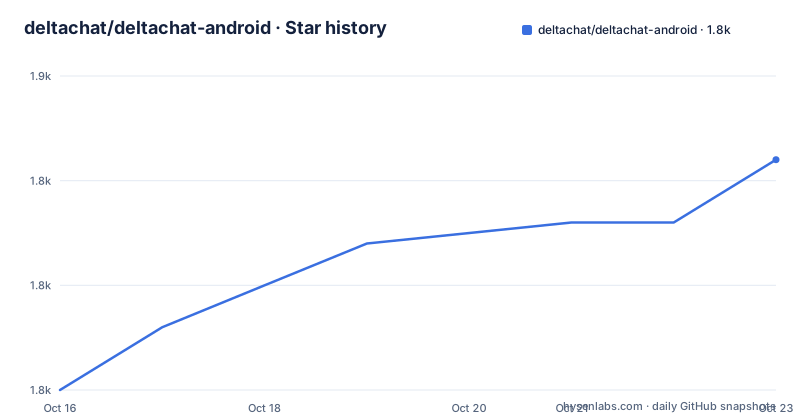
Star history
- deltachat/deltachat-android1,846 ★ · +11
| Repository | 2026-10-16 | 2026-10-23 |
|---|---|---|
| deltachat/deltachat-android | 1.8k | 1.8k |
11 Stars in the last 7 days, measured from the daily GitHub snapshot. Compare with other projects
Editorial analysis
This repository is the app, chatmail/core is the logic
The Android client is this repository's app, while chatmail/core is the separate core library, and the README points anyone looking for the core or general information there. That division is the first thing to understand about this codebase: a change to how messages are sent, received or encrypted belongs upstream, not in a Java class here.
What remains in this repository is the Android application layer. It is Java, with a Gradle build, and the top level listing shows the usual Android furniture plus some that are less usual. There is a jni/ directory, which is the native bridge to the core, a Dockerfile that provisions a complete Android toolchain, flake.nix and flake.lock for Nix, fastlane/ for store metadata and changelogs, spotless/ for code formatting, and a Dockerfile that exists specifically so the build is reproducible on any Linux machine rather than only on a developer's laptop.
The primary language being Java is worth keeping in mind when estimating work. Anything touching message handling is not Java work.
The Dockerfile pins NDK 27, JDK 17 and rustup
The Dockerfile is short and every line is a build decision. It starts from debian:12.4 and installs the Android Studio prerequisites: wget, curl, unzip, openjdk-17-jre, openjdk-17-ddk in the JDK form the file spells as openjdk-17-jdk, file and build-essential.
It then creates a non-root user. The USER argument defaults to deltachat with UID and GID both 1000, a group and a user are created with those values, and USER switches to it. ANDROID_SDK_ROOT is set to that user's home plus android-sdk, and the directory is created. Running the SDK as an unprivileged user rather than root avoids a class of filesystem permission problems in the SDK tools, at the cost of the SDK living in a home directory rather than a system path.
The command line tools are fetched by URL with a pinned archive name, commandlinetools-linux-8512546_latest.zip, unzipped, and then sdkmanager is piped into with yes to accept every licence. The archive name identifies a command-line tools revision, and the file warns elsewhere that an NDK version change has a second home.
ARG USER=deltachat
ENV ANDROID_SDK_ROOT /home/${USER}/android-sdk
RUN wget -q https://dl.google.com/android/repository/commandlinetools-linux-8512546_latest.zip && \
  unzip commandlinetools-linux-8512546_latest.zip
The NDK is installed by explicit version, ndk;27.0.11902837, with a comment identifying it as NDK r27 LTS. ANDROID_NDK_ROOT and the LLVM toolchain bin directory are added to PATH. Rust is installed from sh.rustup.rs with --default-toolchain none, and the cargo bin directory is added to PATH, which is what lets Gradle build the Rust part of the core through the JNI boundary. That rustup line is the clearest evidence that this Android project also compiles Rust.
The NDK version has a second home in flake.nix
The Dockerfile carries an explicit warning above the sdkmanager line: if you change the NDK version here, also change it in flake.nix. That is the kind of comment that saves hours, because a container image and a Nix flake are two independent descriptions of the same toolchain and they drift silently.
Having flake.nix, flake.lock, gradle/, gradlew and gradlew.bat side by side means the project supports two build paths. The Dockerfile path gives a container with everything preinstalled. The Nix path gives a declarative environment locked by flake.lock. Android Studio remains the comfortable path for interactive development, and the Dockerfile comment points at the official Android Studio install requirements for Linux, which suggests the container was assembled to match what a desktop install provides.
Release process lives in RELEASE.md, contribution guidance in CONTRIBUTING.md, and standards.md holds project specific conventions. Those three files, plus BUILDING.md for build steps, are where the actual instructions live; the README itself does not contain a single build command, which is worth knowing before you go looking for one there.
Two translation systems, for two different kinds of text
Localisation is split deliberately. Android metadata and changelogs are translated through Weblate, on the deltachat/android-metadata project. App strings and the website go through Transifex. The .tx/ directory at the repository root is the Transifex client configuration, which is how a contributor knows which of the two systems a given string belongs to.
Separating them makes sense in retrospect. Store listings and changelogs are edited by whoever cuts a release and shipped through fastlane metadata, whereas app strings need translators to work against the running interface. Bundling them into one system would mean two different reviewer sets colliding in the same queue.
fastlane/ also holds the screenshot images the README embeds, under fastlane/metadata/android/en-US/images/phoneScreenshots, so the store metadata and the README are the same assets rather than two sets that drift.
Licence and release cadence
The app is licensed GPLv3+, stated in the README with copyright to Delta Chat contributors, and the LICENSE file at the repository root is the text to read. The plus matters: it means later versions are permitted rather than only version 3, so a downstream distributor combining this app with GPLv3+ code has room to work with.
Releases come often. v2.62.0 shipped on 2026-09-26, v2.59.1 on 2026-08-24 and v2.59.0 on 2026-08-21, with the last push on 2026-10-16. For a mobile client tracking a moving protocol, that cadence is the point: users get security and compatibility changes without waiting on a major version.
One credit note in the README is worth reading for orientation rather than history. Many user interface classes were based on the Android Signal messenger, ported in 2019 from an earlier Telegram based interface, and the README states that development has since diverged in many areas. Anyone tracing a surprising UI behaviour to its origins will find that trail, and anyone assessing the licence of a given file should check the repository rather than assume Signal's terms.
Where this repository is the wrong place to work
The clearest wrong turn is trying to change Delta Chat's behaviour here. Encryption, message routing and the chat protocol are upstream in chatmail/core, and a Java only patch will not achieve anything durable. If your goal is interoperability with another client, or a change to how contacts are verified, that is core work.
The second wrong turn is treating this as the whole of Delta Chat. Other platforms exist and downloads for them are listed at get.delta.chat, so a platform decision made here does not generalise. The README directs to that site rather than duplicating a platform table, which is a reasonable choice for a project shipping on several app stores.
The realistic alternative for most evaluation work is reading chatmail/core and using the published clients. Forks of this app make sense for rebranding or store distribution changes, and for anything deeper you are maintaining a Java plus Rust plus native toolchain build with two synchronised version definitions.
Editorial conclusion
Adopt deltachat-android only if you intend to ship an Android build of Delta Chat, since it is the client app rather than the protocol core, and the shared logic lives in the separate chatmail/core repository. A team wanting to change Delta Chat behaviour belongs in that core library, not here. Verify first that your build environment matches the Dockerfile exactly, because the file states that changing the NDK version also means changing flake.nix, and a mismatched toolchain produces native build failures that look like unrelated linker errors.
Frequently asked questions
Where does the Delta Chat Android app keep its messaging logic?
In the separate Chatmail Core Library at chatmail/core, which the README points to for the core and for general information. This repository holds the Android application layer and the jni/ bridge to it.
Which Android NDK does the deltachat-android build use?
The Dockerfile installs ndk;27.0.11902837, described there as NDK r27 LTS. The file also notes that changing this version means changing it in flake.nix as well.
What licence is deltachat-android released under?
GPLv3+, stated in the README with copyright to Delta Chat contributors, and spelled out in the LICENSE file at the repository root.
How are Delta Chat Android translations managed?
Two systems. Android metadata and changelogs go through Weblate on the deltachat/android-metadata project, while app strings and the website go through Transifex, configured by the .tx/ directory.
What is the Dockerfile in deltachat-android for?
It provisions a reproducible Android build environment on debian:12.4 with openjdk-17, the pinned command line tools, the pinned NDK and a Rust toolchain installed through rustup, all under a non-root user.
Official sources
Add this badge to your README
If you maintain this project, the badge below links readers to this analysis and shows its maintenance status from the daily GitHub snapshot. Paste the markdown into your README; add ?metric=license or ?metric=stars to the image URL for a different field.

[](https://hysenlabs.com/projects/deltachat-deltachat-android)Star history chart for your README
[](https://hysenlabs.com/projects/deltachat-deltachat-android)Was this useful?