NewPipeExtractor and the two Maven coordinates hiding one Java library
NewPipe's core library for extracting data from streaming sites
At a glance
- What is it?
- NewPipeExtractor is the Java library that turns YouTube, SoundCloud, media.ccc.de, PeerTube and Bandcamp pages into stream objects for NewPipe and for anything else that depends on it. Adding it takes one Gradle coordinate, while building against unreleased code takes a second coordinate, a 90 day snapshot window and a minimizer rule list the project never explains.
- Who is it for?
- Adopt NewPipeExtractor if you ship a JVM product that must read stream metadata from YouTube, SoundCloud, media.ccc.de, Bandcamp or non-P2P PeerTube and would rather not write those parsers yourself. Skip it when you need an official API, documented rate limits or any compatibility promise.
- Can I use it commercially?
- Yes, with conditions. GPL-3.0 is a copyleft licence: if you distribute software that includes it, you must release that software's source code under the same licence. Running it internally without distributing it does not trigger that obligation.
- Is it still maintained?
- Yes. The repository received new commits within the last day.
- What is it written in?
- Mainly Java, according to GitHub's language statistics.
Answers come from the project's GitHub data, last synced on October 23, 2026, and from our analysis. They are not legal advice.
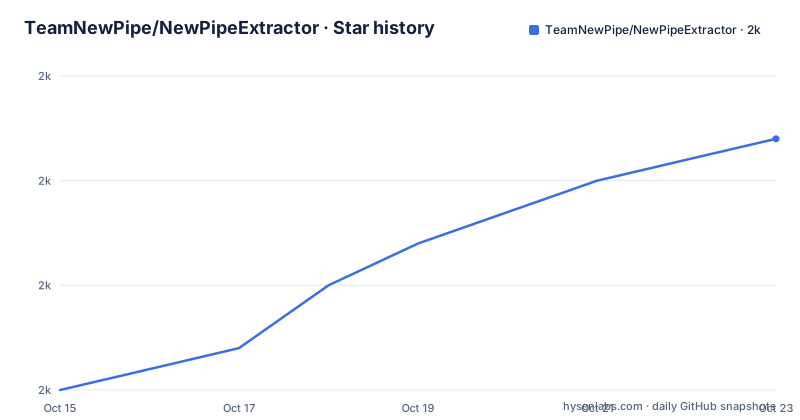
Star history
- TeamNewPipe/NewPipeExtractor2,022 ★ · +12
| Repository | 2026-10-15 | 2026-10-23 |
|---|---|---|
| TeamNewPipe/NewPipeExtractor | 2k | 2k |
12 Stars in the last 8 days, measured from the daily GitHub snapshot. Compare with other projects
Editorial analysis
Extracting stream metadata without shipping an app
The repository calls NewPipeExtractor "NewPipe's core library for extracting data from streaming sites", and the README adds that it is a core component of NewPipe but could be used independently. That second clause is the one that matters if you are not building an Android app. As a Java library pushed to a Maven repository, it fits any JVM project that needs to turn a stream URL into video identifiers, titles and playable stream objects, on a phone or on a server.
The audience is narrower than video scraping in general. You want page-level metadata from the sites NewPipe's users watch, and you would rather not write five parsers yourself. If you need a documented API with published rate limits, this library is the wrong shape of tool. Its repository topics include `scraper`, `crawler` and `extractor`, which is the project naming its approach plainly.
The default branch is dev, and the CI badge in the README is requested for `branch=dev` with `event=schedule`, so what the badge reports is the scheduled pipeline on the development branch. The last push was on 2026-10-05, and the three newest tags are v0.26.5 from 2026-08-15, v0.26.4 from 2026-07-20 and v0.26.3 from 2026-06-09.
The repository layout splits extraction from time-ago handling
Five supported sites sit behind one artifact, and the root directory shows how the work is divided. `extractor/` holds the extraction code. Two sibling subprojects, `timeago-parser/` and `timeago-generator/`, deal with the relative timestamps that stream pages are full of, which means time handling is deliberately kept outside the extractor itself rather than folded into each parser. `checkstyle/` sits alongside them, so style is enforced by a checked-in configuration.
The build files are Kotlin DSL: `build.gradle.kts` and `settings.gradle.kts`, with `gradlew` and `gradlew.bat` committed at the root and `gradle.properties` beside them. `jitpack.yml` is the file the JitPack service reads when it builds the library on your behalf, which is why that repository needs no extra configuration from a consumer.
One name in the README confirms the internal layout from the outside. The composite-build snippet substitutes the dependency with `project(':extractor')`, so the Gradle subproject that produces the library is the same `extractor` directory visible at the root, not a nested module you have to search for.
Adding the library to a Gradle build with JitPack
NewPipe Extractor is available at JitPack's Maven repo, so wiring it into a Gradle build is two lines plus, on Android, a minimizer rule list. Add the repository, then add the dependency:
repositories {
    maven { url 'https://jitpack.io' }
}

dependencies {
    implementation 'com.github.teamnewpipe:NewPipeExtractor:INSERT_VERSION_HERE'
}
`INSERT_VERSION_HERE` is a literal placeholder inside that coordinate. Replace it with the version you intend to pin and Gradle resolves the artifact from jitpack.io; leave it in place and resolution stops before any of your own code is compiled. The coordinate name itself is fixed, so a build that already declares a different group and artifact for this library will not pick anything up from the repository you just added.
On Android there is a third step. If anything in your build shrinks or obfuscates the app, add these lines to your proguard file:
## Rules for NewPipeExtractor
-keep class org.mozilla.javascript.** { *; }
-keep class org.mozilla.classfile.ClassFileWriter
-dontwarn org.mozilla.javascript.tools.**
The first line keeps every class in `org.mozilla.javascript`, the second keeps one more class by name, and the third suppresses warnings for `org.mozilla.javascript.tools`. Those lines belong to the install itself, not to an optimisation pass you add later once something breaks.
Snapshot, composite build and local Maven paths
Consuming a pinned version is one path; the README documents three others for building against code that carries no version number yet.
The first is the snapshot repository on Maven Central. Versions there are keyed by the commit's short hash, the same value `git rev-parse --short HEAD` prints:
repositories {
    maven(url = "https://central.sonatype.com/repository/maven-snapshots/")
}

dependencies {
    implementation("net.newpipe:extractor:${LAST_COMMIT_SHORT_HASH}-SNAPSHOT")
}
A snapshot stays available for 90 days from the date of publication or the commit, so an integration job pinned to one hash stops resolving after that window and has to be moved to a newer commit.
The second is a composite build that swaps the dependency for the checkout sitting next to yours, so local edits rebuild without publishing anything:
includeBuild('../NewPipeExtractor') {
    dependencySubstitution {
        substitute module('com.github.teamnewpipe:NewPipeExtractor') with project(':extractor')
    }
}
The third goes through the local Maven repository. Add `mavenLocal()` to your repositories list, normally first so it takes priority, change the library version to something like `LOCAL_SNAPSHOT`, run the wrapper's install task, then depend on that new version:
./gradlew installOne detail in that paragraph deserves copying exactly. The README prints the task name as `ìnstall`, with a grave accent on the i, so search your notes for `gradlew install` rather than the accented spelling. Android Studio users are told to pick up the installed copy afterwards through `File → "Sync with File System"`.
Two Maven coordinates for one artifact
The same library resolves under two different coordinates, and a close reading of the build snippets is the only place that becomes visible. Consuming a published version uses `com.github.teamnewpipe:NewPipeExtractor:INSERT_VERSION_HERE` from JitPack. Snapshot consumption uses `net.newpipe:extractor:${LAST_COMMIT_SHORT_HASH}-SNAPSHOT` from Maven Central. Different group, different artifact name, different repository, two separate repository entries in your build file.
That difference is not cosmetic, because Gradle matches dependencies on group and artifact. Paste the snapshot coordinate into a project whose other configuration expects the JitPack one and nothing links them together. The composite-build rule makes the same assumption in code: `substitute module('com.github.teamnewpipe:NewPipeExtractor')` names the JitPack coordinate explicitly, so a build declaring `net.newpipe:extractor` receives no substitution and keeps resolving the remote artifact.
Version vocabularies differ too. One side is a tag; the other is a commit short hash with a `-SNAPSHOT` suffix that disappears after 90 days. Pin one coordinate per project, and if you take the snapshot path, record the date the pin expires so a build failure months later has an obvious cause.
The keep rules and the minSdk 33 desugaring floor
Read those minimizer lines as a description of the classpath. Keeping every class in `org.mozilla.javascript`, and keeping `org.mozilla.classfile.ClassFileWriter` by name, tells you a JavaScript engine travels with the library. The `-dontwarn` entry for `org.mozilla.javascript.tools` then says the tools in that package are not required at runtime even though the engine itself is. Nothing in the project names which of the five sites needs that engine, so there is nothing to tune here: keep all three lines or do not shrink the build.
The second Android constraint is a floor on `minSdk`. Any project below 33 must turn on core library desugaring and add the `desugar_jdk_libs_nio` artifact. That is a Java-version compatibility layer rather than a NewPipeExtractor switch, and getting it wrong shows up as desugaring diagnostics during the build, long before an extractor class loads.
Together the two items are the real integration cost on Android: a Gradle coordinate, three minimizer lines and one desugaring artifact. None of it applies to a plain server-side JVM build, which is where the library's independent use starts to look attractive.
PeerTube without P2P, and an undocumented failure surface
The supported site list is short and specific: YouTube, SoundCloud, media.ccc.de, PeerTube (no P2P) and Bandcamp. That parenthetical is the only coverage caveat in the README, and it is the one line worth reading twice. PeerTube deployments can federate over P2P, and the extractor does not handle that topology, so a URL that resolves through a P2P instance sits outside what the library covers even though the site name appears in the list.
Past that caveat, the README is silent on the parts of scraping that decide how much work an integration really is. It does not document rate limits, retry or backoff behaviour, a configurable user agent, caching, or what the library does when a site changes its markup or answers with a consent or challenge page. There is no compatibility table mapping site layouts to library tags either. Assume every parse failure surfaces as an empty result, and watch the project's own tag stream for the repair.
GPL-3.0 governs the whole project, and no exception for embedding it in a product that is not Free Software appears anywhere in the README. Settle that against your own distribution model before the dependency lands in a build file.
No API call appears anywhere in the README
Everything above is build wiring. Not one line of the README shows how you ask the library for a stream: no class name, no method signature, no import, and no parameter telling it whether you mean a video, a playlist or an audio track. The Usage heading covers the repository, the coordinate, minimizer rules, snapshots, local builds, the site list and the licensing terms, then stops.
Integration therefore starts outside the README. Two documentation links sit in the badge row at the top: API pages at https://teamnewpipe.github.io/NewPipeExtractor/javadoc/ and prose documentation at https://teamnewpipe.github.io/documentation/. Which of the two holds the calling conventions, and whether either is versioned alongside the tag you pin, is not stated.
That gap shapes the estimate. The dependency is quick to add and slow to evaluate, because the only public description of the library's runtime behaviour lives in pages the README does not quote.
Editorial conclusion
Adopt NewPipeExtractor if you ship a JVM product that must read stream metadata from YouTube, SoundCloud, media.ccc.de, Bandcamp or non-P2P PeerTube and would rather not write those parsers yourself. Skip it when you need an official API, documented rate limits or any compatibility promise. Before pinning a version, read the javadoc for the calls you need, check whether your minSdk is 33 or you have added desugar_jdk_libs_nio, and confirm which of the two coordinates your build already declares.
Frequently asked questions
What is NewPipeExtractor and who uses it?
It is the Java library NewPipe is built on, described as NewPipe's core library for extracting data from streaming sites, and the README notes it is a core component of NewPipe but could be used independently. Supported sites are YouTube, SoundCloud, media.ccc.de, PeerTube (no P2P) and Bandcamp.
How do I add NewPipeExtractor to a Gradle project?
Add `maven { url 'https://jitpack.io' }` to the repositories in your build.gradle, then add `implementation 'com.github.teamnewpipe:NewPipeExtractor:INSERT_VERSION_HERE'` to the dependencies block and replace the placeholder with the version you want to pin.
Why does NewPipeExtractor need ProGuard rules on Android?
If your build minimizes the app, you must keep the classes under org.mozilla.javascript and org.mozilla.classfile.ClassFileWriter, and suppress warnings for org.mozilla.javascript.tools. The README does not say which of the supported sites needs that JavaScript engine, so the rules cannot be trimmed per site.
Does NewPipeExtractor work with an Android minSdk below 33?
It does, but only after you enable core library desugaring and add the desugar_jdk_libs_nio artifact, which the README calls out as a requirement for Android projects with a minSdk below 33.
Which Maven coordinate does NewPipeExtractor use, and how long do snapshots last?
There are two: com.github.teamnewpipe:NewPipeExtractor from JitPack for tagged versions, and net.newpipe:extractor with a commit short hash suffix for snapshots from Maven Central. Snapshots are available for 90 days since the date of publication or commit.
Official sources
Add this badge to your README
If you maintain this project, the badge below links readers to this analysis and shows its maintenance status from the daily GitHub snapshot. Paste the markdown into your README; add ?metric=license or ?metric=stars to the image URL for a different field.

[](https://hysenlabs.com/projects/teamnewpipe-newpipeextractor)Star history chart for your README
[](https://hysenlabs.com/projects/teamnewpipe-newpipeextractor)Was this useful?