BedrockConnect puts a server list on a console by hijacking DNS
Join any Minecraft Bedrock Edition server IP on Xbox One, Nintendo Switch, and PS4/PS5
At a glance
- What is it?
- BedrockConnect is a small Java server that gives console Minecraft players a server list they cannot get from the game itself, delivered by rewriting what the console's DNS resolver returns. It works without an app or an account, and the README is candid that half of its advertised access methods are currently switched off.
- Who is it for?
- BedrockConnect answers one console gap well, and it suits players who can edit their console network settings and accept a third party resolver in the path of every lookup. It does not suit operators who need a documented build, or anyone who must serve host addresses from a domain they control.
- Can I use it commercially?
- Yes, with conditions. GPL-3.0 is a copyleft licence: if you distribute software that includes it, you must release that software's source code under the same licence. Running it internally without distributing it does not trigger that obligation.
- Is it still maintained?
- Yes. The repository last received commits 19 days ago.
- What is it written in?
- Mainly Java, according to GitHub's language statistics.
Answers come from the project's GitHub data, last synced on October 23, 2026, and from our analysis. They are not legal advice.
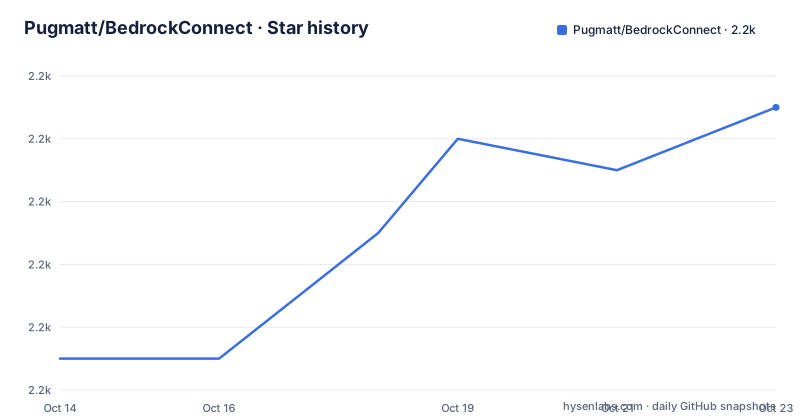
Star history
- Pugmatt/BedrockConnect2,185 ★ · +8
| Repository | 2026-10-14 | 2026-10-23 |
|---|---|---|
| Pugmatt/BedrockConnect | 2.2k | 2.2k |
8 Stars in the last 9 days, measured from the daily GitHub snapshot. Compare with other projects
Editorial analysis
Console Minecraft gives no list of third party servers
Bedrock Edition on a console ships with a fixed Featured Servers list and no field for typing a community server address, so a Switch, Xbox or PlayStation player cannot browse where their friends play. BedrockConnect is a minimal Java server that supplies that missing interface: it answers with a server-list screen, and the player comes away with a stored list of the servers they chose. The audience is the player, not the server operator. Nobody patches a console, installs client software, or pays for a companion app, and the project positions itself as something any player can set up from the console itself in a few minutes. The cost sits somewhere less obvious: the setup happens in the console's network settings, which changes DNS for every game and service on that device.
A custom resolver rewrites the Featured Servers domains
BedrockConnect reaches the console by answering for domain names it does not own. A custom DNS server redirects the domains used by Featured Servers so that they point at the BedrockConnect serverlist server instead, which lets players arrive through ordinary Featured Servers entries. Nothing about the entry matters to the player. Mineville, Lifeboat, Enchanted, Galaxite and The Hive are named as redirect-compatible, so joining any one of them lands on the same list screen. What the game sees is an ordinary Minecraft server handshake with a server-list interface on the other end. Topics on the repository, bedrock, bedrock-edition, dns, java and minecraft, describe that design precisely: the lever is name resolution and the payload is a Minecraft server, not an app.
Every list entry ends in a transfer packet
Joining a BedrockConnect instance does not keep you there. The server sends a server-list interface, and when the player enters the address of the server they want, BedrockConnect sends a packet that transfers them off the list and on to that server. So each entry is a redirect, not a proxy: BedrockConnect brokers the handoff and then steps out of the connection. A second door exists through the game's Friends menu, where the Join Game button can be arranged to land on a BedrockConnect instance. That path is powered by MCXboxBroadcast, a separate project, and the README sends you to the Standalone install instructions in the Broadcaster repository rather than describing its own. Two mechanisms, one owned here and one borrowed.
Two console values and one featured server join
On Nintendo Switch and Xbox the whole setup is one settings change plus one join. Open the console's internet settings and set the resolver values:
- Go into your console's internet settings, and set the primary DNS to 104.238.130.180 and secondary DNS to 8.8.8.8Then open Minecraft, go to the Servers tab, and join any of the redirect-compatible featured servers named above. There is no download and no account step. Keeping 8.8.8.8 in the secondary slot means ordinary resolution still works when the custom resolver is silent, which is a sensible habit for anyone who later renames the console or enables a different network. Repeating the same two values on a second console gives that console the same list, and the README documents no account, token or per-device pairing step that would distinguish one player from another.
PlayStation is given a different resolver address
PlayStation is the exception, and it is not a cosmetic difference. Both PlayStation sections point at 45.55.68.52 as the primary resolver rather than the 104.238.130.180 given for Switch and Xbox, and Sony consoles bury the setting several menus deep:
1. In the PS5 home screen, go to "Settings" and then "Network"
2. Select "Settings" and choose "Set up internet connection"
3. In "Advance Settings", set the "DNS settings" to "Manual"
4. Enter 45.55.68.52 for the primary DNS and 8.8.8.8 for the secondary DNS, and select "Ok"
5. Wait for connection to test
The PS4 route is longer again, because the console has no quick toggle at all:
8. For the "DNS settings" screen, select “Manual”
9. Enter 45.55.68.52 for the primary DNS and 8.8.8.8 for the secondary DNS, and click "Next"
10. Select "Automatic" for "MTU settings"
11. Select "Do not use" for "Proxy server"
12. Test connection
The instance table adds a fallback for exactly this platform pair: if issues occur on PS4 or PS5 with the DNS method, replace the primary DNS address with 45.55.68.52. The README never states why the consoles differ, so read the second address as a working fallback rather than an explained protocol difference.
The second advertised method is switched off
The quick setup announces two primary methods available to join BedrockConnect, then the Add Friend section states that the public bots have been turned off until further notice due to inscalability with player growth and other security related concerns. Both lines sit inside the same setup block, which is the clearest contradiction in the documentation. For anyone on the public instance today, DNS is the only route that works without extra work. Add Friend now means self hosting: follow the Standalone instructions in the MCXboxBroadcast Broadcaster repository and set the target server address in your `config.yml` to 104.238.130.180. That turns a player feature into an operator task, and a console player who cannot change DNS settings has no ready path at all.
One instance table mixes resolvers with plain servers
The community instance list folds two different services into one table, and the DNS Method Enabled column is the only way to tell them apart. The main instance at 104.238.130.180 is maintained by Pugmatt and is described as multiple load balanced servers, with a note to fall back to 45.55.68.52 on PS4 and PS5. ZAP-Hosting runs 134.255.231.119 and hasankayra04 runs 185.169.180.190 on NextDNS, both with the DNS method marked. Three entries carry a blank DNS column: 5.161.83.73 by Cybrancee in Virginia, 2.59.252.99 by Minjae in Seoul, and 57.128.153.204 by AdrianJoeK in the United Kingdom. A blank cell means the address is a Minecraft server you join directly, not a resolver a console can be pointed at, which is a distinction the table states only implicitly.
The server side has a layout and no build steps
The repository root is small and tells you what the server side consists of:
serverlist-server
docker
scripts
Beyond that, the README documents no build command, no required Java version, no server configuration file and no listening port for the list server, and it says nothing about how upgrades or rollback should be handled. It also does not explain whether a player's saved list belongs to their Microsoft account or to the console. Anyone who wants to run their own instance has the layout, the two resolver addresses and a pointer to another project's instructions, which is a thin basis for operating software that sits in front of every DNS lookup on a gaming device.
Editorial conclusion
BedrockConnect answers one console gap well, and it suits players who can edit their console network settings and accept a third party resolver in the path of every lookup. It does not suit operators who need a documented build, or anyone who must serve host addresses from a domain they control. Verify three things first: that the resolver you point at is still listed, that Add Friend works for your instance, and what the serverlist-server and docker/ directories expect, since the README documents none of it. The last push was on 2026-09-28.
Frequently asked questions
Does BedrockConnect work on PS4 and PS5?
Both PlayStation consoles are documented, with a different primary resolver from the other platforms. The PS4 and PS5 instructions use 45.55.68.52 with 8.8.8.8 as secondary, and the instance table says to replace the primary DNS address with 45.55.68.52 if issues occur on PS4 or PS5 with the DNS method.
Do I need to download an app to use BedrockConnect?
Not for the DNS method, which needs no download: change the console's DNS values and join a redirect-compatible featured server such as Mineville or The Hive. The project states it has no official mobile app on the Apple or Google Play store, and that any app sharing its name is not associated with it.
Can I run my own BedrockConnect server?
The repository ships docker/, scripts/ and serverlist-server/, but the README gives no build command, Java version or server configuration file. For the Add Friend route it points to the Standalone install instructions in the MCXboxBroadcast Broadcaster repository, where the target server address goes in your `config.yml`.
Is the Add Friend method available right now?
Not on the public instance. The README states that the public bots have been turned off until further notice due to inscalability with player growth and other security related concerns, which leaves the DNS method as the working route for new players.
Which BedrockConnect instance should I point my console at?
The main instance at 104.238.130.180 is maintained by Pugmatt and sits behind multiple load balanced servers, with 45.55.68.52 as the PlayStation fallback. ZAP-Hosting and hasankayra04 also run DNS enabled instances, while 5.161.83.73 and 2.59.252.99 have no DNS method and are reached by address.
Under what licence is BedrockConnect published?
GPL-3.0. Anyone who forks or modifies it and keeps distributing it inherits the copyleft obligations of that licence.
Official sources
Add this badge to your README
If you maintain this project, the badge below links readers to this analysis and shows its maintenance status from the daily GitHub snapshot. Paste the markdown into your README; add ?metric=license or ?metric=stars to the image URL for a different field.

[](https://hysenlabs.com/projects/pugmatt-bedrockconnect)Star history chart for your README
[](https://hysenlabs.com/projects/pugmatt-bedrockconnect)Was this useful?