k8s-for-docker-desktop: Kubernetes and Istio on Docker Desktop for Mac and Windows
Enables Kubernetes and Istio for Docker Desktop on Mac/Windows.
At a glance
- What is it?
- A PowerShell and shell script repository that loads the right Kubernetes control plane images for Docker Desktop, then walks you through dashboard, Ingress, Helm and Istio setup. It is a convenience layer, not a distribution, and that distinction decides whether you want it.
- Who is it for?
- Adopt it if you are on Docker Desktop for Mac or Windows, your network path to Docker Hub is slow or blocked, and you want the local Kubernetes dashboard, Ingress and Istio examples working in one sitting. Do not adopt it if you are not running Docker Desktop, if you need a supported production cluster, or if you are unwilling to accept the Docker Subscription Service Agreement, in which case the README itself points at Minikube.
- Can I use it commercially?
- Not without permission. GitHub finds no licence file in the repository, and without a licence all rights are reserved by default: you may read the code but not reuse it. Check the README, or ask the authors, before using it.
- Is it still maintained?
- Yes. The repository last received commits 180 days ago.
- What is it written in?
- Mainly PowerShell, according to GitHub's language statistics.
Answers come from the project's GitHub data, last synced on November 15, 2026, and from our analysis. They are not legal advice.
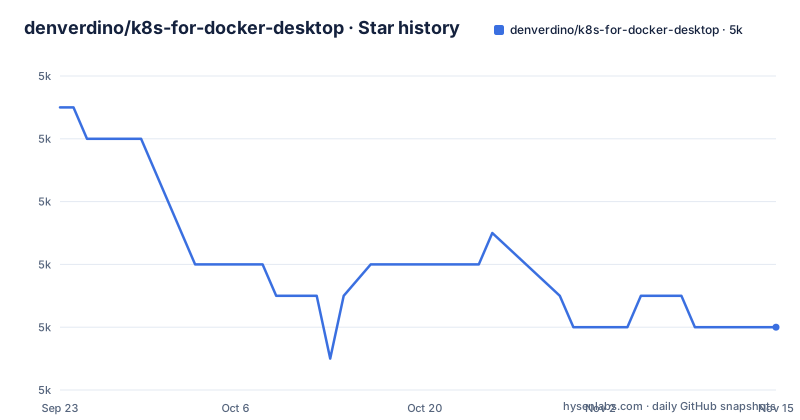
Star history
- denverdino/k8s-for-docker-desktop5,032 ★ · -7
| Repository | 2026-09-23 | 2026-11-15 |
|---|---|---|
| denverdino/k8s-for-docker-desktop | 5k | 5k |
-7 Stars in the last 53 days, measured from the daily GitHub snapshot. Compare with other projects
Editorial analysis
The gap k8s-for-docker-desktop fills
Docker Desktop ships a Kubernetes option, but enabling it on a slow or filtered connection to Docker Hub is where it usually stalls. The control plane images have to arrive before the cluster can come up, and the images are pulled from Docker Hub. This repository exists to pre-load those images from a mirror instead. The README states that it downloads the Kubernetes images from Alibaba Cloud's image service, then has you flip the Kubernetes switch in the Docker Desktop UI.
The audience is narrow and specific: developers on macOS or Windows who already run Docker Desktop and want a local cluster without leaving the Docker Desktop UI. If you run Linux, or you use kind or k3s, this repository is not aimed at you, and the README does not pretend otherwise. It also carries a pointed note: read and comply with the Docker Subscription Service Agreement, and if you do not accept Docker Desktop's terms, the README recommends Minikube instead. That is an unusual thing for a convenience script to say about the product it depends on.
What the scripts actually do, and what they do not
There is no daemon here and no controller. The repository is a set of loader scripts plus manifests. The top level holds load_images.sh for macOS and load_images.ps1 for Windows, a version manifest called images.properties, a getLatestIstio.ps1 helper, and two manifests: kube-system-default.yaml and kubernetes-dashboard.yaml. A sample directory holds apple.yaml, banana.yaml and ingress.yaml for the Ingress test.
The data flow is one-directional. images.properties names the image versions. The loader scripts read that file and pull those images into the local Docker image store. Docker Desktop's own Kubernetes implementation then starts the control plane from the images already present, which is why the load step has to happen before the switch is flipped. Nothing in the repository replaces Docker Desktop's Kubernetes distribution; the README is explicit that the master branch tracks Kubernetes v1.34.3 and that other versions live on other branches.
That design has a consequence worth stating plainly. When Docker Desktop upgrades its own Kubernetes, the images you pre-loaded may no longer be the ones it expects. The README anticipates this: if the Kubernetes version you want is not yet provided, you can edit images.properties and open a pull request. You can generate the required image list with kubeadm config images list --kubernetes-version v1.30.2, and the README points at the Docker Hub tag pages for docker/desktop-kubernetes, docker/desktop-vpnkit-controller and docker/desktop-storage-provisioner. So the maintenance burden is real and it is pushed onto the user, deliberately.
Installing it and bringing up your first cluster
Start from a machine with Docker Desktop for Mac or Windows installed. The README advises allocating at least 4GB of memory to Kubernetes in the Docker Desktop resource settings before you begin.
On macOS, run the loader script from the repository root. It reads images.properties and pulls the control plane images.
./load_images.shOn Windows, run the PowerShell equivalent. The README notes that if execution policy blocks the script, open PowerShell as administrator and run Set-ExecutionPolicy RemoteSigned first.
.\load_images.ps1With the images loaded, enable Kubernetes in the Docker Desktop UI and wait for it to report running. Then point kubectl at the context. Older Docker Desktop releases used docker-for-desktop as the context name, which is why the README calls this step optional.
kubectl config use-context docker-desktop
kubectl cluster-info
kubectl get nodes
If the cluster sits in a starting state indefinitely, the README points to two Docker issue threads and a concrete fix: on macOS remove the pki directory under ~/Library/Group\ Containers/group.com.docker/pki, and on Windows delete the pki directories under C:\ProgramData\DockerDesktop and C:\Users\yourUserName\AppData\Local\Docker. For live logs on macOS the README gives a log stream predicate; on Windows it points at service.txt under C:\ProgramData\DockerDesktop and log.txt under C:\Users\yourUserName\AppData\Local\Docker.
Dashboard, Ingress and Helm in one pass
The dashboard walkthrough is the part most people come for. Apply the dashboard manifest, check the pods, then open the API server proxy.
kubectl apply -f kubernetes-dashboard.yaml
kubectl get pod -n kubernetes-dashboard
kubectl proxy
The README gives the URL as http://localhost:8001/api/v1/namespaces/kubernetes-dashboard/services/https:kubernetes-dashboard:/proxy/. It also offers the upstream recommended.yaml from the kubernetes/dashboard repository as an alternative. To log in you apply kube-system-default.yaml, which authorizes the kube-system default service account, then extract the token. The Mac and Windows commands differ only in shell syntax.
kubectl apply -f kube-system-default.yaml
TOKEN=$(kubectl -n kube-system describe secret default| awk '$1=="token:"{print $2}')
kubectl config set-credentials docker-desktop --token="${TOKEN}"
echo $TOKEN
Paste that token into the dashboard's token field, or select the Kubeconfig option and point at $HOME/.kube/config on Mac or %UserProfile%\.kube\config on Windows.
Ingress comes next, with a warning: if you plan to test Istio, skip Ingress, because the Istio Ingress Gateway and Ingress conflict on their default ports. The repository ships a three-file sample. After applying apple.yaml, banana.yaml and ingress.yaml, the README shows curl -kL http://localhost/apple returning apple and the same for /banana. Cleanup is the same three files with kubectl delete. Helm is installed through brew on Mac or choco on Windows, with the stable repo pointed at http://mirror.azure.cn/kubernetes/charts/, and an optional WordPress install as a smoke test. The README flags that Helm's CDN can be unreachable in China and links the upstream issue.
Istio, and the Windows caveat the README admits
The Istio path uses upstream tooling rather than a bundled chart. You download a pinned release, put its bin directory on PATH, and install the demo profile.
curl -L https://istio.io/downloadIstio | ISTIO_VERSION=1.22.1 sh -
cd istio-1.22.1
export PATH=$PWD/bin:$PATH
istioctl install --set profile=demo -y
kubectl get pods -n istio-system
Then you label the default namespace for automatic sidecar injection with kubectl label namespace default istio-injection=enabled, and apply the Bookinfo sample from the Istio distribution. The README's own note on Windows is blunt: the Windows environment has not been strictly tested. The workaround offered is getLatestIstio.ps1, which the README says was adapted from a community install script. If you are on Windows and Istio matters to you, treat this as the least verified part of the repository and expect to debug it yourself.
The version pinning deserves attention too. The README uses Istio 1.22.1 as its example and tells you newer versions can be substituted at your own discretion. That is honest, but it means the Istio instructions age independently of the Kubernetes instructions.
Where this is the wrong tool
The clearest failure mode is scope. This repository only makes sense on top of Docker Desktop for Mac or Windows. The README's own alternative for anyone who rejects Docker Desktop's terms is Minikube, which runs its own VM or container driver and does not depend on Docker Desktop's embedded Kubernetes at all. That is a different architecture, not a drop-in swap: Minikube manages the cluster lifecycle itself, so you lose the Docker Desktop integration and gain independence from the Docker subscription.
The second limitation is version drift. Because the repository tracks a specific Kubernetes release on master and expects you to switch branches for others, a Docker Desktop update can leave your pre-loaded images mismatched with what the embedded cluster wants. The README's remedy is editing images.properties by hand and submitting a pull request, which is a community-maintained cadence, not a release cadence. The repository has no published GitHub releases.
Third, none of this is a production story. A single-node cluster inside a desktop application, with a demo Istio profile and a dashboard exposed through kubectl proxy, is a development and learning environment. If you need multi-node scheduling, real ingress with certificates, or an upgrade path with rollback, this repository does not address any of it, and the README does not claim to.
Maintenance, licence and upgrade cost
The repository is not archived, and the last push was on 2026-05-19. That is more than five months before today, so the project is not dormant, but it is also not moving quickly, and the repository has no published releases to anchor a version history. Treat the master branch as the current artifact and expect the Kubernetes version it names to lag Docker Desktop's shipping version.
Upgrade cost falls on you in three places. When Docker Desktop bumps its Kubernetes, you check whether images.properties still matches and regenerate the list with kubeadm config images list if it does not. When you move to a new Istio version, you re-run the download with a different ISTIO_VERSION and reinstall the profile. When Helm's repository layout changes, the stable repo URL in the README may need revisiting.
The licence is listed as unknown in the repository metadata, and there is no licence file among the top-level entries. The one licensing statement it does make concerns Docker, not this project: it directs you to read and comply with the Docker Subscription Service Agreement and suggests Minikube if you do not accept those terms. For the repository's own code, the absence of a licence file means the terms of reuse are simply not stated, and anyone intending to redistribute the scripts or fold them into an internal tool should resolve that before doing so. That is a factual gap, not legal advice.
Editorial conclusion
Adopt it if you are on Docker Desktop for Mac or Windows, your network path to Docker Hub is slow or blocked, and you want the local Kubernetes dashboard, Ingress and Istio examples working in one sitting. Do not adopt it if you are not running Docker Desktop, if you need a supported production cluster, or if you are unwilling to accept the Docker Subscription Service Agreement, in which case the README itself points at Minikube. Before you start, verify that images.properties names the Kubernetes version you actually want to run, and confirm the matching tags exist on Docker Hub for docker/desktop-kubernetes, docker/desktop-vpnkit-controller and docker/desktop-storage-provisioner, because that file names the image versions the loader scripts load.
Frequently asked questions
Does k8s-for-docker-desktop work on macOS?
Yes. The README gives ./load_images.sh as the macOS path and includes Mac-specific commands for extracting the dashboard token and for streaming Docker Desktop logs.
What Kubernetes version does k8s-for-docker-desktop install?
The README states that the master branch contains Kubernetes v1.34.3, and that other versions are available on other branches. If the version you need is missing, you edit images.properties and can submit a pull request.
What should I do if Docker Desktop Kubernetes is stuck in the starting state?
The README points to two Docker issue threads and gives a concrete fix: on macOS remove the pki directory under ~/Library/Group Containers/group.com.docker/pki, and on Windows delete the pki directories under C:\ProgramData\DockerDesktop and C:\Users\yourUserName\AppData\Local\Docker.
Can I run Ingress and Istio at the same time with k8s-for-docker-desktop?
No. The README states that the Istio Ingress Gateway and Ingress conflict on their default ports, and tells you to remove Ingress before testing Istio.
Official sources
Add this badge to your README
If you maintain this project, the badge below links readers to this analysis and shows its maintenance status from the daily GitHub snapshot. Paste the markdown into your README; add ?metric=license or ?metric=stars to the image URL for a different field.

[](https://hysenlabs.com/projects/denverdino-k8s-for-docker-desktop)Star history chart for your README
[](https://hysenlabs.com/projects/denverdino-k8s-for-docker-desktop)Was this useful?