godot-statecharts: hierarchical state machines without the state explosion
A state charts extension for Godot 4
At a glance
- What is it?
- This Godot 4 extension implements state charts on nodes and signals, and its central constraint is that your code only ever touches one class, StateChart, with two methods for transitions and expression guards. Inactive states stop updating every frame, and the whole thing can be removed without refactoring.
- Who is it for?
- Adopt godot-statecharts if your Godot 4 game logic has grown into a state machine whose states multiply as you add features, since hierarchy is what removes that multiplication, and the one-class API means you can adopt it incrementally. Do not adopt it for a project that needs behaviour per state in code, because the design deliberately keeps everything in the chart rather than in state subclasses, and per-state scripts are what you would write instead.
- Can I use it commercially?
- Yes. MIT is a permissive licence: you can use, modify and sell software built on it, as long as you keep its copyright and licence notices.
- Is it still maintained?
- Yes. The repository last received commits 135 days ago.
- What is it written in?
- Mainly GDScript, according to GitHub's language statistics.
Answers come from the project's GitHub data, last synced on November 7, 2026, and from our analysis. They are not legal advice.
Star history
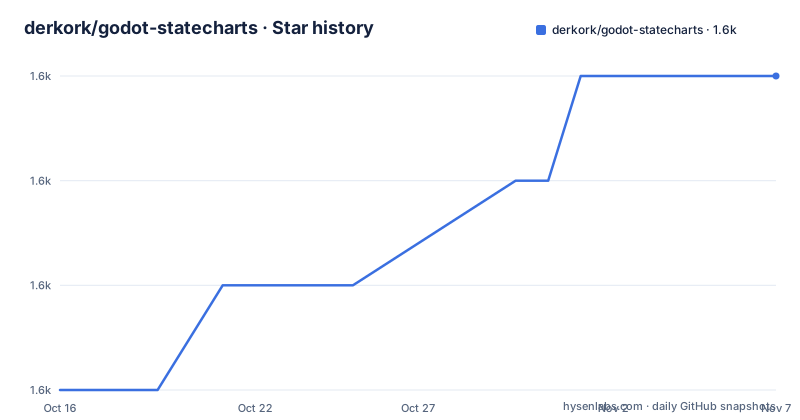
- derkork/godot-statecharts1,625 ★ · +3
| Repository | 2026-10-16 | 2026-11-07 |
|---|---|---|
| derkork/godot-statecharts | 1.6k | 1.6k |
3 Stars in the last 22 days, measured from the daily GitHub snapshot. Compare with other projects
Editorial analysis
The whole API surface is one class and two methods
The design decision that defines this extension is stated first in the feature list: your code only interacts with a single class, `StateChart`, which has two methods for triggering transitions and setting properties for expression guards.
There is no need to create subclasses or implement interfaces.
That constraint is the library's main argument. In a conventional FSM implementation you often subclass a state node, override an enter or exit hook, and reference those classes from your gameplay code. Once you have done that in a few places, the FSM has spread through your codebase and removing it later is a refactor. The README makes that point directly, saying this makes it easy to integrate the library into an existing code base or remove it if you find it unsuitable.
Transitions themselves are declared rather than coded. Declarative transitions with guards let you express complex logic without writing any code, and transitions can be time-delayed, which is how you build cooldowns.
So the split is: structure and conditions live in the chart, and your gameplay code calls the chart. Two methods is the entire interface your game logic needs to know.
Hierarchy is the point, not a bonus
The positioning is that state charts are similar to finite state machines but more powerful, because they avoid the state explosion problem of traditional FSMs.
State explosion is what happens when a flat state machine has to enumerate combinations. A character that can be running, crouching, injured and carrying an item becomes running-not-carrying, running-carrying, crouching-not-carrying, crouching-carrying, and the same multiplication happens for every independent dimension you add. The state count grows multiplicatively while the behaviour does not.
Hierarchy fixes this by making the dimensions nested instead of combined. A running state can contain a carrying sub-state, and transitions that apply to running apply to everything inside it. The behaviour is inherited rather than duplicated.
That is the reason to adopt this extension over writing your own FSM node, and it is also the reason it may be more than you need. If your game has one state machine with six states and no independent dimensions, a plain boolean or enum in your player script is less machinery.
The extension targets Godot Engine 4 or later and is built from scratch for Godot in an idiomatic way using nodes and signals, so it does not wrap a port of another library.
Inactive states stop running, which is a real saving
One feature line is easy to skim and easy to underestimate: inactive states will not update every frame for improved performance.
This is the practical payoff of hierarchy, and it applies even to people who came for the expressiveness. In a state chart, only the active path processes, so a deep hierarchy with many states is not a per-frame cost for every state in it.
The related feature is pause behaviour: all states adhere to the pause mode, so state charts pause when the game is paused. For a game with menus and paused states, that is a behaviour you otherwise write by hand for each chart.
Together these two lines are the difference between a state chart being a structural convenience and being a performance decision, and they are worth checking against your own project: if your game has many simultaneous logical dimensions, the inactive-state behaviour means adding dimensions does not add per-frame work.
Both GDScript and C# are supported, so the choice of scripting language does not constrain the adoption.
In-editor checking and a runtime debug view
Two of the features target the moment things go wrong rather than the moment things work.
Comprehensive in-editor error checking and warnings help you avoid common mistakes. For a declarative system this matters more than usual, because the failure mode is a chart that does not fire and a game that silently does the wrong thing. An editor-time error is far cheaper than that.
The built-in debug view lets you inspect your state charts in the game while they are running. You can see which states are active and which transitions are configured, in the running application, rather than by adding logging and guessing.
The documentation position matches. There is a manual with annotated examples at derkork.github.io/godot-statecharts, an FAQ at the faq page of the same site, and a video tutorial for people who would rather watch than read.
Installation is through the Godot Asset Library as asset 1778, which means you can add it from the editor rather than by vendoring files into your project.
What the repository says about how this is maintained
The feature list is short, but the repository layout shows a project with process.
Releases are frequent and small: v0.22.5 on 2026-06-26, v0.22.4 on 2026-03-24 and v0.22.3 on 2026-02-20. The last push was on 2026-06-26, the same day as v0.22.5, so commits and tags have been landing together. That cadence is what you want from an editor extension, where a breaking change to a node property affects everyone on the same day.
The version stays below 1.0, which for an API this small is a reasonable signal that interfaces may still change.
The process files are visible: CONTRIBUTING.md, CHANGES.md and RELEASE_CHECKLIST.md at the root. A release checklist is an unusual thing to find in a small extension and suggests releases are routine rather than improvised.
Testing is set up with GUT. The root carries .gut_editor_config.json, .gut_editor_shortcuts.cfg and run_tests.bat, plus a tests/ directory, so the test runner is configured for both command line and editor use. There is also a C# project file, godot-state-charts.csproj, alongside godot-state-charts.sln, matching the claim that C# is supported.
Examples live in godot_state_charts_examples/, and the demos use Pixel Adventure assets by Pixel Frog, which Pixel Frog has made available in the public domain, plus icons by J. W. Bjerk licensed CC BY DEED 3.0. Both attributions are given in the README.
The licence is MIT, and .junie/, .vscode/ and .editorconfig at the root cover editor and agent tooling.
When to use plain scripts instead
The clearest wrong-tool case is a small game with one or two state dimensions. Adding a chart editor, guards and a debug view to a character that has three states and no independent dimensions costs more in concepts than it saves in code.
The second case is code that wants substantial per-state behaviour in state subclasses. This extension's premise is that your code should not have to create those subclasses or implement interfaces.
The alternative is writing the state chart as data in your own code: a dictionary of states, a transition table, and a single update function that evaluates conditions in order. For a game with one chart, that is a few dozen lines and no dependency, and you keep full control of how transitions are evaluated, including the ordering guarantees that hierarchical charts make you think less about.
What you give up with the hand-rolled version is the editor integration: no in-editor validation, no runtime debug view, no visual chart. For a project with several charts, or a team where the chart is meant to be readable by designers, that is what the extension is for. The MIT licence means adopting it commits you to nothing beyond attribution.
Editorial conclusion
Adopt godot-statecharts if your Godot 4 game logic has grown into a state machine whose states multiply as you add features, since hierarchy is what removes that multiplication, and the one-class API means you can adopt it incrementally. Do not adopt it for a project that needs behaviour per state in code, because the design deliberately keeps everything in the chart rather than in state subclasses, and per-state scripts are what you would write instead. Before you start, open the manual at derkork.github.io/godot-statecharts and enable the in-editor error checking, since the checks it flags are cheaper to fix in the editor than at runtime.
Frequently asked questions
What Godot version does godot-statecharts support?
Godot Engine 4 or later, with both GDScript and C# supported. It is published in the Godot Asset Library as asset 1778.
How much of my code has to change to use godot-statecharts?
Your code interacts with a single class, StateChart, which has two methods for triggering transitions and for setting properties used in expression guards. There is no need to create subclasses or implement interfaces, and the README notes the library is easy to remove if unsuitable.
What problem do state charts solve over a finite state machine?
The state explosion problem. State charts are hierarchical, so independent dimensions nest instead of multiplying into every combination of states, while a traditional flat FSM enumerates each combination.
Does godot-statecharts handle paused games?
Yes. All states adhere to the pause mode, so state charts pause when the game is paused. Inactive states also do not update every frame.
What licence is godot-statecharts released under?
MIT. Demo projects additionally use Pixel Adventure assets by Pixel Frog, released into the public domain, and icons by J. W. Bjerk under CC BY DEED 3.0, both credited in the README.
Official sources
Add this badge to your README
If you maintain this project, the badge below links readers to this analysis and shows its maintenance status from the daily GitHub snapshot. Paste the markdown into your README; add ?metric=license or ?metric=stars to the image URL for a different field.

[](https://hysenlabs.com/projects/derkork-godot-statecharts)Star history chart for your README
[](https://hysenlabs.com/projects/derkork-godot-statecharts)Was this useful?