Claude-to-IM ships one dependency as a path outside the checkout
Bridge Claude Code / Codex to IM platforms — chat with AI coding agents from Telegram, Discord, or Feishu/Lark.
At a glance
- What is it?
- A skill that puts a background daemon between five IM bots and Claude Code or Codex, with tool permission requests mirrored into the chat. Five documented install paths, one of which updates by deleting the installed copy.
- Who is it for?
- This fits a machine where you want to drive a coding agent from a phone, and the permission mirroring is the part that makes it bearable, since a tool call waits for an explicit approval in the chat rather than proceeding on its own. Check three things first.
- Can I use it commercially?
- Yes. MIT is a permissive licence: you can use, modify and sell software built on it, as long as you keep its copyright and licence notices.
- Is it still maintained?
- Activity is slowing. The repository last received commits 7 months ago.
- What is it written in?
- Mainly TypeScript, according to GitHub's language statistics.
Answers come from the project's GitHub data, last synced on November 14, 2026, and from our analysis. They are not legal advice.
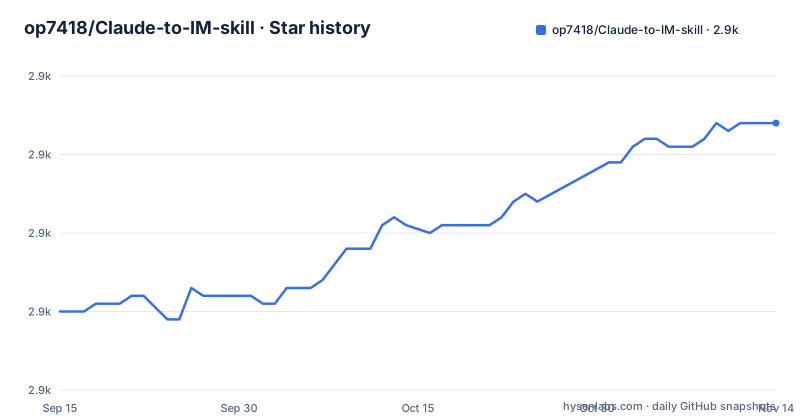
Star history
- op7418/Claude-to-IM-skill2,904 ★ · +24
| Repository | 2026-09-15 | 2026-11-14 |
|---|---|---|
| op7418/Claude-to-IM-skill | 2.9k | 2.9k |
24 Stars in the last 60 days, measured from the daily GitHub snapshot. Compare with other projects
Editorial analysis
A dependency points at a sibling directory the repository does not contain
The dependency block in package.json lists three runtime packages. Two are ordinary registry entries, `@anthropic-ai/claude-agent-sdk` at `^0.2.62` and `qrcode` at `^1.5.4`. The third is `claude-to-im` at `file:../Claude-to-IM`, a path one level above the checkout rather than a version on a registry. A `file:` specifier resolves against the directory the install runs in, so `npm install` inside a fresh clone looks for a sibling folder named Claude-to-IM next to it. The documented Codex alternative is exactly a fresh clone followed by an install:
git clone https://github.com/op7418/Claude-to-IM-skill.git ~/.codex/skills/claude-to-im
cd ~/.codex/skills/claude-to-im
npm install
npm run build
The install script is described as installing dependencies and building the daemon, so it reaches the same resolution. Check that one line in package.json before running any of the documented commands.
Five install paths, and only one of them has a delete step on update
Claude Code has three: the recommended `npx skills add op7418/Claude-to-IM-skill`, a direct clone into `~/.claude/skills/claude-to-im` which Claude Code discovers on its own, and a development shape that clones to `~/code/Claude-to-IM-skill` and symlinks it into `~/.claude/skills`. Codex has two: the install script, which copies the skill to `~/.codex/skills/claude-to-im`, with `--link` for a live checkout, and the direct clone shown above.
The update instructions then diverge per path. The npx path is refreshed by re-running the same add command. The clone and symlink paths run `git pull`, then `npm install`, then `npm run build`. The Codex copy mode is the exception:
rm -rf ~/.codex/skills/claude-to-im
bash ~/code/Claude-to-IM-skill/scripts/install-codex.sh
An `rm -rf` of the installed directory is the documented refresh for that single path, while `--link` and the direct clone just pull. If you installed through the script, know which mode you used before your next update.
The daemon outlives the terminal, and CTI_RUNTIME picks the agent
The whole architecture fits in the README's diagram:
You (Telegram/Discord/Feishu/QQ/WeChat)
  ↕ Bot API
Background Daemon (Node.js)
  ↕ Claude Agent SDK or Codex SDK (configurable via CTI_RUNTIME)
Claude Code / Codex → reads/writes your codebase
Two properties of that shape matter in daily use. The daemon is a Node.js process that keeps running after you close the terminal, so `start` detaches it rather than tying it to a shell. And conversations survive daemon restarts, so a crash costs the running task rather than the thread.
`CTI_RUNTIME` decides which agent the daemon drives, and the prerequisites are conditional on it. Claude Code is needed for `claude` or `auto`, installed and authenticated with the `claude` command available. Codex is needed for `codex` or `auto`, installed with `npm install -g @openai/codex` and authenticated by running `codex auth login` or by setting `OPENAI_API_KEY`, which the README marks as optional and for API mode.
Permission requests arrive as buttons on two platforms and as digits on three
When the agent reaches for a tool, the request is mirrored into the chat rather than resolved on the machine. Telegram and Discord get Allow and Deny buttons inline. Feishu, QQ and WeChat get a text `/perm` command prompt, or quick `1/2/3` replies. Those two groups are not independent of a third feature: Telegram and Discord are also the only platforms listed with the streaming preview, so the platforms that render buttons are the platforms where you watch the response arrive as it types. The three platforms that approve with digits get no preview.
The digits work as a numbered choice against a pending request, so approval depends on the daemon being able to line a reply up with the right prompt. The feature list also claims token storage with `chmod 600` and automatic redaction in all logs, which matters more here than in a normal CLI bridge, because the bot tokens for five platforms now sit in one config file on a machine that talks to your codebase.
WeChat is reached by a phrase, and the phrase differs per product
Every other capability is a command, but WeChat is requested in Chinese. The Claude Code section says 帮我接微信, and the Codex section says 帮我接微信桥接, with the longer form repeated in the Codex verification step. Neither is a slash command, so both have to be typed as plain text into the agent, and the wording is not interchangeable between the two products.
WeChat also has its own login path in package.json, a `weixin:login` script wired to `node --import tsx src/weixin-login.ts`, and the dependency list carries `qrcode` at `^1.5.4`. A `dev` script runs `tsx src/main.ts` directly, and `typecheck` is `tsc --noEmit`, so the daemon can be run from source without a build when you are changing it. Keep both Chinese phrases to hand before you start, since typing the wrong one on the wrong product is the most likely first failure.
Eight operations, two spellings, and one positional argument
The command table sets Claude Code slash commands against Codex phrases for the same eight operations: setup, start, stop, status, logs, reconfigure and doctor, with logs taking a count. The Codex column gives English phrases and, for several rows, Chinese ones: 配置, 启动桥接, 停止桥接, 状态, 查看日志, 修改配置 and 诊断. On Claude Code the forms are `/claude-to-im setup` through `/claude-to-im doctor`.
The single argument anywhere is the log line count, and it is positional. Bare `/claude-to-im logs` shows the last 50 lines; `/claude-to-im logs 200` shows the last 200. No flag form is documented for it, and no argument is documented for the other seven, so anything else you want to change goes through `reconfigure`, which the table describes as an interactive update of the config. The daemon's working directory, model and mode are set in the setup wizard rather than at start time.
The wizard verifies tokens against platform APIs before the daemon runs
Setup collects channels in any combination, then credentials, then defaults for working directory, model and mode, and the fourth step validates the tokens against each platform's API immediately. That last step is where a wrong token surfaces, which is worth having in a process that would otherwise fail later on the first message.
The per platform guides say where each token comes from. For Telegram: message `@BotFather`, send `/newbot`, copy the bot token in the form `123456789:AABbCc...`, and for group use set `/setprivacy` to Disable; your own user id comes from `@userinfobot`. For Discord: create a new application in the developer portal, open the Bot tab, use Reset Token, copy it, then enable the Message Content Intent. That Discord step is where the guide stops, with the intent named and the sentence unfinished, so the remaining settings for that platform are left to the wizard's own inline guidance.
Version 0.1.0, no tagged release, last push on 2026-03-23
package.json reads `0.1.0` and the repository has no GitHub releases, so there is no tag to pin and no release note to diff against. The root holds CLAUDE.md, SECURITY.md, SKILL.md, config.env.example, evals/, references/, scripts/, src/ and tsconfig.json, with README.md and README_CN.md side by side. The last push to main was on 2026-03-23, which is the date to judge freshness against, since both the Claude Code and Codex CLIs it wraps move faster than that.
The pinning story is in the dependencies rather than in tags. The Claude Agent SDK is a required dependency at `^0.2.62`, and `@openai/codex-sdk` at `^0.110.0` sits in optionalDependencies, which is what lets one install serve either runtime under `CTI_RUNTIME` without pulling the other SDK. `engines` requires node `>=20`, matching the stated prerequisite. The test script is the one piece of real plumbing: it points `CTI_HOME` at a fresh `mktemp -d`, then runs the node test runner single threaded with a 15000ms timeout over `src/__tests__/*.test.ts`.
Editorial conclusion
This fits a machine where you want to drive a coding agent from a phone, and the permission mirroring is the part that makes it bearable, since a tool call waits for an explicit approval in the chat rather than proceeding on its own. Check three things first. The `claude-to-im` dependency is a `file:../Claude-to-IM` path, so the documented npm install only resolves when a sibling directory of that name sits next to your clone. WeChat is reached by typing a Chinese phrase rather than a command, and the phrase is not the same on both products. And the last push to main was on 2026-03-23, at version 0.1.0 with no tagged release, so expect to reconcile version drift against the Claude Code and Codex CLIs yourself through the pinned SDK versions rather than through a release note.
Frequently asked questions
What does the Claude-to-IM skill need before it starts?
Node.js 20 or newer, which is both the stated prerequisite and the engines field in package.json. Claude Code CLI installed and authenticated for `CTI_RUNTIME=claude` or `auto`, with the `claude` command available, and Codex CLI for `codex` or `auto`, installed with `npm install -g @openai/codex` and authenticated by `codex auth login` or by setting `OPENAI_API_KEY`.
How do I install the Claude-to-IM skill into Claude Code?
The recommended line is `npx skills add op7418/Claude-to-IM-skill`, then tell Claude Code `/claude-to-im setup`. To check it landed, start a new session and type `/`, where `claude-to-im` should appear in the skill list. Cloning straight into `~/.claude/skills/claude-to-im` is the alternative, discovered automatically.
How are tool permissions approved in Claude-to-IM?
Telegram and Discord show Allow and Deny buttons inline in the chat. Feishu, QQ and WeChat get a text `/perm` command prompt or quick `1/2/3` replies instead. Telegram and Discord are also the two platforms listed with the streaming preview.
What is CTI_RUNTIME for in Claude-to-IM?
It selects which agent the background daemon drives. The Claude Agent SDK at `^0.2.62` is a required dependency, while `@openai/codex-sdk` at `^0.110.0` is in optionalDependencies, so one install can serve either runtime. The README diagram names CTI_RUNTIME as the switch between the two SDKs.
Official sources
Add this badge to your README
If you maintain this project, the badge below links readers to this analysis and shows its maintenance status from the daily GitHub snapshot. Paste the markdown into your README; add ?metric=license or ?metric=stars to the image URL for a different field.

[](https://hysenlabs.com/projects/op7418-claude-to-im-skill)Star history chart for your README
[](https://hysenlabs.com/projects/op7418-claude-to-im-skill)Was this useful?