Greenlet: A Single-Function Web Worker Wrapper with Real Constraints
GitHub describes it as 🦎 Move an async function into its own thread.. The repository metadata lists JavaScript as its primary language. This article stays within the project description and details documented in the GitHub repository README.
At a glance
- What is it?
- Greenlet moves one async function into a Web Worker thread. It is small, transferable-aware, and blunt about its scope limits, but it has not been updated since 2019.
- Who is it for?
- Adopt Greenlet if you need a minimal, dependency-free way to offload a single async function to a Web Worker in a browser, especially when input and output sizes are small and you can live with the isolated scope and CSP blob requirements. Do not use it if you need to share state with the main thread, call greenlet() dynamically, or expect ongoing maintenance; the last release was 1.1.0 in October 2019.
- Can I use it commercially?
- Not without permission. GitHub finds no licence file in the repository, and without a licence all rights are reserved by default: you may read the code but not reuse it. Check the README, or ask the authors, before using it.
- Is it still maintained?
- Probably not. The repository last received commits 68 months ago, on March 1, 2021.
- What is it written in?
- Mainly JavaScript, according to GitHub's language statistics.
Answers come from the project's GitHub data, last synced on October 22, 2026, and from our analysis. They are not legal advice.
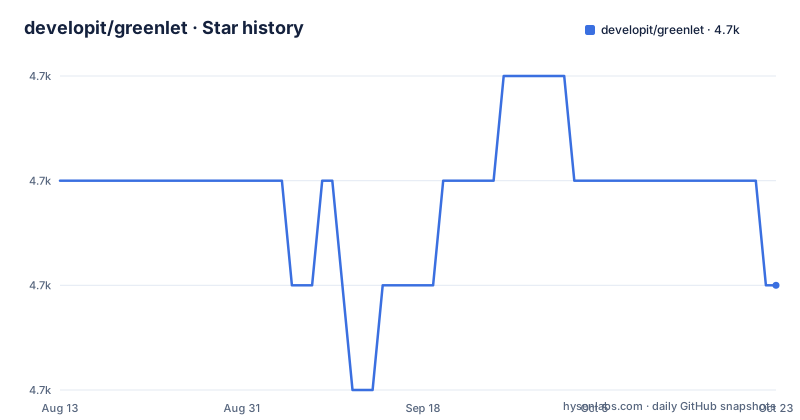
Star history
- developit/greenlet4,687 ★ · -1
| Repository | 2026-08-13 | 2026-10-22 |
|---|---|---|
| developit/greenlet | 4.7k | 4.7k |
-1 Stars in the last 70 days, measured from the daily GitHub snapshot. Compare with other projects
Editorial analysis
What Greenlet Solves and Who It Is For
Greenlet addresses a narrow but real problem: moving a single asynchronous function off the main thread in a browser. Web Workers are the standard mechanism, but using them directly requires boilerplate: creating a worker file, posting messages, handling events, and cleaning up. Greenlet collapses that into one function call. It is aimed at developers who have one expensive or blocking operation, like a fetch that only needs a small piece of the response, and want the concurrency benefit without the ceremony. The README explicitly positions it as a simplified single-function version of workerize, which is a more general worker wrapper. If your workload is a single function with small inputs and outputs, Greenlet fits. If you need multiple functions, complex messaging, or shared state, it is the wrong tool from the start.
The Mechanism: Function to Worker, Scope Isolated
Greenlet takes an async function and returns a copy that runs inside a Web Worker. The input function is serialized and executed in an isolated context. That means the function cannot rely on its surrounding scope. Variables, closures, and imported modules outside the function body are unavailable inside the worker. The README warns about this caveat directly. The return value is a function that, when called, posts a message to the worker and returns a promise. The worker runs the async function and posts the result back. This is a simple message-passing architecture. The key detail is that the function body is the entire program; anything it needs must be self-contained. For example, the fetch example in the README builds a URL, calls fetch, parses JSON, and returns a name. That works because fetch is a global in the worker. But if you tried to use a helper function defined outside, it would fail. This is a hard constraint, not a minor caveat.
Installation and Usage: Commands and Config Keys
Installation is a single npm command: npm i -S greenlet. The package is available on npm as greenlet. Usage is equally direct: import greenlet from 'greenlet', then define a function like let getName = greenlet(async username => { ... }). The README shows a fetch example that returns a profile name. The critical usage rule is never to call greenlet() dynamically. Each call creates a new Worker thread. The README gives a diff: the bad pattern calls greenlet(x => x)('bad') inside another function, which spawns a thread on every invocation. The good pattern assigns the greenlet-wrapped function once and reuses it. This is a performance and resource pitfall that is easy to hit if you wrap inside a loop or a frequently called function. The README advises creating greenlets at the top of your module. There are no other configuration keys; the library is function-only. For Node.js, the README notes that Web Workers must be polyfilled, for example with node-webworker. That adds a dependency and complexity, so browser use is the primary target.
Transferables and Small Payloads: The Performance Sweet Spot
Greenlet supports transferables. The README states it will accept and optimize transferables as arguments and return values. Transferables allow moving data like ArrayBuffer or ImageBitmap between threads without copying, which is a meaningful performance win for binary data. However, the README also says Greenlet is most effective when inputs and outputs are relatively small. That is a direct constraint on its use case. If you pass large strings or objects, the structured clone or transfer cost can outweigh the benefit of offloading. The transferable support is a differentiator from naive worker wrappers, but it only matters if your data is transferable. The project's own benchmark link claims the same performance as direct Worker usage, but we cannot verify that from the repository alone. The point is that Greenlet is not a general-purpose parallel computing tool; it is a narrow optimization for small, self-contained async tasks.
Browser Support and CSP: Real Deployment Constraints
Greenlet relies on Web Workers, which are supported in Chrome, Firefox, Safari, Edge, and IE10+. That is broad but not universal. The README suggests a feature check: if (window.Worker) { ... } else { ... }. That is a practical fallback for older browsers. More importantly, Content-Security-Policy is a hard requirement. The README states that Greenlet requires worker-src blob: and script-src blob: in your CSP configuration. This is because Greenlet creates the worker from a Blob URL. If your site has a strict CSP that disallows blob: sources, Greenlet will not work. This is a deployment constraint that many developers miss. You cannot just add the library and expect it to run under a restrictive policy. You must adjust your CSP headers. That is a concrete, non-negotiable requirement. If you cannot relax your CSP, Greenlet is not an option.
Limitations and Failure Modes: Scope, Dynamic Calls, and Node
The most obvious failure mode is scope isolation. Any function that references variables outside its own body will break at runtime. This is not a warning; it is a design consequence. The README warns about dynamic calls, which create a new thread per call and can exhaust browser resources. Another limitation is Node.js support, which requires a polyfill like node-webworker. That polyfill is not maintained by the Greenlet project, so its reliability is uncertain. Also, the library has not been updated since October 2019. The npm package is version 1.1.0, and the last push to the repository was on 2019-10-01. That means it is effectively unmaintained. For a library that touches threading and browser APIs, this is a concern. Browser APIs evolve, and security issues or deprecations could arise. The README does not mention any known issues, but the lack of activity is a fact you must weigh.
Maintenance and License: What You Are Adopting
Greenlet is licensed under the MIT License, as stated in the README. That is permissive and allows commercial use, modification, and redistribution with attribution. The license file is not in the provided material, but the README links to the MIT text. The maintenance status is the bigger issue. The last release was 1.1.0 on 2019-10-01, and the repository has not had a push since then. There is no indication of active development. For a small utility, that might be acceptable if the code is stable and the API is complete. However, Web Workers and browser standards have changed since 2019. New security restrictions or performance improvements could affect Greenlet's behavior. The README credits a refactor prompted by an annotated exploration of the source, which suggests the code has been cleaned up, but that was years ago. You should inspect the source yourself, as the repository is public, to see if it still aligns with current browser behavior. The absence of maintenance is not a dealbreaker for every project, but it is a real cost.
Alternatives: workerize and Direct Worker Usage
The README names workerize as the broader alternative. workerize is also by developit and supports multiple functions and a more complete worker API. Greenlet is a single-function simplification. If you have more than one function to offload, workerize is the natural choice. The trade-off is size and complexity: workerize is larger and has more features, while Greenlet is minimal. Another alternative is using Web Workers directly. Direct usage gives you full control over messaging, lifecycle, and error handling, but requires more boilerplate. The README claims Greenlet offers the same performance as direct Worker usage, but that is a benchmark claim we cannot verify. The difference in approach is clear: Greenlet abstracts the worker creation and messaging into a single function, while direct usage requires you to write that plumbing yourself. If you need fine-grained control, direct workers are better. If you want minimal code and can accept the constraints, Greenlet or workerize are options.
Editorial conclusion
Adopt Greenlet if you need a minimal, dependency-free way to offload a single async function to a Web Worker in a browser, especially when input and output sizes are small and you can live with the isolated scope and CSP blob requirements. Do not use it if you need to share state with the main thread, call greenlet() dynamically, or expect ongoing maintenance; the last release was 1.1.0 in October 2019. Before adopting, verify that your target browsers support Web Workers and that your Content-Security-Policy allows worker-src blob: and script-src blob:, and check whether the unmaintained status is acceptable for your project.
Frequently asked questions
What is greenlet for JavaScript?
A package that takes an async function and returns a copy of it which runs inside a Web Worker. You call the returned function like any other promise-returning function, and the work happens off the main thread.
How do I install greenlet?
With npm i -S greenlet. The published package is greenlet, with main pointing at dist/greenlet.js, module at dist/greenlet.m.js and types from index.d.ts, built from greenlet.js by microbundle.
Does greenlet work in Node.js?
Not without a polyfill. The README says that for NodeJS usage Web Workers must be polyfilled using a library like node-webworker, since greenlet relies on the browser Workers API.
Does greenlet need a Content-Security-Policy change?
Yes. If your app has a Content-Security-Policy, the README says greenlet requires worker-src blob: and script-src blob: in the config, because its workers are created from blob URLs.
Why should greenlet not be called inside a function?
Because every call creates a new Worker thread. The README's diff contrasts a bad pattern that spawns a thread per call with a good pattern that creates the greenlet once and reuses it, and recommends creating greenlets at the top of your module.
Official sources
Add this badge to your README
If you maintain this project, the badge below links readers to this analysis and shows its maintenance status from the daily GitHub snapshot. Paste the markdown into your README; add ?metric=license or ?metric=stars to the image URL for a different field.

[](https://hysenlabs.com/projects/developit-greenlet)Star history chart for your README
[](https://hysenlabs.com/projects/developit-greenlet)