webgpu-claude-skill: Three.js TSL knowledge packaged for coding agents
A Claude skill for developing WebGPU applications with Three.js
At a glance
- What is it?
- webgpu-claude-skill is documentation and runnable examples for building WebGPU Three.js applications with TSL, shipped in two forms: a Claude Code agent skill and a set of glob-scoped Cursor rules that reference the same files. It is most useful as a reference, and most dangerous when the Three.js version moves past the API it was written against.
- Who is it for?
- Adopt webgpu-claude-skill if you are using a coding agent to write WebGPU Three.js code and want the API details in front of it, especially for compute shaders, WGSL interop and device loss recovery, which are the parts of the API that documentation covers thinly.
- Can I use it commercially?
- Not without permission. GitHub finds no licence file in the repository, and without a licence all rights are reserved by default: you may read the code but not reuse it. Check the README, or ask the authors, before using it.
- Is it still maintained?
- Activity is slowing. The repository last received commits 7 months ago.
- What is it written in?
- Mainly JavaScript, according to GitHub's language statistics.
Answers come from the project's GitHub data, last synced on November 7, 2026, and from our analysis. They are not legal advice.
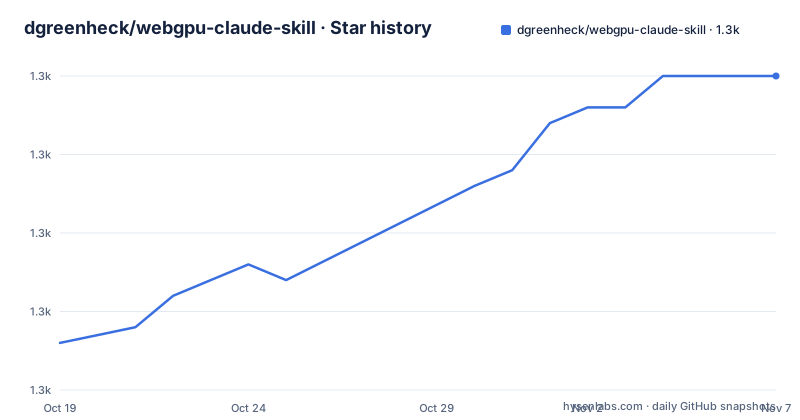
Star history
- dgreenheck/webgpu-claude-skill1,270 ★ · +17
| Repository | 2026-10-19 | 2026-11-07 |
|---|---|---|
| dgreenheck/webgpu-claude-skill | 1.3k | 1.3k |
17 Stars in the last 19 days, measured from the daily GitHub snapshot. Compare with other projects
Editorial analysis
What the skill is made of
webgpu-claude-skill is an Agent Skill for developing WebGPU-enabled Three.js applications using TSL, the Three.js Shading Language. The stated purpose is to give an agent detailed knowledge of six areas: setting up Three.js with the WebGPU renderer, writing shaders in TSL, creating node-based materials, building GPU compute shaders, implementing post-processing effects, and integrating custom WGSL code.
The content is a documentation set plus code, not a library. The skill directory holds a SKILL.md entry point with the overview and a REFERENCE.md quick reference cheatsheet, a docs/ directory with the detailed reference, an examples/ directory with five runnable files and a templates/ directory with two starter files.
The documentation set is the substance. core-concepts.md covers types and constructors, which means float, vec2, vec3, vec4, color and uniform, along with vector swizzling, operators and math functions, control flow through If, Loop and Fn, and time and animation. materials.md covers all the node material types, material properties such as color, roughness and metalness, physical material features including clearcoat, transmission and iridescence, and vertex displacement. compute-shaders.md covers instanced array buffers, parallel physics simulation, particle systems, and atomic operations and barriers. post-processing.md covers built-in effects like bloom, blur, FXAA and depth of field, custom effects written with Fn(), effect chaining and multiple render targets. wgsl-integration.md covers custom WGSL functions through wgslFn(), hybrid TSL and WGSL approaches, and performance optimisation. device-loss.md covers detecting GPU device loss, recovery strategies, testing with destroy() and a Chrome GPU crash, and state preservation and restoration.
For an engineer, the last document is the one that separates this from a generic API reference. Device loss is the failure mode that most WebGPU examples ignore, and the skill treats it as a first-class topic rather than a footnote.
One source of truth, two delivery formats
The repository ships the same content twice, and the reason it does is the part worth reading.
The Claude skill under skills/ is the source of truth. The Cursor rules under .cursor/rules/ are described as thin shims that @file-reference those same documents, so edits flow through automatically. That single decision removes the classic failure of a project that maintains a Claude skill and a Cursor rule set in parallel: they drift, and the agent gives different advice depending on which tool you happen to run.
The shim mechanism has a consequence that the documentation is upfront about. The .mdc files use @file references pointing at skills/webgpu-threejs-tsl/..., so the skills/ directory has to travel with them. If you would rather not keep the skills/ folder, the alternative is to inline the referenced content into each .mdc file. That is a maintenance decision, not just a packaging one, because inlined content stops receiving updates automatically.
Installation for Claude Code is a single command in the repository's own form:
# Install from this repository
/skill install webgpu-threejs-tsl@<your-github-username>/webgpu-claude-skill
Or you copy the skills/webgpu-threejs-tsl folder by hand, either to ~/.claude/skills/ for global use or to <project>/.claude/skills/ for one project.
For Cursor the instruction is to clone the repository and open it directly, since Cursor picks up .cursor/rules/ automatically. To use the rules in your own project you copy both directories into the project root, preserving the paths, with .cursor/rules/ and skills/webgpu-threejs-tsl/ side by side. The reason the paths have to be preserved is the @file reference, and the documentation explains the failure mode: the rules will not resolve if the skills folder is missing or renamed.
Rules that attach themselves by glob
The Cursor rules are scoped by globs so that they auto-attach only to files that matter, and the five files show a sensible division.
webgpu-threejs-tsl.mdc is the entry point and attaches to JavaScript and TypeScript files. compute-shaders.mdc attaches to files matching *compute* or *particle*, which catches the naming a developer would actually use for a GPU simulation. post-processing.mdc attaches to files matching *post*, *effect* or *bloom*. wgsl-integration.mdc attaches to .wgsl files and to JavaScript or TypeScript files whose names contain *wgsl*. device-loss-and-limits.mdc attaches to files matching *renderer* or *webgpu*.
The design is doing something practical. A rule that attaches to every source file is a rule the agent rereads on every keystroke, and one that attaches too narrowly is never seen. Matching on filename fragments is a crude heuristic, but it means the compute shader documentation lands in front of the agent exactly when it is about to write a compute shader, and the device loss document appears when it touches renderer setup.
The names of the last two files also tell you what the author considered important enough to isolate. Device loss and limits get their own file, which means the recovery notes are not buried in a general reference, and the WGSL integration file is scoped to the cases where raw WGSL is actually involved.
The repository root is small, with a .claude-plugin/ directory, a .cursor/ directory, the skills/ directory and the README, so there is no application code here at all. The value is entirely in the documentation and the examples.
Examples and templates, and what the quick example shows
The examples directory is where the documentation becomes executable, and the file names describe the progression. basic-setup.js is a minimal WebGPU project, custom-material.js is a custom shader material, particle-system.js is GPU compute particles, post-processing.js is an effect pipeline, and earth-shader.js is a complete Earth with atmosphere. The templates directory holds a starter project template in webgpu-project.js and a compute shader template in compute-shader.js.
The README's quick example is short enough to read in full, and it shows the shape of a TSL material in a way the prose cannot:
import * as THREE from 'three/webgpu';
import { color, time, oscSine, normalWorld, cameraPosition, positionWorld, Fn, float } from 'three/tsl';

// WebGPU renderer
const renderer = new THREE.WebGPURenderer();
await renderer.init();

// TSL material with animated fresnel
const material = new THREE.MeshStandardNodeMaterial();

material.colorNode = color(0x0066ff);

material.emissiveNode = Fn(() => {
  const viewDir = cameraPosition.sub(positionWorld).normalize();
  const fresnel = float(1).sub(normalWorld.dot(viewDir).saturate()).pow(3);
  return color(0x00ffff).mul(fresnel).mul(oscSine(time));
})();
Three things are worth noting in those twenty lines. The imports come from three/webgpu and three/tsl, which is why the version notes say r171+ needs a three/webgpu import map entry. The renderer is initialised with an await on renderer.init(), which reflects the asynchronous setup WebGPU requires. And the material is a MeshStandardNodeMaterial with colour and emissive assigned as node functions, so the fresnel term is computed on the GPU with the view direction built from cameraPosition and positionWorld, and animated with oscSine(time).
That is a compact illustration of why TSL exists as a separate language surface: the shading expression reads like the maths rather than like GLSL wrapped in uniforms.
Version drift is the risk to manage
The compatibility section is where you should look before trusting anything here, and it starts with a recommended Three.js version of r171+ and target browsers of Chrome 113+, Edge 113+, Firefox behind a flag, and Safari in WebGPU preview.
The version notes are the useful part. For r178+, PI2 is deprecated in favour of TWO_PI, and transformedNormalView and transformedNormalWorld are renamed to normalView and normalWorld. For r171+, the TSL API became stable and requires the three/webgpu import map entry.
Now the dating, and it is the thing to weigh. The README says the content was last updated on April 1, 2026, aligned with Three.js r183+ API changes, and it also recommends r171+ as the version to use. The repository's last push was on 2026-04-10, and there are no GitHub releases, so there is no tag history to compare against and no changelog to read.
The practical consequence is straightforward. The rename pair in the r178+ note is exactly the kind of change that produces confusing errors in code written against the older names, and the skill was written to be correct as of early 2026. If your project is on a later Three.js release, the guidance may be describing an API that has moved again, and the mismatch will be silent, producing a material that compiles but does not behave as documented.
The linked resources are the hedge. The Three.js TSL documentation, the Three.js Shading Language wiki, the WebGPU examples in the Three.js repository, a WebGPU best practices page, and the Agent Skills specification are all upstream references, and they are the things to check the skill against when the two disagree. The licence is MIT, and the code examples are described as derived from Three.js, which is itself MIT.
Editorial conclusion
Adopt webgpu-claude-skill if you are using a coding agent to write WebGPU Three.js code and want the API details in front of it, especially for compute shaders, WGSL interop and device loss recovery, which are the parts of the API that documentation covers thinly. Do not adopt it as the source of truth for the current Three.js API, because the content is dated to April 1, 2026, the last push was on 2026-04-10 and the compatibility notes list renames from r178+ that will have moved on since. Before you start, check which Three.js version your project pins against the r171+ and r178+ notes, keep the skills/ directory alongside the Cursor rules, and read the device loss document before you ship anything that must survive a GPU reset.
Frequently asked questions
What does the webgpu-claude-skill contain?
It is an agent skill for developing WebGPU Three.js applications with TSL, covering renderer setup, TSL shaders, node materials, compute shaders, post-processing and WGSL integration, plus device loss handling. The content is a SKILL.md entry point, a REFERENCE.md cheatsheet, six documents under docs/, five examples and two templates.
How do I install the skill in Claude Code and Cursor?
In Claude Code run /skill install webgpu-threejs-tsl@<your-github-username>/webgpu-claude-skill, or copy the skills/webgpu-threejs-tsl folder into ~/.claude/skills/ or <project>/.claude/skills/. In Cursor, clone the repository and open it so .cursor/rules/ is picked up automatically, and copy both .cursor/rules/ and skills/webgpu-threejs-tsl/ into your own project root, preserving the paths.
Which Three.js version does the skill target?
It recommends r171 or later, and states it was last updated on April 1, 2026 aligned with Three.js r183+ API changes. Its version notes record that r178+ deprecated PI2 in favour of TWO_PI and renamed transformedNormalView and transformedNormalWorld to normalView and normalWorld, and that r171+ made the TSL API stable and requires a three/webgpu import map entry.
Why do the Cursor rules need the skills folder?
The .mdc files use @file references pointing at skills/webgpu-threejs-tsl/..., so that directory must travel with them for the references to resolve. If you would rather not keep it, the documentation says you can inline the referenced content into each .mdc file, at the cost of the rules no longer updating automatically.
Does the skill cover GPU device loss?
Yes, there is a dedicated device-loss-and-limits.mdc rule scoped to files matching *renderer* or *webgpu*, and a docs/device-loss.md covering detection, recovery strategies, testing with destroy() and a Chrome GPU crash, and state preservation and restoration.
Official sources
Add this badge to your README
If you maintain this project, the badge below links readers to this analysis and shows its maintenance status from the daily GitHub snapshot. Paste the markdown into your README; add ?metric=license or ?metric=stars to the image URL for a different field.

[](https://hysenlabs.com/projects/dgreenheck-webgpu-claude-skill)Star history chart for your README
[](https://hysenlabs.com/projects/dgreenheck-webgpu-claude-skill)Was this useful?