Subliminal (Diaoul/subliminal): a Python CLI and library for downloading subtitles
Subtitles, faster than your thoughts
At a glance
- What is it?
- Subliminal finds and saves subtitle files for your video collection, from the command line or from Python code. It is a solid fit for scripted pipelines and a poor fit for anyone who wants a desktop app with a search box.
- Who is it for?
- Adopt Subliminal if you already script your media workflow in Python or shell and want subtitle fetching as one more step. Do not adopt it if you need a graphical picker, manual subtitle search, or timing adjustment, none of which the README describes.
- Can I use it commercially?
- Yes. MIT is a permissive licence: you can use, modify and sell software built on it, as long as you keep its copyright and licence notices.
- Is it still maintained?
- Yes. The repository last received commits 2 days ago.
- What is it written in?
- Mainly Python, according to GitHub's language statistics.
Answers come from the project's GitHub data, last synced on November 22, 2026, and from our analysis. They are not legal advice.
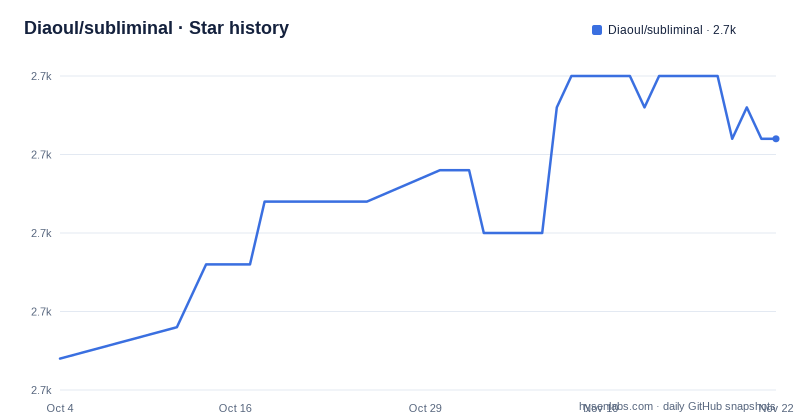
Star history
- Diaoul/subliminal2,678 ★ · +7
| Repository | 2026-10-04 | 2026-11-22 |
|---|---|---|
| Diaoul/subliminal | 2.7k | 2.7k |
7 Stars in the last 49 days, measured from the daily GitHub snapshot. Compare with other projects
Editorial analysis
The problem Subliminal solves, and who actually has it
Video files and subtitle files are separate artifacts. A downloaded episode arrives with audio and no text track, and someone has to find a matching subtitle in the right language and put it next to the video with a filename the player will associate with it. Doing that by hand for a season is tedious; doing it for a library that grows weekly is worse.
Subliminal automates that loop. The README states the project is "Subtitles, faster than your thoughts", and the usage section shows the shape of the work: point it at a video file, name a language, get a subtitle. The intended audience is visible in the classifiers in pyproject.toml, which list "Intended Audience :: Developers" and "Topic :: Software Development :: Libraries :: Python Modules" alongside "Topic :: Multimedia :: Video". This is a tool for people who are comfortable running commands or importing a module, not a consumer application.
The metadata in pyproject.toml also sets expectations about the project's own maturity: "Development Status :: 5 - Production/Stable", Python 3.10 through 3.14, MIT licensed. The last push to the repository was on 2026-09-22, and the most recent release listed is 2.7.1 on 2026-07-23.
How Subliminal works: scan, guess, download, save
The pipeline is easiest to read from the library example in the README, because it exposes the four stages that the CLI wraps.
First, scanning. scan_videos walks a folder and returns video objects, with an age filter available so you can limit the work to recent files. Second, identification. The guessit dependency (guessit>=3.0.0 in pyproject.toml) parses the filename into structured information such as series, season, episode and release group. Third, subtitle retrieval, where download_best_subtitles takes the scanned videos plus a set of languages and returns a mapping from video to subtitles. Fourth, writing, done by save_subtitles, which places the files next to the video.
The README is explicit about one dependency that affects result quality: to extract information about the video files, subliminal uses knowit, and the README advises installing one of its providers, naming MediaInfo as an example. That is the part of the chain that inspects the file itself rather than trusting the filename, so a machine without a provider is relying on filename parsing alone.
There is also a cache. The library example configures a dogpile.cache region before scanning, and the Docker image declares a volume at /usr/src/cache with an entrypoint of subliminal --cache-dir /usr/src/cache. Caching matters here because provider lookups are network calls and repeated runs over the same library would otherwise repeat them.
Installing Subliminal and downloading your first subtitle
The README recommends pipx for isolation, and gives pip as the alternative for a regular module install.
pipx install subliminalAfter that, the CLI should be on your PATH. The README's first example downloads English subtitles for a single file:
subliminal download -l en The.Big.Bang.Theory.S05E18.HDTV.x264-LOL.mp4The README shows the expected output as two progress bars, one for collecting videos and one for downloading subtitles, followed by lines such as "1 video collected / 0 video ignored / 0 error" and "Downloaded 1 subtitle". If something goes wrong, the README documents a debug flag placed before the subcommand:
subliminal --debug download -l en The.Big.Bang.Theory.S05E18.HDTV.x264-LOL.mp4For repeated runs, arguments can live in a configuration file. Subliminal looks for subliminal.toml in the platform-specific default configuration folder, or you can point at a file with -c. The README offers two ways to get a starting point: a linked example config, or generating one from the installed package.
python -c "from subliminal.cli import generate_default_config; print(generate_default_config())"If you would rather not install Python packages at all, the README gives a Docker invocation:
docker run --rm --name subliminal -v subliminal_cache:/usr/src/cache -v /tvshows:/tvshows -it ghcr.io/diaoul/subliminal download -l en /tvshows/The.Big.Bang.Theory.S05E18.HDTV.x264-LOL.mp4The Dockerfile builds on python:3.12-alpine, installs libmediainfo for the metadata refiner, and accepts a BUILD_WITH_UNRAR build argument that compiles unrar from source when set to true. That last detail matters if your videos are packed in RAR archives, since the default image does not include unrar.
Where Subliminal is the wrong tool
Subliminal downloads subtitles. It does not sync them. If a subtitle exists but is timed for a different release, the README describes no mechanism for shifting the offset or re-timing cues, and no such option appears in the documented CLI surface. You would need a separate tool for that.
The second limitation is selection. download_best_subtitles returns what the scoring considers best, and the README shows no interactive prompt for choosing among candidates. If you care which of several matching subtitles you get, or you want to compare releases before committing, this is not the interface for that.
Provider availability is a third constraint, and the README is silent on it. The dependencies include requests and beautifulsoup4, which is consistent with scraping or querying remote sources, but the README does not document which providers ship with the package, how they are configured, or what happens when one is down or rate limiting. The stevedore dependency suggests a plugin architecture for providers, but the README does not explain how to add or disable one. Treat provider behaviour as something to observe on your own network rather than something the documentation promises.
Finally, the scanning step depends on filenames and file metadata. A library with inconsistent or cryptic naming will produce worse guesses, and the README's advice to install a knowit provider such as MediaInfo is the only documented mitigation.
Subliminal compared with file-manager integrations and other subtitle tools
The most direct alternative is not a different downloader but a different interface. The README points to two desktop integrations: a Nautilus/Nemo extension at github.com/Diaoul/nautilus-subliminal, and a Dolphin recipe published as a Gist. Those wrap the same underlying capability in a right-click menu. The difference in approach is who supplies the context: with the CLI you name the file or folder and the language explicitly, while the file-manager integration infers both from what you selected. If your workflow already happens in a file manager, the extension removes the terminal step; if it happens in a scheduler or a script, the CLI is the one you can call.
The other category of alternative is a media server that fetches subtitles as part of its own library management. Subliminal does not know about your library database, watch history or playback state, and it does not need to. That is the trade: it stays a small, composable step that reads files and writes files, which is why it fits into pipelines, and also why it will never decide for you that an old episode deserves a fresh subtitle because you re-watched it.
Maintenance, upgrades and the MIT licence
The repository is not archived, and the last push was on 2026-09-22. Releases listed are 2.7.1 on 2026-07-23, 2.7.0 on 2026-07-21 and 2.6.0 on 2026-02-20. The project ships a changelog.d directory and a HISTORY.rst, plus a RELEASING.md, so release notes have a documented home. Version numbers are dynamic via hatch-vcs, which means the installed version is derived from the repository state at build time rather than typed into a file.
Upgrade cost is mostly the Python floor. pyproject.toml sets requires-python to ">=3.10", so an environment on 3.9 or older cannot install it. The dependency list is broad rather than minimal, including babelfish, guessit, knowit, pysubs2, srt, dogpile.cache and stevedore, and the README notes that a knowit provider such as MediaInfo should be installed separately for better results. That external binary is the part pip will not manage for you, and it is the most likely thing to be missing after an upgrade to a fresh machine or container.
The licence is MIT, declared in both pyproject.toml ("license = { text = "MIT" }") and the LICENSE file, with the classifier "License :: OSI Approved :: MIT License". MIT is permissive and imposes no source-disclosure obligation on your own code, but this is a description of what the repository declares, not legal advice. If you redistribute the Docker image, note that the Dockerfile can compile unrar from source when BUILD_WITH_UNRAR is set to true, and unrar has its own licence terms that are not the project's MIT licence.
Editorial conclusion
Adopt Subliminal if you already script your media workflow in Python or shell and want subtitle fetching as one more step. Do not adopt it if you need a graphical picker, manual subtitle search, or timing adjustment, none of which the README describes. Verify two things before committing: that a knowit provider such as MediaInfo is installed on the machine doing the scanning, and that the subtitle providers you rely on are reachable from that machine, since the README documents the pipeline but not provider availability or rate limits.
Frequently asked questions
How do I install Subliminal?
The README recommends pipx install subliminal for isolation, and gives pip install --user subliminal as the alternative. For a development checkout it shows cloning the repo and running pip install --user -e '.[docs,types,tests,dev]'.
How do I download subtitles with the Subliminal CLI?
Run subliminal download -l en followed by the video file, as in the README's example. The documented output is a collection progress bar, a download progress bar, and lines such as "1 video collected / 0 video ignored / 0 error" and "Downloaded 1 subtitle".
Can I use Subliminal as a Python library instead of the CLI?
Yes. The README's library example imports scan_videos, download_best_subtitles and save_subtitles from subliminal, configures a dogpile.cache region, scans a folder, downloads subtitles for a set of babelfish Language objects, and saves them next to the video.
Does Subliminal need MediaInfo?
The README states that subliminal uses knowit to extract information about video files and advises making sure one of its providers is installed, naming MediaInfo as an example, for better results. The Dockerfile installs libmediainfo for the metadata refiner.
How do I get more detail when a Subliminal download fails?
The README documents a --debug flag placed before the download command, for example subliminal --debug download -l en followed by the file. By default the README says subliminal output is minimal.
Official sources
Add this badge to your README
If you maintain this project, the badge below links readers to this analysis and shows its maintenance status from the daily GitHub snapshot. Paste the markdown into your README; add ?metric=license or ?metric=stars to the image URL for a different field.

[](https://hysenlabs.com/projects/diaoul-subliminal)Star history chart for your README
[](https://hysenlabs.com/projects/diaoul-subliminal)Was this useful?