DramaClaw: A Source-Available Pipeline for Script-to-Film Drama Production
A general-purpose AIGC video engine: script to finished film in one pipeline - dramas, ads, product videos, otome games, and more.
At a glance
- What is it?
- DramaClaw is a Python-based, source-available engine that turns a manuscript into a finished video through an integrated pipeline. This review examines its architecture, setup, and limitations for creators and indie studios.
- Who is it for?
- Adopt DramaClaw if you are an indie studio or creative engineer who wants to own the entire drama production pipeline, from script parsing to final export, on your own infrastructure. Avoid it if you need a fully open-source license or if you require plug-and-play cloud integration without managing multiple AI providers.
- Can I use it commercially?
- Check first. The repository uses a licence we do not classify automatically, so read its LICENSE file before any commercial use.
- Is it still maintained?
- Yes. The repository last received commits 1 day ago.
- What is it written in?
- Mainly Python, according to GitHub's language statistics.
Answers come from the project's GitHub data, last synced on October 21, 2026, and from our analysis. They are not legal advice.
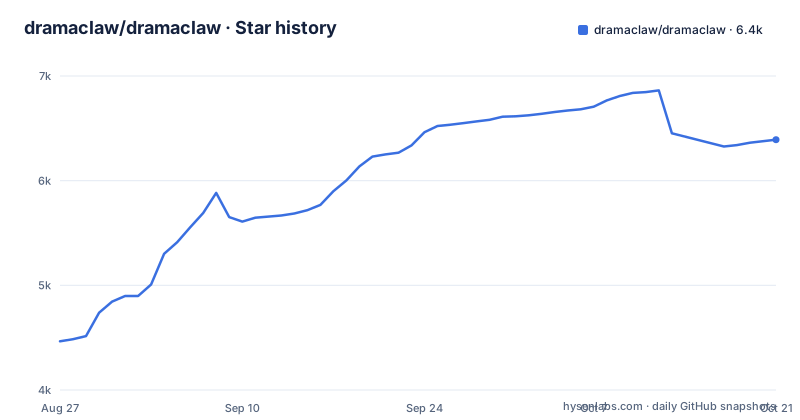
Star history
- dramaclaw/dramaclaw6,391 ★ · +1,926
| Repository | 2026-08-27 | 2026-10-21 |
|---|---|---|
| dramaclaw/dramaclaw | 4.5k | 6.4k |
1,926 Stars in the last 55 days, measured from the daily GitHub snapshot. Compare with other projects
Editorial analysis
What DramaClaw Solves and Who It Serves
DramaClaw addresses a specific pain point: the fragmentation of AI video production. Without it, a creator must manually stitch together separate tools for character extraction, script generation, storyboarding, voice-over, and compositing. DramaClaw replaces that with a single pipeline that takes a manuscript and outputs a finished film. The README positions it as an 'industrialized drama-production line whose source is available.' It is built for creators, indie studios, and creative engineers who want to run the whole factory on their own infrastructure, avoiding black-box cloud services. While drama is the primary focus, the same pipeline applies to short-form ads, e-commerce product videos, and interactive otome games. This is not a tool for casual hobbyists; it is for teams that produce serialized content at scale.
The Pipeline: From Novel to Finished Episode
The pipeline is modular, with each step having its own interface. It starts with novel parsing, which converts a manuscript into a queryable graph of characters, relationships, and timeline. From that graph, the system plans episodes, segments chapters, and creates multi-episode arcs. Script generation follows, with modes like adaptive, literal, and staged, plus review and repair loops. Then storyboards and first frames are generated, driven by beats, with grid splitting and image-pool selection. Voice-over synthesis is emotion-aware and switchable across providers. Finally, video composition assembles episodes and exports video files, subtitles, and an asset pack. The README also mentions a 'Freezone' infinite canvas for node-based exploration, where users can generate images, video, or audio and promote satisfying results back to the main pipeline. This dual-track approach lets creators experiment without disrupting the main production line.
Key Architectural Features: Director World and Xia Director
Two features stand out for their architectural ambition. Director World, also called 3GS, is described as a 'framable virtual set' that locks spatial structure, character blocking, and camera placement. This is a direct attempt to solve the consistency problem across shots: if a location must look the same in episode 1 and episode 58, Director World enforces that. The other feature, Xia Director, is a conversational AI assistant that checks project progress, advances script or shot tasks, audits deliverable completeness, and suggests next steps. This is not a toy chatbot; it is integrated into the production workflow as a project manager. Both features are concrete mechanisms, not marketing fluff, and they address real production bottlenecks: visual consistency and task coordination.
Getting Started: Installation and Configuration
The README points to a Quick Start guide in the docs directory, but the truncated material does not include the actual commands. Based on the repository layout, you would clone the repository and follow the instructions in docs/en/getting-started/quickstart.md. The project is Python-based, so you likely need a Python environment, and given the heavy tasks like image generation and video compositing, a GPU is almost certainly required. The README mentions 'Task Center' with status, progress, logs, and cancel/retry for background generation tasks, with resume-from-checkpoint for long runs. This implies that setup involves configuring background workers and possibly multiple AI provider API keys, since voice-over synthesis is 'switchable across providers.' Without the full docs, the exact configuration keys are unknown, but the architecture suggests a YAML or environment-variable-based setup for provider credentials and model choices.
Limitations and Failure Modes
The most obvious limitation is the license: the repository lists 'NOASSERTION' for the license, which means the legal terms are unclear. The README links to a file at ./LICENSES/Elastic-2.0.txt, suggesting the intent to use the Elastic License 2.0, but that is not confirmed. This is a serious concern for any commercial adoption. Another limitation is the resource intensity: running the full pipeline requires significant compute for image generation, voice synthesis, and video rendering. Small studios may find this prohibitive. The README also implies that the pipeline is opinionated: it is built for drama production, so adapting it to other formats like ads or product videos may require understanding the internal data structures for characters and episodes. If your content does not fit the narrative graph model, you may fight the tool. Finally, the material does not show any error handling or edge cases, such as what happens when a manuscript is too short or too long, or when a provider API fails mid-run.
Alternatives and How They Differ
The obvious alternative is to assemble a custom pipeline using individual AI tools. For example, you could use a large language model for script generation, a text-to-image model for storyboards, and a video editor for compositing. The difference is that DramaClaw provides the integration and the production management layer: the story graph, the asset library, the episode planner, and the consistency mechanisms like Director World. Another alternative is a commercial cloud service like Runway or Pika, which offer end-to-end video generation but as a black box. DramaClaw's source-available nature means you can inspect and modify the code, which is a fundamental difference. However, those services handle the infrastructure for you, whereas DramaClaw requires you to run and maintain the pipeline yourself. The choice is between control and convenience.
Maintenance and Upgrade Costs
The project is actively maintained, with recent releases v2.0.1 in August 2026 and a history of minor updates. The README mentions 'review / repair loops' in script generation, which suggests ongoing refinement of the AI prompts or logic. However, the cost of maintenance is on you: you must keep dependencies updated, manage provider API changes, and handle any bugs in the pipeline. The dual-track Freezone and the Task Center indicate a complex codebase, so debugging could be non-trivial. The license ambiguity adds a legal risk that you must resolve before committing. If the license is indeed Elastic 2.0, it restricts use in certain ways, such as offering the software as a managed service to third parties, which could affect your business model. Verify the license file and consult a legal expert if needed.
Editorial conclusion
Adopt DramaClaw if you are an indie studio or creative engineer who wants to own the entire drama production pipeline, from script parsing to final export, on your own infrastructure. Avoid it if you need a fully open-source license or if you require plug-and-play cloud integration without managing multiple AI providers. Before adoption, verify the actual license terms, since the repository lists NOASSERTION, and confirm that your hardware can handle the resource-intensive tasks of image generation, voice synthesis, and video compositing. Also, test the pipeline with a short script to see if the story graph and episode planning meet your narrative needs, as the tool's strength lies in its integrated workflow, not in any single AI model.
Frequently asked questions
Can DramaClaw create an entire movie from a script?
The Series path takes a manuscript or screenplay and runs the chain end to end: story structuring, episode planning, script writing, storyboards and first frames, voice-over synthesis, and the final cut. Xia Director, the built-in agent, can also build and run the node graph for that work on the XiaHua canvas.
Is DramaClaw free for commercial use?
The standalone version is free for commercial use under Elastic License 2.0, no permission needed, with one ask: a small 'Powered by DramaClaw' in the corner of your UI. Wrapping it up as a hosted SaaS for other people is the one case that license does not open, and the project points to issue #475 for the reasoning.
How does DramaClaw actually make an AI film?
Through Xia Director, which turns one prompt into a node graph that the canvas executes. The worked example in the README is 17 nodes and 32 edges: brief, story direction, character and set references, five shot first frames, five shot videos, voice-over and score, then the final cut.
Which AI movie maker is the best for this kind of work?
The repository makes no ranking against named tools. What it states is scope: DramaClaw holds both an 18-node canvas and a script-to-film pipeline on one asset library under one agent, is built for creators, indie studios and creative engineers running the line on their own machine, and carries from drama to short-form ads and e-commerce product videos.
Official sources
Add this badge to your README
If you maintain this project, the badge below links readers to this analysis and shows its maintenance status from the daily GitHub snapshot. Paste the markdown into your README; add ?metric=license or ?metric=stars to the image URL for a different field.

[](https://hysenlabs.com/projects/dramaclaw-dramaclaw)Star history chart for your README
[](https://hysenlabs.com/projects/dramaclaw-dramaclaw)