docling-api wraps Docling in FastAPI endpoints and a Celery queue
Easily deployable and scalable backend server that efficiently converts various document formats (pdf, docx, pptx, html, images, etc) into Markdown. With support for both CPU and GPU processing, it is Ideal for large-scale workflows, it offers text/table extraction, OCR, and batch processing with sync/async endpoints.
At a glance
- What is it?
- docling-api is an MIT licensed Python service that turns PDF, DOCX, PPTX, HTML, CSV, images and AsciiDoc into Markdown through IBM's Docling parser, with synchronous, batch and job-tracked asynchronous endpoints backed by Celery and Redis. It fits a document ingestion pipeline that needs tables and OCR out of the box, and it is a heavier dependency than a direct library call if you only convert a few files a day.
- Who is it for?
- Adopt docling-api when you are building a document ingestion pipeline that needs table extraction, multi-language OCR and batch throughput, and you can run Python 3.12 with Redis and, for production, a GPU. Prefer calling Docling as a library if you convert a handful of files daily, because the service adds Redis, Celery, Flower and four containers to a problem one process can solve.
- Can I use it commercially?
- Yes. MIT is a permissive licence: you can use, modify and sell software built on it, as long as you keep its copyright and licence notices.
- Is it still maintained?
- Yes. The repository last received commits 96 days ago.
- What is it written in?
- Mainly Python, according to GitHub's language statistics.
Answers come from the project's GitHub data, last synced on November 7, 2026, and from our analysis. They are not legal advice.
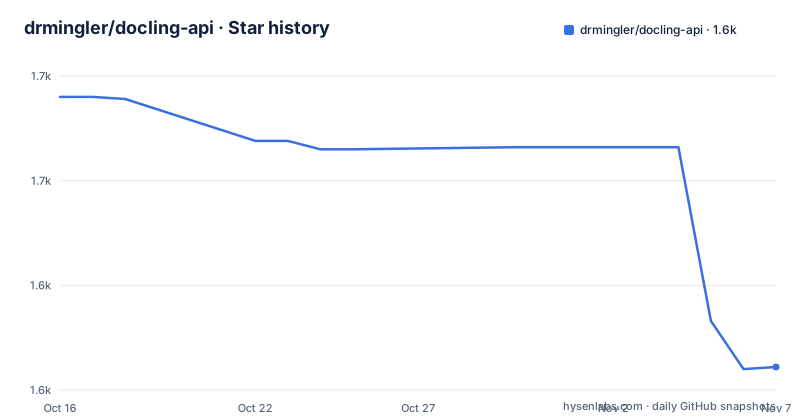
Star history
- drmingler/docling-api1,561 ★ · -129
| Repository | 2026-10-16 | 2026-11-07 |
|---|---|---|
| drmingler/docling-api | 1.7k | 1.6k |
-129 Stars in the last 22 days, measured from the daily GitHub snapshot. Compare with other projects
Editorial analysis
What the service actually converts, and what Docling does
The accepted formats are listed concretely: PDF files, Microsoft Word documents as DOCX, PowerPoint presentations as PPTX, HTML files, images in JPG, PNG, TIFF and BMP, AsciiDoc files, Markdown files and CSV files.
The conversion work is not this project's. It is powered by Docling, described in the README as IBM's advanced document parser, and the local name of the Poetry package is `document-to-markdown` at version 0.1.0. What this repository adds is the service shape around that parser: HTTP endpoints, a task queue, and a container layout.
The capability list is what tells you whether the extraction is good enough for your documents. It covers text extraction and formatting, table detection, extraction and conversion, image extraction and processing, multi-language OCR support with French, German, Spanish, English, Italian and Portuguese named, and configurable image resolution scaling. Tables and OCR are the two features that separate this class of tool from a plain text dump, and the README includes a comparison table showing the same original PDF rendered by docling-api, Marker, PyPDF and PyMuPDF4LLM, so you can compare output quality visually before deploying anything.
The dependency is `docling = "^2.25.1"` in `pyproject.toml`, which means your Docling behaviour is bounded by a caret range starting at 2.25.1. Docling itself brings PyTorch, and the Dockerfile treats that as a first class concern.
Four endpoint shapes for four different workloads
The API surface is organised by how long you are willing to wait, which is the decision you make at call time rather than at deploy time.
The synchronous single document endpoint returns Markdown immediately:
curl -X POST "http://localhost:8080/documents/convert" \
  -H "accept: application/json" \
  -H "Content-Type: multipart/form-data" \
  -F "document=@/path/to/document.pdf" \
  -F "extract_tables_as_images=true" \
  -F "image_resolution_scale=4"
The asynchronous single document endpoint submits a job to `POST /conversion-jobs` and then polls `GET /conversion-jobs/{job_id}` for status. That pair is the pattern to use for a single large document or a document that will need OCR, since it keeps the client connection short.
Batch conversion posts multiple files to `POST /batch-conversion-jobs`, repeating the `documents` field once per file:
curl -X POST "http://localhost:8080/batch-conversion-jobs" \
  -H "accept: application/json" \
  -H "Content-Type: multipart/form-data" \
  -F "documents=@/path/to/document1.pdf" \
  -F "documents=@/path/to/document2.pdf"
Synchronous batch conversion is also listed in the feature list, so all four combinations of single or batch and sync or async exist.
Two conversion options appear as form fields. `image_resolution_scale` controls the resolution of extracted images on a 1 to 4 scale, and `extract_tables_as_images` extracts tables as images rather than as Markdown tables. That second flag is a genuine trade-off for a retrieval pipeline: an image of a table survives layout perfectly but is not text you can search or embed, while a Markdown table is searchable and loses the visual structure.
There is also a health endpoint at `/health` and generated API documentation at `/docs`, both of which the README tells you to use to verify a local install.
Local start is three processes, and Redis does two jobs
The local setup requires Python 3.12 or higher, Poetry, and a Redis server. Then there are three commands, each in its own terminal.
The API server:
poetry run uvicorn main:app --reload --port 8080The Celery worker, with `--pool=solo` because you are running one worker in development:
poetry run celery -A worker.celery_config worker --pool=solo -n worker_primary --loglevel=infoAnd optionally the Flower monitoring dashboard:
poetry run celery -A worker.celery_config flower --port=5555The development notes explain the shape: Redis is used as both message broker and result backend for Celery tasks, the service supports both synchronous and asynchronous conversion, and the server runs with auto-reload during development. `main.py` at the repository root is the FastAPI application object, and `worker/` is the Celery package holding `celery_config`.
Configuration lives in a `.env` file at the project root, with `.env.example` shipped alongside. The four keys you will touch first are `REDIS_HOST`, `ENV` set to `development` or `production`, `MAX_SIZE_PER_FILE_MB` and `MAX_BATCH_SIZE_MB`.
The `.env.example` is more informative than the four, because it documents two things the README does not. `CELERY_BROKER_URL` and `CELERY_RESULT_BACKEND` are optional overrides that take precedence over `REDIS_HOST`, which is what you need when Redis is hosted outside the compose stack. And `CORS_ALLOW_ORIGINS` takes a comma-separated list, with the note that `*` is for permissive development use and that credentials are only allowed with explicit origins. That comment is the whole CORS policy, so read it before you set it in production.
The Dockerfile swaps PyTorch wheels based on a CPU_ONLY build arg
The container image is where the GPU recommendation becomes concrete, and the mechanism is a build argument rather than runtime configuration.
The Dockerfile is a multi-stage build on `python:3.12-slim-bookworm`, installing `libgl1` and `libglib2.0-0` for image and document handling, creating a virtualenv at `/opt/venv`, and pinning Poetry to 1.8.4 through an ARG. Application dependencies are installed with `poetry install --only main --no-interaction --no-root` from the committed `poetry.lock`.
The key step is what comes next: it discovers every installed distribution named torch, torchvision, torchaudio or triton, plus anything starting with `nvidia-`, uninstalls them, and reinstalls the right variant. If `CPU_ONLY` is `true` it installs from `https://download.pytorch.org/whl/cpu` with torch and torchvision; otherwise it installs from `https://download.pytorch.org/whl/cu121` with torch, torchvision and torchaudio. So the CPU and GPU images differ only by that build arg, and the version already in the lock file is replaced.
Three ARGs control this: `CPU_ONLY`, defaulting to `true`, `PRELOAD_MODELS`, defaulting to `true`, and `POETRY_VERSION`. `PRELOAD_MODELS` runs a Python command that imports docling and populates the model directories during the build, which is why the image has a `models` volume mounted at `/models` and why the environment sets `HF_HOME=/models/huggingface` and `TORCH_HOME=/models/torch`. Preloading at build time is what stops the first request paying for a model download.
The compose file passes `CPU_ONLY: "true"` as a build arg to the app, celery_worker and flower services, all of which run as `user: "10001:10001"` with `no-new-privileges:true`, share the `model_cache` volume, and set `MALLOC_ARENA_MAX: "2"`, `OMP_NUM_THREADS: "2"` and `PYTHONMALLOC: malloc`. The worker runs the same `--pool=solo` command as local development, and the app has a healthcheck hitting `/health` on a 30 second interval with a 60 second start period.
Where the compose topology disagrees with the README
Running the service with Docker is two commands. The base file is CPU only:
docker compose up --build --scale celery_worker=1And the GPU variant uses a separate file, which the README recommends for production:
docker compose -f docker-compose.gpu.yml up --build --scale celery_worker=3Both `--scale` values are illustrative: one worker for CPU, three for GPU. There is also a `docker-compose.cpu.yml` in the repository root alongside the base and GPU files, so there are three compose files and the README only names two.
The four services in the base file are `app`, `celery_worker`, `redis` and `flower`. Redis is pinned to `redis:7.2.4-alpine` and publishes `6379:6379` on the host. The app publishes `8080:8080`, starts uvicorn with `--host 0.0.0.0`, declares `depends_on` both redis and celery_worker, and restarts on failure. The worker depends only on redis.
Here is the inconsistency to resolve before you rely on it. The Service Components section lists the API server at http://localhost:8080, Redis at http://localhost:6379 and the Flower dashboard at http://localhost:5556. The local development instructions start Flower with `--port=5555` and tell you to open http://localhost:5555. So the two documented setups disagree on the Flower port by one, and the compose file section is truncated before the flower service definition, so you need to check `docker-compose.yml` yourself for the mapping.
That is the kind of detail that costs an hour on your first deploy, which is why it belongs in the article rather than only in the README.
What this repository does not give you
State the boundary first: this is a service wrapper, not a document understanding system. There is no layout model of its own, no retrieval pipeline, no chunking strategy, and no embedding store. It converts and returns Markdown.
The operational cost is the other boundary. Running this means Python 3.12, Redis, and either one or more Celery workers, plus Flower if you want visibility. If your volume is a few documents a day, importing Docling in your own application is fewer moving parts and one less service to operate.
Version and release discipline is worth checking. The repository has no GitHub releases, and `pyproject.toml` still carries version `0.1.0` for the `document-to-markdown` package, while `docling` is tracked at `^2.25.1`. The last push was on 2026-08-04, and the repository is not archived. So activity is recent but the version field is not a useful signal about what you are running, and there is no tagged stream to pin against. Keeping `poetry.lock` preserves the recorded dependency versions, though the Dockerfile replaces some locked PyTorch wheels.
Testing is thin by the repository's own shape. The dev dependency group contains only `pytest = "^8.3.3"`, `testpaths` is `tests/`, and formatting is Black at line length 120 with `skip-string-normalization`. There is no type checking tool, no linting rule set and no coverage requirement declared in `pyproject.toml`. For a service that will sit in front of your ingestion pipeline, that means your own integration tests against real documents carry the weight.
Licensing is straightforward: MIT, with the `LICENSE` file at the repository root. The Docling dependency carries its own licence, which you should check separately if you deploy it as a service.
Editorial conclusion
Adopt docling-api when you are building a document ingestion pipeline that needs table extraction, multi-language OCR and batch throughput, and you can run Python 3.12 with Redis and, for production, a GPU. Prefer calling Docling as a library if you convert a handful of files daily, because the service adds Redis, Celery, Flower and four containers to a problem one process can solve. Before deploying, read `docs/docker.md`, which the README defers to for the actual Docker instructions, and decide whether the Flower port is 5555 or 5556: the local startup steps use 5555 while the service component list in the README gives 5556, so verify the port your compose file actually binds. Also confirm `MAX_SIZE_PER_FILE_MB` and `MAX_BATCH_SIZE_MB` against the documents you actually accept.
Frequently asked questions
What document formats does docling-api convert to Markdown?
PDF, DOCX, PPTX, HTML, images in JPG, PNG, TIFF and BMP, AsciiDoc, Markdown and CSV. Conversion is powered by Docling, IBM's document parser, pinned to `^2.25.1` in pyproject.toml.
How do I run docling-api on my own machine?
You need Python 3.12 or later, Poetry and Redis. Clone the repository, run `poetry install`, create a `.env` file with `REDIS_HOST`, `ENV`, `MAX_SIZE_PER_FILE_MB` and `MAX_BATCH_SIZE_MB`, start Redis, then run `poetry run uvicorn main:app --reload --port 8080` and `poetry run celery -A worker.celery_config worker --pool=solo -n worker_primary --loglevel=info`.
When should I use asynchronous conversion instead of the sync endpoint?
The async path posts to /conversion-jobs and polls GET /conversion-jobs/{job_id} for status, which keeps the client connection short for a single large document or one needing OCR. The sync path returns Markdown immediately from /documents/convert, and batch work posts multiple documents to /batch-conversion-jobs.
Does docling-api need a GPU?
Not to run. `docker compose up --build --scale celery_worker=1` starts the CPU-only setup, while the GPU path uses `docker compose -f docker-compose.gpu.yml up --build --scale celery_worker=3`, which the README recommends for production because GPU significantly improves performance.
What do MAX_SIZE_PER_FILE_MB and MAX_BATCH_SIZE_MB control?
They are upload size limits in megabytes, defaulting to 100 per file and 500 per batch. In Docker they are read from the environment with those defaults, so you can override them at deploy time.
Official sources
Add this badge to your README
If you maintain this project, the badge below links readers to this analysis and shows its maintenance status from the daily GitHub snapshot. Paste the markdown into your README; add ?metric=license or ?metric=stars to the image URL for a different field.

[](https://hysenlabs.com/projects/drmingler-docling-api)Star history chart for your README
[](https://hysenlabs.com/projects/drmingler-docling-api)Was this useful?