Huey: a little task queue for Python with Redis, Postgres or SQLite backends
a little task queue for python
At a glance
- What is it?
- Huey is a lightweight Python task queue with zero required dependencies, a consumer command, and built-in Django integration. It suits small to mid-sized workloads where Celery's footprint is more than the job needs.
- Who is it for?
- Huey fits teams running small to mid-sized Python or Django workloads who want a task queue with no required dependencies and a single consumer command. It is the wrong tool if you need a broker-agnostic architecture, cross-language workers, or a workflow engine with a visual DAG editor; those needs point to Celery or a dedicated orchestrator instead.
- Can I use it commercially?
- Yes. MIT is a permissive licence: you can use, modify and sell software built on it, as long as you keep its copyright and licence notices.
- Is it still maintained?
- Yes. The repository last received commits 9 days ago.
- What is it written in?
- Mainly Python, according to GitHub's language statistics.
Answers come from the project's GitHub data, last synced on November 14, 2026, and from our analysis. They are not legal advice.
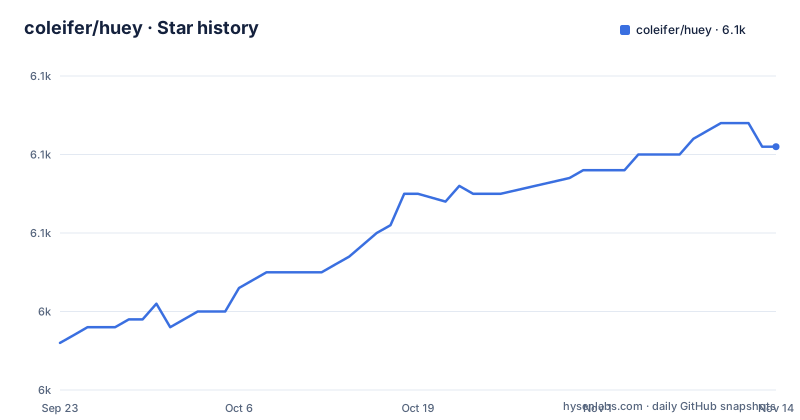
Star history
- coleifer/huey6,061 ★ · +25
| Repository | 2026-09-23 | 2026-11-14 |
|---|---|---|
| coleifer/huey | 6k | 6.1k |
25 Stars in the last 52 days, measured from the daily GitHub snapshot. Compare with other projects
Editorial analysis
What Huey solves, and who reaches for it
Web requests should not block on work that takes seconds or minutes: sending email, resizing images, calling a slow third-party API. Huey exists to move that work out of the request cycle. You decorate a function with @huey.task(), call it normally, and get a result handle back immediately. A separate consumer process picks up the call and runs it.
The project describes itself as "a lightweight alternative," and that framing is accurate. The README lists zero dependencies, with redis-py required only if you use a Redis-like broker and psycopg only for Postgres. For a team already running Redis for caching, adding Huey means one install and one new process to supervise. There is no broker to provision, no separate result backend to configure, and no cluster topology to reason about.
The intended audience is Python developers, particularly Django developers. The README calls out Django integration both natively and via django.tasks, with admin integration for visibility and management. There is also flask-peewee admin integration built on the same stat-tracking system, and a stats extension other frameworks can use. If your application is a single Python service with a Redis instance nearby, Huey's scope matches the problem.
How the task, result and consumer pieces connect
The mechanism is straightforward. Calling a task-decorated function enqueues the function call for execution by the consumer. The return value is a Result object, not the function's return value. In the README's own example, calling add_numbers(1, 2) prints a Result with a task UUID, and calling that result object (res()) returns 3 once the task has finished.
Storage is the queue. Huey ships builtin support for Redis, Postgres, SQLite, file-system and in-memory backends. The README is explicit that the design was informed by Redis, and that Redis "is a fantastic fit for a lightweight task queueing library like Huey." But the storage layer implements a simple API, so other tools can substitute. That is the architectural decision that matters: there is no separate broker protocol. The queue lives in whatever database you already have.
The consumer is the worker side. huey_consumer takes the import path of your Huey instance and runs it. Execution models are selectable: process, thread, or greenlet. Scheduling, retries, prioritization, expiration, locking, rate-limits, timeouts, pipelines, chains, groups and chords are all listed as supported features in the README. That is a wider feature set than the phrase "little task queue" suggests, and it is the part of the project most worth reading the guide for before you commit.
Installing Huey and running a first task
The pyproject.toml defines optional dependency groups named redis, postgres, cysqlite, and stats, so a Redis-backed setup installs the redis extra. The README's glance example shows the shape of a Huey application: a RedisHuey instance created with a name and host, a task decorated with @huey.task(), and a periodic task decorated with @huey.periodic_task(crontab(minute='0', hour='3')).
from huey import RedisHuey, crontab

huey = RedisHuey('my-app', host='redis.myapp.com')

@huey.task()
def add_numbers(a, b):
    return a + b
The README notes that PostgresHuey, SqliteHuey, FileHuey and others follow the same pattern, so the only change between backends is the class you instantiate. The consumer is started with the import path of the Huey instance. The README shows the four-process form and the single-worker-thread default:
huey_consumer my_app.huey -k process -w 4Now call the task from a Python shell. You should see a Result object with a task UUID printed immediately, and calling that object returns the sum once the consumer has processed it. If nothing is consumed, the usual cause is that the consumer is pointed at a different Huey instance than the one your application enqueued into, or that the backend connection details differ between the two processes.
Retries, scheduling and the consumer model you pick
Two decorator arguments cover most operational needs. retries sets the number of attempts, and retry_delay sets the seconds between them. The README's example is a task decorated with retries=2 and retry_delay=60, described as being retried up to two times with a 60-second gap. Recurring work uses periodic_task with a crontab helper; the README's nightly_backup example runs at minute 0, hour 3.
Delayed execution is separate from retry. The README shows add_numbers.schedule((2, 3), delay=10) for a run roughly ten seconds out, and res(blocking=True) to wait for completion. Note the argument-passing difference: schedule takes the arguments as a tuple, while a direct call takes them positionally.
The consumer's -k flag selects the execution model, and this is a real design decision rather than a detail. Threads and greenlets suit IO-bound work; the README notes that greenlets are lightweight enough to run quite a few efficiently, showing -w 32 as an example. Processes suit CPU-bound work but carry more memory per worker. Choosing wrong here shows up as either idle CPU or memory pressure, not as an error message.
Where Huey is the wrong tool
The in-memory backend is the obvious limitation. In-memory storage cannot survive a process restart, which makes it suitable for tests and local development rather than production queues. The README lists these backends without qualifying them, so a reader skimming the feature list could reasonably miss that the storage choice determines durability.
More broadly, Huey assumes a Python-only worker. If your architecture needs workers in other languages consuming the same queue, or a broker protocol that other systems already speak, Huey's storage-API approach works against you. The README frames the pluggable storage as a strength, and for a Python shop it is. For a polyglot system it is a boundary.
The feature list is also broader than the project's self-description. Groups, chords, pipelines and chains are workflow primitives, and the README does not document what happens to an in-flight chain when a worker is killed mid-execution. If your job depends on exactly-once semantics, Huey's documentation does not make that guarantee visible, and you should treat that silence as a reason to look elsewhere rather than as a gap you can paper over.
How Huey differs from Celery and Dramatiq
Celery is the default comparison. It targets a much wider range of brokers and result backends, supports workers in multiple languages through its protocol, and carries a correspondingly larger configuration surface. Huey's counter-argument is the one in its own README: zero dependencies, and a storage layer simple enough that Redis, Postgres, SQLite or the file system can all serve as the queue. The practical difference is operational. A Celery deployment typically involves a broker, a result backend, and a beat scheduler as separate concerns. A Huey deployment is one consumer process pointed at an existing database.
Dramatiq is the closer comparison in spirit. Both aim at a smaller footprint than Celery. Dramatiq's documented model centers on a broker abstraction with middleware, and it ships with its own set of supported brokers rather than treating an arbitrary database as the queue. Huey's distinguishing choice remains the storage-API approach: if you already run Postgres and do not want to add Redis, Huey lets you use Postgres as the queue directly.
The honest summary is that Huey trades ecosystem breadth for deployment simplicity. If you need a feature that exists only in Celery's ecosystem, no amount of small footprint compensates.
Maintenance, licensing and upgrade cost
The repository is not archived, and its last push was on 2026-11-01. Releases are frequent and versioned: 3.5.4 on 2026-11-01, 3.5.3 on 2026-10-24, and 3.5.2 on 2026-10-23. The CHANGELOG.md sits at the repository root, and pyproject.toml points to it as the changelog URL, so upgrade notes are one file away rather than buried in release pages.
The licence is MIT. In practical terms that permits commercial use and modification with attribution, and it is compatible with the way most Python applications are distributed. This is not legal advice; read the LICENSE file at the repository root if your organisation has specific requirements.
Upgrade cost is shaped by the optional dependency pins. The redis extra requires redis>=3.0.0, postgres requires psycopg>=3.2, cysqlite requires cysqlite>=0.3.5, and stats requires peewee>=3.17. Those are lower bounds, not upper bounds, so a major-version bump in any of those libraries is something you would discover at install time rather than in Huey's own version number. The project also declares Development Status :: 5 - Production/Stable in its classifiers, which is a claim about maturity rather than a guarantee about a specific upgrade path.
Editorial conclusion
Huey fits teams running small to mid-sized Python or Django workloads who want a task queue with no required dependencies and a single consumer command. It is the wrong tool if you need a broker-agnostic architecture, cross-language workers, or a workflow engine with a visual DAG editor; those needs point to Celery or a dedicated orchestrator instead. Before adopting, verify which storage backend you will actually run in production, since the in-memory option does not survive a process restart and the README does not document rollback semantics for any backend. Check the CHANGELOG.md for the 3.5.4 release notes and confirm the optional dependency you need (redis, psycopg, cysqlite, peewee) is installable in your environment.
Frequently asked questions
How do I install Huey with Redis support?
pyproject.toml defines an optional dependency group named redis, which requires redis>=3.0.0. The base package has zero required dependencies, so the extra is what pulls in the client library you need for a Redis-backed queue.
What does the huey_consumer command do?
It starts the worker process that pulls tasks off the queue and executes them. It takes the import path of your Huey instance, and the -k flag selects process, thread or greenlet execution while -w sets the worker count.
Can Huey use Postgres or SQLite instead of Redis?
Yes. The README lists builtin support for Redis, Postgres, SQLite, file-system and in-memory storage, and notes that although Huey was designed with Redis in mind, the storage system implements a simple API so other tools can be used instead.
How does Huey retry a failed task?
The task decorator accepts retries and retry_delay arguments. The README's example decorates a function with retries=2 and retry_delay=60, describing it as being retried up to two times with a 60-second delay between attempts.
Does Huey integrate with Django?
Yes, both natively and via django.tasks, according to the README. It also provides an optional Django admin integration for visibility and management, and a flask-peewee admin integration built on the same stat-tracking system.
Official sources
Add this badge to your README
If you maintain this project, the badge below links readers to this analysis and shows its maintenance status from the daily GitHub snapshot. Paste the markdown into your README; add ?metric=license or ?metric=stars to the image URL for a different field.

[](https://hysenlabs.com/projects/coleifer-huey)Star history chart for your README
[](https://hysenlabs.com/projects/coleifer-huey)Was this useful?