dax Cross-Platform Shell Tools for Deno and Node.js
Cross-platform shell tools for Deno and Node.js inspired by zx.
At a glance
- What is it?
- dax brings tagged-template command execution, HTTP requests, and interactive prompts to Deno and Node.js, with particular attention to Windows behavior. Its documented differences from zx center on cross-platform parsing, built-in commands, and limited global state.
- Who is it for?
- dax is suitable for application code that needs shell automation across Deno and Node.js, especially when Windows behavior matters. It is less appropriate for projects that require a custom CLI, extensive global configuration, or an interactive shell-oriented interface.
- Can I use it commercially?
- Yes. MIT is a permissive licence: you can use, modify and sell software built on it, as long as you keep its copyright and licence notices.
- Is it still maintained?
- Yes. The repository last received commits 19 days ago.
- What is it written in?
- Mainly TypeScript, according to GitHub's language statistics.
Answers come from the project's GitHub data, last synced on October 24, 2026, and from our analysis. They are not legal advice.
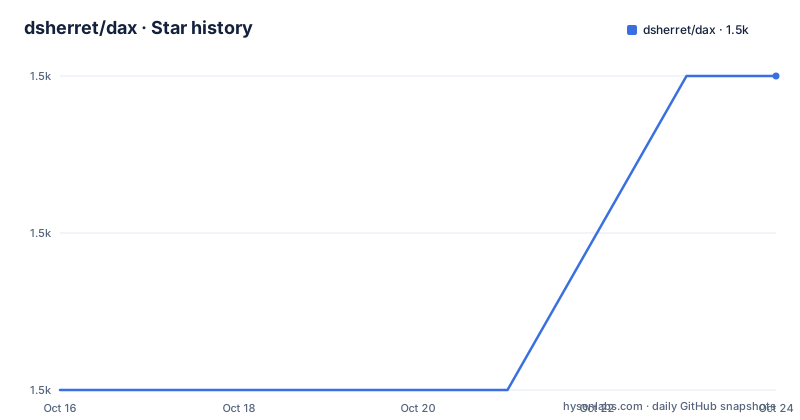
Star history
- dsherret/dax1,506 ★ · +2
| Repository | 2026-10-16 | 2026-10-24 |
|---|---|---|
| dsherret/dax | 1.5k | 1.5k |
2 Stars in the last 8 days, measured from the daily GitHub snapshot. Compare with other projects
Editorial analysis
Why dax Exists for TypeScript Automation
dax addresses the difficulty of writing automation that starts processes, captures their output, sends HTTP requests, and requests user input through TypeScript code. Its intended users are developers building scripts, developer tools, and applications on either Deno or Node.js. The same library can express each operation without requiring the project to become a shell script with a custom command-line interface.
The README positions dax as “Cross-platform shell tools for Deno and Node.js inspired by zx.” Cross-platform behavior is the central design goal, with explicit attention to making more code work on Windows. This matters because an automation library can use the right syntax conceptually but still fail when command availability, path handling, or shell parsing differs by operating system. dax addresses that gap by using the parser from deno_task_shell and including common commands intended to improve Windows support.
The library is also designed for embedded application code. A developer can create a default `$` export, but the README says it is not mandatory to use it. That distinction matters for teams that do not want shell behavior spread across unrelated modules through globals or broad configuration. dax is therefore closer to a programmable execution API than a tool whose purpose is to become the application itself. It has no custom CLI, according to the README.
dax Command, Request, and Prompt Data Flow
The documented command path starts with a tagged template imported from the `dax` package. The template contains a command, execution returns a promise, and callers can wait for that promise to finish or select output such as `.text()`. In this example, the command output is captured as the current Git branch:
import $ from "dax";

const branch = await $`git rev-parse --abbrev-ref HEAD`.text();
The README also gives a basic execution example:
await $`echo 5`; // outputs: 5These examples show an asynchronous API. Output capture is explicit through `.text()`, rather than being the only purpose of command construction. The available repository entries include TypeScript modules and tests at the top level, but the README does not document process exit-code handling, stderr capture, piping, redirection, timeouts, or cancellation. Those behaviors should not be assumed from the examples alone.
HTTP access uses the same default object through `$.request`. The README calls `.json()` after the request, which indicates that the API returns a response-like object with a JSON decoding method. The documented data flow is therefore command construction, execution, and output selection for processes, or URL construction, request execution, and response decoding for HTTP. Input uses `$.prompt` and awaits the entered value.
import $ from "dax";

const data = await $.request("https://plugins.dprint.dev/info.json").json();
const name = await $.prompt("What's your name?");
The HTTP example is sufficient to show request and JSON parsing, but the README does not document headers, authentication, status handling, retry policy, or request cancellation.
Installing dax and Running the First Commands
The repository publishes `dax` through both JSR and npm, as shown by the README badges for `@david/dax` and the `dax` npm package. However, the README does not give installation commands for either runtime. It directs readers to `https://dax.land` for documentation. Since no exact install command is documented, this article does not invent one.
For a first real use, add the README's TypeScript import and run the command shown above. A script that exercises output capture, HTTP, and prompting can begin with these exact examples:
import $ from "dax";

await $`echo 5`;
const branch = await $`git rev-parse --abbrev-ref HEAD`.text();
const data = await $.request("https://plugins.dprint.dev/info.json").json();
const name = await $.prompt("What's your name?");
The first call should print `5`. The Git call should assign the abbreviated current branch name to `branch`. The request should decode the JSON document into `data`, while the prompt should wait for and assign the entered text. The README does not describe a command-line runner for this script, so the containing Deno or Node.js application must already provide the execution context.
The top-level `deno.json`, `deno.lock`, and TypeScript sources indicate a Deno-centered repository structure, while the project description explicitly supports both Deno and Node.js. The README does not explain whether one published package entry point serves both runtimes, nor does it provide separate Node.js loader instructions. That compatibility boundary is worth checking in the linked documentation before committing to a migration.
Why dax Differs from zx
zx is the stated inspiration, but dax documents several concrete design differences. First, dax focuses on a cross-platform shell. It uses deno_task_shell's parser, includes common commands for better Windows support, allows the shell environment to be exported into the current process, and is intended to make more automation code work on Windows.
Second, dax keeps globals and global configuration to a minimum. A default `$` instance exists, but its use is optional. This makes dependency injection or direct local use plausible at the API level, although the README does not show the exact construction syntax for a non-default instance. The difference is still meaningful: its default instance is optional.
Third, dax has no custom CLI. It is intended for application code as well as replacing shell scripts, rather than only for authoring an interactive command-line program. The documented distinctions are platform behavior, state management, interface shape, and intended use. They make dax most relevant to teams embedding process automation into TypeScript applications.
A plain child-process package is the practical alternative for a small Node.js utility that only spawns commands and buffers stdout. Such a package can remain lightweight, but it does not provide dax's documented tagged command interface, HTTP helper, prompt helper, deno_task_shell parser, or common-command layer. Conversely, choosing dax adds a shell-oriented abstraction that may be unnecessary when the application only needs one direct process call.
dax Constraints for Windows and Application Code
dax's principal constraint is also its principal feature: cross-platform command execution depends on platform-specific command availability and parsing behavior. The README claims that its shell parser and built-in common commands improve Windows support, but it does not enumerate those commands or document a compatibility matrix. A team relying on an external executable still needs to know whether that executable exists on every supported operating system.
The environment-export capability is another boundary. The README states that dax can export the shell environment to the current process, but it does not show the method signature, persistence semantics, or restoration behavior. Code that mutates process-wide environment state can therefore affect later operations. The documentation does not provide enough detail to assess isolation or cleanup requirements.
The API is compact, but the documented surface leaves important production questions open. There is no stated timeout API, process-tree cleanup policy, retry model, signal policy, or concurrency guidance. HTTP behavior similarly omits error and timeout handling. Prompt behavior does not state whether prompts can be redirected, canceled, or used without an interactive terminal. These omissions do not prove that the features are absent from the implementation. They do mean adoption decisions should rely on the linked documentation rather than infer behavior from four introductory examples.
dax is also a poor fit when the deliverable must be a custom interactive CLI. The README explicitly says there is no custom CLI. It can still be called by an existing CLI, but it does not replace the command discovery, argument parsing, help system, and terminal presentation layer that such an application needs.
dax Maintenance, License, and Upgrade Surface
The repository is not archived. Its last push was on 2026-10-05, and the listed release `0.50.1` was published on 2026-10-05. Earlier listed releases include `0.50.0` from 2026-09-04 and `0.49.0` from 2026-07-11. This release history indicates continuing project activity, but the repository does not define a support policy, compatibility matrix, migration guide, or long-term-support branch.
The project is licensed under MIT. That means the repository identifies a permissive license, but this review does not provide legal interpretation. Consumers still need to review the repository's `LICENSE` file and any notices when distributing bundled or modified code.
The visible maintenance surface is relatively focused. Top-level entries include `src/`, `docs/`, `scripts/`, `deno.json`, `deno.lock`, and TypeScript tests. Because dax covers command execution, parsing, networking, and input, upgrades can affect both runtime compatibility and application behavior even when application source code remains unchanged. The README does not publish a breaking-change policy, so teams using the library in deployment tooling should check the release notes and locked dependency graph when moving to a newer version.
Editorial conclusion
dax is suitable for application code that needs shell automation across Deno and Node.js, especially when Windows behavior matters. It is less appropriate for projects that require a custom CLI, extensive global configuration, or an interactive shell-oriented interface. Before adoption, verify the installation method supported by your chosen runtime, inspect the relevant platform-specific command behavior, and confirm that the small default API matches your dependency and configuration needs.
Frequently asked questions
What runtimes does dax support?
dax describes itself as cross-platform shell tools for Deno and Node.js. The README does not provide a detailed runtime-version support matrix.
How do I install dax?
The README shows publication through JSR as `@david/dax` and npm as `dax`, then links to `https://dax.land` for documentation. It does not include exact installation commands.
How does dax differ from zx?
dax emphasizes cross-platform shell behavior, minimal global state, the deno_task_shell parser, built-in common commands, use from application code, and the absence of a custom CLI. It is inspired by zx rather than reproducing the same interface wholesale.
Official sources
Add this badge to your README
If you maintain this project, the badge below links readers to this analysis and shows its maintenance status from the daily GitHub snapshot. Paste the markdown into your README; add ?metric=license or ?metric=stars to the image URL for a different field.

[](https://hysenlabs.com/projects/dsherret-dax)Star history chart for your README
[](https://hysenlabs.com/projects/dsherret-dax)Was this useful?