Skylos: A Local-First PR Scanner That Checks AI-Generated Code Without Executing It
Open source local-first PR scanner that finds dead code, security bugs, secrets, quality regressions, and AI-code mistakes before merge. For first timers refer to https://duriantaco.github.io/skylos/repo-map/
At a glance
- What is it?
- Skylos is an open-source CLI that scans Python, TypeScript, and other languages for dead code, security flaws, and AI-specific mistakes before merge. Its verify command uses deterministic local API checks, a rare approach that sets it apart from cloud-based scanners.
- Who is it for?
- Adopt Skylos if you work in Python, TypeScript/JavaScript, Go, or Java and want a local-first PR gate that can prove API usage without running code. Skip it if your stack is PHP, Rust, Dart, C#, Kotlin, or Shell: those languages get static analysis but no local API proof, so verify returns incomplete.
- Can I use it commercially?
- Yes. Apache-2.0 is a permissive licence: you can use, modify and sell software built on it, as long as you keep its copyright and licence notices.
- Is it still maintained?
- Yes. The repository received new commits within the last day.
- What is it written in?
- Mainly Python, according to GitHub's language statistics.
Answers come from the project's GitHub data, last synced on October 21, 2026, and from our analysis. They are not legal advice.
Star history
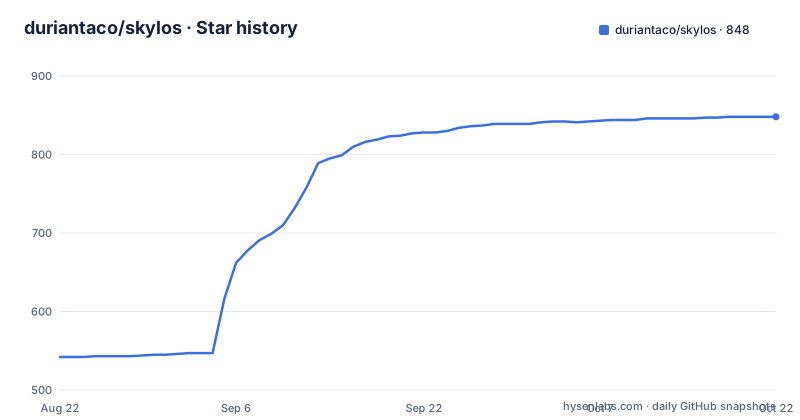
- duriantaco/skylos848 ★ · +306
| Repository | 2026-08-22 | 2026-10-21 |
|---|---|---|
| duriantaco/skylos | 542 | 848 |
306 Stars in the last 60 days, measured from the daily GitHub snapshot. Compare with other projects
Editorial analysis
What Skylos Actually Solves
Skylos targets a specific pain: pull requests that look fine but hide dead code, misconfigurations, or mistakes introduced by AI assistants. The README lists dead code, security flaws, secrets, dependency CVEs, quality regressions, and a category called AI-code mistakes. That last part is the differentiator. Most static analyzers check for known bug patterns. Skylos also checks for missing guards, fake helpers, invented package APIs, and impossible dependency versions, which are the kinds of errors an LLM might generate. The intended user is a developer or a CI system that wants one command to validate a repo or a PR without sending code to a cloud service. Local-first is the stated default, which matters for teams with proprietary code or air-gapped environments.
The Verify Mechanism: Deterministic Local API Proof
The core innovation is in skylos verify. According to the README, this command runs deterministic local/workspace API verification for Python, TypeScript/JavaScript, Go, and Java without executing target code. That means it resolves imports, function calls, and variable references against the local workspace and reports whether a given line range is valid. The output is schema version 2, which returns pass, fail, or incomplete. The incomplete status is not a failure in the traditional sense. It means Skylos could not prove a claim, for example because the code uses a third-party TS/JS import, a computed namespace member, or a parser surface it does not support. The command exits with code 2 on incomplete unless --no-fail is set. This is a honest design: it does not pretend to know everything. The coverage object in the JSON lists detected languages, expected checks, language support, missing checks, and deterministic skip reasons. That level of transparency is rare in static analysis tools.
Getting Started: Commands That Work Out of the Box
The README promises a 60-second start. pip install skylos then skylos . runs a dead-code scan. The default scan focuses on unused functions, classes, imports, files, and framework entrypoint mistakes. To add security, secrets, quality, dependency, and AI-defect checks, you run skylos . -a. There is also a focused flag: skylos . --ai-defects runs only evidence-backed AI defect checks. For a single file range, the command is skylos verify . --file src/app.py --range 40:75 --project-context. The --project-context flag likely tells the tool to use the whole repo as context, though the README does not explain it in detail. The output is JSON, which makes it easy to integrate into a script or a CI step.
Limitations and Failure Modes
The most obvious limitation is language coverage for the verify command. The README is explicit: deterministic local API verification covers Python, TypeScript/JavaScript, Go, and Java. For PHP, Rust, Dart, C#, Kotlin, and Shell, the tool still does static analysis, but the local API proof is reported as unsupported and therefore incomplete. That means if your project is primarily Rust, you cannot use the AI defect verification feature. The tool will return incomplete for those checks, and unless you set --no-fail, it will exit with code 2. This could break a CI pipeline if you do not handle the exit code. Another failure mode is the incomplete status itself. The README lists examples: third-party TS/JS imports, computed namespace members, unsupported language-local API checks, or parser surface that Skylos could not prove. In practice, many real-world projects use third-party imports, so you may see incomplete more often than pass for TypeScript projects. That is not a bug, but it means the tool is conservative: it would rather say I cannot prove this than risk a false positive.
Alternatives and How Skylos Differs
The obvious alternative is a cloud-based PR scanner like SonarQube or Snyk, but the README does not name them. The compare command implies Skylos is meant to sit beside an incumbent scanner. The key difference is local-first execution. Cloud scanners send your code to a remote service, which can be a problem for proprietary code or compliance. Skylos runs locally by default. The other difference is the deterministic API verification. SonarQube and similar tools use pattern matching and data flow analysis, but they do not claim to prove that a symbol exists in your workspace. Skylos does that by building a local symbol table. That is a meaningful architectural difference. For AI-code verification, there is no direct equivalent in the open-source space that the README mentions. The closest thing might be a linter with a plugin for detecting hallucinated imports, but those are typically regex-based and prone to false positives. Skylos's approach of checking against the actual workspace is more rigorous, though it is limited to four languages. If you need a pure dead-code scanner, tools like Vulture for Python or ts-prune for TypeScript are simpler, but they do not cover security or AI defects.
Maintenance, Licensing, and Upgrade Considerations
The project is licensed under Apache-2.0, which is permissive and allows commercial use without copyleft obligations. The repository shows active development with releases on a roughly weekly basis: v4.35.0 on 2026-08-26, v4.34.0 on 2026-08-23, and v4.33.2 on 2026-08-09. That cadence means you will get regular updates, but it also means you need to track breaking changes. The README mentions schema version 2 for verify, which implies there was a version 1 with a different output format. If you integrate verify into a CI pipeline, you need to pin the version or handle schema changes. The tool has a cache command (skylos cache stats), which suggests it maintains a local cache, likely for dependency data or rule packs. That cache could grow over time, and you may need to manage it in a CI environment. The docs include a REAL_WORLD_RESULTS.md and BENCHMARK.md, but the README does not summarize them, so you would need to read those files to assess performance. The project also has a repo map for first-time contributors, which is a sign that the codebase is complex enough to warrant navigation help. Overall, the maintenance burden is moderate: you need to keep the tool updated, handle the exit code 2 for incomplete, and verify that the languages you use are supported for the verify feature.
Editorial conclusion
Adopt Skylos if you work in Python, TypeScript/JavaScript, Go, or Java and want a local-first PR gate that can prove API usage without running code. Skip it if your stack is PHP, Rust, Dart, C#, Kotlin, or Shell: those languages get static analysis but no local API proof, so verify returns incomplete. Before adopting, check the docs on AI Code Verification Coverage to see which checks apply to your languages, and test the verify command on a small file with --range to confirm the schema v2 output fits your CI. The project is actively released (v4.35.0 as of August 2026) and Apache-2.0 licensed, so integration risk is low, but the incomplete exit code 2 needs explicit handling in any pipeline.
Frequently asked questions
skylos vs vulture
The file contains no head to head comparison. What it does contain is a keyword list naming vulture-alternative, bandit-alternative and semgrep-alternative, a default scan focused on dead code, and a clean command whose codemods currently cover Python imports and functions, listed with --dry-run so nothing is written.
What does skylos exit with when it cannot prove something?
The verify result can be pass, fail or incomplete under schema version 2, and incomplete means a requested proof could not be established. That state exits 2 unless --no-fail is set, and the coverage object lists detected languages, missing checks, completed and skipped checks, and deterministic skip reasons.
Does the skylos image scan fail a build on vulnerabilities?
Not by default. The command needs Trivy installed separately on a trusted PATH, and without --fail-on a completed scan exits 0 even when it reports vulnerabilities. Add --fail-on to turn findings into a gate.
Which languages get a local API proof from skylos?
Python, TypeScript and JavaScript, Go, and Java, verified without executing the target code. PHP, Rust, Dart, C#, Kotlin and Shell keep their static analysis coverage but their local API proof is reported as unsupported and therefore incomplete.
Can skylos remove dead code for me automatically?
The clean command lists Python import and function cleanup candidates, and --dry-run never writes. Without --dry-run or --apply it is interactive and can write after a final confirmation, and an apply pass still exits 0 if an individual edit fails, so the completion output has to be read.
Official sources
Add this badge to your README
If you maintain this project, the badge below links readers to this analysis and shows its maintenance status from the daily GitHub snapshot. Paste the markdown into your README; add ?metric=license or ?metric=stars to the image URL for a different field.

[](https://hysenlabs.com/projects/duriantaco-skylos)Star history chart for your README
[](https://hysenlabs.com/projects/duriantaco-skylos)