NLWeb: a reference implementation for conversational endpoints on Schema.org sites
Main reference implementation for NLWeb, implemented in Python.
At a glance
- What is it?
- NLWeb turns existing structured markup into an MCP-compatible natural language endpoint. The Python repository is a proof of concept, not a finished product, and the README says so.
- Who is it for?
- Adopt NLWeb if you already publish Schema.org or RSS data and want to expose an ask endpoint to both users and agents without rebuilding your content pipeline. Skip it if you need managed deployment, CI/CD, or a stable release: the README states CI/CD pipelines are not yet included and the repository has no published releases.
- Can I use it commercially?
- Yes. MIT is a permissive licence: you can use, modify and sell software built on it, as long as you keep its copyright and licence notices.
- Is it still maintained?
- Yes. The repository last received commits 96 days ago.
- What is it written in?
- Mainly Python, according to GitHub's language statistics.
Answers come from the project's GitHub data, last synced on November 15, 2026, and from our analysis. They are not legal advice.
Star history
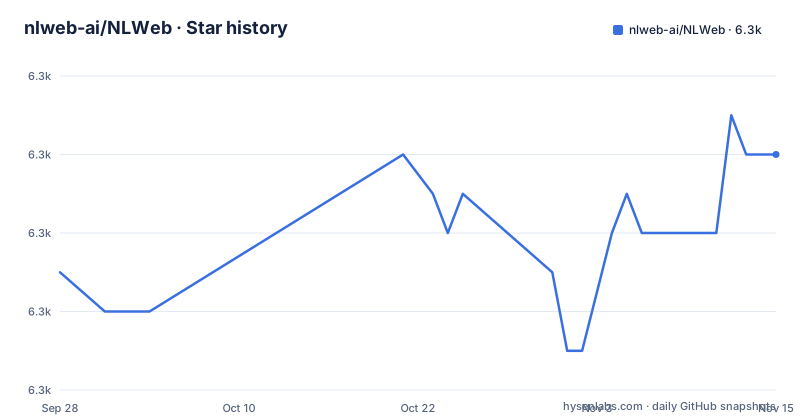
- nlweb-ai/NLWeb6,260 ★ · +3
| Repository | 2026-09-28 | 2026-11-15 |
|---|---|---|
| nlweb-ai/NLWeb | 6.3k | 6.3k |
3 Stars in the last 48 days, measured from the daily GitHub snapshot. Compare with other projects
Editorial analysis
The problem NLWeb targets: sites that already have structured data but no conversational endpoint
Most sites that list things (products, recipes, attractions, reviews) already publish that data in Schema.org or RSS. The README notes these formats are used by over 100 million websites and have become a semantic layer for the web. NLWeb's premise is that this existing markup is enough to answer natural language questions, without a separate content pipeline. The audience is site owners and platform engineers who want a conversational interface and an agent-facing API from the same source of truth. The README is explicit about the project's status: it provides practical implementation code "not as the definitive solution, but as proof-of-concept demonstrations showing one possible approach." That framing matters when you decide how much to depend on it. It is also explicitly a collection of protocols plus tools, not a single product. The protocol half is specified at nlweb.ai/spec; the repository is the reference implementation of that protocol in Python.
How the AskAgent turns a question into a Schema.org JSON response
The repository splits into five modules. AskAgent is the core query agent: it handles natural language queries against websites using Schema.org structured data, and it carries the connectors for LLMs and vector databases, the data ingestion tools, and a sample web UI. AgentFinder is a discovery service for finding and routing to NLWeb agents across the web. DataFinder translates natural language to SQL for enterprise sources such as HubSpot, Dynamics 365 and Jira, using Schema.org-based ontology mappings. ModelRouter handles LLM routing and scoring, picking cost-effective models that meet quality thresholds. NLWebScorer holds neural scorer models for ranking and evaluating search result quality. Two protocol details are worth noting. Every NLWeb instance also acts as an MCP server and supports a core method called `ask`. And the response format is Schema.org, which is what makes the same endpoint usable by a human UI and by an agent. The README sums this up as "NLWeb is to MCP/A2A what HTML is to HTTP," which is a positioning statement rather than a technical guarantee. A2A support is described as coming soon, so treat that half as unshipped.
Installing NLWeb and running the hello world example
The README points to docs/nlweb-hello-world.md for a laptop setup, and the repository ships setup.sh at the top level along with a .env.template for configuration. The root requirements.txt is a delegation file: it contains a single line pointing at code/python/requirements.txt, which the comment says exists to help Azure Oryx build detection. That means the real dependency list lives under code/python, and anything you install from the root pulls from there.
Start by cloning the repository, then follow docs/nlweb-hello-world.md.
git clone https://github.com/nlweb-ai/NLWeb.git
cd NLWeb
The setup script and the environment file are the two entry points the repository layout exposes; the README does not document individual flags for setup.sh, so read the script before running it if you need to know what it touches.
Configuration is YAML, and the README says the config directory holds files for LLM providers, embedding models, retrieval backends and web server settings. Because the README does not reproduce the exact keys, check the files under config/ for the provider you intend to use rather than guessing at names. The supported LLM list in the README is OpenAI, DeepSeek, Gemini, Anthropic, Inception and HuggingFace. The supported vector stores are Qdrant, Snowflake, Milvus, Azure AI Search, Elasticsearch, Postgres and Cloudflare AutoRAG, each with its own setup document under docs/.
Once configured, a query goes to the `ask` method and comes back as Schema.org JSON. The README does not print a sample request body, so the REST API document at docs/nlweb-rest-api.md is the place to confirm the exact shape before you write a client against it. For a first real use, pick the smallest dataset you have that is already in Schema.org or RSS form, load it through the ingestion tools in AskAgent, and ask a question whose answer you can verify by hand.
Where NLWeb stops: proof-of-concept code, no CI/CD, and a freshness trap
The most important limitation is stated by the project itself. CI/CD pipelines are not yet included, and the README invites contributions to add automated testing or deployment workflows. If your team expects a release process, versioned artifacts or a supported upgrade path, none of that is present in this repository. The repository has no published GitHub releases, so there is no changelog to diff against when you pull.
The second limitation is architectural. The README warns that most production deployments will connect NLWeb to live databases instead of duplicating content, specifically to avoid freshness issues. If you ingest a copy of your catalog into a vector store and never resync it, the conversational endpoint will confidently answer from stale data. That is not a bug in NLWeb; it is the cost of the retrieval layer, and the README treats it as the deployer's responsibility.
The third is scope. GCP and AWS deployment guides are marked coming soon, so Azure is the only cloud path documented today. A2A support is also described as coming soon. And the project describes itself as demonstration code, which means you are adopting a reference, not a maintained product. The last push to the repository was on 2026-08-11, so the code is recent, but recency of commits is not the same as a support commitment.
Finally, the modules are uneven in maturity. AskAgent is the core and the one the README describes in most detail. AgentFinder, DataFinder, ModelRouter and NLWebScorer are separate concerns with far less documentation in the main README. Do not assume they are equally ready.
NLWeb and RAG: what the difference actually is
The obvious comparison is a hand-rolled retrieval augmented generation stack. A typical RAG build starts from documents, chunks them, embeds the chunks, retrieves the nearest ones, and asks a model to answer from that context. The output is prose for a human.
NLWeb starts from a different assumption: the content is already structured, and the structure is the interface. It reads Schema.org and RSS rather than arbitrary documents, and it returns Schema.org JSON rather than free text. That response shape is what allows the same endpoint to serve a chat widget and an MCP client without a second integration. If your content is unstructured, or your answers need to be long-form prose with citations, a conventional RAG pipeline is the better fit and NLWeb adds a schema constraint you would have to fight. If your content is a product catalog, a recipe collection or a listing site, the schema is already there and NLWeb is doing less work than a general RAG stack would.
The second difference is the agent surface. A RAG service exposes an HTTP endpoint you write a client for. An NLWeb instance is also an MCP server with a core `ask` method, so an assistant that speaks MCP can query it without custom glue. That is the part of the design that is genuinely distinct, and it is also the part most dependent on a protocol that is still moving.
Licence, maintenance and what an upgrade costs you
NLWeb uses the MIT License. That is permissive: you can modify and redistribute it, including in commercial products, provided you keep the copyright and permission notice. This is a description of the licence text, not legal advice, and the repository also carries a trademark section noting that Microsoft trademarks and logos in the project are subject to Microsoft's brand guidelines, so modified versions must not imply Microsoft sponsorship. If you fork and ship, read LICENSE and the trademark paragraph together.
On maintenance, the honest reading is that this is a reference implementation with no releases and no CI/CD. Upgrades are therefore git pulls against main, and you own the merge. There is no published compatibility matrix, no deprecation policy and no migration guide. Two practical consequences follow. Pin the commit you deploy, because there is nothing else to pin to. And budget for the connectors: the README lists seven vector stores, each with its own setup document, and six LLM providers, so a provider swap is a configuration change you have to validate yourself. The check connectivity script documented at docs/nlweb-check-connectivity.md exists for exactly that validation step.
What to verify before you point NLWeb at a production database
Three things are worth confirming on your own hardware before you commit. First, that your retrieval backend is on the supported list and that its setup document matches the version you run. Second, that the LLM you intend to use is one of the six named providers. Third, that your content is genuinely in Schema.org or RSS form, since the whole design rests on that assumption.
The README also notes that most production deployments will use their own user interface and integrate NLWeb directly into their application environment. The static directory and the sample UI are for evaluation, not a finished front end. If you need a polished chat interface, that is your build.
One more check that is easy to skip: the README does not document rollback, and with no releases and no CI/CD there is no built-in way to revert a bad ingestion. Decide how you will restore a previous state before you load your production catalog.
Editorial conclusion
Adopt NLWeb if you already publish Schema.org or RSS data and want to expose an ask endpoint to both users and agents without rebuilding your content pipeline. Skip it if you need managed deployment, CI/CD, or a stable release: the README states CI/CD pipelines are not yet included and the repository has no published releases. Before committing, verify that your chosen vector store and LLM provider both appear in the supported lists, and run the check connectivity script described in docs/nlweb-check-connectivity.md against your own configuration.
Frequently asked questions
What is NLWeb?
NLWeb is a collection of open protocols and open source tools for building conversational interfaces on websites, with a Python reference implementation in this repository. It reads existing Schema.org and RSS markup and returns answers as Schema.org JSON, and every instance also acts as an MCP server.
What does NLWeb do?
It exposes a core method called `ask` that takes a natural language question about a site and answers it from the site's structured data. The same endpoint serves human users through a UI and AI agents through MCP.
How is NLWeb different from a RAG pipeline?
NLWeb starts from content that is already structured in Schema.org or RSS and returns Schema.org JSON rather than free text, so the response can serve both a chat UI and an MCP client. A conventional RAG stack starts from arbitrary documents and returns prose, which suits unstructured content better.
Official sources
Add this badge to your README
If you maintain this project, the badge below links readers to this analysis and shows its maintenance status from the daily GitHub snapshot. Paste the markdown into your README; add ?metric=license or ?metric=stars to the image URL for a different field.

[](https://hysenlabs.com/projects/nlweb-ai-nlweb)Star history chart for your README
[](https://hysenlabs.com/projects/nlweb-ai-nlweb)Was this useful?