text-to-cad has your coding agent write build123d scripts that become STEP, STL and 3MF parts
A collection of agent skills for CAD, robotics and hardware design.
At a glance
- What is it?
- text-to-cad is an MIT-licensed set of agent skills that turns plain-language part requests into Python CAD scripts, builds them on a local server and adds drawings, manufacturability checks, robot description files and print or fabrication hand-off. The model is always code, which is its strength and its main constraint.
- Who is it for?
- text-to-cad suits people who already work in an agent such as Claude Code, Codex, Cursor, Gemini or Grok and want parts, assemblies, drawings and robot description files produced as reviewable Python scripts with standard STEP, STL, 3MF and GLB output. It is a poor fit for anyone who wants to sculpt geometry by hand in a GUI, or who will not run a remote install script that touches every agent app on the machine.
- Can I use it commercially?
- Yes. MIT is a permissive licence: you can use, modify and sell software built on it, as long as you keep its copyright and licence notices.
- Is it still maintained?
- Yes. The repository received new commits within the last day.
- What is it written in?
- Mainly JavaScript, according to GitHub's language statistics.
Answers come from the project's GitHub data, last synced on November 15, 2026, and from our analysis. They are not legal advice.
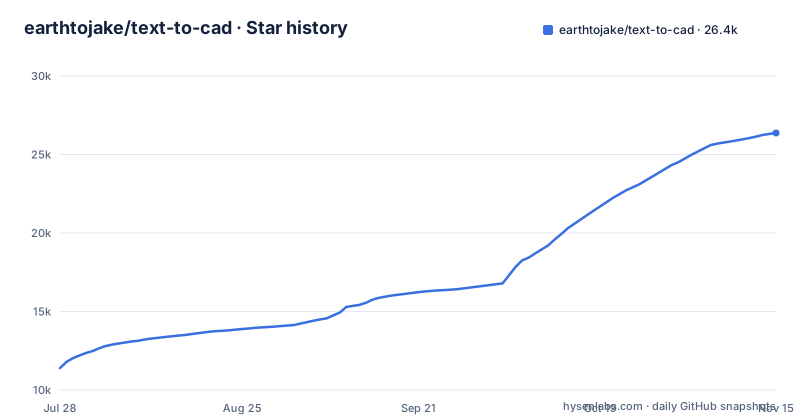
Star history
- earthtojake/text-to-cad26,371 ★ · +14,974
| Repository | 2026-07-28 | 2026-11-15 |
|---|---|---|
| earthtojake/text-to-cad | 11.4k | 26.4k |
14,974 Stars in the last 110 days, measured from the daily GitHub snapshot. Compare with other projects
Editorial analysis
Every model is a build123d Python script
text-to-cad does not hand you a mesh generated from a prompt. Your agent writes each model as a Python script using build123d, which is built on the Open CASCADE geometry kernel. Running the script with python model.py builds the model through text-to-cad's server and produces two kinds of output: an .xbf document that records the parts, names, colours, materials and joints, and whatever STEP, GLB, STL or 3MF files the script declares.
This design has clear consequences. Because the source of truth is a script, a model can be diffed, reviewed and versioned like any other code, and a change is an edit to a line rather than a redraw. It also means the result is only as good as the script the agent writes. If the agent misreads a dimension, the error sits in code that you have to read to find, and anyone unwilling to look at Python will have a hard time correcting the model by hand.
An in-memory server that rebuilds only what changed
The server keeps each model's work in memory, so an edit rebuilds only the part of the model it changed instead of starting from scratch. A CAD viewer shows the result either inside your agent app or in a browser, and it follows every rebuild, so the loop is: ask for a change, the agent edits the script, the script runs, the viewer updates.
That loop is the main reason to prefer this over a one-shot generator. Iterating on a bracket or an enclosure becomes a conversation where each step is visible. The trade-off is that the server is a running local process with state. Its memory of each model is what makes partial rebuilds possible, which also means the server, its version and its health are part of your setup. For problems, the project asks for the model script and the output of cad doctor in a bug report, which tells you where to start when a build misbehaves.
A one-line installer that touches every agent app
The quickstart is a remote script. On macOS and Linux:
curl -fsSL https://texttocad.dev/install.sh | shOn Windows, in PowerShell:
irm https://www.texttocad.dev/install.ps1 | iexThe script installs uv if it is missing, then sets up text-to-cad in every agent app on your computer using each app's own commands. Apps that support plugins get the plugin, which brings the skills plus CAD's MCP server; apps without plugins get the skills alone. It also registers the cad command and moves CAD's server to the new release. Running it again updates everything, or you can click CAD's update button when one appears, and it lists the apps you need to restart.
The convenience has a cost. Piping a script from the network into a shell runs code you have not read, and it changes configuration across every agent app at once. If you want control over which apps get it, the manual, app-by-app route is in docs/install.md.
Plugin apps get the MCP server, skill-only apps do not
Support is claimed for all popular agents that support plugins or the skills.sh framework, with Claude Code, Codex, Cursor, Gemini and Grok named. The installer makes a distinction that matters in practice: the plugin bundles both the skills and CAD's MCP server, while an agent without plugin support receives only the skills.
The skills are instructions; the MCP server is the piece that connects the agent to text-to-cad's running services. So the same request can behave differently depending on which agent you use. Before committing a team to one agent, check whether it gets the plugin or only the skills, and confirm that the viewer and build loop work there. The project also says an agent app without a plugin gets one on request, through an issue.
Twelve skills from drawings to robot description files
The library goes well past model generation. CAD creates and edits models from plain-language or image requests. step.parts finds off-the-shelf STEP parts such as screws, bearings, motors and connectors. Engineering Drawing produces a dimensioned PDF with views, hidden lines, dimensions, hole callouts and a title block. DXF creates 2D drawings like profiles, templates, gaskets and cut layouts.
For robotics, URDF writes robot structure files with links, joints, limits, inertials and meshes. SRDF adds MoveIt planning groups, end effectors, poses and collision rules to a URDF. SDF creates simulator models and worlds with frames, physics, sensors and lights.
The manufacturing end is covered by DfAM Check, which measures mesh printability by process (wall thickness, overhangs, support volume and build orientation), and DFM, which reviews a part for sheet metal, CNC machining or injection molding with measured evidence and the cited rule behind every finding, including draft, undercuts and projected area from a mesh. Each skill lives in its own folder under skills/ with a SKILL.md.
Fabrication hand-off is tied to specific services and printers
The last mile names real vendors rather than a generic export. SendCutSend checks DXF and STEP files before upload to that service. G-code slices models into printer-ready G-code with OrcaSlicer, using your own printer presets. Bambu Labs sends prints to Bambu Lab printers through Bambu Connect, Bambu Lab's official app, or Bambu Studio.
If your shop or printer is one of those, the path from prompt to part is short. If it is not, the hand-off stops at the exported STEP, STL, 3MF or DXF file and you continue in your own tools. The project invites new skills for a fabrication service, a printer or a CAD workflow in skills/, and example models in models/, so coverage depends on what contributors add.
Telemetry is on by default and releases move fast
By default, text-to-cad sends usage stats and crash reports, tagged with a random ID. The project states these never include your files, paths or prompts, and the privacy policy at https://www.texttocad.dev/privacy-policy explains what is sent and how to turn it off. Teams with strict rules about outbound data should switch it off before first use rather than after.
The pace of change is high. v0.8.3 and v0.8.4 both shipped on 2026-10-30, v0.10.0 followed on 2026-11-02, and the last push was the same day. The repository is not archived. A pre-1.0 version number and releases days apart mean the installer's one-command update can change behavior between sessions, so update deliberately. The repository lists https://www.cadskills.xyz as its homepage while the README points to https://www.texttocad.dev, which is also the host of the install scripts.
Editorial conclusion
text-to-cad suits people who already work in an agent such as Claude Code, Codex, Cursor, Gemini or Grok and want parts, assemblies, drawings and robot description files produced as reviewable Python scripts with standard STEP, STL, 3MF and GLB output. It is a poor fit for anyone who wants to sculpt geometry by hand in a GUI, or who will not run a remote install script that touches every agent app on the machine. Before installing, read docs/install.md for the per-app manual route, decide whether to turn off the default usage stats and crash reports, and pin a release, since v0.8.3, v0.8.4 and v0.10.0 all appeared within four days.
Frequently asked questions
Is text-to-cad free?
Yes. text-to-cad is MIT-licensed and built in the open on GitHub. By default it sends usage stats and crash reports, which the privacy policy explains how to turn off.
What is text-to-cad?
text-to-cad is a collection of agent skills for CAD, robotics and hardware design. Your agent writes each model as a build123d Python script, which a local server builds into STEP, GLB, STL or 3MF files.
How do I convert text to CAD with text-to-cad?
Install it with the script from texttocad.dev, then ask your agent for a part or an assembly. The agent writes the model as a Python script, runs it to build the model and shows it in the CAD viewer.
Official sources
Add this badge to your README
If you maintain this project, the badge below links readers to this analysis and shows its maintenance status from the daily GitHub snapshot. Paste the markdown into your README; add ?metric=license or ?metric=stars to the image URL for a different field.

[](https://hysenlabs.com/projects/earthtojake-text-to-cad)Star history chart for your README
[](https://hysenlabs.com/projects/earthtojake-text-to-cad)Was this useful?