r2modman: mod profiles for Thunderstore, and where it still falls short
A simple and easy to use mod manager for several games using Thunderstore
At a glance
- What is it?
- r2modman is a desktop mod manager for games served through Thunderstore, built around mod profiles you can switch and export. It is actively developed and MIT licensed, ships as exe, Flatpak, AppImage and deb, and still asks Linux users to create a marker file to force Proton.
- Who is it for?
- Adopt r2modman when you run a Thunderstore game with more than a handful of mods and want profiles you can export to reproduce a working set on another machine, and install only from Thunderstore, the GitHub releases page or ebkr.dev, since the README opens by warning about fake redistribution sites. Do not adopt it if you play one or two mods, where manual unzipping is faster.
- Can I use it commercially?
- Yes. MIT is a permissive licence: you can use, modify and sell software built on it, as long as you keep its copyright and licence notices.
- Is it still maintained?
- Yes. The repository last received commits 2 days ago.
- What is it written in?
- Mainly TypeScript, according to GitHub's language statistics.
Answers come from the project's GitHub data, last synced on October 21, 2026, and from our analysis. They are not legal advice.
Star history
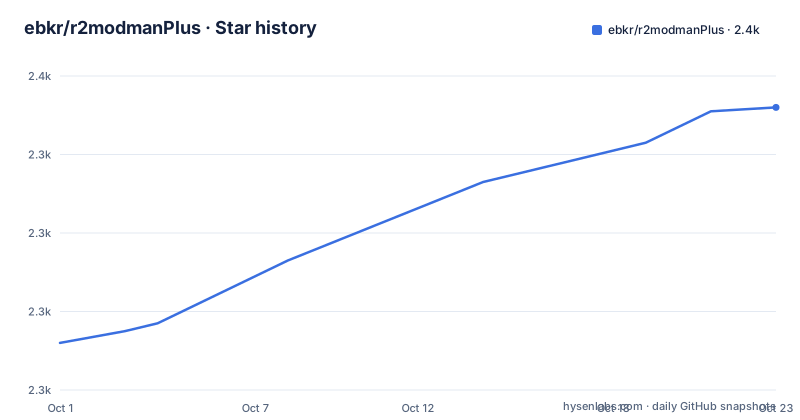
- ebkr/r2modmanPlus2,351 ★ · +59
| Repository | 2026-10-01 | 2026-10-21 |
|---|---|---|
| ebkr/r2modmanPlus | 2.3k | 2.4k |
59 Stars in the last 20 days, measured from the daily GitHub snapshot. Compare with other projects
Editorial analysis
A mod manager for the Thunderstore model
r2modman is a desktop mod manager for several games, all served through Thunderstore. The game list in the feature section names Risk of Rain 2, Dyson Sphere Program, Valheim, GTFO, BONEWORKS and more, and the repository topics run to two dozen more including Subnautica, Lethal Company and Titanfall 2.
The model matters more than the feature list. Thunderstore distributes mods as versioned packages with dependency declarations, so r2modman is resolving a package graph rather than copying files you found on a forum. That is why profiles exist, and why a game that draws from a different source, a Steam Workshop, does not appear in the same shape of workflow.
The README's definition is plain: a mod manager is an application to make it easier to control which mods you have installed, letting you update, enable, disable or uninstall with a click while keeping the same mods available on another profile.
Beyond that core it adds a config editor so mod settings can be changed from inside the manager, exportable profiles so a friend can receive your exact mod set and config, direct download and install from the manager, and a view of outdated mods. The stated design goal is a clean interface that makes modding as simple as possible, and the feedback section names the audience constraint directly: suggestions are judged by their impact on users who do not have much experience with computers.
The redistribution warning comes before the features
The README opens with a warning rather than a logo, and it is the first thing worth reading. There has been a rise in third-party redistribution sites which are claiming to be official, and the project names exactly three legitimate download locations: the Thunderstore package page, the GitHub releases page at ebkr/r2modmanPlus, and ebkr.dev for hosted Flatpak builds.
This is a mod manager. It holds an installer, a package index client, auto-update machinery, and write access to your game directories, which is about as attractive a target as a desktop application can be. A fake r2modman is a keylogger and a game-file stealer in one download, and the fact that the README needs to say this at all tells you how often it has happened.
The recommendation that follows from it is simple and worth repeating: check the domain before you run anything. Thunderstore, `github.com/ebkr/r2modmanPlus` and `r2builds.ebkr.dev` are the three names in the warning, and the Linux installation instructions below are the trap, because the per-user Flatpak command in that section uses a plain `http://` URL where the system-wide one uses `https://`.
Profiles, which is the feature everything else serves
The feature list reads like a checklist until you get to mod profiles to switch between different sets of mods quickly and easily, and export profiles to share both mods and configs. That is the mechanism the rest of the app is built to feed.
A profile is a named set of enabled mods. Switching profiles changes which mods are active without deleting anything, and the README is explicit that you can update, disable or uninstall in one profile while keeping the same mods available on another. That last part is the difference from deleting files.
Export is what makes profiles collaborative rather than personal. If a friend is stuck on a mod conflict, exporting your profile and their importing it produces the same set of versions, which removes the entire class of bug where two people have the same mods at different versions. Exporting config alongside the mod list is what makes that work, since a config change is as capable of breaking a session as a version mismatch.
The feature section also lists safer mod installation allowing you to play the game through Steam normally, which is about file layout rather than about permissions or sandboxing. r2modman installs into the game's mod directory and leaves the Steam launch path untouched, so nothing about the install requires replacing the game launcher.
Windows and Linux install paths
On Windows the path is a manual download and a nested installer.
1. Click "Manual Download" on Thunderstore.
2. Inside the downloaded .zip file, run "r2modman Setup X.X.X.exe".
3. Follow the steps in the installer.
The application installer being shipped inside a zip is the packaging convention, not a mistake.
On Linux the README opens with a correction, do not install the `.exe` files of r2modman, and offers Flatpak or AppImage. Inside the same extracted zip you get a `flatpak-setup.sh` script and an AppImage that may need `chmod +x`. Steam Deck users are pointed at Flatpak specifically if they want to run the manager in game mode.
The Flatpak script adds a remote and installs one package.
flatpak remote-add --if-not-exists r2builds https://r2builds.ebkr.dev/flatpak/r2modman.flatpakrepo
flatpak install -y r2builds io.github.ebkr.r2modman
Those need elevated privileges. If you would rather not use sudo, the README gives per-user equivalents using `--user`, and those are the two lines worth reading closely, because the remote URL drops from `https://` to `http://`.
flatpak remote-add --user --if-not-exists r2builds http://r2builds.ebkr.dev/flatpak/r2modman.flatpakrepo
flatpak install --user io.github.ebkr.r2modman
Package-manager builds also exist under the latest GitHub release as `deb`, `rpm`, `pacman` and `tar.gz`.
The Proton workaround, and what knownIncompatibilities.json is for
Buried under the Linux installation notes is a single line that tells you more about the state of Linux support than any feature list would. Temporary workaround to force Proton on Linux systems: place a `.forceproton` file in the game directory whilst a solution is in development.
That is a project admitting it has no working answer for launching a Windows game under Proton, and asking users to drop an empty marker file into the game folder until it builds one. The empty file has no contents to configure because it is a sentinel, and the user has to know where the game directory is and create it by hand.
The repository is candid about the wider problem. There is a `knownIncompatibilities.md` at the root and a `modExclusions.json` with a matching `modExclusions.md`, which is the shape of a project maintaining a deliberate list of mods it cannot support together. A mod manager for many games accumulates these, because each game has its own load order quirks and its own set of mods that conflict in ways no resolver can express.
Both files are worth reading before you commit to the tool, because they are the honest measure of how much friction you will hit on a specific game and mod set. The README does not summarise either one.
Quasar build tooling over a Bulma interface
The stack is unusual enough to be worth describing precisely, because the build tooling and the UI framework are not the same thing.
The build is Quasar in Electron mode, with per-platform scripts `build-win`, `build-linux` and `build-osx`, an unpacked Linux variant that sets `SKIP_PACKING=true`, and separate `publish` scripts. Tests run under vitest from `test/vitest`, and type checking uses `vue-tsc --noEmit` even though the interface is Bulma. There is also a `sync` script that runs `tsx ./scripts/sync.ts`, and Flatpak packaging built through `flatpak-builder` with dependencies from Flathub.
The runtime dependency list explains what the app actually does. `@node-steam/vdf` parses Steam's VDF metadata to find game install paths. `adm-zip` and `fflate` handle archives from both ends, since mods arrive zipped and profiles leave zipped. `dexie` is an IndexedDB wrapper, so local state lives in the browser-side database rather than on disk in a bespoke format. `ajv` with `ajv-formats` validates structured data, plausibly against Thunderstore's package metadata. `electron-updater` implements the update behaviour the README describes, downloading while you use the app and installing on close. `async-lock` serialises the file operations, which matters when a mod install and an update can fire at once.
One pin stands out. `axios` is at `^0.24.0` while its neighbours are current, with `core-js` at `^3.47.0` and `dexie` at `^3.2.7`. A pre-1.0 HTTP client several years behind everything around it is worth checking against current advisories before you trust an application that fetches a package index.
r2modman against copying mods by hand
The alternative for most of these games is manual installation: download the mod archive from Thunderstore, unzip it into the game's mod folder, and repeat for every dependency and version update. For a game with one mod, that is faster than installing a manager.
The difference in approach is dependency resolution and state you can return to. Thunderstore packages declare their dependencies, so the manager knows that mod A needs mod B at a specific version and will fetch it. By hand you discover that dependency when the game crashes. The manager also knows what an upgrade touches, which is what makes updating a dozen mods survivable.
Where the manager earns its cost is the profile. Manual installation has no notion of two configurations of the same install, so switching from a lightweight mod set to a heavy one means re-downloading and re-filing everything. If you only ever run one configuration, the profiles feature is decoration and a folder manager would serve you.
The honest argument against is narrower than it looks. This is a third-party desktop application, MIT licensed and actively developed with the last push on 2026-09-28, that holds write access to your game folders and fetches code from a third-party index. That is the trade the README's warning at the top is really about, and it is only worth making if you install from one of the three named sources.
Editorial conclusion
Adopt r2modman when you run a Thunderstore game with more than a handful of mods and want profiles you can export to reproduce a working set on another machine, and install only from Thunderstore, the GitHub releases page or ebkr.dev, since the README opens by warning about fake redistribution sites. Do not adopt it if you play one or two mods, where manual unzipping is faster. Verify first that your game and mod combination appears in knownIncompatibilities.md and modExclusions.json, and prefer the https remote in the system-wide Flatpak command over the http one in the per-user variant.
Frequently asked questions
Where should I download r2modman from?
The README names exactly three legitimate locations: the Thunderstore package page, the GitHub releases page on ebkr/r2modmanPlus, and ebkr.dev for hosted Flatpak builds. It warns that third-party redistribution sites claiming to be official have been appearing.
How do I install r2modman on Linux?
Do not run the Windows .exe. Extract the zip downloaded from Thunderstore and either run flatpak-setup.sh, which needs elevated privileges, or make the AppImage executable with chmod +x. deb, rpm, pacman and tar.gz builds are also attached to the latest GitHub release.
What are mod profiles for?
A profile is a set of enabled mods you can switch between. The README says you can update, enable, disable or uninstall mods in one profile while keeping them available on another, and exported profiles share both your mods and their configs with someone else.
How does r2modman handle updates?
It downloads available updates while you use it, and installs them once you close the application. The dependency list includes electron-updater, which is what performs that sequence.
Why is there a .forceproton file mentioned in the Linux instructions?
It is described as a temporary workaround to force Proton on Linux, and the README says to place one in the game directory while a solution is in development. It is a marker file rather than something you configure.
What is r2modman built with and under what licence?
It is built with Quasar in Electron mode over a Bulma-based interface, typed with vue-tsc, tested with vitest, and published under the MIT licence. The application id for its Flatpak build is io.github.ebkr.r2modman.
Official sources
Add this badge to your README
If you maintain this project, the badge below links readers to this analysis and shows its maintenance status from the daily GitHub snapshot. Paste the markdown into your README; add ?metric=license or ?metric=stars to the image URL for a different field.

[](https://hysenlabs.com/projects/ebkr-r2modmanplus)Star history chart for your README
[](https://hysenlabs.com/projects/ebkr-r2modmanplus)Was this useful?