Enso: a GraalVM data workflow engine shipped with an AGPL visual IDE
Enso Analytics is a self-service data prep and analysis platform designed for data teams.
At a glance
- What is it?
- Enso is a self-service data preparation platform with an unusual repository shape: a compiler-grade engine under Apache 2.0, an Electron IDE under AGPL 3.0, and downloadable binaries that are deliberately not open source. The split matters more than the feature list.
- Who is it for?
- Enso is a reasonable choice for a team that wants the engine on its own terms, because the compiler and language server can be used as separate command line tools without the IDE. It is a poor fit if the requirement is a single uniform licence across what you run and what you distribute, because the engine and IDE differ and the binaries sit outside both.
- Can I use it commercially?
- Yes. Apache-2.0 is a permissive licence: you can use, modify and sell software built on it, as long as you keep its copyright and licence notices.
- Is it still maintained?
- Yes. The repository last received commits 74 days ago.
- What is it written in?
- Mainly Java, according to GitHub's language statistics.
Answers come from the project's GitHub data, last synced on October 23, 2026, and from our analysis. They are not legal advice.
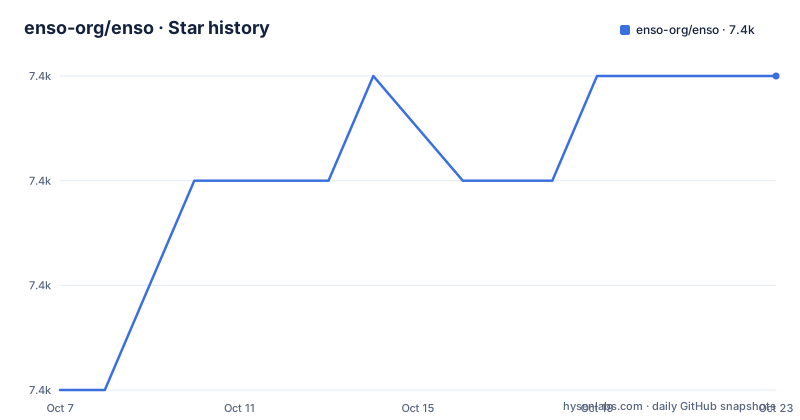
Star history
- enso-org/enso7,443 ★ · +3
| Repository | 2026-10-07 | 2026-10-23 |
|---|---|---|
| enso-org/enso | 7.4k | 7.4k |
3 Stars in the last 16 days, measured from the daily GitHub snapshot. Compare with other projects
Editorial analysis
Two products in one repository, split by name
The README divides Enso into exactly two components, and the division matters more than it first appears. The Enso Engine is the set of tools implementing the Enso language and its services: an interpreter, a just-in-time compiler and runtime, both powered by GraalVM, plus a language server that lets you inspect Enso code as it executes. The README adds a line that decides whether you need the IDE at all: these components can be used on their own as command line tools.
The Enso IDE is the desktop application for working with the visual form of Enso. It is an Electron application, paired with the searcher, which supplies contextual search, hints and documentation across the language's functionality.
That structure tells you the language and the graphical surface are separable. The visual workflow builder is one client of the engine, not the engine itself. It is also why the repository's default branch is `develop` and why the topic list includes compiler, interpreter, jit, graalvm, language, textual and visual as separate concerns rather than one lumped label.
Why the repository carries four build systems
The repository root is the most informative page in the project and nobody wrote a paragraph explaining it. Read the top level and you find `build.sbt` for Scala, `Cargo.toml` alongside `rust-toolchain.toml`, `clippy.toml` and `rustfmt.toml`, `package.json` with `pnpm-workspace.yaml` and `eslint.config.mjs` for the JavaScript side, `BUILD.bazel` with `MODULE.bazel` and `bazel_scripts/`, `flake.nix` for Nix, `.jvmopts` for the JVM, and `.node-version` for Node.
Four build systems, then: Bazel, pnpm, Cargo and sbt. The Rust workspace members in `Cargo.toml` explain a good part of it, and they are not what you would guess from the fact that the project is listed as a Java repository:
chrono = { version = "0.4.31", features = ["serde"] }
clap = { version = "4.5.15", features = [
	"derive",
	"env",
	"wrap_help",
	"string",
] }
derive-where = "1.2.7"
The workspace includes `app/rust-ffi`, `lib/rust/parser/jni`, `lib/rust/parser/generate-java`, `lib/rust/parser/fuzz`, `lib/rust/metamodel`, `lib/rust/prelude` and `lib/rust/reflect`. A Rust parser with a JNI module and a target that generates Java is a parser being shared across two runtimes.
The `Cargo.toml` also opens with a four-line warning telling contributors to keep the dependency set minimal and consult the core development team before adding one. That is a useful signal about how the project absorbs upstream churn, and it is a contrast with the 29-line `devDependencies` block in the root `package.json`, which is where tooling churn is concentrated instead.
The engine and the IDE are licensed differently
This is the section to read twice if you are considering Enso for anything commercial. The README states that the source code is open source, then immediately qualifies it: the downloadable binaries are not.
The licences are split by component. The Enso Engine is licensed under Apache 2.0, with the licence file at the repository root. The Enso IDE is licensed under AGPL 3.0, with its licence file at `app/gui/LICENSE`. GitHub reports the repository itself as Apache-2.0, which reflects the root file rather than the whole tree.
For binaries the position is different again. The README offers no-cost licences to individuals and to small companies through a separate end user agreement, and states that outside that limited scope there are commercial options. So there are three regimes to keep straight: Apache 2.0 for engine source you build yourself, AGPL 3.0 for IDE source, and a proprietary agreement for the binary downloads. The README says this licence set was chosen to give users freedom to create libraries and release under any licence while allowing commercial products on top, including Enso Cloud and Enso Enterprise server managers.
This is not legal advice, and none is needed to see the shape: the build-it-yourself route is genuinely open, and the convenience route is not.
The build entry points live in the root package.json
The README sends contributors to the development and contribution guidelines for build instructions, which is the correct choice for a project this size. The root `package.json` still exposes the real entry points, and they are more informative than a prose description:
"compile": "corepack pnpm run -r compile",
"build:gui": "corepack pnpm run -r compile && corepack pnpm run -r --filter enso-gui build",
"build:ide": "corepack pnpm run -r compile && corepack pnpm run -r --filter enso build",
"dist:ide": "corepack pnpm run -r --filter enso dist",
Every one of them routes through `corepack pnpm run -r`, a recursive workspace call. The distinction between `build:gui` and `build:ide` is a filter on `enso-gui` versus `enso`, so the Electron shell and the IDE are separate packages with separate build targets. There is also `dev:inspect`, which compiles `ydoc-inspect` and then attaches `node --inspect` to it, and `check:tsconfigs`, which runs a Bazel target before validating TypeScript configs.
The scripts at the repository root named `run`, `run.cmd` and `run.ps1` are launcher entry points for the three platforms, and the presence of `flake.nix` suggests a Nix path exists for reproducible environments. None of this is described in the README prose, and all of it is what you need before a first build.
Only nightly builds appear in the release list
The published releases are all nightlies of the same version: `2026.1.1-nightly.2026.8.5` on 2026-08-05, `2026.1.1-nightly.2026.5.11` on 2026-05-11 and `2026.1.1-nightly.2026.5.4` on 2026-05-04. No stable tag appears among them.
For a compiler project that is a defensible policy rather than a red flag. Enso's build passes through GraalVM, and nightly artifacts are a natural way to validate a just-in-time compiler against a fast-moving set of integrations. For a consumer it is also a real constraint: there is no semver promise to pin against, and the gap between 2026.5.11 and 2026.8.5 is nearly three months. If you need a reproducible version, the README's own answer applies, which is to build the source yourself.
The last push was on 2026-08-10, and the repository is not archived. `CHANGELOG.md` and `RELEASES.md` sit at the root, so change history exists even though the tags do not follow a stable numbering line.
What the product claims, and what the README leaves out
The feature list is oriented at finance, accounting, tax and sales operations teams, and the mechanisms are named concretely: a catalog system for reusable workflows and data assets, deployment automation with scheduling on your own hardware or serverless in Enso Cloud, automatic version history, multi-row formulas, dynamic rename, user-defined functions and a join between operation. The README also claims an average saving of around seven hours per week for users, which reads as a marketing number rather than a measurement.
What the README does not cover is the part a developer would want. There is no description of the language's syntax, no worked example, no list of built-in connectors, and no statement of which data sources the catalog can reach. The visual workflow model is described in terms of features rather than semantics. For an engineer weighing whether Enso can express a given transformation, that is the gap that matters, and the documentation at `help.enso.org` and the contribution guidelines are where you would have to look.
Editorial conclusion
Enso is a reasonable choice for a team that wants the engine on its own terms, because the compiler and language server can be used as separate command line tools without the IDE. It is a poor fit if the requirement is a single uniform licence across what you run and what you distribute, because the engine and IDE differ and the binaries sit outside both. Before adopting it, read the licensing section of the README against your own deployment model, then look at the scripts in the root package.json, which is where the actual build entry points live and where the mismatch between the documented product and the repository layout is most visible.
Frequently asked questions
What is the difference between the Enso Engine and the Enso IDE?
The Engine is the set of tools implementing the language, including the interpreter, the GraalVM-powered just-in-time compiler and runtime, and a language server for inspecting running code. The IDE is the Electron desktop application for the visual form of Enso, bundled with the searcher that provides contextual hints and documentation.
Can I use the Enso Engine without the Enso IDE?
Yes. The README states that the engine components can be used on their own as command line tools, which separates the compiler and language server from the desktop application.
Are Enso's downloadable binaries open source?
No, and the README is explicit that the downloadable binaries are not open source. The engine source is under Apache 2.0 and the IDE source is under AGPL 3.0, while no-cost licences for binaries are offered to individuals and small companies through a separate agreement, with commercial options outside that scope.
Which version of Enso appears in the release list?
The published releases are nightly builds, including `2026.1.1-nightly.2026.8.5` on 2026-08-05, and no stable tag appears in that list. Building the source yourself is the route that gives you a version you control.
Official sources
Add this badge to your README
If you maintain this project, the badge below links readers to this analysis and shows its maintenance status from the daily GitHub snapshot. Paste the markdown into your README; add ?metric=license or ?metric=stars to the image URL for a different field.

[](https://hysenlabs.com/projects/enso-org-enso)Star history chart for your README
[](https://hysenlabs.com/projects/enso-org-enso)Was this useful?