Envoy Gateway: A Kubernetes-Native Front Door for Envoy Proxy
Manages Envoy Proxy as a Standalone or Kubernetes-based Application Gateway.
At a glance
- What is it?
- Envoy Gateway manages Envoy Proxy as a standalone or Kubernetes application gateway, driven entirely by Gateway API resources. This review covers its architecture, quickstart, limitations, and where it fits versus alternatives.
- Who is it for?
- Adopt Envoy Gateway if you run Envoy Proxy in Kubernetes and want a declarative, API-driven way to provision and configure it without hand-writing Envoy configuration. It is also suitable for standalone deployments where you want the same Gateway API model.
- Can I use it commercially?
- Yes. Apache-2.0 is a permissive licence: you can use, modify and sell software built on it, as long as you keep its copyright and licence notices.
- Is it still maintained?
- Yes. The repository last received commits 2 days ago.
- What is it written in?
- Mainly Go, according to GitHub's language statistics.
Answers come from the project's GitHub data, last synced on November 12, 2026, and from our analysis. They are not legal advice.
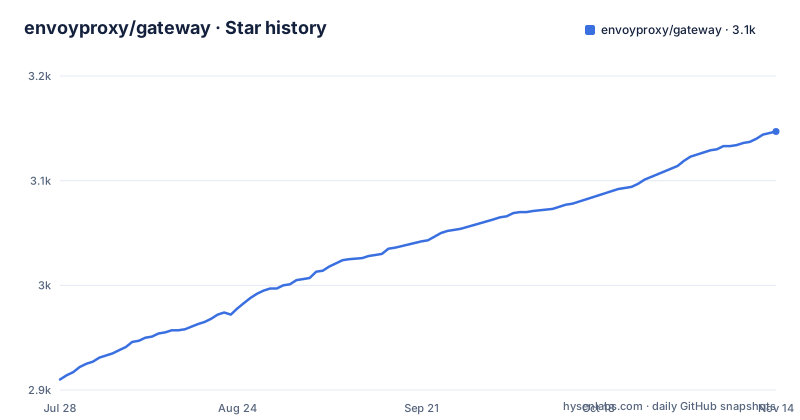
Star history
- envoyproxy/gateway3,144 ★ · +234
| Repository | 2026-07-28 | 2026-11-12 |
|---|---|---|
| envoyproxy/gateway | 2.9k | 3.1k |
234 Stars in the last 107 days, measured from the daily GitHub snapshot. Compare with other projects
Editorial analysis
The Problem: Hand-Managing Envoy Configuration
The README is explicit: Gateway API resources are used to dynamically provision and configure the managed Envoy Proxies. That is the core mechanism. You define a Gateway resource to represent the entry point, an HTTPRoute to route traffic, and Envoy Gateway translates those into Envoy's internal configuration. The project is written in Go, which makes sense for a control plane that watches Kubernetes resources and reconciles state. The data flow is: you apply Gateway API resources to your cluster, the Envoy Gateway controller watches those resources, generates Envoy configuration, and pushes it to the Envoy proxies it manages. This is a control plane pattern, not a sidecar or a simple ingress controller. The architecture is designed to be dynamic, so changes to routes or gateways propagate without manual reloads.
Standalone and Kubernetes: Two Deployment Modes
The description says Envoy Gateway manages Envoy Proxy as a standalone or Kubernetes-based application gateway. That is a wider scope than many ingress controllers, which only work in Kubernetes. The standalone mode is interesting because it means you can use the same Gateway API abstractions outside a cluster, perhaps for a VM-based deployment or a hybrid environment. However, the README does not detail how standalone mode works. It mentions the quickstart for Kubernetes, but there is no standalone quickstart in the README. This is a gap in the documentation. If you are considering standalone mode, you will need to dig into the docs or the source to understand the operational model. The Kubernetes mode is clearly the primary path, given the focus on Gateway API resources. That said, having the option is a differentiator, because most Envoy management tools assume a cluster.
Getting Started: The Quickstart Path
The README points to a quickstart at gateway.envoyproxy.io/latest/tasks/quickstart. It promises you can use Envoy Gateway in a few simple steps. The exact commands are not in the README, but the pattern for such projects is usually: install the Gateway API CRDs, install Envoy Gateway, then apply a Gateway and an HTTPRoute. The project provides a compatibility matrix at /news/releases/matrix/, which you should check before installing to ensure your Envoy version and Gateway API version are supported. The latest release at the time of writing is v1.9.1, with v1.8.4 also maintained. The release cadence appears to be monthly or so, based on the dates. To get running, you would likely use kubectl apply with manifests from the release, or use a Helm chart if provided, though the README does not mention Helm. The quickstart is the authoritative source for exact commands, and it is short by design.
Where It Falls Short: Abstraction Overhead and Feature Gaps
The main limitation is the abstraction layer. Gateway API is a subset of what Envoy can do. If you need a specific Envoy filter or a custom extension, you may not be able to express it through Gateway API resources. The project does have extension points, but they are not described in the README. You will need to consult the full documentation. Another failure mode is version skew. Envoy Gateway manages Envoy, but Envoy releases frequently. The compatibility matrix exists because not every Envoy version works with every Envoy Gateway version. If you upgrade Envoy independently, you risk breaking the control plane. The project also assumes you are comfortable with the Gateway API model, which has its own learning curve. For a simple ingress, a traditional ingress controller might be simpler. Envoy Gateway is not the wrong tool for complex routing, but it is overkill for a basic reverse proxy.
Alternatives: Other Gateway API Implementations
The most direct alternative is another Gateway API implementation, such as Contour or Istio's ingress gateway, both of which also support Gateway API. Contour uses Envoy under the hood but has its own configuration model, historically using HTTPProxy resources. Istio uses Envoy as its data plane but adds a service mesh layer, which is a different scope. The key difference is that Envoy Gateway is purpose-built to manage Envoy directly, with no service mesh features. If you want a mesh, Istio is the choice. If you want a simpler Envoy-based ingress without learning Gateway API, Contour's HTTPProxy might be easier. Envoy Gateway's approach is to standardize on Gateway API, so you get portability across implementations, but you lose the ability to use implementation-specific features unless they are exposed. That trade-off is central to the project's design.
Maintenance and Upgrade Cost
The project is under active development, with three releases in the last month: v1.9.1, v1.8.4, and v1.9.0. That is a fast cadence, which means you should expect frequent updates. The README does not mention a deprecation policy or upgrade path, but the compatibility matrix is the place to check. Upgrading Envoy Gateway likely requires upgrading the Gateway API CRDs and possibly re-applying your resources. The cost is not trivial, because you must test your routes after each upgrade. The project uses security scanning tools, as shown by the badges for CodeQL, OSV Scanner, and Trivy, which is a positive sign for security maintenance. The license is Apache-2.0, which is permissive and allows commercial use without copyleft obligations. That reduces legal friction for adoption. However, you are responsible for keeping up with the release cycle, and the fast pace means you cannot sit on a version for too long.
Community and Support Channels
The project has an active community, with a mailing list for announcements and a Slack channel. Contributor meetings are held weekly, alternating between EU-friendly and APAC-friendly times, which shows an effort to include a global community. The README links to a roadmap and a contributing guide, so there is a path for users to become contributors. For support, you can ask questions on Slack or file issues on GitHub. The security reporting process is documented in SECURITY.md, which is important for a project that sits at the edge of your network. The community structure is typical for a CNCF-adjacent project, but it is not a guarantee of responsiveness. If you need enterprise support, you would need to look at commercial offerings that build on Envoy Gateway, though none are mentioned in the README. The project is open source, so you can also read the source and fix issues yourself, but that assumes Go expertise.
Editorial conclusion
Adopt Envoy Gateway if you run Envoy Proxy in Kubernetes and want a declarative, API-driven way to provision and configure it without hand-writing Envoy configuration. It is also suitable for standalone deployments where you want the same Gateway API model. Do not use it if you need fine-grained control over every Envoy filter or if your team is not comfortable with the Gateway API abstraction layer. Before adopting, verify the compatibility matrix for your Envoy version and confirm that the Gateway API features you rely on are implemented in the release you plan to use. The project is under active development, so pin a release and track the roadmap for breaking changes.
Frequently asked questions
how to install gateway api kubernetes
This repository does not give you an install command. It implements the API as a control plane, and the page sends you to a quickstart document hosted on the project's documentation site for the actual steps, alongside a compatibility matrix, a goals document in the repository and a roadmap. If you are looking for the raw Kubernetes Gateway API rather than this implementation, the link in the opening paragraph goes to the upstream standard.
How does gateway work?
The word covers too much to answer here: the surrounding search terms are about a hardware brand, a mortgage lender, a game location, gift cards and a business intelligence connector. In this repository a gateway is a control plane that reads Gateway API resources and provisions and configures Envoy proxy processes from them, which is the Envoy proxy's model of an application gateway rather than a network device.
What brand is gateway?
Nothing in this repository is about a hardware brand, and the page contains no product names, models or pricing. It describes a piece of infrastructure software that manages Envoy Proxy as a standalone application or as a gateway inside Kubernetes, licensed under Apache 2.0, with a compatibility matrix as the document it points adopters at first.
how to install gateway
Not answerable from this page, and the ambiguity is in the word: the search terms behind that phrase are about drivers, laptops and a company's own product pages. What this project does document is where to start, which is the quickstart task on its documentation site plus the compatibility matrix, and it publishes no installation command of its own on the front page.
What is a Gateway Program?
That is not a term this repository uses. The API in the name is the Kubernetes Gateway API, a resource specification this project implements as a control plane, and the page links that specification directly in its opening paragraph so you can read the interface it is translating from.
Official sources
Add this badge to your README
If you maintain this project, the badge below links readers to this analysis and shows its maintenance status from the daily GitHub snapshot. Paste the markdown into your README; add ?metric=license or ?metric=stars to the image URL for a different field.

[](https://hysenlabs.com/projects/envoyproxy-gateway)Star history chart for your README
[](https://hysenlabs.com/projects/envoyproxy-gateway)Was this useful?