ESP-Skainet puts wake word and command recognition on the ESP32
Espressif intelligent voice assistant
At a glance
- What is it?
- ESP-Skainet is Espressif's on-device voice assistant stack, pairing the WakeNet wake word engine with the MultiNet speech command model and an audio front-end that handles echo cancellation, voice activity detection, blind source separation and noise suppression. It is a set of runnable examples and components rather than a general assistant framework.
- Who is it for?
- ESP-Skainet fits a hardware engineer who needs an offline voice front end on ESP32 or ESP32-S3 hardware, and the reference hardware list plus the per-example READMEs remove most of the guesswork about which board carries which model.
- Can I use it commercially?
- Check first. The repository uses a licence we do not classify automatically, so read its LICENSE file before any commercial use.
- Is it still maintained?
- Yes. The repository last received commits 11 days ago.
- What is it written in?
- Mainly C, according to GitHub's language statistics.
Answers come from the project's GitHub data, last synced on November 7, 2026, and from our analysis. They are not legal advice.
Star history
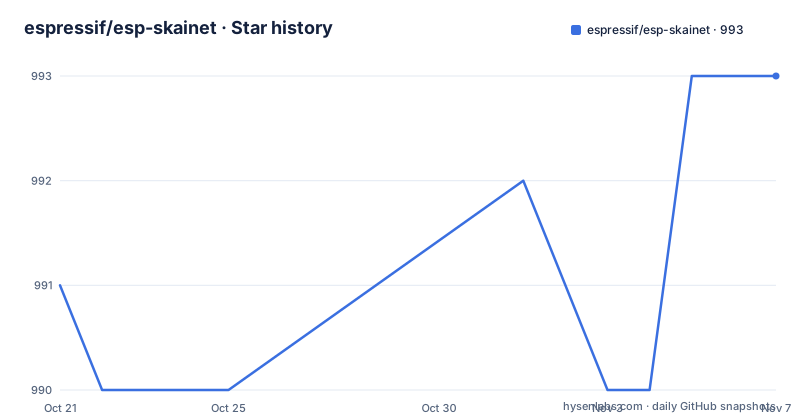
- espressif/esp-skainet993 ★ · +2
| Repository | 2026-10-21 | 2026-11-07 |
|---|---|---|
| espressif/esp-skainet | 991 | 993 |
2 Stars in the last 17 days, measured from the daily GitHub snapshot. Compare with other projects
Editorial analysis
A voice stack for the always-listening path
ESP-Skainet exists to make two jobs cheap on microcontrollers: noticing that someone spoke a wake word, and understanding a short command afterwards. The scope is stated in one line, that it currently supports the Wake Word Engine and Speech Commands Recognition, and the examples in the repository follow that split exactly. The target hardware is the ESP32 series, and the README recommends the ESP32-S3 for speech command recognition, citing support for AI instructions and high-speed octal SPI PSRAM, with the note that the latest models are deployed on ESP32-S3 first. That is a concrete engineering constraint rather than a marketing claim, since running a command recogniser continuously competes with everything else on the device. The audience is a developer building a device that must respond to a person without a network round trip, and the value of doing this on the chip is that audio never has to leave the room.
WakeNet9 is the part that never sleeps
The wake word engine, WakeNet, is described as built for high performance and low memory usage so a device can always listen, and the wake words it targets include the phrase Alexa as well as the localized equivalents Espressif ships for the Chinese market. Espressif provides wake words such as Hi, Lexin and Hi, ESP for free, and also supports custom wake words through a separate customization process documented by Espressif. The latest model listed for the wake word example is WakeNet9, and the wake word detection example is the one the project recommends as a starting point. The architectural point here is that the wake word stage is a filter, not a recogniser: it answers a single question, is this the phrase we are waiting for, and the answer has to be cheap and reliable enough to run continuously, which is why memory and speed are the metrics the project emphasises rather than command breadth.
MultiNet7 handles 200 commands without retraining
The command side is the MultiNet model, which the project describes as providing flexible offline speech command recognition with the ability to add your own commands without retraining the model. That last point is the one that matters for a product team, because it removes the data collection step from adding a phrase like turning on a light. The current limit is stated plainly: up to 200 Chinese or English speech commands. The English and Chinese command recognition examples both target the MultiNet7 model, which tells you the same model line serves both language sets. The offline part is what keeps MultiNet usable alongside WakeNet, since the two run in sequence on the same device, the first deciding that speech is addressed to the device and the second deciding what was said. The advanced path in the README is that experienced users can add or modify speech commands in the example itself, which is a configuration exercise rather than a model training exercise.
The audio front-end handles the hard four problems
Before any recognition happens, the audio has to be made usable, and this is where the Audio Front-End, or AFE, sits. It integrates AEC for acoustic echo cancellation, VAD for voice activity detection, BSS for blind source separation, and NS for noise suppression. Each of those four addresses a specific problem in a speaker device: echo cancellation removes the device's own output from the microphone signal, voice activity detection decides when speech is present, blind source separation isolates a speaker from a noisy mix of other sources, and noise suppression cleans up the rest. Espressif states that its two-mic AFE has been qualified as a software audio front-end solution for Amazon Alexa Built-in devices, which is the kind of third-party qualification that matters when you are choosing between building the front end yourself and reusing one. The AFE is the component most likely to determine whether a command is heard correctly in a noisy room, and the deep_noise_suppression, direction_of_arrival and voice_activity_detection examples in the tree show it being exercised in isolation.
The example folder tells you which board carries which model
The repository is organised so that a developer picks a starting point by model and board, and the table in the README makes the pairing explicit. The cn_speech_commands_recognition and en_speech_commands_recognition folders carry MultiNet7, wake_word_detection carries WakeNet9, and chinese_tts carries esp-tts-v1.7. The supported boards listed for most of them are ESP32-Korvo, ESP32-S3-Korvo-1, ESP-BOX, ESP-S3-Korvo-2, ESP32-S3-EYE and ESP32-P4-Function-EV, while the English command example omits the older ESP32-Korvo and the usb_mic_recorder example lists only ESP-BOX and ESP-S3-Korvo-2. Application configuration is not centralised, and the README is explicit that you should refer to the README.md in each example folder for it. The wider examples folder also holds player, voice_communication, usb_mic_recorder and sdkconfig.defaults, so a board bring-up often means copying a configuration from a neighbouring example rather than starting from an empty project.
Building with ESP-IDF 4.4 or 5.0
The toolchain requirement is specific. ESP-IDF v4.4 and ESP-IDF v5.0 are the supported releases, and if you already have an environment you do not want to replace, the README tells you to point the IDF_PATH environment variable at the new ESP-IDF path instead. Users who need ESP-IDF v3.2 or earlier are pointed at the older esp-skainet v0.2.0 release. The setup itself is the usual Espressif three steps. Clone the project:
git clone https://github.com/espressif/esp-skainet.gitThen move into the recommended starting example:
cd examples/wake_word_detectionAnd compile, flash and attach the serial monitor in one command:
idf.py flash monitorThe repository also carries the tooling around a component based layout, with components/, a test/ directory, a pytest.ini and a conftest.py at the top level, which tells you the project expects its own test suite to be run under pytest. A .gitlab-ci.yml and a .pre-commit-config.yaml sit alongside the GitHub configuration, so the same project is built and linted in two CI systems.
A custom licence and a hardware-tied example set
Two constraints are worth reading before you commit to this stack. The first is legal. The repository licence is not one of the licences GitHub can classify automatically, so the terms have to be read in the LICENSE file rather than assumed from a badge, and a company shipping a voice product needs that review before anything else. The second is structural: the examples are tied to specific boards, and the same model moves between them with different feature sets, as the English command example shows by leaving out ESP32-Korvo. Shipping a dedicated text to speech example alongside the recognisers shows the project treating one market as a first class case, but the language support of a given command set is a property of the model, not of the framework, so the limit of 200 commands and the language mix have to be checked per example. The project is not archived, the last push was on 2026-10-12, and no GitHub releases are published, so you build from the master branch or a tag you create yourself.
Editorial conclusion
ESP-Skainet fits a hardware engineer who needs an offline voice front end on ESP32 or ESP32-S3 hardware, and the reference hardware list plus the per-example READMEs remove most of the guesswork about which board carries which model. It does not fit a product team that needs a general conversational assistant, a custom wake word trained in house without following Espressif's customization process, or anyone who needs a permissive licence, because the repository licence is a custom one that GitHub cannot classify and the terms have to be read directly. Before starting, confirm your board is one of the listed Korvo, ESP-BOX, ESP-S3-Korvo-2, ESP32-S3-EYE or ESP32-P4-Function-EV platforms, read the README.md inside your chosen example folder for the application configuration, and check the LICENSE file, since the last push was on 2026-10-12 and the project publishes no GitHub releases to fall back on.
Frequently asked questions
What is ESP-Skainet?
ESP-Skainet is Espressif's intelligent voice assistant project for the ESP32 series, currently covering the WakeNet wake word engine and the MultiNet speech command recognition model, along with an audio front-end for AEC, VAD, BSS and noise suppression.
How many speech commands does MultiNet support?
Up to 200 Chinese or English speech commands, and the project states that you can add your own commands without retraining the model.
Which development boards are supported?
The listed boards are ESP32-Korvo, ESP32-S3-Korvo-1, ESP-BOX, ESP-S3-Korvo-2, ESP32-S3-EYE and ESP32-P4-Function-EV, with the ESP32-S3 recommended for speech command recognition. The usb_mic_recorder example lists only ESP-BOX and ESP-S3-Korvo-2.
How do I build and flash an ESP-Skainet example?
Clone the repository, enter the example folder such as examples/wake_word_detection, and run idf.py flash monitor. The supported toolchains are ESP-IDF v4.4 and v5.0, with IDF_PATH used when you keep an existing environment.
Can I use a custom wake word?
Espressif provides wake words such as Hi, Lexin and Hi, ESP for free and also supports custom wake words, following its own speech wake words customization process.
Official sources
Add this badge to your README
If you maintain this project, the badge below links readers to this analysis and shows its maintenance status from the daily GitHub snapshot. Paste the markdown into your README; add ?metric=license or ?metric=stars to the image URL for a different field.

[](https://hysenlabs.com/projects/espressif-esp-skainet)Star history chart for your README
[](https://hysenlabs.com/projects/espressif-esp-skainet)Was this useful?