Hexo theme Solitude ships a pjax blog with PWA, LaTeX and five comment backends
A beautiful, powerful, and efficient Hexo theme developed by everfu.
At a glance
- What is it?
- hexo-theme-solitude is a Hexo theme for a personal blog, with page transitions, a progressive web app, LaTeX rendering, several comment systems, and a set of unusual specialty pages. Its version 4 release replaced the old global browser API with a single window.Solitude entry point, which is the main thing to know before you upgrade.
- Who is it for?
- Hexo theme Solitude suits a writer who publishes on Hexo, wants a blog that feels like an application rather than a set of pages, and likes having several comment backends to choose between, including Giscus for GitHub based comments.
- Can I use it commercially?
- Yes. Apache-2.0 is a permissive licence: you can use, modify and sell software built on it, as long as you keep its copyright and licence notices.
- Is it still maintained?
- Yes. The repository last received commits 32 days ago.
- What is it written in?
- Mainly Stylus, according to GitHub's language statistics.
Answers come from the project's GitHub data, last synced on November 7, 2026, and from our analysis. They are not legal advice.
Star history
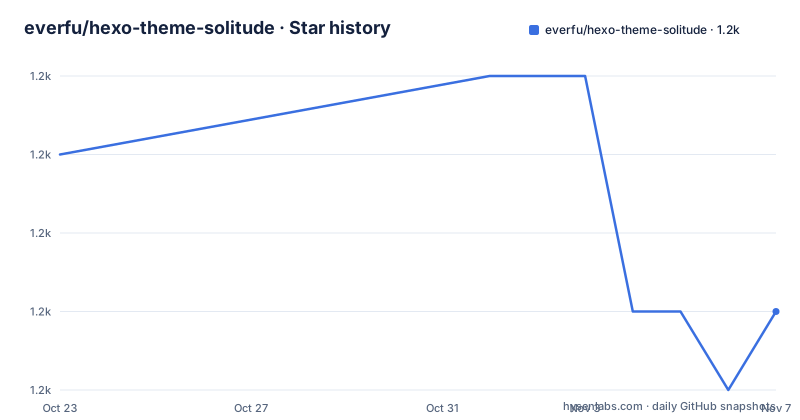
- everfu/hexo-theme-solitude1,186 ★ · -2
| Repository | 2026-10-23 | 2026-11-07 |
|---|---|---|
| everfu/hexo-theme-solitude | 1.2k | 1.2k |
-2 Stars in the last 15 days, measured from the daily GitHub snapshot. Compare with other projects
Editorial analysis
A blog theme that behaves like an application
hexo-theme-solitude is a Hexo theme, and the summary line in the project documentation is that it is an elegant theme supporting lazy loading, PWA, LaTeX and several comment systems. The design itself was fully authorised by @张洪 Heo, which is stated in the project credits.
The feature list is what separates it from a plain style. Page level lazy loading through pjax and image lazy loading keep the initial load small, and a PWA makes the site installable and usable offline. There is a day and night toggle, lightbox support through medium-zoom and fancybox, and LaTeX rendering for mathematical formulas.
The comment story is the most unusual part, because five systems are supported at once: Twikoo, Waline, Valine, Artalk and Giscus, and the theme supports running two comment systems side by side. That is a practical answer to a real problem. Each of those backends stores comments in a different place, and picking one is a commitment you sometimes regret: a self hosted comment server needs upkeep, a hosted one costs money, and a GitHub based one ties comments to a platform with its own login rules. Supporting two at once means you can migrate later, and a reader whose browser blocks one script still has a path to leave a comment.
The audience is a blog owner who has already chosen Hexo and wants a polished result with room to shape it. Hexo generates a static site, so the theme is a set of layouts, styles and scripts that Hexo renders, and the theme is installed from npm like any other Hexo theme.
Installing it and pointing Hexo at it
The installation is the standard two step for a Hexo theme. First, add the package to the site's dependencies:
npm i hexo-theme-solitudeThen set the theme in the site's configuration:
theme: solitudeThat is the whole of the required setup, and the rest of the behaviour is configured through the theme's own options file, which is shipped as part of the package.
The packaging shows what the theme contains. The published files are the layout directory, the languages directory, the source directory for styles and assets, the scripts directory, the theme configuration file _config.yml, plugins.yml, the package manifest, the four README translations, the LICENSE, and a few shared asset and brand files under docs/. The theme is built on two renderers declared as dependencies, hexo-renderer-pug for the templates and hexo-renderer-stylus for the styles, which is why the primary language of the repository shows up as Stylus.
The languages directory explains the four README files: the default Chinese one, plus English, Traditional Chinese and Spanish. A theme that ships translations for the interface is more work than a monolingual one, and it means a non Chinese site can use the same package rather than forking it.
The documentation site at solitude.js.org is where the option reference lives, and the project links to it directly after the installation steps rather than duplicating the option list in the readme.
window.Solitude replaced the old globals in version 4
The most consequential detail for anyone with custom scripts is the browser extension API, and version 4 changed it.
The theme's browser scripts now use native ES modules and expose a stable extension entry point at window.Solitude. The available calls are navigate(url), refresh(), copy(text) and toggleTheme(), plus loadScript(url, options) and loadStyle(url, options) for pulling in additional assets, and on(event, handler) for subscribing to events. The supported events are ready, beforeNavigate, afterNavigate and themeChange, and on returns an unsubscribe function, so a script that needs to detach can do so cleanly rather than leaking a handler.
The breaking part is stated in the same place. The older sco, utils, pjax, GLOBAL_CONFIG and PAGE_CONFIG are no longer public API, and custom scripts should migrate to window.Solitude. That is a substantial change for a theme with a large customisation community, because the previous names were exactly the sort of handles a site owner would reach for to change the theme's behaviour.
Two things make the migration tractable. The old global names are still named in the documentation, so you can grep your own scripts for them. And the new API is narrower, which means the migration is mostly a rename and a reorganisation of what you import, rather than a redesign.
The event names also line up with the theme's own behaviour. beforeNavigate and afterNavigate bracket a pjax page load, so a script that wants to know when a new page's DOM is ready, or to add analytics on each page view, now has explicit hooks instead of monkey patching the history API. themeChange covers the day and night toggle, which previously had no public event at all.
Specialty pages that are not a blog
The feature list includes a set of pages that go beyond posts, and they are the reason this theme is distinctive.
The specialty pages cover instant short posts, a gear or equipment page, an online tools page, a music hall, a friend links fish pond, an album page, a Douban page, and a danmaku comment page. Each is a page type with its own layout and configuration, and each exists because the author wanted one. A theme that ships a gear page and a music hall is telling you something about its intended audience, and it is a different proposition from a theme that ships a post layout and a tag page.
Article level features are more conventional: an AI summary and code highlighting. The AI summary is the notable one, since it is a feature that depends on an external service and therefore on configuration the site owner has to supply.
Lightbox support covers both medium-zoom and fancybox, which are two separate libraries, and the lightbox is applied to images in posts. The LaTeX support handles mathematical formulas, which matters for a technical blog.
Taken together, the feature surface is wide, and width has a cost in a theme: every option is a thing you can misconfigure, and every page type is a layout you can break with custom CSS. The documentation site is the place to look before enabling a specialty page, because the option names and their defaults are not in the readme.
The version history, the dev branch and the release tooling
The release history shows a major version jump. The recent tags are v3.0.19 on 2025-04-18, v3.0.20 on 2025-08-18 and v4.0.0 on 2026-07-14, and the package manifest carries version 4.0.0. So the 3.x line ended with patch releases, and then the theme jumped to a new major version, which is where the browser API change lives.
The default branch is dev, not master, which tells you where the work happens. The last push was on 2026-10-06 and the repository is not archived, so the theme is being worked on.
The release process is automated and conventional. The manifest defines a release script that runs semantic-release, with a dry run variant, and the dev dependencies include the semantic-release plugins for commit analysis, release notes, changelog, npm publishing, GitHub releases and git tagging, alongside commitlint with the conventional config, husky for git hooks, lint-staged and prettier. A.releaserc.json holds the semantic-release configuration and commitlint.config.js the commit rules, and lint-staged runs prettier over JavaScript, JSON, Markdown and YAML files on commit.
The GitHub workflow that publishes to npm is visible in the readme through a status badge, and the repository carries a code of conduct, a contributing guide and a security policy.
One oddity worth noting: the package test script is defined as echoing an error and exiting with status 1, the conventional placeholder for a package with no tests, even though a tests/ directory exists at the repository root. Whatever is in that directory is not wired into the standard test command, so do not count on npm test to validate anything.
Requirements, licence and who maintains the infrastructure
The requirements are stated in two places and they disagree, so read the manifest rather than the badge. The readme badges show Hexo 7.0.0 and later and Node 14.0.0 and later, while the package manifest declares an engines field of node >= 18. The badge is the older statement, and the manifest is what npm will enforce.
The licence is Apache 2.0, with the LICENSE file in the repository root and the copyright line in the readme covering 2025 onwards and the maintainer. The readme also asks that any derivative work keep the theme's copyright information, which is a request rather than a licence condition, and worth honouring if you publish a fork.
The infrastructure has a sponsor worth knowing about, because it affects availability. The project's CDN acceleration and security protection are sponsored by Tencent EdgeOne. A theme delivered through a CDN with a protection layer in front of it depends on that service being willing and able to serve it, and a reader in a region where the CDN is not well covered will see the site load slowly or not at all. The package on npm and the jsDelivr mirror are the other distribution paths, and jsDelivr is the more portable of the two.
The community channels are a Discord server and a QQ group, and the project is maintained by a single author with a small community around it. For a personal blog theme that is a reasonable arrangement, and for a site that depends on the theme for something commercial, the v4 API change is the signal to watch: the maintainer is willing to break the public API when a redesign is worth it, which is good for quality and bad for the stability of your custom scripts.
Editorial conclusion
Hexo theme Solitude suits a writer who publishes on Hexo, wants a blog that feels like an application rather than a set of pages, and likes having several comment backends to choose between, including Giscus for GitHub based comments. It is the wrong choice if you are on Hexo 6 or earlier, since the theme badge states Hexo 7.0.0 and later, and a poor match if you rely on the old browser globals, because sco, utils, pjax, GLOBAL_CONFIG and PAGE_CONFIG are no longer public API and custom scripts have to migrate to window.Solitude. Before upgrading, read the migration note in the project documentation, replace the deprecated global calls in your own scripts, and check that your Node version satisfies the engines field rather than the older badge.
Frequently asked questions
How do I install the Solitude theme for Hexo?
Run npm i hexo-theme-solitude in your Hexo site, then set theme: solitude in the site configuration file. The package ships the layouts, styles, scripts, theme options file and language files, and further configuration is documented at solitude.js.org.
Which comment systems does the Solitude Hexo theme support?
Twikoo, Waline, Valine, Artalk and Giscus, and the theme supports running two comment systems at the same time, which is useful if you want to move between a self hosted backend and a hosted one later.
What changed in version 4 of hexo-theme-solitude?
The browser scripts now use native ES modules and expose a stable extension entry point at window.Solitude, with navigate, refresh, copy, toggleTheme, loadScript, loadStyle and an on(event, handler) subscription that returns an unsubscribe function. The older sco, utils, pjax, GLOBAL_CONFIG and PAGE_CONFIG globals are no longer public API.
What are the requirements for the Solitude Hexo theme?
The readme badges state Hexo 7.0.0 and later, and the package manifest declares node >= 18 in its engines field, which is stricter than the Node 14 badge. The theme renders with hexo-renderer-pug and hexo-renderer-stylus.
Official sources
Add this badge to your README
If you maintain this project, the badge below links readers to this analysis and shows its maintenance status from the daily GitHub snapshot. Paste the markdown into your README; add ?metric=license or ?metric=stars to the image URL for a different field.

[](https://hysenlabs.com/projects/everfu-hexo-theme-solitude)Star history chart for your README
[](https://hysenlabs.com/projects/everfu-hexo-theme-solitude)Was this useful?