Image Toolbox's store build and its free build are different programs with different engines
🖼️ Image Toolbox is a powerful app for advanced image manipulation. It offers dozens of features, from basic tools like crop and draw to filters, OCR, and a wide range of image processing options
At a glance
- What is it?
- Image Toolbox is an Android image editor with background removal, optical character recognition, metadata editing and several hundred filters. It is Apache-2.0 licensed and free. It is also distributed in two builds that differ in more than telemetry: a table on the front page maps seven features onto two different implementations depending on where you got it. The free build cannot decrypt password-protected archives. And the clone command in the build-from-source instructions is an unfilled template.
- Who is it for?
- This is a capable editor with an unusually clear statement of what the store version adds, which is rare and worth reading before you pick a distribution channel. The free build is the right one if the presence of analytics and crash reporting in an image editor matters to you.
- Can I use it commercially?
- Yes. Apache-2.0 is a permissive licence: you can use, modify and sell software built on it, as long as you keep its copyright and licence notices.
- Is it still maintained?
- Yes. The repository received new commits within the last day.
- What is it written in?
- Mainly Kotlin, according to GitHub's language statistics.
Answers come from the project's GitHub data, last synced on November 14, 2026, and from our analysis. They are not legal advice.
Star history
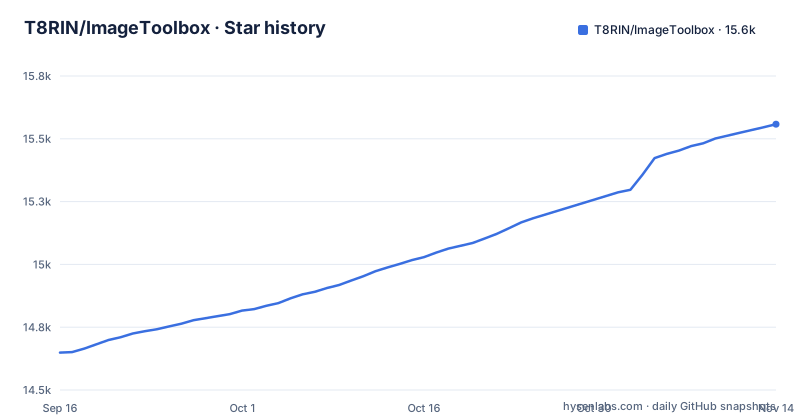
- T8RIN/ImageToolbox15,558 ★ · +909
| Repository | 2026-09-16 | 2026-11-14 |
|---|---|---|
| T8RIN/ImageToolbox | 14.6k | 15.6k |
909 Stars in the last 59 days, measured from the daily GitHub snapshot. Compare with other projects
Editorial analysis
Seven features run on different implementations depending on where you downloaded it
There is a comparison table on this front page with two columns, one for the free build and one for the store build, and it is the most useful thing here.
Three features keep the same purpose but swap the library underneath. The QR scanner is an open-source barcode library in the free build and a proprietary scanning kit in the store build. Background removal runs on a local inference runtime in the free build and the same proprietary kit in the store build. Document scanning runs on an open-source computer vision library in the free build and the proprietary kit in the store build.
So three features are not the same code in the two builds. They have the same purpose and a different implementation underneath.
The consequence is that the distribution channel is part of the specification. If you are comparing this against another editor, you have to know which build you are comparing, and if you are evaluating the free build you are evaluating different code than people downloading it from the store.
The free build cannot open a password-protected archive and the store build can
The same table has one row where the free build has nothing at all.
Decrypting a password-protected archive is unavailable in the free build and present in the store build, where it uses Junrar.
This is the opposite of what the pattern above suggests. Three features swap the library in the free build, and one is removed entirely. So the free build is not a strict subset.
For most people that difference does not matter. Opening an ordinary archive is not the feature; decrypting a password-protected one is.
But if you use this as a general file tool rather than only for images, the capability you would expect from a file utility is absent from the build that is auditable, and present only in the one with analytics and crash reporting in it.
So the consequence is that the free build is not a complete general-purpose tool. If archive handling matters, you are choosing between having it and having a build whose dependencies you can enumerate.
The build-from-source instructions contain an unfilled template as the first command
There is a numbered installation section on this front page, and its first step does not work.
git clone https://github.com/yourusername/ImageToolbox.gitStep one is to clone the repository, and the command it gives contains the literal word yourusername where the account should be.
So anyone following the build-from-source path ends up with a clone command that either fails or, worse, succeeds against a repository they do not own.
The remaining three steps are generic: install dependencies with a package manager, build with a Gradle wrapper script, run with the same. None of those is wrong, but none of them is specific either.
The installation section itself states no minimum Android version, JDK version or build-tool version. The front page links a wiki for FAQ and useful info.
So the consequence is that this section is a scaffold that was never filled in, which tells you something about the maintenance priorities. The project ships through Google Play, F-Droid, GitHub releases and an Obtainium link, plus a chat channel and a wiki, and the source build instructions are the part nobody filled out.
Four different names for the same project appear in one front page
Trace the links on this page and the project has been renamed more than once, with the old names still in place.
The badges near the top point at one repository path. The hit-counter badge points at a different one entirely, with a different name for the same project. The download section links to a third path, again with the other name. And the store listings carry a package identifier that shares its stem with the older name rather than the current one.
So a reader following the download link from the top of the same page lands on a different repository path than the badge above it.
The consequences of this are practical rather than cosmetic. A search for the project finds all of these names. And if you are pinning a build in a script, you need to know which of these URLs is the one that still moves.
There is one place the correct name is used consistently: the deep link that generates an install intent for an update-checking tool encodes the current repository path and the current display name, so the modern path is right there in the URL if you care to decode it.
So the consequence is that if you are automating anything against this project, verify the path against the most recent release rather than against a badge.
Pre-release builds are distributed through a chat channel rather than a store
There are two chat channels linked on this front page, and the second one exists for a specific reason.
The front page says the first is where you can discuss anything, and the second is a channel where the maintainer posts betas and announcements.
So the chat is where betas are announced.
That matches the release record. The three most recent releases are betas: 4.3.0-beta04 on 2026-11-03, 4.3.0-beta03 on 2026-10-26 and 4.3.0-beta02 on 2026-10-22.
The practical consequence is that the distribution channels are tiered and the tiers are not all the same kind of thing. The store has stable releases. The repository's releases page has application archives for side-loading, including the betas. And a sideload install does not update itself the way a store install does, so a user tracking the betas is also the person responsible for knowing when a beta became a release.
The two install links differ in one setting: one sets includePrereleases to false and the other to true. That is a small detail that tells you the difference between the two badges is not accidental.
The donation request and the free claim sit next to a table saying the store build has analytics
There is a tension in this front page that is worth naming rather than glossing.
The application is described as completely free, and there is a donation section with a link to a creator platform and a cryptocurrency wallet address.
So the funding model is voluntary, and the front page says so plainly. That is fine and it is common.
But the comparison table further down says the store build includes analytics, crash reporting and other vendor dependencies, while the free build has none of them.
So a reader who installs from the store gets a build with telemetry and a readme that says the application is completely free. Those two statements are not in contradiction, since neither says free of data collection. But the emphasis falls on the price and not on the difference in what the two builds contain.
The creator-platform link and the wallet address are worth noting separately.
So the consequence is that the free-of-charge claim and the data-collection difference are both true, and the front page does not draw a line between them.
The architecture document exists in two versions and one of them has no file extension
Look at the top of the repository and there are two architecture documents, one of which is named without an extension.
The second one carries a version marker in its name. The first does not.
The rest of the repository layout is a modular one and consistent with a project this size. There is a directory for the application, a directory for shared code, a directory per feature rather than a layering scheme, a build-logic directory which is the modern way to share Gradle configuration, a benchmark directory, an instrumentation test directory, and the release automation for the stores.
The feature-module layout is the notable choice.
So the consequence is that a newcomer reading this repository has to work out which architecture document is current, and the answer is not in the file names.
Editorial conclusion
This is a capable editor with an unusually clear statement of what the store version adds, which is rare and worth reading before you pick a distribution channel. The free build is the right one if the presence of analytics and crash reporting in an image editor matters to you. Two things to check. Which of the seven differing features you actually need, because three of them run on a different library in the store build and one exists only there. And that the free build is a complete tool for you, because archive decryption is absent rather than degraded.
Frequently asked questions
What is Image Toolbox?
An Android image editing application written in Kotlin, Apache-2.0 licensed and described as completely free. It covers cropping, drawing, filters, optical character recognition, background removal, metadata editing and image enhancement, plus batch processing and filter chains with several hundred filters. The front page positions it for photographers and for developers, and a wiki linked from the front page carries FAQ and useful info.
how to use image toolbox app
It is distributed four ways: an application store listing, a third-party application archive listing, direct downloads of the application archive from the repository's releases, and an install-intent link that configures an update checker. Betas and announcements are posted to a separate chat channel, and the 4.3.0 betas are also on the repository's releases page. The front page contains a build-from-source section, but its clone command is an unfilled template and the environment requirements are not stated there.
image toolbox alternative
The front page does not list alternatives. What it does do is something more useful for a reader choosing where to install from: a table of seven features and their implementations in the free build versus the store build. Three features swap an open-source library for a proprietary scanning kit, encrypted-archive decryption exists only in the store build, and analytics, crash reporting and other vendor dependencies exist only in the store build.
Is Image Toolbox the same in both distributions?
No. Three features keep their purpose but run on a different library depending on the build: QR scanning, background removal and document scanning. Encrypted-archive decryption is present only in the store build, and so are analytics, crash reporting and other vendor dependencies. Every other feature is identical. So the store build and the free build are different programs, and the front page's table is the authoritative statement of the differences.
Official sources
Add this badge to your README
If you maintain this project, the badge below links readers to this analysis and shows its maintenance status from the daily GitHub snapshot. Paste the markdown into your README; add ?metric=license or ?metric=stars to the image URL for a different field.

[](https://hysenlabs.com/projects/t8rin-imagetoolbox)Star history chart for your README
[](https://hysenlabs.com/projects/t8rin-imagetoolbox)Was this useful?