Expert: the official Elixir language server, currently in alpha
Official Elixir Language Server Protocol implementation
At a glance
- What is it?
- Expert is the official language server implementation for Elixir, distributed as prebuilt binaries and backed by the Erlang Ecosystem Foundation. At v0.1.11, the project is in alpha, with all future work organized as GitHub milestones before a first stable build.
- Who is it for?
- Expert is the right choice for Elixir teams that want the project with official ERLEF backing, provided they can accept alpha-stage feature completeness and a configuration surface that has not yet stabilized. Avoid it in tooling pipelines where you need guaranteed LSP feature parity across incremental builds or a documented compatibility table.
- Can I use it commercially?
- Yes. Apache-2.0 is a permissive licence: you can use, modify and sell software built on it, as long as you keep its copyright and licence notices.
- Is it still maintained?
- Yes. The repository received new commits within the last day.
- What is it written in?
- Mainly Elixir, according to GitHub's language statistics.
Answers come from the project's GitHub data, last synced on October 23, 2026, and from our analysis. They are not legal advice.
Star history
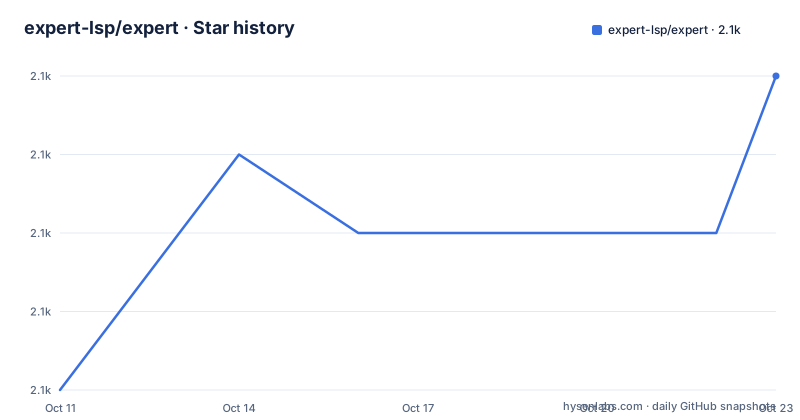
- expert-lsp/expert2,067 ★ · +4
| Repository | 2026-10-11 | 2026-10-23 |
|---|---|---|
| expert-lsp/expert | 2.1k | 2.1k |
4 Stars in the last 12 days, measured from the daily GitHub snapshot. Compare with other projects
Editorial analysis
Elixir's official language server and the LSP standard it implements
Expert calls itself the official language server implementation for the Elixir programming language, a project maintained under the expert-lsp GitHub organization and coordinated through the Erlang Ecosystem Foundation, where Dan Janowski holds the Chair of Sponsorship WG role. The project homepage is at expert-lsp.org, and the repository links to four internal documentation pages: architecture.md, development.md, glossary.md and installation.md.
Language Server Protocol defines a standard communication channel between editors and language tooling, where an editor sends requests such as completion candidates or symbol definitions and the language server returns Elixir-specific data in response. Expert handles the server side by analyzing the source tree and replying over the protocol. Because the protocol format is shared, Neovim, Emacs, VS Code and Helix can all connect to Expert through the same binary path without any editor-specific code in the server itself.
Editor-specific configuration lives in pages/installation.md inside the repository, since the project points there rather than reproducing per-editor setup steps for each supported editor.
Version v0.1.11, published on 2026-10-01, is the latest build, and the last push to the main branch was on 2026-10-06. The project describes itself as in alpha, with all planned features tracked as GitHub milestones.
Installing via prebuilt binary or the GH CLI nightly download
Expert does not require a package manager or a compile step for the standard install. Download the binary for your operating system and architecture from the project's GitHub page, then place it somewhere on your $PATH. The README gives ~/.local/bin/expert as an example destination, and after placing the binary you point your editor's LSP configuration at that path.
For nightly builds, the GH CLI provides a single command:
gh release download nightly --pattern 'expert_linux_amd64' --repo expert-lsp/expertThis pattern targets Linux on amd64. A different platform requires changing it to match the naming convention the project uses for that target, and consulting the repository asset list for any specific build shows which files are available and how they are named. Nightly builds are generated on each push to main, so they reflect the latest merged code without the stability of a numbered stable build.
Upgrading from one build to the next runs through the change log at the repository root. No migration guide is included in the repository, and reading that file before pointing an editor at a newer binary is the only documented way to catch breaking changes before they surface as errors in the editor.
The --stdio flag and what editors must configure manually
Expert communicates with editors over standard input and output, which is the transport the Language Server Protocol specifies for servers that editors launch as child processes. One note from the project documentation is critical: if your editor does not pass the --stdio flag to Expert automatically, you must configure it yourself, because without that flag Expert will not exchange LSP messages correctly.
Standard input and output as a transport means the editor owns the process lifecycle, piping messages to the server's stdin and reading responses from its stdout. This is simpler to configure than a socket-based transport and avoids port conflicts with other running services, but it requires the editor to supply --stdio explicitly when it does not do so by default.
Whether an editor handles this automatically depends on its LSP client implementation, and the documentation does not itemize which editors pass --stdio by default and which do not. Checking pages/installation.md for the target editor is the first step in any integration. After a source build, running start_expert --help prints the full list of available options, including flags beyond --stdio.
Plain and Burrito build paths, with Zig 0.15.2 as an exact pin
Expert supports two build paths from source. Building for the local system uses the plain path:
just releaseThis runs through the just task runner, which manages all 3 internal apps in sequence: expert, engine and forge. The build handles dependency fetching and compilation across all 3, and on completion the start_expert binary lands at apps/expert/_build/prod/rel/plain. Running start_expert --help from there shows available options.
Building a portable binary that packages the Erlang runtime uses Burrito:
just burrito-localBurrito output lands in apps/expert/burrito_out. This path has one strict dependency: Zig 0.15.2 must be installed before running the command, and later versions will not work. That is an exact pin, not a minimum, so installing any later version of Zig and then running just burrito-local will fail, leaving a downgrade to 0.15.2 as the only documented path forward.
A plain build runs only on the machine that compiled it, while a Burrito build can be distributed to other machines without requiring an Erlang installation on those systems.
expert and engine skip standard EPMD by delegating to forge
Expert is a 3-app umbrella project, with the justfile naming the apps as expert, engine and forge. Tasks run across all 3 by default: just deps fetches dependencies for each, and just test runs the test suite for each in sequence. Naming a specific app in a command, such as just test expert, restricts the task to that single app.
One detail the justfile reveals that a quick scan misses: when either the expert or engine app runs, it receives the Erlang flags -start_epmd false -epmd_module Elixir.Forge.EPMD. Forge does not receive those flags. Standard EPMD is the Erlang Port Mapper Daemon, which coordinates port assignments for distributed Erlang nodes, and passing -start_epmd false tells the runtime not to start it, while passing -epmd_module Elixir.Forge.EPMD replaces it with a custom module from the forge app.
Because forge does not receive these flags, it runs with standard EPMD, which is precisely what allows forge to serve as the module that expert and engine delegate to. Expert and engine operate without the system epmd process, so the language server does not require a system daemon running on the developer's machine. Forge provides the coordination layer, and this relationship is only visible in the justfile.
What alpha means for LSP feature coverage and configuration stability
Expert is in alpha, and all future work, including the first stable build, is organized as milestones on GitHub. Features can be added or removed between numbered builds, and the project has not committed to a stable configuration format before reaching one of those milestones. The public milestone list is where to check which capabilities are planned and at what stage they currently stand.
For teams adopting Expert today, this creates concrete planning constraints. LSP feature coverage is incomplete, but neither the project documentation nor the README itemizes which capabilities are implemented and which are absent. Pages/glossary.md and pages/architecture.md are the documents the project points to for understanding the current feature surface, and neither is reproduced in the README.
Each upgrade from one numbered build to the next runs through the change log at the repository root. Teams that automate editor tooling updates without reading that file first risk encountering configuration changes that need correction. Pages/development.md covers the contribution workflow, and pages/architecture.md describes how the 3 internal apps relate to each other, making it the starting point before contributing a change.
Sponsorship through ERLEF and the governance model
Expert has no single company as its owner, and 4 named corporate sponsors are listed in the README: Tauspace, River, Fresha and the organization represented by the Enigmatic logo. Corporate sponsorship for full-time work runs through Dan Janowski, identified as EEF Chair of the Sponsorship WG, at sponsor+expert (at) erlef (dot) org. Individual contributors can donate through GitHub Sponsors.
No single organization controls the roadmap, and sustained development depends on continued community and corporate contributions. A feature that a team needs but the project has not scheduled is something to argue for in the issue tracker, not something that appears without community engagement.
Pages/architecture.md describes the internal structure in more detail, and the repository also includes a flake.nix with a nix/ directory for contributors who manage dependencies through Nix alongside the standard Elixir toolchain.
Expert source code is distributed under Apache-2.0, and THIRD_PARTY_NOTICES.md at the repository root lists the licences of bundled components.
Editorial conclusion
Expert is the right choice for Elixir teams that want the project with official ERLEF backing, provided they can accept alpha-stage feature completeness and a configuration surface that has not yet stabilized. Avoid it in tooling pipelines where you need guaranteed LSP feature parity across incremental builds or a documented compatibility table. Before integrating, verify that your editor's LSP client passes --stdio to Expert automatically, check pages/installation.md for editor-specific setup, and read the change log at the repository root before each build upgrade.
Frequently asked questions
What is Expert LSP?
Expert is the official language server implementation for the Elixir programming language, developed under the expert-lsp organization and coordinated through the Erlang Ecosystem Foundation. It communicates over the Language Server Protocol, so any LSP-compatible editor can connect to it.
How do I install Expert for Elixir?
Download the binary for your operating system and architecture from the project's GitHub page, then place it on your $PATH. The README gives ~/.local/bin/expert as an example destination, and pages/installation.md covers editor-specific configuration steps.
Does Expert require the --stdio flag to work with editors?
Yes. If your editor does not pass the --stdio flag to Expert automatically, you must configure it yourself. Without that flag, Expert will not exchange LSP messages correctly, and pages/installation.md lists the setup steps for specific editors.
Can I build Expert from source?
Running just release builds Expert for the local system, placing start_expert in apps/expert/_build/prod/rel/plain. A Burrito cross-platform build uses just burrito-local and requires exactly Zig 0.15.2, since later versions will not work.
Is Expert stable for production use?
The project describes itself as currently in alpha, with all future work, including the first stable build, organized as GitHub milestones. Feature coverage is still in progress, and the configuration surface has not stabilized across numbered builds.
Official sources
Add this badge to your README
If you maintain this project, the badge below links readers to this analysis and shows its maintenance status from the daily GitHub snapshot. Paste the markdown into your README; add ?metric=license or ?metric=stars to the image URL for a different field.

[](https://hysenlabs.com/projects/expert-lsp-expert)Star history chart for your README
[](https://hysenlabs.com/projects/expert-lsp-expert)Was this useful?