prompts.chat: A Self-Hostable Prompt Library with a Growing Toolchain
GitHub describes it as f.k.a. Awesome ChatGPT Prompts. Share, discover, and collect prompts from the community. Free and open source , self-host for your organization with complete privacy.. The repository metadata lists HTML as its primary language. The metadata lists the NOASSERTION license. This article stays within the project description and details documented in the GitHub repository README.
At a glance
- What is it?
- prompts.chat, formerly Awesome ChatGPT Prompts, is a community-driven prompt collection with a self-hostable web app, an MCP server, and a CLI. This review covers what it actually offers, how to run it, and where its limits show.
- Who is it for?
- Adopt prompts.chat if you want a ready-made, self-hosted prompt library with community contributions, and you can accept a PostgreSQL dependency and a setup wizard that handles branding and auth. Skip it if you need a lightweight, dependency-free prompt store, or if you want to maintain a fully custom UI without the project's structure.
- Can I use it commercially?
- Check first. The repository uses a licence we do not classify automatically, so read its LICENSE file before any commercial use.
- Is it still maintained?
- Yes. The repository received new commits within the last day.
- What is it written in?
- Mainly HTML, according to GitHub's language statistics.
Answers come from the project's GitHub data, last synced on November 14, 2026, and from our analysis. They are not legal advice.
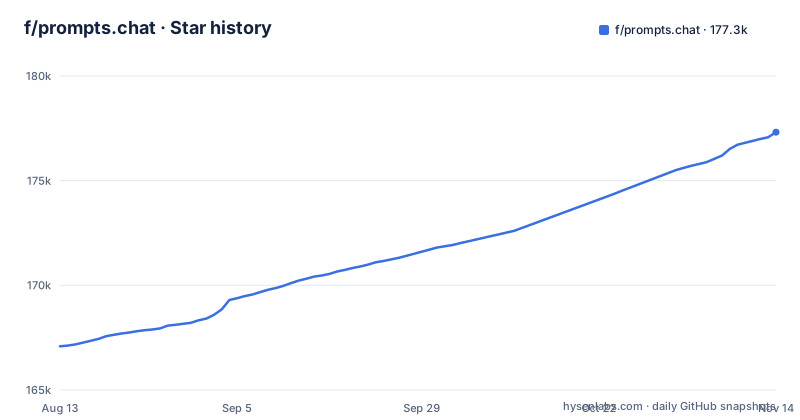
Star history
- f/prompts.chat177,317 ★ · +10,231
| Repository | 2026-08-13 | 2026-11-14 |
|---|---|---|
| f/prompts.chat | 167.1k | 177.3k |
10,231 Stars in the last 93 days, measured from the daily GitHub snapshot. Compare with other projects
Editorial analysis
What prompts.chat Actually Solves
prompts.chat, formerly Awesome ChatGPT Prompts, is a curated collection of prompts for AI chat models. It started as a GitHub list in December 2022 and has grown into a web platform where anyone can browse, contribute, and collect prompts. The README claims it works with ChatGPT, Claude, Gemini, Llama, Mistral, and more. The core problem it addresses is simple: most prompt collections are static markdown files that only one person edits. prompts.chat turns that into a shared, searchable resource with a contribution flow. It is for teams or individuals who want a prompt library that is not locked inside a single vendor's tool, and who want the option to run it privately on their own infrastructure. The self-hosting pitch is explicit: 'complete privacy' for your organization. That is the main differentiator from using a public site like the hosted prompts.chat itself.
How the Platform Is Structured
The repository is primarily HTML, but the actual application is a Node.js project. The README shows a setup flow that runs npm install and a setup wizard. The wizard configures branding, theme, and authentication providers: GitHub, Google, and Azure AD. The data model is centered on prompts, stored in a PostgreSQL database. The README recommends Neon for hosted PostgreSQL, which suggests the project expects a managed database rather than a local file. The front end is a web app that lists prompts at /prompts and allows new submissions at /prompts/new. Contributions made on the site 'sync here automatically,' meaning they flow back into the repository, likely as commits to the PROMPTS.md or prompts.csv files. There is also a prompts.csv and a PROMPTS.md file in the repo, which are the canonical data formats. The architecture is a typical web stack: a Node server, a database, and a static front end. The key point is that the prompt data is not just in the database; it is also versioned in the repository as plain text, which is a nice property for auditing changes.
Getting It Running: Commands and Config
The README gives two installation paths. The quick start is a one-liner: npx prompts.chat new my-prompt-library, then cd into that directory. The manual setup is a git clone, then npm install && npm run setup. The setup wizard handles branding, theme, and authentication. For a production deployment, you need PostgreSQL. The README does not list exact environment variables or database connection strings; it points to SELF-HOSTING.md and DOCKER.md for full guides. So the actual configuration keys are not visible in the README. That is a gap: if you want to know the precise config schema, you must read those separate files. The CLI is invoked as npx prompts.chat with no subcommand, and it also has an mcp subcommand for the MCP server. For the MCP server, you can run it remotely by pointing to https://prompts.chat/api/mcp, or locally with npx -y prompts.chat mcp. That local command is the same package, so the CLI is both a scaffolding tool and a server runtime.
Integrations: MCP, CLI, and Claude Code
prompts.chat has three integrations that stand out. The MCP server is the most interesting because it lets AI tools pull prompts directly. You can use the hosted endpoint at https://prompts.chat/api/mcp, or run your own local server with the CLI. The README shows a JSON config for MCP clients, which is a standard pattern. The CLI is invoked as npx prompts.chat, and the quick start uses its new subcommand to scaffold a project. The Claude Code plugin is a separate integration: you add the marketplace with /plugin marketplace add f/prompts.chat and then install with /plugin install [email protected]. That is a specific path for Claude Code users. These integrations are not just marketing; they are concrete entry points. The MCP server is the most practical for teams that want to expose a prompt library to multiple AI assistants without building a custom API. The CLI is less documented in the README than the MCP server.
Limitations and Failure Modes
The biggest limitation is the dependency on PostgreSQL. The README says 'Recommended database: prompts.chat uses PostgreSQL.' That is a hard requirement for any self-hosted instance. If you are a small team without a database administrator, that adds operational overhead. The README points to Neon, a hosted service, which mitigates that but introduces a third-party dependency. Also, GitHub lists the license as NOASSERTION, but the repository contains LICENSE, LICENSE-CC0 and LICENSE-MIT files, so read them before redistributing or modifying the code. The README's self-promotion includes claims like 'world's largest open-source prompt library' and mentions 143k+ GitHub stars, but those are popularity metrics, not quality indicators. The actual prompt quality is subjective and unverified by the repository itself.
Alternatives: Static Markdown vs. Full Platforms
The most direct alternative is a simple static markdown file or a git repository of prompts, like the original Awesome ChatGPT Prompts list before it became prompts.chat. That approach has zero infrastructure: no database, no server, no auth. You just edit a file and commit. The trade-off is that you lose the web UI, the contribution flow, and the MCP server. Another alternative is a purpose-built prompt management tool like PromptLayer or LangSmith, which offer prompt versioning and testing. Those are commercial products. The key difference is that prompts.chat gives you a full web application with community features, while a static file gives you simplicity, and a commercial tool gives you analytics and evaluation. If your need is just to store a few dozen prompts for personal use, a markdown file is simpler. If you need team collaboration with authentication, prompts.chat is a middle ground that you control.
Maintenance and Upgrade Costs
The README does not mention a release schedule or a changelog. The repository has no GitHub releases. That means upgrades are likely pull-based: you git pull the latest main branch and redeploy. That is a low overhead model, but it also means you get changes without notice. The setup wizard is run once at install time, so any future changes to the wizard will not affect your existing deployment unless you re-run it. The documentation points to SELF-HOSTING.md and DOCKER.md for operational details. The Next.js and Prisma application on PostgreSQL is the real maintenance burden. You will need to handle database migrations, backups, and updates. Before adopting, check the repository's LICENSE, LICENSE-CC0 and LICENSE-MIT files; GitHub reports NOASSERTION.
Who Should Adopt It and What to Verify First
prompts.chat fits teams that want a self-hosted, branded prompt library with community contribution features and integrations like MCP. It is a poor fit for individuals who just want a personal list, or for organizations that cannot accept a PostgreSQL dependency. Before you commit, verify three things. First, read SELF-HOSTING.md and DOCKER.md to confirm the exact deployment steps, because the README does not give you enough to configure the database connection or auth providers. Second, check the license status: GitHub reports NOASSERTION, so read the LICENSE, LICENSE-CC0 and LICENSE-MIT files to see what applies to self-hosting and modification. Third, test the MCP server locally with npx -y prompts.chat mcp to see if it meets your latency and feature needs. The project is active enough to have a book and a kids' game, but those are extras, not core features. The core value is the prompt collection and the self-hosting capability, and both are solid if the operational details hold up.
Editorial conclusion
Adopt prompts.chat if you want a ready-made, self-hosted prompt library with community contributions, and you can accept a PostgreSQL dependency and a setup wizard that handles branding and auth. Skip it if you need a lightweight, dependency-free prompt store, or if you want to maintain a fully custom UI without the project's structure. Before deploying, verify the current state of the SELF-HOSTING.md and DOCKER.md guides, since the README points to them for details not covered here. Also check the license: GitHub reports NOASSERTION, and the repository has LICENSE, LICENSE-CC0 and LICENSE-MIT files, so read them before relying on it in production.
Frequently asked questions
how to use prompts chat
You can browse the library at prompts.chat/prompts, read it as PROMPTS.md or download prompts.csv, and install a self-hosted copy with npx prompts.chat new my-prompt-library, or clone the repository and run npm install && npm run setup, which opens a wizard for branding, theme and authentication. The prompts were originally created for ChatGPT and are stated to work with Claude, Gemini, Llama and Mistral as well.
how to use prompts chat gpt
Paste a prompt from the library into the chat window, or connect a tool to the library instead: the repository ships a CLI, a Claude Code plugin, and an MCP server with both a remote URL and a local npx form. The remote MCP configuration points at https://prompts.chat/api/mcp, so an agent using that endpoint reads the hosted collection.
what is prompts chat
It is a curated collection of prompts for AI chat models, first published in December 2022 and formerly known as Awesome ChatGPT Prompts. What is unusual is the second half: the same repository is a Next.js application on PostgreSQL that you can self-host with your own branding and authentication, and it can be consumed as a CLI, a plugin or an MCP server.
prompts chat alternative
The repository names no competing prompt library. The different approach it offers is running your own: a Next.js and Prisma application on PostgreSQL, with an MCP endpoint, a CLI and an interactive setup wizard, so an organisation can keep its prompts inside its own network rather than browsing the hosted site or reading a static Markdown file.
Official sources
Add this badge to your README
If you maintain this project, the badge below links readers to this analysis and shows its maintenance status from the daily GitHub snapshot. Paste the markdown into your README; add ?metric=license or ?metric=stars to the image URL for a different field.

[](https://hysenlabs.com/projects/f-prompts-chat)Star history chart for your README
[](https://hysenlabs.com/projects/f-prompts-chat)Was this useful?