MetaPython: Meta's Fork of CPython, and Who Should Build It
This is Meta's fork of the CPython runtime. The name "cinder" here is historical, see https://github.com/facebookincubator/cinderx for the Python extension / JIT compiler.
At a glance
- What is it?
- MetaPython is Meta's fork of the CPython runtime, sitting on the meta/3.14 branch. It is a build-it-yourself interpreter, not a drop-in replacement, and the README is still CPython's.
- Who is it for?
- Adopt MetaPython only if you need to build a CPython 3.14 interpreter from source while tracking Meta's runtime work, and you are willing to read the commit history for the changes. Do not adopt it as a general Python install, and do not expect pip install metapython to exist.
- Can I use it commercially?
- Check first. The repository uses a licence we do not classify automatically, so read its LICENSE file before any commercial use.
- Is it still maintained?
- Yes. The repository received new commits within the last day.
- What is it written in?
- Mainly Python, according to GitHub's language statistics.
Answers come from the project's GitHub data, last synced on November 14, 2026, and from our analysis. They are not legal advice.
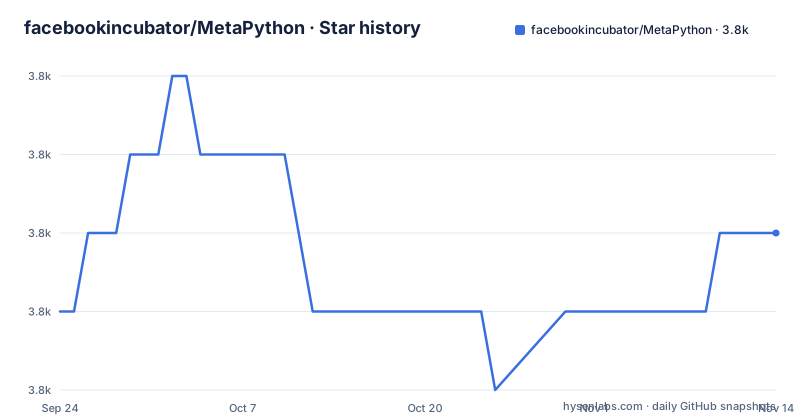
Star history
- facebookincubator/MetaPython3,794 ★ · +1
| Repository | 2026-09-24 | 2026-11-14 |
|---|---|---|
| facebookincubator/MetaPython | 3.8k | 3.8k |
1 Stars in the last 51 days, measured from the daily GitHub snapshot. Compare with other projects
Editorial analysis
What MetaPython Is, and What It Is Not
MetaPython is a fork of the CPython runtime maintained under facebookincubator, with meta/3.14 as the default branch. The README opens by declaring Python version 3.14.7+, and the repository layout is CPython's own: Objects/, Python/, Parser/, Modules/, Lib/, Include/, Tools/, PCbuild/, plus configure and Makefile.pre.in. Nothing in the top-level listing suggests a separate build system or a packaging layer.
The name is the trap. The README states plainly that "cinder" here is historical, and points to facebookincubator/cinderx for the Python extension and JIT compiler. So MetaPython is the runtime, and cinderx is the extension that plugs into it. If you arrived looking for a JIT, you are on the wrong repository. If you arrived looking for a pip-installable Meta Python, that does not exist here either. The repository has no published GitHub releases, and the README is CPython's own document, so it describes python.org, the CPython issue tracker, and the CPython developer guide rather than Meta-specific tooling.
The audience is narrow: engineers who build CPython from source, either because they patch the interpreter or because they need a runtime matching a specific Meta branch. Everyone else should use a standard CPython build.
The meta/3.14 Branch and the CPython Baseline
The work happens on a versioned branch, not on a long-lived trunk with backports. meta/3.14 tracks the 3.14 line, and the README reports 3.14.7+. That naming tells you how upgrades arrive: rebasing onto upstream CPython 3.14 point releases rather than merging a divergent main. For anyone embedding this interpreter, that is the whole maintenance story, and it is also the risk. A fork that follows upstream point releases inherits upstream's schedule and its churn.
The repository's last push was on 2026-09-23, so the branch is current as of that date. That is a fact about activity, not about stability. The README offers no changelog of Meta-specific changes; it points to the What's New in Python 3.14 document and to Misc/NEWS, both of which describe upstream CPython. To find out what Meta changed, the README says a full accounting of changes "can only be gleaned from the commit history". That is a real cost. There is no MetaPython release notes file, no migration guide, and no list of divergences in the repository.
The practical consequence: before you build, diff the branch against upstream 3.14 or read the log. Do not assume the fork is a superset you can reason about from the CPython documentation alone.
Building MetaPython From Source on Unix
There is no package. The README gives the standard CPython build sequence, which is the only installation path documented. On Unix, Linux, BSD, macOS, and Cygwin, the three commands are configure, make, and make install. The README notes this installs Python as python3.
./configure
make
make test
sudo make install
The README also documents out-of-tree builds, which is what you want if you intend to keep a system Python intact. Create a directory, run configure from inside it with a relative path to the source, and build there. The debug flavor comes from the --with-pydebug flag.
mkdir debug
cd debug
../configure --with-pydebug
make
make test
The README warns that this fails if you also built at the top level, and that you should run make clean at the top level first. After the build, make test runs the interpreter's test suite. The README says to ignore messages about skipped tests for optional features, and to treat a failed test or a traceback as a real problem. If test_os and test_gdb fail, the documented way to re-run them verbosely is a TESTOPTS argument.
make test TESTOPTS="-v test_os test_gdb"On Windows the README does not give a command sequence. It points to PCbuild/readme.txt for the build and Tools/msi/README.txt for producing an installer. On macOS it points to Mac/README.rst for framework and universal build options.
Optimized Builds: PGO and LTO Flags
The README documents two build-time optimizations, and both matter if you are building this fork for anything other than debugging. The first is configure --enable-optimizations, which the README says sets the default make targets to enable Profile Guided Optimization and may auto-enable Link Time Optimization on some platforms. The second is --with-lto, which enables LTO directly.
The PGO sequence is worth understanding because it changes what you are compiling. The build first cleans temporary files from any previous compilation. It then builds an instrumented interpreter with profiling instructions embedded. That binary is explicitly not suitable for real workloads, per the README. The Makefile then runs a training workload with stdout and stderr suppressed, and finally builds the real interpreter using what the instrumented run collected.
The cost is build time, and the README does not quantify it. It also does not state which platforms auto-enable LTO under --enable-optimizations, only that some do. If reproducible build artifacts matter to you, that platform-dependent behavior is a gap you have to close yourself by pinning the flags explicitly.
Where MetaPython Is the Wrong Choice
The clearest failure mode is treating this as a Python distribution. It is not. There is no installer, no release artifact, and no documented upgrade path between MetaPython versions. The README's own section on installing multiple versions is truncated in the repository's rendered text, and even where complete it describes CPython's altinstall machinery, not a MetaPython-specific story.
A second problem is support. The README's issue tracker and documentation links point at python.org and the CPython GitHub repository. If you hit a bug that Meta introduced, those links will not help you, and the repository gives no MetaPython-specific tracker. You are reading commit history and filing nothing.
A third is licensing ambiguity. The repository's licence is reported as NOASSERTION, and the README carries the Python Software Foundation copyright notice and says further copyright and licence information appears at the end of the file. A fork can carry additional terms. If your organization requires an approved licence identifier before adoption, that gap alone may stop you, and no amount of building will resolve it.
Finally, if what you actually want is the JIT, this repository is not it. The README redirects to facebookincubator/cinderx. Installing MetaPython gets you a runtime, not a compiler extension.
MetaPython and cinderx: Two Repositories, Two Jobs
The obvious alternative is not another Python implementation. It is the sibling repository the README names: facebookincubator/cinderx, described there as the Python extension and JIT compiler. The division of labor is the point. MetaPython is the runtime fork, and cinderx is the extension that attaches to a runtime.
That means the two are not substitutes. If your goal is faster execution of existing Python code, the README's own pointer sends you to cinderx, and adopting MetaPython instead would leave you with a stock-shaped interpreter and no JIT. If your goal is to modify interpreter internals, MetaPython is the repository you fork or build, and cinderx is a downstream consumer of it.
The second alternative is plain CPython at the same version. The README describes 3.14.7+, and the build instructions, test commands, and optimization flags are CPython's. Building upstream CPython 3.14 gives you the same documented workflow without the fork's divergence and without the licence question. The only reason to prefer MetaPython is that you specifically need Meta's changes on the 3.14 line, and the repository does not enumerate what those changes are, so you have to check the log before you can even make that call.
Verifying a MetaPython Build Before You Commit
Start with the licence. Open the LICENSE file at the repository root and read the copyright section the README points to at the end of the file. A NOASSERTION identifier means automated tooling could not classify it, and your compliance process will want a human answer.
Next, confirm the divergence. Since the README says changes can only be gleaned from the commit history, compare the meta/3.14 branch against the upstream 3.14 tag you would otherwise use. If the diff is empty or trivial for your use case, you have your answer without building anything.
Then build out of tree with the debug flavor first, because it is faster and the README documents it, and run make test. Treat any failed test as blocking rather than as noise. Once the debug build passes, do the optimized build with --enable-optimizations and decide deliberately whether to add --with-lto, since the README leaves that auto-enablement platform-dependent. Keep the install prefix separate from your system Python so you can remove it cleanly.
The upgrade cost after that is a rebase cadence you do not control. When upstream CPython 3.14 moves, meta/3.14 moves, and your patches move with it. Budget for that, or stay on upstream.
Editorial conclusion
Adopt MetaPython only if you need to build a CPython 3.14 interpreter from source while tracking Meta's runtime work, and you are willing to read the commit history for the changes. Do not adopt it as a general Python install, and do not expect pip install metapython to exist. Verify first: the licence file at the repository root, whether the meta/3.14 branch builds on your platform, and whether the specific Meta change you need is present on that branch rather than only in cinderx.
Frequently asked questions
What is MetaPython and how is it different from CPython?
It is Meta's fork of the CPython runtime, hosted under facebookincubator with meta/3.14 as the default branch, and the README reports Python version 3.14.7+. The build instructions and test commands in the README are CPython's own, so the difference is in the branch contents rather than in a documented new workflow.
Is MetaPython the same as cinderx?
No. The README states that the name "cinder" in MetaPython is historical and points to facebookincubator/cinderx for the Python extension and JIT compiler. MetaPython is the runtime fork; cinderx is the extension.
How do I install MetaPython?
You build it from source. The README gives the Unix sequence ./configure, make, make test, sudo make install, which installs Python as python3, and it also documents out-of-tree builds with a debug flavor via --with-pydebug. On Windows it points to PCbuild/readme.txt instead of giving commands.
What licence does MetaPython use?
The repository's licence is reported as NOASSERTION, and the README carries the Python Software Foundation copyright notice while stating that further copyright and licence information appears at the end of the file. No single SPDX identifier is given for the fork.
Official sources
Add this badge to your README
If you maintain this project, the badge below links readers to this analysis and shows its maintenance status from the daily GitHub snapshot. Paste the markdown into your README; add ?metric=license or ?metric=stars to the image URL for a different field.

[](https://hysenlabs.com/projects/facebookincubator-metapython)Star history chart for your README
[](https://hysenlabs.com/projects/facebookincubator-metapython)Was this useful?